
ハイライト
Apple は iOS 27 で Bluetooth accessory に Channel Sounding 機能をもたらします。Nearby Interaction と Core Bluetooth API により、accessory は正確な距離と方向を報告できるようになります。
主要内容
以前、accessory を探す体験はかなり曖昧でした。
Bluetooth accessory が接続されると、近くにあることは分かります。しかし具体的にどこにあるかは分かりません。ソファの隙間なのか、隣の部屋なのか。ユーザーは「なぜ接続できないのだろう」という手がかりから推測するしかありませんでした。
方法自体は以前からありました。信号強度、つまり RSSI から距離を推定する方法です。しかし RSSI は環境の影響を受けすぎます。壁を 1 枚挟む、角度が変わる、近くに電子レンジがある、そうした要因で値は大きく跳ねます。しかも RSSI は方向をまったく示せません。
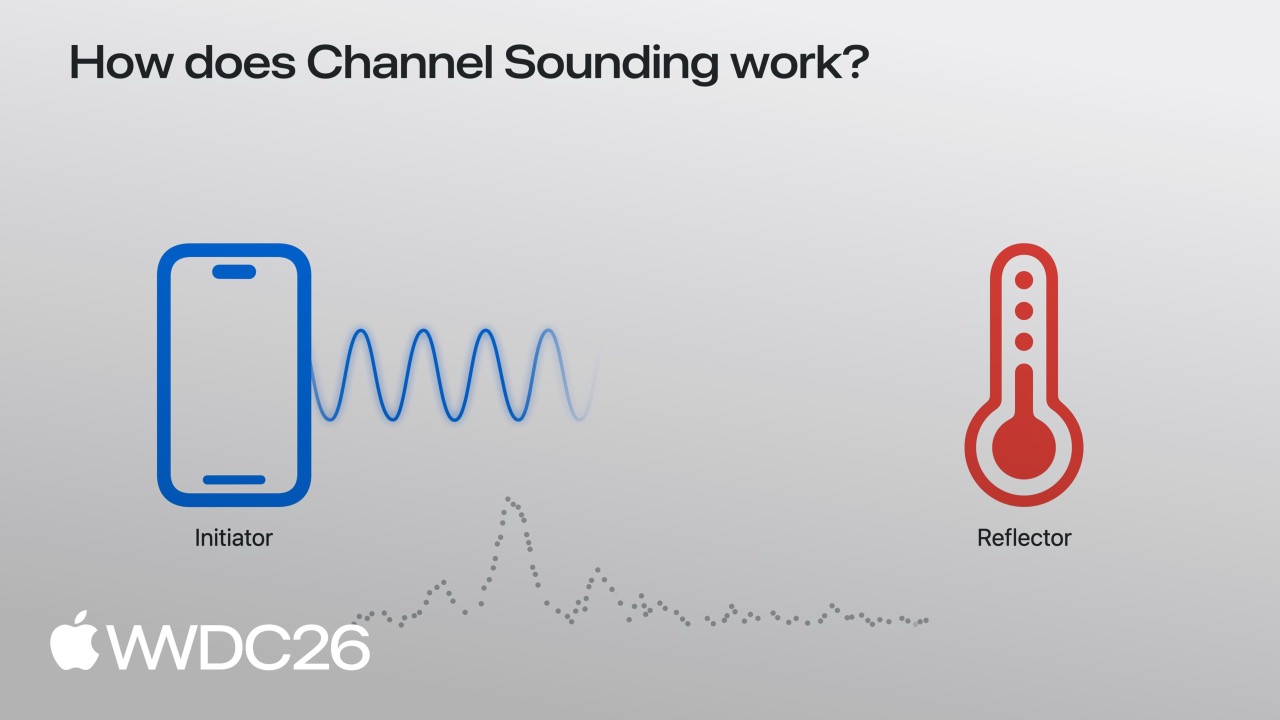
Apple の解決策が Bluetooth Channel Sounding です。これは Bluetooth 5.1 standard で導入された技術で、2 つの device が双方向 ranging によって正確な距離を計算でき、centimeter level の精度を得られます。
iOS 27 はこの機能を developer に開放します。
- Core Bluetooth に新しい API が追加され、accessory と直接 channel sounding を行い、距離 data を取得できます。
- Nearby Interaction は Bluetooth channel sounding をサポートし、距離と方向を同時に取得できます。
- Accessory 側には対応 firmware update が必要で、Apple は accessory 側実装の完全な guide を提供します。
これらが揃うと、accessory を探す体験はずっと簡単になります。App を開くと、地図上に accessory の正確な位置、そこまでの距離、進むべき方向が表示されます。
詳細
Core Bluetooth channel sounding
([03:43](https://developer.apple.com/videos/play/wwdc2026/369/?time=223))
Core Bluetooth は iOS 27 で channel sounding support を追加しました。まず device が対応しているか確認します。
import CoreBluetooth

func isChannelSoundingSupported() -> Bool {
    guard centralManager.state == .poweredOn else { return false }
    if #available(iOS 27.0, *) {
        // 現在の device が Bluetooth channel sounding に対応しているか確認
        return CBCentralManager.supportsFeatures(.channelSounding)
    }
    return false
}ポイント:
- Device は
.poweredOn状態である必要があります。 supportsFeatures(.channelSounding)がtrueを返す必要があります。
Ranging session を開始します。
func startChannelSounding(_ peripheral: CBPeripheral) {
    guard peripheral.isConnected else { return }
    if #available(iOS 27.0, *) {
        // Step 1: session configuration を作成し、この device を initiator に指定
        let config = CBChannelSoundingSessionConfiguration(role: .initiator)

        // Step 2: channel sounding session を開始
        peripheral.startChannelSoundingSession(config)
    }
}ポイント:
role: .initiatorは phone が ranging を開始し、accessory が responder になることを意味します。- 接続済みの peripheral だけが ranging を開始できます。
- Accessory は channel sounding に対応している必要があります。
Ranging result を受け取ります。
([04:09](https://developer.apple.com/videos/play/wwdc2026/369/?time=249))
func peripheral(_ peripheral: CBPeripheral,
                didReceive results: CBChannelSoundingProcedureResults?,
                error: Error?) {
    guard let results = results else { return }

    let distance = results.distance
    // Distance data を使用
}ポイント:
distanceは正確な距離値を返します。通常は centimeter 単位です。- Result は
CBPeripheralDelegatecallback で届きます。 errorcase を処理する必要があります。
Session を cancel します。
func cancelChannelSounding(_ peripheral: CBPeripheral) {
    guard peripheral.isConnected else { return }
    if #available(iOS 27.0, *) {
        peripheral.cancelChannelSoundingSession(config)
    }
}

func peripheral(_ peripheral: CBPeripheral,
                didCompleteChannelSoundingSession error: Error?) {
    // Session が終了
}ポイント:
- 明示的な cancel でも accessory の切断でも completion callback が呼ばれます。
- 電力を節約するため、使い終わったらすぐ停止します。
Nearby Interaction 統合
([04:41](https://developer.apple.com/videos/play/wwdc2026/369/?time=281))
Nearby Interaction も Bluetooth channel sounding を使えるようになり、方向情報も取得できます。
まず device capability を確認します。
import NearbyInteraction

func startChannelSoundingThroughNearbyInteraction(_ peripheral: CBPeripheral) {
    if #available(iOS 27.0, *) {
        // Step 1: device が Bluetooth channel sounding に対応しているか確認
        guard NISession.deviceCapabilities.supportsBluetoothChannelSounding else { return }

        // Step 2: accessory configuration を作成
        let config = NINearbyAccessoryConfiguration(
            bluetoothChannelSoundingIdentifier: peripheral.identifier,
            previousChannelSoundingIdentifier: nil)

        // Step 3: direction を得るため camera assistance を有効化
        if NISession.deviceCapabilities.supportsCameraAssistance {
            config.isCameraAssistanceEnabled = true
        }
    }
}ポイント:
bluetoothChannelSoundingIdentifierは accessory の UUID を使います。previousChannelSoundingIdentifierは前回 session を再利用して接続を速くできます。- Camera assistance を有効にすると direction data が得られますが、ユーザーの許可が必要です。
Session を実行します。
([05:19](https://developer.apple.com/videos/play/wwdc2026/369/?time=319))
func runChannelSoundingThroughNearbyInteraction(_ config: NINearbyAccessoryConfiguration) {
    let session = NISession()
    session.delegate = self
    session.run(config)
}
Update を受け取ります。
func session(_ session: NISession, didUpdate nearbyObjects: [NINearbyObjects]) {
    guard let object = nearbyObjects.first else { return }

    if let distance = object.distance {
        // Distance data を使用
    }

    if let direction = object.horizontalAngle {
        // Direction data を使用
    }
}ポイント:
distanceは正確な距離です。horizontalAngleは水平方向の角度を示します。- Data は継続的に更新されるため、real-time tracking に使えます。
Direction output を最適化します。
func updateAccessoryMotionState(_ isMoving: Bool) {
    let motionState = isMoving ? .moving : .stationary
    session.updateMotionState(motionState, forObjectWithToken: object.discoveryToken)
}ポイント:
- Nearby Interaction に accessory が静止しているか移動しているかを伝えます。
- 静止している場合、方向計算はより正確になります。
- Accessory に motion sensor がある場合は real-time state を渡せます。
電力最適化
Channel sounding は電力を消費するため、Apple は必要なときだけ使うことを推奨しています。
- 必要なときだけ session を開始します。
- 十分な data を取得したらすぐ cancel します。
- Background で継続的な ranging を避けます。
- Use case に応じて update frequency を調整します。
Accessory 側の要件
Accessory は channel sounding に対応する firmware update が必要です。
- Bluetooth 5.1 以降を実装します。
- Channel Sounding feature をサポートします。
- Accessory は responder role として動作します。
- Apple が提供する accessory implementation guide を参照します。
主要な示唆
-
高精度な探し物 App: 単に「近くにある」ではなく、「ソファ左側 30 centimeter」と示します。鍵、財布、イヤホンを正確に位置特定し、ユーザーがそのまま取りに行けるようにします。
-
Smart accessory trigger: ユーザーが accessory の特定距離まで近づいたら機能を自動 trigger します。ライトの近くに行くと自動で点灯し、ドアロックに近づくと unlock prompt を表示する、といった使い方です。
-
屋内 navigation 補助: ショッピングモールや空港で、近くの固定 Bluetooth beacon までの距離と方向を使い、大まかな indoor positioning を行って、店舗や搭乗口を探す手助けをします。
-
ゲーム accessory positioning: 体感ゲーム accessory の正確な位置を tracking し、player の controller がどこにあるか、screen からどれだけ離れているか、どの方向を向いているかを把握します。
-
AR accessory visualization: Camera と組み合わせ、AR view の中で隠れた accessory を「見える」ようにします。眼鏡がソファの隙間に落ちても、screen 上に直接 mark できます。
関連 Session
- 341 - Center Stage — Camera に関連する空間認識技術
- 223 - Live Activities — Accessory の状態を Dynamic Island と Lock Screen に表示できる
- 277 - WidgetKit — Accessory までの距離を widget で real-time 表示できる
- 297 - Visual Intelligence — Camera-assisted visual recognition と位置特定の組み合わせ
- 310 - Shortcuts — Accessory までの距離で automation shortcut を trigger できる
コメント
GitHub Issues · utterances