
ハイライト
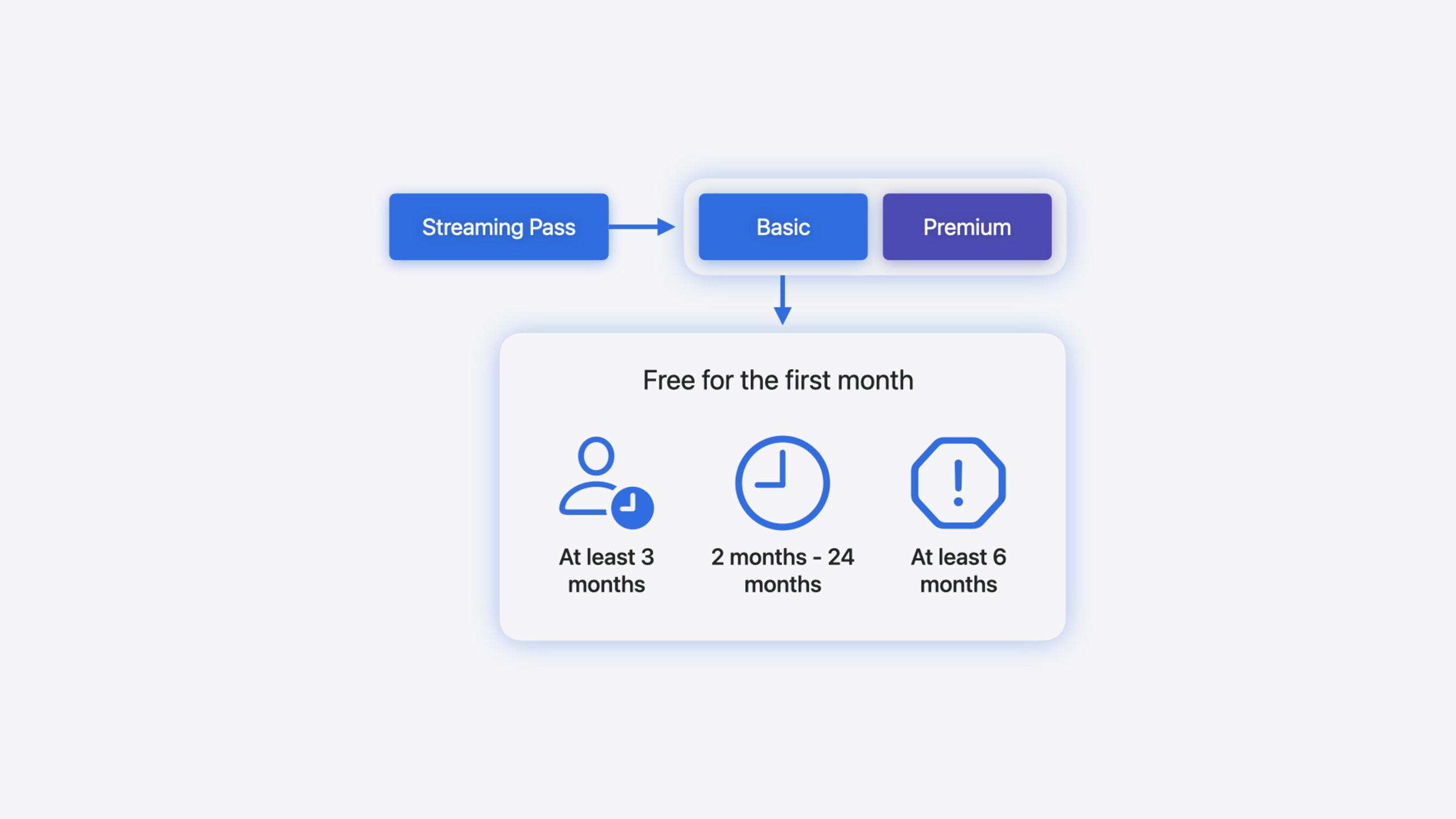
App Store のサブスクリプションオファー体系には introductory offers(新規獲得)、promotional offers(活性化)、offer codes(マーケティング配布)の 3 形態があります。今年の更新は 2 方向。既存 API の情報補完と、離脱ユーザーを取り戻す全新 win-back offers の登場です。
主要内容
サブスクリプション製品の核心課題はユーザー離脱です。ユーザーが自動更新をキャンセルすると、開発者はほぼ再接触手段がありません——promotional offers は資格検証とプッシュを自前で行い、コンバージョン経路が長くコストも高い。Apple 今年の解は win-back offers。サブスクリプション期限切れかつ自動更新オフの離脱ユーザー向けの全新オファータイプです。
win-back offers が従来オファーと最大の違いは、Apple がユーザーセグメントとチャネル配布を代行すること。App Store Connect で資格条件(有料期間、離脱期間、2 回目オファー間隔)を設定すれば、Apple が条件合致ユーザーを自動マッチし、製品ページ、Today タブ、サブスクリプション設定ページなどにオファーカードを表示。ユーザーはカードをタップし決済確認まで一気通貫。App Store Connect で win-back offer の優先度も設定でき、Apple がパーソナライズ推薦に使用します。
API 面も更新あり。Transaction と RenewalInfo 構造体に offer フィールドが追加され、オファー ID、タイプ、支払モードを統合。StoreKit Views に subscriptionPromotionalOffer と preferredSubscriptionOffer の 2 つの View Modifier が追加され、SubscriptionStoreView で表示オファーを直接制御可能。macOS 15 で offer code redemption sheet がついにサポート。
詳細
Transaction と RenewalInfo の offer フィールド追加
Transaction 構造体は iOS 17.2 で offer メンバーを追加。オプショナル値で id、type、paymentMode の 3 フィールドを含む。ユーザーがオファー利用で購入した場合のみ設定される。RenewalInfo の同名フィールドは iOS 18.0 から利用可能。次の更新サイクルに適用されるオファーを表す(02:02)。
App Store Server API 側の対応フィールドは offerIdentifier、offerType(既存)、新規 offerDiscountType(新フィールド、履歴取引もバックフィル)。offerDiscountType の値は StoreKit の paymentMode に対応し、free trial / pay-as-you-go / pay-up-front を区別(02:53)。
macOS 15 が offer code redemption sheet をサポート
// Present offer code redemption sheet on macOS - SwiftUI API

import SwiftUI
import StoreKit

struct MyView: View {

    @State var showOfferCodeRedemption: Bool = false

    var body: some View {
        Button("Redeem Code") {
            showOfferCodeRedemption = true
        }
        .offerCodeRedemption(isPresented: $showOfferCodeRedemption) { result in
            // Handle result
        }
    }
}
@State var showOfferCodeRedemption:ブール状態で引換シートの表示/非表示を制御.offerCodeRedemption(isPresented:):macOS 15 から iOS と同 API。シートが引換フローを自動処理resultクロージャ:引換結果を取得して後続処理(04:25)
preferredSubscriptionOffer:SubscriptionStoreView で表示オファーを選択
// Choose preferred offer in a SubscriptionStoreView

import SwiftUI
import StoreKit

struct MyView: View {
    let groupID: String

    var body: some View {
        SubscriptionStoreView(groupID: groupID)
            .preferredSubscriptionOffer { product, subscription, eligibleOffers in
                let freeTrialOffer = eligibleOffers
                    .filter { $0.paymentMode == .freeTrial }
                    .max { lhs, rhs in
                        lhs.period.value < rhs.period.value
                    }
                return freeTrialOffer ?? eligibleOffers.first
            }
    }
}preferredSubscriptionOffer:クロージャ引数は product、subscription、eligibleOffers。StoreKit が現在ユーザーが資格を持つ全オファーを自動渡し$0.paymentMode == .freeTrial:無料トライアル系オファーをフィルタ.max { lhs.period.value < rhs.period.value }:最長の無料トライアルを検索freeTrialOffer ?? eligibleOffers.first:無料トライアルがなければ最初の利用可能オファーにフォールバック(20:15)
サブスクリプション資格と win-back offer 表示ロジックの確認
// Check subscription entitlement and offer eligibility

import StoreKit

func shouldShowMerchandising(
    for groupID: String,
    productIDs: [Product.ID]
) async throws -> MerchandisingVisibility {
    // Get subscription status
    let statuses = try await Product.SubscriptionInfo.status(for: groupID)

    // Check if the customer is already entitled to the subscription
    let entitlement = SubscriptionEntitlement(for: statuses)
    if entitlement.autoRenewalEnabled {
        return .hidden
    }

    // Check for offers to show in merchandising UI
    let products = try await Product.products(for: productIDs)

    let isEligibleForIntroOffer = await Product.SubscriptionInfo.isEligibleForIntroOffer(for: groupID)
    if isEligibleForIntroOffer {
        let subscriptions = products.map {
            ($0, $0.subscription?.introductoryOffer)
        }
        return .visible(subscriptions)
    }

    // Check for eligible win-back offers
    let purchasedStatus = statuses.first {
        $0.transaction.unsafePayloadValue.ownershipType == .purchased
    }
    let renewalInfo = try purchasedStatus?.renewalInfo.payloadValue
    let bestWinBackOfferID = renewalInfo?.eligibleWinBackOfferIDs.first

    // Return the product with the offer if there is one
    if let bestWinBackOfferID {
        let subscriptions: [(Product, Product.SubscriptionOffer?)] = products.map {
            let winBackOffer = $0.subscription?.winBackOffers.first {
                $0.id == bestWinBackOfferID
            }
            return ($0, winBackOffer)
        }
        return .visible(subscriptions)
    }

    // Only return the product if there is no offer
    return .visible(products.map { ($0, nil) })
}Product.SubscriptionInfo.status(for:):サブスクリプショングループの現在状態を取得SubscriptionEntitlement:カスタム構造体。状態リストから権利保有と自動更新 ON/OFF を判定isEligibleForIntroOffer:まず introductory offer 資格を確認。新規ユーザーにはトライアル優先表示$0.transaction.unsafePayloadValue.ownershipType == .purchased:「自己購入」記録のみ参照。Family Sharing を除外renewalInfo?.eligibleWinBackOfferIDs.first:Apple 返却リストの先頭が最適 win-back offer$0.subscription?.winBackOffers.first { $0.id == bestWinBackOfferID }:製品情報内で ID マッチし完全 offer オブジェクトを取得(23:05)
win-back offer を購入に追加
// Add a win-back offer to a purchase

import StoreKit

func purchase(
    _ product: Product,
    with offer: Product.SubscriptionOffer?
) async throws {
    // Prepare the purchase options
    var purchaseOptions: Set<Product.PurchaseOption> = []

    // Add win-back offer to the purchase
    if let offer, offer.type == .winBack {
        purchaseOptions.insert(.winBackOffer(offer))
    }

    // Make the purchase
    try await product.purchase(options: purchaseOptions)
}.winBackOffer(offer):iOS 18.0 新 PurchaseOption。win-back offer オブジェクトを購入フローに渡すproduct.purchase(options:):App Store が支払シート表示前にユーザー資格を自動検証(25:26)
Streamlined Purchasing と PurchaseIntent
App Store Connect で App Store プロモーションを有効化している場合(デフォルト ON)、ユーザーは app を開かず App Store 内で win-back offer 購入を完了可能。この動作を streamlined purchasing と呼ぶ。購入前にカスタムロジック(オンボーディング画面など)が必要なら App Store Connect で無効化し、app 内で PurchaseIntent API を使って App Store から開始された購入を受信(28:48)。PurchaseIntent は iOS 18.0 で offer フィールドを追加。win-back offer を含む場合のみ設定される。
重要ポイント
-
何を作るか:離脱ユーザー向け win-back offers セグメント戦略を設定。「有料サブスクリプション期間 ≥ 3 か月 + 離脱 2–6 か月」を初回条件に、App Store Connect で無料トライアル型 win-back offer を作成。なぜ価値があるか:Apple が自動配布。資格検証とプッシュロジックを自前で書かず、promotional offers より広いカバレッジ。どう始めるか:App Store Connect のサブスクリプション価格ページで Win-Back Offers タブを開き、Create Offer をクリック、資格条件と価格を設定。
-
何を作るか:SubscriptionStoreView に
preferredSubscriptionOfferを組み込み、StoreKit Views が最適オファーを自動表示。なぜ価値があるか:introductory offer と win-back offer の両方に該当する場合、どちらを表示するか決める必要があり、この View Modifier で数行の選択ロジックを完結。どう始めるか:既存 SubscriptionStoreView に.preferredSubscriptionOffer修飾子を追加、クロージャ内でビジネス優先度に応じた SubscriptionOffer を返す。 -
何を作るか:Transaction と RenewalInfo のオファー確認を新
offerフィールドに移行。なぜ価値があるか:offerフィールドがオファー ID、タイプ、支払モードを統合。Apple 推奨の照会方式。旧分散フィールドは将来非推奨の可能性。どう始めるか:サーバー側 JWSTransaction 解析でofferIdentifier+offerTypeに加えofferDiscountTypeも読み取り。クライアント側はtransaction.offerを第一チェック入口に。 -
何を作るか:macOS 版 app に offer code redemption sheet サポートを追加。なぜ価値があるか:macOS 15 でついにこの能力が追加。以前 macOS ユーザーは手動でコード入力のみで体験が悪かった。どう始めるか:
.offerCodeRedemption(isPresented:)SwiftUI 修飾子を使用。コードは iOS と完全一致。
関連セッション
- What’s new in StoreKit and In-App Purchase — StoreKit Views スタイル制御、Transaction 新フィールド、StoreKit Testing 改善
- Explore App Store server APIs for In-App Purchase — サーバー側 offerDiscountType フィールド、消費情報報告、通知タイプ更新
- What’s new in App Store Connect — App Store Connect のフィーチャー指名、マーケティング素材生成、TestFlight 改善
コメント
GitHub Issues · utterances