
ハイライト
Core Data は iOS 17 で、構造化データを整理する Composite Attributes、複雑なモデル変更を扱う Staged Migration、起動時の長い待ち時間を避ける Deferred Migration を導入しました。
主な内容
データモデルは app の反復とともに複雑になっていきます。以前はこうした問題に直面すると、開発者は「大量の移行コードを書く」か「Core Data を諦めて別の方法に切り替える」かを選びがちでした。
Composite Attributes は構造化データの保存問題を解決します。以前は関連する属性群を複数の独立フィールドに平坦化するか、Transformable 型で独自のシリアライズコードを書く必要がありました。Composite Attributes を使うと、関連する属性群を 1 つの複合属性にまとめ、辞書のようにアクセスでき、keypath を検索条件として直接使えます。
Staged Migration は複雑なモデル変更の移行問題を解決します。たとえばエンティティの属性を独立したエンティティへ分割するような変更は、軽量移行の範囲を超えます。以前はカスタム移行マッピングを書くしかなく、コード量が多くエラーも起きやすいものでした。Staged Migration では複雑な変更を、軽量移行で処理できる複数ステップに分解し、Core Data が順番に自動実行します。
Deferred Migration は、移行が UI をブロックする問題を解決します。一部の軽量移行は自動で完了しますが、古いデータのクリーンアップには時間がかかります。以前はこれが app 起動時の停止につながっていました。Deferred Migration ではクリーンアップをバックグラウンドへ遅延させ、app は先に新しい schema を使い、データ整理は後で行えます。
詳細
Composite Attributes
(00:56)Composite Attributes は、構造化データをカプセル化する Core Data の新しい属性型です。
Aircraft エンティティがあり、以前は Transformable 型でカラースキームを保存していたとします。
@NSManaged public var colors: Data? // Transformable、カスタム transformer が必要現在は Composite Attribute を使えます。
@NSManaged public var colorScheme: [String: Any]?Xcode のモデルエディタで composite attribute を定義します。
- composite attribute を追加し、
colorSchemeと名付ける - その中に 3 つの String サブ属性
primary、secondary、tertiaryを追加する AircraftエンティティにcolorScheme属性を追加し、型をcolorSchemeに設定する
composite attribute を設定します。
private func addAircraft() {
    viewContext.performAndWait {
        let newAircraft = Aircraft(context: viewContext)
        newAircraft.tailNumber = tailNumber
        newAircraft.aircraftType = aircraftType
        newAircraft.aircraftClass = aircraftClass
        newAircraft.aircraftCategory = aircraftCategory

        newAircraft.colorScheme = [
            "primary": primaryColor.rawValue,
            "secondary": secondaryColor.rawValue,
            "tertiary": tertiaryColor.rawValue
        ]

        do {
            try viewContext.save()
        } catch {
            // エラーを処理
        }
    }
}
キーポイント:
- 辞書構文で composite attribute のサブ属性にアクセスする
- キー名はモデルエディタで定義した属性名と一致する
keypath で composite attribute を検索します。
private func findAircraft(with color: String) {
    viewContext.performAndWait {
        let fetchRequest = Aircraft.fetchRequest()
        fetchRequest.predicate = NSPredicate(
            format: "colorScheme.primary == %@", color
        )

        do {
            let fetchedResults = try viewContext.fetch(fetchRequest)
            // ...
        } catch {
            // エラーを処理
        }
    }
}
キーポイント:
colorScheme.primaryのような namespaced keypath を使うNSPredicateでサブ属性を直接検索できる- これは Transformable 属性ではできない
Composite Attributes はネストも可能で、1 つの composite attribute の中に別の composite attribute を含められます。要素は NSAttributeDescription またはネストした NSCompositeAttributeDescription のみで、relationship は含められません。
パフォーマンス面では、あるエンティティを fetch した後にほぼ常に特定の relationship へアクセスするなら、その relationship のデータを composite attribute に変える選択肢があります。これにより faulting による追加クエリを避けられます。
Staged Migration
(07:36)当模型变更超出轻量级迁移能力时,使用 Staged Migration。
核心思路:把复杂的非轻量级变更,拆成多个轻量级迁移可以处理的步骤。
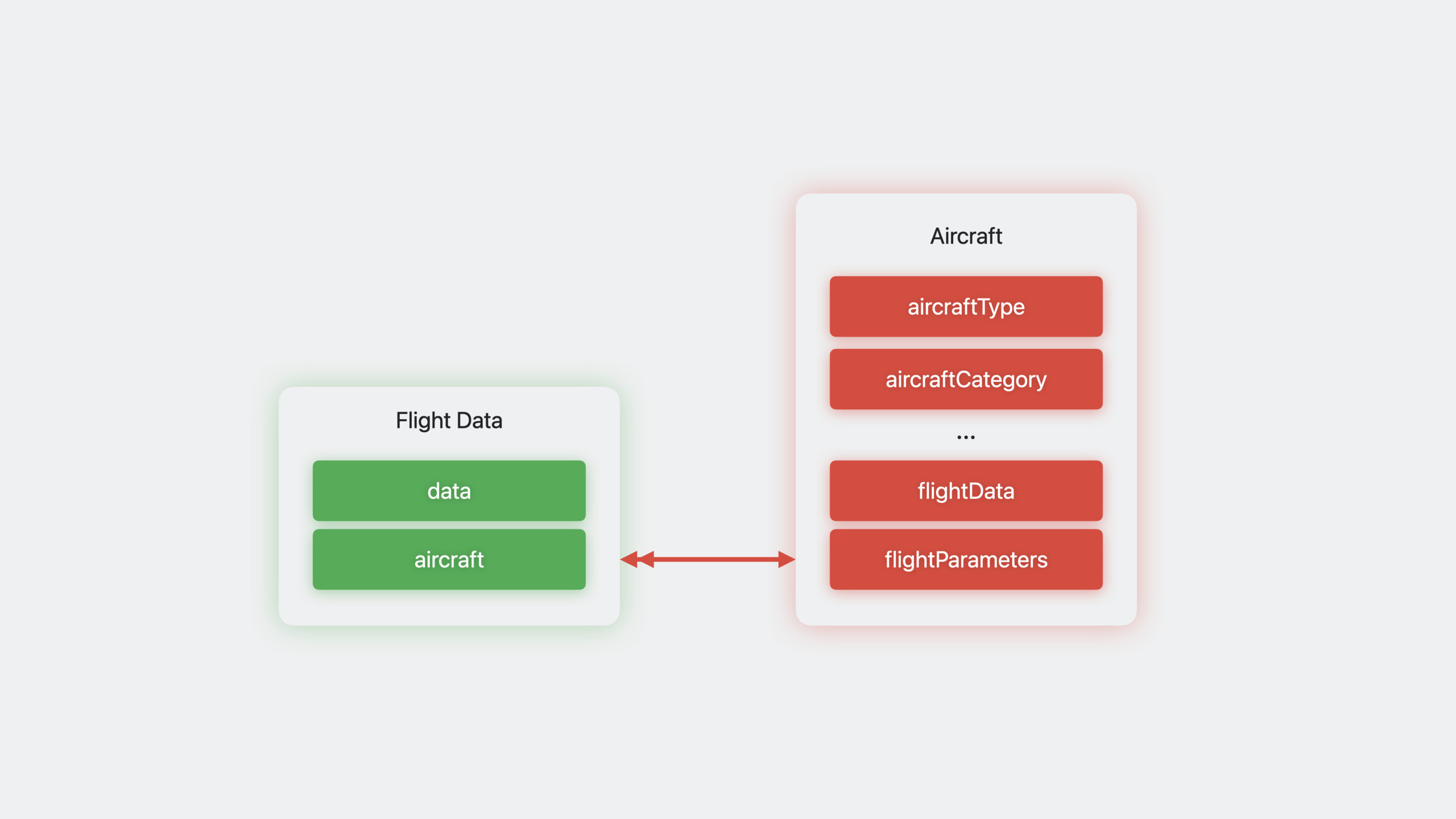
示例场景:Aircraft 实体有一个 flightData 二进制属性,需要把它拆成独立的 FlightData 实体。
分解步骤:
- ModelV1(原始):
Aircraft有flightData属性 - ModelV2:添加
FlightData实体,与Aircraft建立 relationship,轻量级迁移可以完成 - ModelV3:删除
Aircraft的flightData属性,数据已通过自定义代码迁移到FlightData
创建模型引用:
let v1ModelChecksum = "kk8XL4OkE7gYLFHTrH6W+EhTw8w14uq1klkVRPiuiAk="
let v1ModelReference = NSManagedObjectModelReference(
    modelName: "modelV1",
    in: Bundle.main,
    versionChecksum: v1ModelChecksum
)

let v2ModelChecksum = "PA0Gbxs46liWKg7/aZMCBtu9vVIF6MlskbhhjrCd7ms="
let v2ModelReference = NSManagedObjectModelReference(
    modelName: "modelV2",
    in: Bundle.main,
    versionChecksum: v2ModelChecksum
)

let v3ModelChecksum = "iWKg7bxs46g7liWkk8XL4OkE7gYL/FHTrH6WF23Jhhs="
let v3ModelReference = NSManagedObjectModelReference(
    modelName: "modelV3",
    in: Bundle.main,
    versionChecksum: v3ModelChecksum
)
キーポイント:
versionChecksum用NSManagedObjectModel.versionChecksum获取- 也可以在 Xcode build log 中搜索 “version checksum”
- versioned model 的 checksum 也在
VersionInfo.plist中
创建迁移阶段:
// V1 → V2 是轻量级变更(添加属性/实体)
let lightweightStage = NSLightweightMigrationStage([v1ModelChecksum])
lightweightStage.label = "V1 to V2: Add flightData attribute"

// V2 → V3 需要自定义代码迁移数据
let customStage = NSCustomMigrationStage(
    migratingFrom: v2ModelReference,
    to: v3ModelReference
)
customStage.label = "V2 to V3: Denormalize model with FlightData entity"
在自定义阶段中迁移数据:
customStage.willMigrateHandler = { migrationManager, currentStage in
    guard let container = migrationManager.container else {
        return
    }

    let context = container.newBackgroundContext()
    try context.performAndWait {
        let fetchRequest = NSFetchRequest<NSFetchRequestResult>(entityName: "Aircraft")
        fetchRequest.predicate = NSPredicate(format: "flightData != nil")

        do {
            let fetchedResults = try context.fetch(fetchRequest)
            for airplane in fetchedResults {
                guard let airplane = airplane as? NSManagedObject else { continue }

                let fdEntity = NSEntityDescription.insertNewObject(
                    forEntityName: "FlightData",
                    into: context
                )

                let flightData = airplane.value(forKey: "flightData")
                fdEntity.setValue(flightData, forKey: "data")
                fdEntity.setValue(airplane, forKey: "aircraft")
                airplane.setValue(nil, forKey: "flightData")
            }
            try context.save()
        } catch {
            // 处理错误
        }
    }
}
キーポイント:
- 使用
NSFetchRequestResult和NSManagedObject泛型,因为迁移时子类可能不存在 willMigrateHandler在轻量级迁移完成后、schema 更新前执行- 在 handler 中创建新实体、复制数据、建立 relationship
didMigrateHandlerは schema 更新後に実行される(必要な場合)
配置 staged migration:
let migrationStages = [lightweightStage, customStage]
let migrationManager = NSStagedMigrationManager(migrationStages)

let persistentContainer = NSPersistentContainer(
    path: "/path/to/store.sqlite",
    managedObjectModel: myModel
)

var storeDescription = persistentContainer.persistentStoreDescriptions.first
storeDescription?.setOption(
    migrationManager,
    forKey: NSPersistentStoreStagedMigrationManagerOptionKey
)

persistentContainer.loadPersistentStores { storeDescription, error in
    if let error = error {
        // 处理错误
    }
}
キーポイント:
NSStagedMigrationManager管理整个迁移流程- 通过
NSPersistentStoreStagedMigrationManagerOptionKey添加到 store options - Core Data 自动按顺序执行每个阶段
Deferred Migration
(18:56)某些轻量级迁移的清理工作可以延迟执行。
启用延迟迁移:
let options = [
    NSPersistentStoreDeferredLightweightMigrationOptionKey: true,
    NSMigratePersistentStoresAutomaticallyOption: true,
    NSInferMappingModelAutomaticallyOption: true
]

let store = try coordinator.addPersistentStore(
    ofType: NSSQLiteStoreType,
    configurationName: nil,
    at: storeURL,
    options: options
)
在合适的时机完成延迟迁移:
// 通过 BGProcessingTask 在后台执行
let metadata = coordinator.metadata(for: store)
if metadata[NSPersistentStoreDeferredLightweightMigrationOptionKey] == true {
    coordinator.finishDeferredLightweightMigration()
}
キーポイント:
- 轻量级迁移本身仍是同步的,只有清理工作被延迟
- app 可以立即使用新 schema
- 延迟迁移支持回退到 macOS Big Sur 和 iOS 14
- 仅支持 SQLite store type
- 适合的场景:删除属性/relationship、改变 entity hierarchy、改变 ordered relationship
- 建议用
BGProcessingTask在设备空闲时执行
Staged + Deferred 组合使用
(22:08)复杂迁移可以组合两种技术。比如示例中的 ModelV3 删除 flightData 属性,这个清理工作可以延迟到后台执行。
重要ポイント
1. 住所/連絡先の構造化保存
- 何をするか: Composite Attributes を使い、住所の都道府県、市区町村、区、番地を 1 つの
address属性にまとめる - 取り組む価値: 4 つの独立属性へ平坦化するより直感的で、検索時に
address.city == %@で直接フィルタできる - 始め方: Xcode のモデルエディタで composite attribute を作成し、
province、city、district、streetの 4 つの String サブ属性を含める
2. 大規模ユーザーデータベースを安全に移行
- 何をするか: Staged Migration で複雑なデータベース変更を複数ステップに分け、一括移行による起動クラッシュを避ける
- 取り組む価値: ユーザーデータ量が多い場合、複雑な移行はタイムアウトしてシステムに終了される可能性があり、段階的実行の方が安定する
- 始め方: モデル変更を分析し、非軽量変更を「新構造の追加→データ移行→旧構造の削除」の 3 ステップに分け、各ステップに model version を使う
3. ブロックしない起動体験
- 何をするか: Deferred Migration でクリーンアップ作業をバックグラウンドに回し、app 起動後すぐ利用可能にする
- 取り組む価値: ユーザーが app を開いたときに起動画面で数秒以上止まると離脱につながるため、遅延移行によって起動を速く保てる
- 始め方: store options に
NSPersistentStoreDeferredLightweightMigrationOptionKey: trueを追加し、BGProcessingTaskを登録してバックグラウンドでfinishDeferredLightweightMigration()を呼ぶ
4. Transformable から Composite Attributes へ移行
- 何をするか: 既存の Transformable 属性(JSON エンコードしたカスタム型の保存など)を段階的に Composite Attributes へ置き換える
- 取り組む価値: Transformable はサブフィールドを直接検索できませんが、Composite Attributes は
NSPredicatekeypath 検索に対応し、パフォーマンスも向上する - 始め方: 新しい composite attribute を作成し、Staged Migration の
willMigrateHandlerで Transformable データを解析して composite のサブ属性へ書き込む
関連セッション
- Meet SwiftData — Apple 新推出的数据持久化框架
- SwiftData 深入 — SwiftData 高级用法和与 Core Data 的关系
- Evolve your app’s schema — 数据模型演进的最佳实践
コメント
GitHub Issues · utterances