
ハイライト
SwiftUI エンジニアの Julia は、「女性コンピュータ科学者ディレクトリ」アプリを例として、Transferable プロトコルの設計と使用法を紹介しました。
主要内容
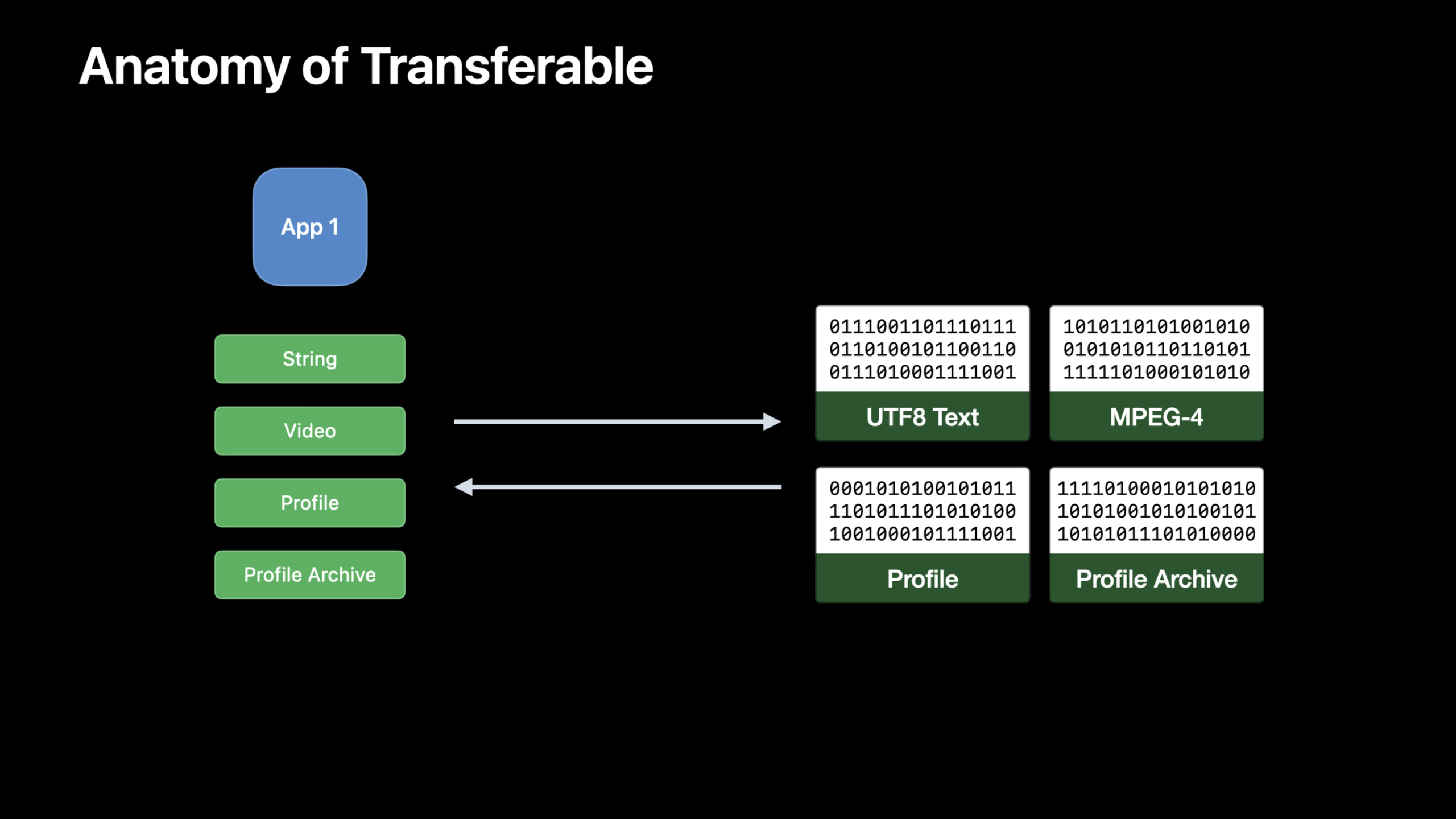
Julia のサンプル アプリには、女性コンピューター科学者のプロフィールが保存されています。プロフィール ページには、名前、自己紹介、興味深い事実、ポートレート、ビデオが含まれます。ユーザーは、肖像画をアプリにドラッグしたり、クリップボードから逸話を貼り付けたり、watchOS でプロフィールを共有したりするなど、いくつかの日常的なことを実行したいと考えています。 (00:38)
以前は、これらのエントリはさまざまな API に分散していることがよくありました。ドラッグ アンド ドロップ、コピー アンド ペースト、およびシートの共有はすべて、モデルを受信者が理解できるデータに変換し、データのタイプを宣言します。Transferableこの問題をモデル層に戻します。モデル自体は、エクスポート方法、インポート方法、および対応する種類を宣言します。UTType。(02:09)
この話のポイントは、共有ボタンを書くことではありません。ポイントは、Profile、ProfilesArchive、Videoこれらのモデルは転送ルールを一度宣言し、その後PasteButton、.draggable、.dropDestination、ShareLinkSwiftUI エントリが再利用されるまで待ちます。 (05:10)
詳細
最初にデータ型を宣言します
(04:18) アプリ間でデータを転送する場合、受信者はバイナリ データが何を表しているのかを知る必要があります。 Apple は、Uniform Type Identifier (UTType) を使用してデータ構造を記述します。カスタム モデルに独自のファイル形式がある場合は、最初にカスタム タイプを宣言する必要があります。
import UniformTypeIdentifiers

// also declare the content type in the Info.plist
extension UTType {
    static var profile: UTType = UTType(exportedAs: "com.example.profile")
}重要なポイント:
-import UniformTypeIdentifiers導入UTType。
extension UTTypeビジネス セマンティック名をシステム タイプ テーブルに追加します。 -UTType(exportedAs:)このタイプが現在のアプリによって定義され、エクスポートされることを示します。- メモのリマインダーはまだ残っています
Info.plist声明;セッションでは、アプリがこの種のファイルを開けられることをシステムに知らせるために、同時にファイル拡張子を追加することをお勧めします。
標準タイプはすでに直接送信可能です
(05:01)String、Data、URL、AttributedString、ImageすでにフォローされていますTransferable。機能にこれらの標準タイプのみが含まれる場合は、SwiftUI エントリを直接使用できます。
import SwiftUI

struct Profile {
    private var funFacts: [String] = []
    mutating func addFunFacts(_ newFunFacts: [String]) {
        funFacts.append(newFunFacts)
    }
}

struct PasteButtonView: View {
    @State var profile = Profile()
    var body: some View {
        PasteButton(payloadType: String.self) { funFacts in
            profile.addFunFacts(funFacts)
        }
    }
}重要なポイント:
-funFacts文字列配列を使用して、人物に関する逸話を保存します。
-addFunFacts新しい文字列を受け取り、それをモデルに追加します。
-@State var profileビューに変更可能なデータ モデルを保持させます。
-PasteButton(payloadType: String.self)クリップボード内の文字列コンテンツのみを受信することを宣言します。
- 閉鎖中
funFactsシステムによって解析されたペイロードは、モデルに直接書き戻されます。
同じ標準タイプをドラッグ アンド ドロップにも使用できます。以下のポートレートビューは、Imageドラッグ ソースとドロップ ターゲットの両方として機能します。
import SwiftUI

struct PortraitView: View {
    @State var portrait: Image
    var body: some View {
        portrait
            .cornerRadius(8)
            .draggable(portrait)
            .dropDestination(payloadType: Image.self) { (images: [Image], _) in
                if let image = images.first {
                    portrait = image
                    return true
                }
                return false
            }
    }
}重要なポイント:
-@State var portrait現在のアバター画像を保存します。
-.draggable(portrait)電流を流してくださいImageドラッグ可能なコンテンツになります。
-.dropDestination(payloadType: Image.self)画像ドロップを受け取るには、このビューを宣言します。
-images.firstドロップされた最初の写真を入手します。
- 正常に更新されました
portrait後に戻るtrue、画像が利用できない場合に返されますfalse。
CodableRepresentation は通常のモデルに適しています
(06:34)Profileこの分野の中心モデルです。それは持っていますid、name、bio、funFacts、videoそしてportrait、フォローしてきましたCodable。
import Foundation

struct Profile: Codable {
    var id: UUID
    var name: String
    var bio: String
    var funFacts: [String]
    var video: URL?
    var portrait: URL?
}重要なポイント:
-Codableモデルにエンコード機能とデコード機能を持たせます。
-id使用UUID個々のデータを識別します。
-funFacts貼り付け可能な文字列データを保存します。
-videoそしてportraitオプションを使用するURL外部リソースを指します。
(07:31)Profileすでにエンコードとデコードが可能で、転送可能な適合性を提供するだけで済みますtransferRepresentation。CodableRepresentationデフォルトでは JSON が使用されますが、カスタムのエンコーダー/デコーダーも使用できます。
import CoreTransferable
import UniformTypeIdentifiers

struct Profile: Codable {
    var id: UUID
    var name: String
    var bio: String
    var funFacts: [String]
    var video: URL?
    var portrait: URL?
}

extension Profile: Codable, Transferable {
    static var transferRepresentation: some TransferRepresentation {
        CodableRepresentation(contentType: .profile)
    }
}

// also declare the content type in the Info.plist
extension UTType {
    static var profile: UTType = UTType(exportedAs: "com.example.profile")
}重要なポイント:
-import CoreTransferable導入Transferableそして表現タイプ。
-extension Profile: Codable, Transferable声明Profileシステム送信に参加できます。
-transferRepresentation従うことですTransferable実装される静的プロパティ。
-CodableRepresentation(contentType: .profile)使用Codableバイナリデータを生成し、コンテンツをカスタムとしてマークします.profileタイプ。
-UTType.profileそしてCodableRepresentationコンテンツ タイプは一貫したままです。
インメモリバイナリ形式に適した DataRepresentation
(07:49)ProfilesArchiveCSV はすでにサポートされています。 CSVから取得できますData初期化、CSVエクスポートも可能Data。このモデルはこんな方に適していますDataRepresentation。
import CoreTransferable
import UniformTypeIdentifiers

struct ProfilesArchive {
    init(csvData: Data) throws { }
    func convertToCSV() throws -> Data { Data() }
}

extension ProfilesArchive: Transferable {
    static var transferRepresentation: some TransferRepresentation {
        DataRepresentation(contentType: .commaSeparatedText) { archive in
            try archive.convertToCSV()
        } importing: { data in
            try ProfilesArchive(csvData: data)
        }
    }
}重要なポイント:
-init(csvData:)受信した CSV データからアーカイブを再構築する方法について説明します。
-convertToCSV()アーカイブをCSVデータとしてエクスポートする方法について説明します。
-DataRepresentation(contentType: .commaSeparatedText)転送形式をCSVテキストとして宣言します。
- クロージャのエクスポート
ProfilesArchiveに変換するData。 - インポートクロージャーは受信したものを受け取ります
Data転送して戻すProfilesArchive。
FileRepresentation は大きなファイルに適しています
(08:46) ビデオはサイズが大きくなる場合があります。 Julia は、ビデオをメモリにロードしたくないことを明確に示しています。FileRepresentationディスク ファイルは送信キャリアとして使用され、受信側はファイル URL を使用してモデルを再構築します。
import CoreTransferable

struct Video: Transferable {
    let file: URL
    static var transferRepresentation: some TransferRepresentation {
        FileRepresentation(contentType: .mpeg4Movie) {
            SentTransferredFile($0.file)
        } importing: { received in
            let destination = try Self.copyVideoFile(source: received.file)
            return Self.init(file: destination)
        }
    }

    static func copyVideoFile(source: URL) throws -> URL {
        let moviesDirectory = try FileManager.default.url(
            for: .moviesDirectory, in: .userDomainMask,
            appropriateFor: nil, create: true
        )
        var destination = moviesDirectory.appendingPathComponent(
            source.lastPathComponent, isDirectory: false)
        if FileManager.default.fileExists(atPath: destination.path) {
            let pathExtension = destination.pathExtension
            var fileName = destination.deletingPathExtension().lastPathComponent
            fileName += "_\(UUID().uuidString)"
            destination = destination
                .deletingLastPathComponent()
                .appendingPathComponent(fileName)
                .appendingPathExtension(pathExtension)
        }
        try FileManager.default.copyItem(at: source, to: destination)
        return destination
    }
}重要なポイント:
-Videoファイルを保存するURL、ビデオ コンテンツをモデル属性に含めないでください。
-FileRepresentation(contentType: .mpeg4Movie)これが MPEG-4 動画ファイルであることを宣言します。
-SentTransferredFile($0.file)既存のファイルを転送のためにシステムに送信します。
- インポートするクロージャは、まず受信したファイルをコピーし、次にコピーされたアドレスを使用してファイルを作成します。
Video。 FileManager.default.url(for:in:appropriateFor:create:)ユーザーの映画ディレクトリを見つけます。- ターゲットファイル名がすでに存在する場合、コードは追加します。
UUIDカバーは避けてください。 -copyItem(at:to:)ファイルのコピーを完了し、アプリ自体が管理するターゲットアドレスに戻ります。
ProxyRepresentation は劣化した表現を提供します
(10:04) 一部の受信機はカスタムを認識しません.profile入力しますが、テキストは認識されます。ProxyRepresentation現在のモデルを、すでに転送可能な別のタイプで表現できるようにします。ここで使用されますname代表するProfile。
import CoreTransferable
import UniformTypeIdentifiers

struct Profile: Codable {
    var id: UUID
    var name: String
    var bio: String
    var funFacts: [String]
    var video: URL?
    var portrait: URL?
}

extension Profile: Transferable {
    static var transferRepresentation: some TransferRepresentation {
        CodableRepresentation(contentType: .profile)
        ProxyRepresentation(exporting: \.name)
    }
}

// also declare the content type in the Info.plist
extension UTType {
    static var profile: UTType = UTType(exportedAs: "com.example.profile")
}重要なポイント:
-CodableRepresentation(contentType: .profile)最も完全なカスタム データ形式を維持します。
-ProxyRepresentation(exporting: \.name)追加の名前を文字列としてエクスポートします。
- プレゼンテーションの順序は重要です。受信者は、サポートする最初のコンテンツ タイプを使用します。
- 独自のアプリを理解する
.profileクリックすると完全な情報が表示されます。通常のテキスト ボックスは、テキスト メッセージ送信時の名前の取得のみをサポートします。
(11:20) ビデオにはファイル表現と URL プロキシの両方を含めることもできます。FileRepresentation受信者にディスク ファイルの内容にアクセスできるようにし、一時的なサンドボックス拡張機能を通じてアクセス権を確保します。ProxyRepresentationバンドルURL通常の可搬性値として扱われます。
import CoreTransferable

struct Video: Transferable {
    let file: URL
    static var transferRepresentation: some TransferRepresentation {
        FileRepresentation(contentType: .mpeg4Movie) { SentTransferredFile($0.file) }
           importing: { received in
               let copy = try Self.copyVideoFile(source: received.file)
               return Self.init(file: copy) }
        ProxyRepresentation(exporting: \.file)
  }

    static func copyVideoFile(source: URL) throws -> URL {
        let moviesDirectory = try FileManager.default.url(
            for: .moviesDirectory, in: .userDomainMask,
            appropriateFor: nil, create: true
        )
        var destination = moviesDirectory.appendingPathComponent(
            source.lastPathComponent, isDirectory: false)
        if FileManager.default.fileExists(atPath: destination.path) {
            let pathExtension = destination.pathExtension
            var fileName = destination.deletingPathExtension().lastPathComponent
            fileName += "_\(UUID().uuidString)"
            destination = destination
                .deletingLastPathComponent()
                .appendingPathComponent(fileName)
                .appendingPathExtension(pathExtension)
        }
        try FileManager.default.copyItem(at: source, to: destination)
        return destination
    }
}重要なポイント:
- 1階
FileRepresentationディスク上の動画ファイルを転送します。 - クロージャをインポートしてもファイルはコピーされ、一時的な場所への依存が回避されます。
-
ProxyRepresentation(exporting: \.file)ダウングレード出力を URL として提供します。 - ビデオをテキスト フィールドに貼り付ける場合、受信者は URL を使用できます。受信者がファイルのコンテンツを必要とする場合は、ファイル表現を使用します。
###exportingCondition は条件付きエクスポートを表します
(12:35) 一部のアーカイブは CSV へのエクスポートをサポートしていません。exportingConditionこのビジネス条件を代表者に書き込みます。条件が満たされない場合、この形式はエクスポートされません。
import CoreTransferable
import UniformTypeIdentifiers

struct ProfilesArchive {
    var supportsCSV: Bool { true }
    init(csvData: Data) throws {  }
    func convertToCSV() throws -> Data { Data() }
}

extension ProfilesArchive: Transferable {
    static var transferRepresentation: some TransferRepresentation {
        DataRepresentation(contentType: .commaSeparatedText) { archive in
            try archive.convertToCSV()
        } importing: { data in
            try Self(csvData: data)
        }
        .exportingCondition { $0.supportsCSV }
    }
}重要なポイント:
-supportsCSV「このアーカイブを CSV にエクスポートできますか」をモデル プロパティにします。
-DataRepresentationCSV のインポートとエクスポートの方法については引き続き説明します。
-.exportingCondition { $0.supportsCSV }エクスポートする前に現在のアーカイブを確認してください。
- 条件は
false、アーカイブは CSV として受信者に提供されません。
重要ポイント
1. データカードにコピー&ペーストを追加する
- やるべきこと: 連絡先、ポートフォリオ、コースカードを利用できるようにする
Transferable、テキスト ボックスにコピーされたときにタイトルまたは名前が出力されます。 - 実行する価値がある理由:
ProxyRepresentation(exporting:)すべての受信者がプライベート形式を理解する必要がなく、カスタム モデルに対してテキストの劣化を提供できます。 - 開始方法: 最初に使用します
CodableRepresentation(contentType:)完全なモデルを宣言して追加するProxyRepresentation(exporting: \.name)または同様の分野。
2. 画像編集結果をドラッグアンドドロップする
- 内容: 編集した画像をプレビュー領域から Finder、メール、または別のウィンドウにドラッグできるようにします。
- 実行する価値がある理由: セッションでは、
ImageがすでにTransferableに準拠しており、.draggableと.dropDestinationで標準型をそのまま使えることが示されています。 - 開始方法: SwiftUI ビューに追加
.draggable(image);受信エリア用.dropDestination(payloadType: Image.self)ローカルステータスを更新します。
3. バッチのインポートおよびエクスポート形式として CSV を使用する
- 作業内容: CSV のインポートとエクスポートを台帳、名簿、在庫テーブルに追加します。
- 実行する価値がある理由:
DataRepresentation例では、既存のメモリ データ形式を持つモデルに適しています。ProfilesArchiveCSVアーカイブです。 - 開始方法: アーカイブ タイプに実装
init(csvData:)そしてconvertToCSV()、存在するDataRepresentation(contentType: .commaSeparatedText)これら 2 つの関数を呼び出します。
4. 大きなビデオはファイルのみを転送します
- 何をするか: 動画編集、運動記録、授業録画 App で素材を共有するときは、メモリ上のデータ全体ではなくファイルを転送します。
- 実行する価値がある理由: session では動画が非常に大きくなり得ると明確に述べており、
FileRepresentationによるディスク ファイル転送は、一度にメモリへ読み込むことを避けるのに適しています。 - 開始方法: モデルにファイル
URLを保存し、FileRepresentation(contentType: .mpeg4Movie)でSentTransferredFileを返し、インポート時は App 管理ディレクトリへコピーします。
5. モデルのステータスに応じてエクスポート可能な形式を制御する
- 内容: ドキュメントのレンダリングが完了しているか、アーカイブが CSV をサポートしているか、ユーザーが権限を持っている場合にのみ、エクスポート形式を公開します。
- 実行する価値がある理由:
exportingCondition「エクスポートが許可されるかどうか」は、現在のモデル インスタンスにバインドできます。 - 開始方法: ブール属性をモデルに追加し、表現の後に追加します。
.exportingCondition { $0.someFlag }。
関連セッション
- SwiftUI の新機能 — ShareLink、PhotosPicker、Transferable、ドラッグ アンド ドロップ ポータルを含む SwiftUI 2022 の概要。
- 写真ピッカーの新機能 - PhotosPicker は、画像とビデオの選択プロセスを継続するのに適した、選択結果を読み込むために Transferable を使用します。
- カスタム コラボレーション アプリをメッセージと統合する — TransferRepresentation と ShareLink を通じてコラボレーション メタデータがどのようにメッセージに取り込まれるかを示します。
- メッセージによるコラボレーション エクスペリエンスの強化 — 共有シートとメッセージ間のコラボレーション プロセスを説明し、共有エクスペリエンスの製品レベルの設計を補足します。
コメント
GitHub Issues · utterances