
ハイライト
Foundation は、Swift のネイティブ AttributedString と新しい書式設定 API を iOS 15 と macOS Monterey に導入します (
.formatted()) と、国際化、ローカリゼーション、およびリッチ テキスト処理を大幅に簡素化する自動構文一貫性エンジン。
主要内容
リッチテキスト処理のジレンマ
Foundation フレームワークは、すべてのアプリとフレームワークに基本的な機能を提供しますが、その国際化/ローカライゼーションはすべてのアプリで必要となります。今年は、国際化の点で財団史上最大のアップデートとなります。
リッチ テキスト処理は、iOS 開発において常に課題となってきました。NSAttributedStringこれは参照型であり、Swift のネイティブ値型ではありません。これは Swift String の文字カウント動作と矛盾しており、ローカライズをサポートしていません。開発者は、エラーが発生しやすい複雑な範囲計算を手動で処理する必要があります。
AttributedString: Swift ネイティブ リッチ テキスト
(02:05) iOS 15 には新しい機能が導入されていますAttributedStringSwift 用に特別に設計された構造:
- 値のタイプ: 属性として安全にコピー、渡し、保存できます。
- 一貫した文字数: Swift String と同じ文字数カウント ロジックを使用します。
- ネイティブ ローカリゼーション: ローカライズされた文字列の完全なサポート
- タイプ セーフティ: プロパティは正しいタイプ (SwiftUI のフォントなど) を使用します。
- コーディング可能なサポート: 安全にシリアル化および逆シリアル化できます。
フォーマットAPIのリファクタリング
(17:28) 古いDateFormatter、NumberFormatterクラスは比較的重量があり、インスタンスの作成、スタイルの構成、スレッドの問題の処理が必要です。新しい API は型に対して直接呼び出します.formatted()簡潔でスレッドセーフなメソッド。
自動構文一貫性エンジン
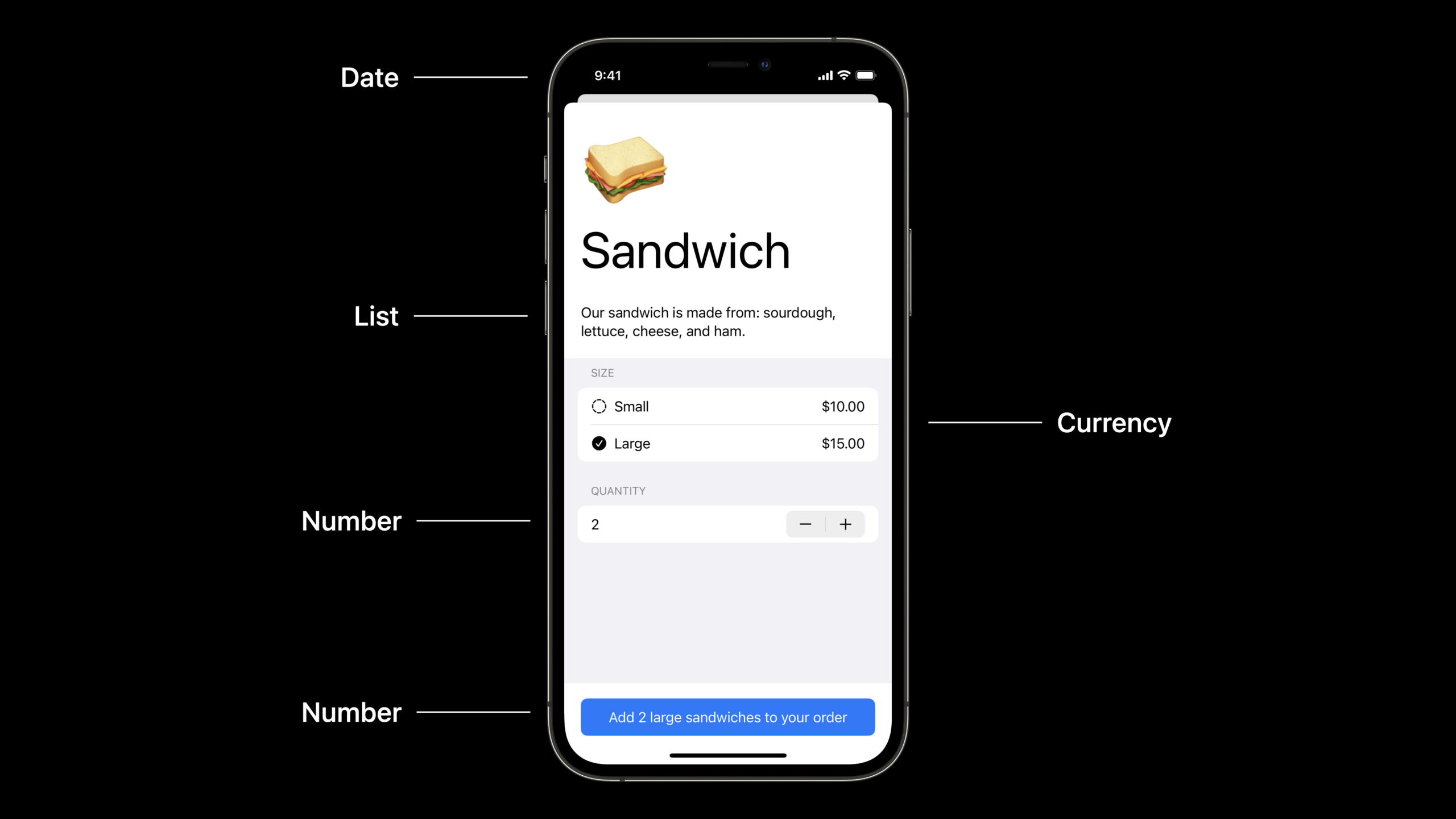
(29:41) 多言語アプリケーションにおける最大の悩みの 1 つは、構文の一貫性です。たとえば、ユーザーが英語インターフェイスで「2 ラージ サラダ」を選択した場合、スペイン語に切り替えると、「2 grandes ensaladas」ではなく「2 ensaladas grandes」と表示されるはずです。以前は、言語ごとに複数のバージョンの文字列を準備する必要がありました。
新しい自動構文整合性エンジンが渡されましたinflect: trueパラメータはこれらの問題を自動的に処理します。
詳細
AttributedString 基础
(02:50) AttributedString を作成し、属性を設定します。
func attributedStringBasics(important: Bool) {
    var thanks = AttributedString("Thank you!")
    thanks.font = .body.bold()

    var website = AttributedString("Please visit our website.")
    website.font = .body.italic()
    website.link = URL(string: "http://www.example.com")

    var container = AttributeContainer()
    if important {
        container.foregroundColor = .red
        container.underlineColor = .primary
    } else {
        container.foregroundColor = .primary
    }

    thanks.mergeAttributes(container)
    website.mergeAttributes(container)

    print(thanks)
    print(website)
}
キーポイント:
AttributedStringそれは構造物であり、使用する必要がありますvar変更により属性を変更できる- プロパティはインスタンスに直接設定されます。たとえば、
font、link、foregroundColor AttributeContainerバッチで文字列にマージできる属性のコレクションです。mergeAttributesコンテナのすべてのプロパティをターゲット文字列にマージします
マークダウンから AttributedString を作成する
(07:29) 使用localizedパラメーターは、Markdown からローカライズされた AttributedString を作成できます。
func prompt(for document: String) -> String {
    String(localized: "Would you like to save the document "\(document)"?")
}

func attributedPrompt(for document: String) -> AttributedString {
    AttributedString(localized: "Would you like to save the document "\(document)"?")
}
キーポイント:
AttributedString(localized:)会解析 Markdown 格式(粗体、斜体、链接)- 補間
\()ローカリゼーションパラメータの正しい配置は自動的に処理されます - マークダウン構文
_イタリック体を意味します。**大胆という意味ですが、[text](url)リンクを表します
自定义 Markdown 属性
(10:42) カスタム プロパティは、Markdown 構文を使用して定義および設定できます。
enum RainbowAttribute : CodableAttributedStringKey, MarkdownDecodableAttributedStringKey {
    enum Value : String, Codable {
        case plain
        case fun
        case extreme
    }

    public static var name = "rainbow"
}マークダウン構文^[an attribute](rainbow: 'extreme')カスタム属性として解析されます。
キーポイント:
CodableAttributedStringKeyプロトコルによりプロパティをシリアル化できるようになりますMarkdownDecodableAttributedStringKeyプロトコルによりプロパティが Markdown から解析可能になります^[text](key: 'value')カスタム属性の Markdown 構文です
日付の書式設定
(17:28) 新規.formatted()API を使用すると、日付の書式設定が非常に簡単になります。
func formattingDates() {
    let date = Date.now

    let formatted = date.formatted()
    // example: "6/7/2021, 9:42 AM"

    let onlyDate = date.formatted(date: .numeric, time: .omitted)
    // example: "6/7/2021"

    let onlyTime = date.formatted(date: .omitted, time: .shortened)
    // example: "9:42 AM"
}
キーポイント:
formatted()現在のロケールを使用して自動的にフォーマットします.numeric、.omitted、.shortened事前定義されたスタイルによる構成の簡素化- スレッドセーフ、フォーマッタインスタンスを作成する必要なし
复杂日期格式
(18:36) Fluent API を使用して複雑なフォーマットを構築します。
func formattingDatesMoreExamples() {
    let date = Date.now

    let formatted = date.formatted(.dateTime.year().day().month())
    // example: "Jun 7, 2021"

    let formattedWide = date.formatted(.dateTime.year().day().month(.wide))
    // example: "June 7, 2021"

    let logFormat = date.formatted(.iso8601)
    // example: "20210607T164200Z"

    let fileNameFormat = date.formatted(.iso8601.year().month().day().dateSeparator(.dash))
    // example: "2021-06-07"
}
キーポイント:
.dateTimeフォーマットの構築とチェーン呼び出しを開始する.year()、.month()等.wide、.numeric各パートのスタイルを制御するその他のパラメーター.iso8601標準化された日付形式を提供します
日付範囲の書式設定
(20:30) 日付範囲の形式:
func formattingIntervals() {
    let now = Date.now
    let later = now + TimeInterval(5000)

    let range = (now..<later).formatted()
    // example: "6/7/21, 9:42 – 11:05 AM"

    let timeDuration = (now..<later).formatted(.timeDuration)
    // example: "1:23:20"

    let components = (now..<later).formatted(.components(style: .wide))
    // example: "1 hour, 23 minutes, 20 seconds"

    let relative = later.formatted(.relative(presentation: .named, unitsStyle: .wide))
    // example: "in 1 hour"
}
キーポイント:
- 日期范围会智能合并相同部分(如月、日、年只显示一次)
.timeDuration表示継続時間の長さ.components显示组件分解.relative相対時間の説明を表示する
数値の書式設定
(25:30) 数値の書式設定も同様に簡潔です。
func formattingNumbersWithStyles() {
    let percent = 25
    let percentFormatted = percent.formatted(.percent)
    // percentFormatted is "25%"

    let scientific = 42e9
    let scientificFormatted = scientific.formatted(.number.notation(.scientific))
    // scientificFormatted is "4.2E10"

    let price = 29
    let priceFormatted = price.formatted(.currency(code: "usd"))
    // priceFormatted is "$29.00"
}
キーポイント:
.percent、.currency、.number.notation等预定义样式- ロケール関連の形式 (通貨記号の位置など) を自動的に処理します。
- スレッドセーフ、フォーマッタインスタンスを作成する必要なし
SwiftUI TextField 集成
(26:05) SwiftUI TextField は書式設定を直接サポートしています。
struct ReceiptTipView: View {
    @State var tip = 0.15

    var body: some View {
        HStack {
            Text("Tip")
            Spacer()
            TextField("Amount",
                      value: $tip,
                      format: .percent)
        }
    }
}
キーポイント:
- テキストフィールド
formatパラメータは書式設定スタイルを直接受け入れます .percentパーセント記号の入力と表示を自動的に処理します- バインドされた値は数値型のままであり、手動変換は必要ありません。
自動構文一貫性
(29:41)inflect: true自動パラメータ処理の構文は一貫しています。
func addToOrderEnglish() {
    let quantity = 2
    let size = "large"
    let food = "salad"

    let message = AttributedString(localized: "Add ^[\(quantity) \(size) \(food)](inflect: true) to your order")
    print(message)
}
キーポイント:
^[...](inflect: true)マークアップには構文的に一貫したテキストが必要です- システムは現在の言語に従って語順と形式を自動的に調整します。
- 数字、形容詞、名詞の一貫した文法をサポート
重要ポイント
-
NSAttributedString を AttributedString に置き換えます: 新しいプロジェクトで直接使用します。
AttributedString、ローカリゼーションとマークダウン解析を自動的に処理します。 SwiftUI の Text ビューで使用する場合、ブリッジは必要ありません。 -
Formatter クラスを .formatted() に置き換えます: 日付、数値、通貨の書式設定には新しいクラスを使用します。
.formatted()API。コードがシンプルになり、スレッド セーフやインスタンス管理を考慮する必要がなくなり、パフォーマンスが向上します。 -
Markdown を使用してローカライズされた文字列を定義します:
.stringsファイル内で直接 Markdown 構文 (太字、斜体、リンク) を使用します。AttributedString(localized:)自動的に解析されます。これにより、コード内の書式設定ロジックが削減されます。 -
自動構文一貫性により翻訳量を削減: 多言語アプリで使用されます
inflect: trueシステムが数字と形容詞の文法的一貫性を自動的に処理できるようにするパラメータ。これにより、翻訳する必要がある文字列のバリエーションの数を大幅に減らすことができます。 -
TextField は数値型を直接バインドします: SwiftUI で TextField を使用する
formatパラメータは文字列変換を手動で処理するのではなく、数値にバインドされます。.percent、.currencyなどのスタイルがすぐに利用可能です。
関連セッション
- What’s new in SwiftUI— AttributedString とともに使用される新しい SwiftUI 機能
- Discover concurrency in UIKIt and macOS— UIKitの同時更新
- Text and display in SwiftUI— SwiftUI テキスト レンダリング
コメント
GitHub Issues · utterances