
ハイライト
2020 年に導入された Metal 関数ポインタは、コンパイル時に呼び出し関係を固定するのではなく、実行時に関数テーブル(Function Table)経由で GPU コードが異なる関数を動的に呼び出せるようにします。
主要内容
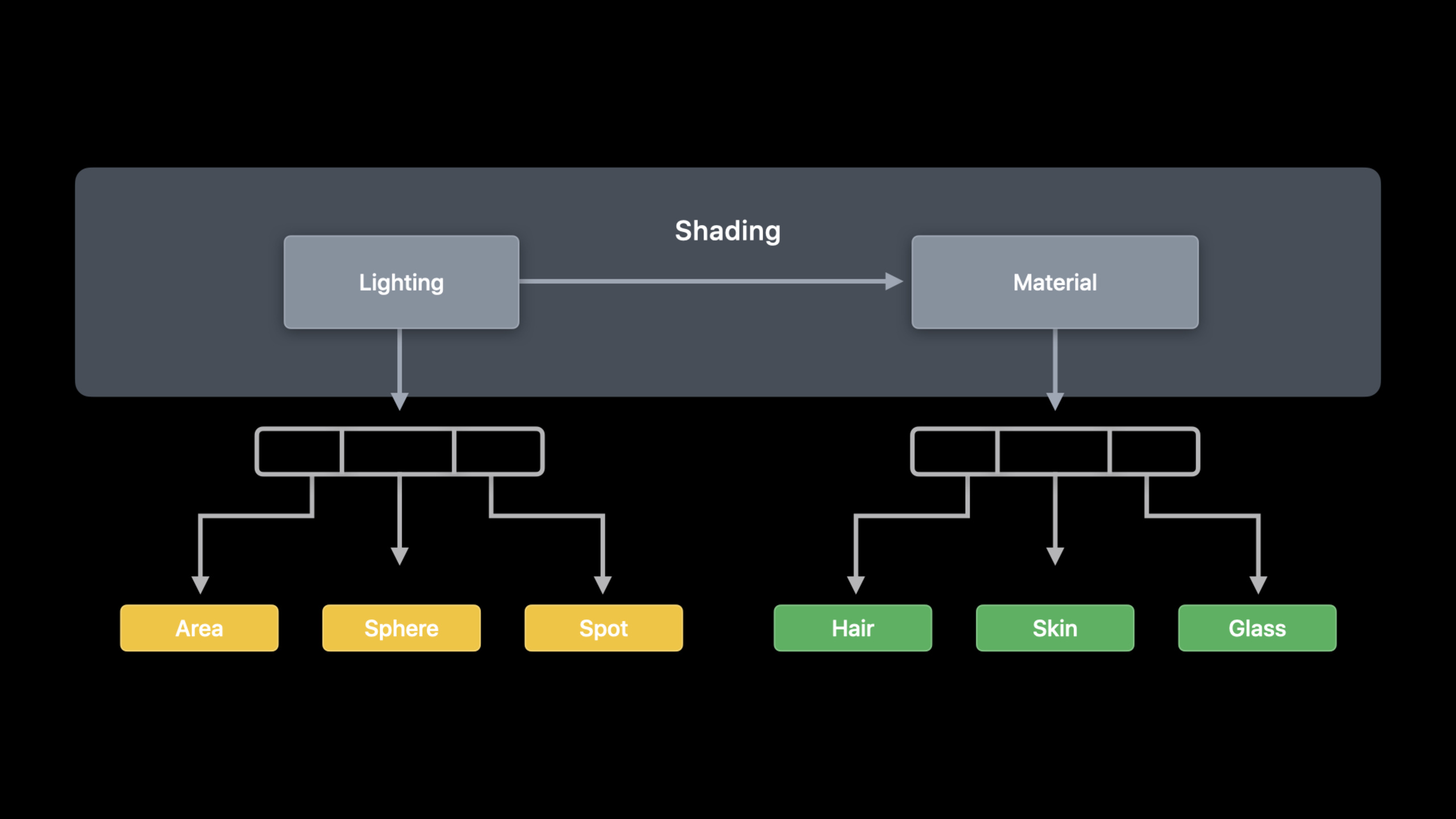
レイトレーシングのシェーディング段階はすぐに膨らみます。単純な path tracer はレイを生成し、ジオメトリと交差判定し、命中したマテリアルと光源から色を計算します。光源とマテリアルの種類が増えると、shade 内のロジックは固定呼び出しの連鎖になり、新しいマテリアル種ごとに shader と pipeline の組み直しが必要になります。
Metal 2020 の関数ポインタ API はこれを切り離します。光照関数とマテリアル関数を visible function としてマークし、Metal API で pipeline に接続すると、GPU は visible function table を受け取り、shader がインデックスで関数ポインタを取り出して呼び出せます。
このセッションは shader 構文の追加だけではありません。どの関数を 1 回の pipeline コンパイルに含めるか、どれを binary function として事前コンパイルするか、どれを後から増分追加するか、テーブルを GPU に渡す方法、再帰と SIMD divergence の性能制約まで、工程全体に関数ポインタを組み込みます。
詳細
03:09 固定のシェーディング呼び出しから始める
セッションは簡略化した path tracer で問題の位置を示します。kernel は交差後にマテリアルを見つけ、shade を呼んで光照とマテリアル計算を行います。
float3 shade(...);

[[kernel]] void rtKernel(...
                         device Material *materials,
                         constant Light &light)
{
    // ...

    device Material &material = materials[intersection.geometry_id];
    float3 result = shade(ray, triangleIntersectionData, material, light);

    // ...
}
キーポイント:
intersection.geometry_idで命中マテリアルを特定します。shadeは光照とマテリアルロジックの合流点です。- 光源とマテリアル種が増えると、固定の
shade呼び出しに分岐が集まります。
shade 内部は lighting と material の 2 段階に分かれます。
float3 shade(...)
{
    Lighting lighting = LightingFromLight(light, triangleIntersectionData);

    return CalculateLightingForMaterial(material, lighting, triangleIntersectionData);
}
キーポイント:
LightingFromLightは光源種に応じた lighting 計算段階です。CalculateLightingForMaterialはマテリアル種に lighting を適用する段階です。- 両段階は visible function に分割する自然な単位です。
04:59 [[visible]] で GPU 関数を公開する
Metal Shading Language には [[visible]] 関数修飾が追加されました。vertex、fragment、kernel と同様に関数定義の前に付け、Metal API が操作できる関数であることを示します。
[[visible]]
Lighting Area(Light light, TriangleIntersectionData triangleIntersectionData)
{
    Lighting result;

    // Clever math code ...

    return result;
}
キーポイント:
[[visible]]によりAreaのような光照関数が CPU から参照できる Metal function object になります。- transcript では visible function は別の Metal ファイルや library に置けます。
- pipeline 作成時にこれらの function object を追加し、GPU は関数ポインタ経由で呼び出します。
05:30 単一コンパイル:visible function を pipeline にコピーする
single compilation は、呼び出し得る visible function をすべて MTLLinkedFunctions.functions に入れ、compute pipeline state を作ります。
// Single compilation configuration
let linkedFunctions = MTLLinkedFunctions()
linkedFunctions.functions = [area, spot, sphere, hair, glass, skin]
computeDescriptor.linkedFunctions = linkedFunctions

// Pipeline creation
let pipeline = try device.makeComputePipelineState(descriptor: computeDescriptor,
                                                   options: [],
                                                   reflection: nil)
キーポイント:
linkedFunctions.functionsは pipeline が呼び得る visible function の一覧です。- 作成結果には kernel と、それら関数の specialized copy が含まれます。
- transcript は link-time optimization に例え、実行時性能は最良だが pipeline 作成時間とサイズは増えると説明しています。
07:43 分離コンパイル:関数を binary function として事前コンパイルする
separate compilation では関数が独立した GPU binary として存在し、複数 pipeline で共有可能です。入口は MTLFunctionDescriptor です。
// Create by function descriptor:
let functionDescriptor = MTLFunctionDescriptor()
functionDescriptor.name = "Area"
// More configuration goes here
let areaBinaryFunction = try library.makeFunction(descriptor: functionDescriptor)
キーポイント:
MTLFunctionDescriptorは関数作成に設定を付けられます。nameを設定するとlibrary.makeFunction(descriptor:)が Metal function object を返します。- descriptor の価値は次の binary 事前コンパイルにあります。
// Create and compile by function descriptor:
let functionDescriptor = MTLFunctionDescriptor()
functionDescriptor.name = "Area"
functionDescriptor.options = MTLFunctionOptions.compileToBinary
let areaBinaryFunction = try library.makeFunction(descriptor: functionDescriptor)
キーポイント:
MTLFunctionOptions.compileToBinaryは関数を binary として事前コンパイルさせます。- binary function は pipeline 作成時に参照でき、pipeline へのコピーコストを減らせます。
- セッションはこのモードで関数呼び出しの実行時オーバーヘッドがあると明言しています。
事前コンパイルした関数は linkedFunctions.binaryFunctions で pipeline に接続します。
// Specify binary functions on compute pipeline descriptor
let linkedFunctions = MTLLinkedFunctions()
linkedFunctions.functions = [spot, sphere, hair, glass, skin]
linkedFunctions.binaryFunctions = [areaBinaryFunction]
computeDescriptor.linkedFunctions = linkedFunctions

// Pipeline creation
let pipeline = try device.makeComputePipelineState(descriptor: computeDescriptor,
                                                   options: [],
                                                   reflection: nil)
キーポイント:
functions内の関数は specialization に参加します。binaryFunctions内は事前コンパイル済み binary を使います。- 両方を混ぜて pipeline サイズ、作成時間、実行時性能のバランスを取ります。
11:04 増分コンパイル:既存 pipeline に関数を追加する
ゲームや動的コンテンツ読み込みでは新しいマテリアルが必要になることが多いです。セッションは Wood material を例に、既存 pipeline へ binary function を追加する方法を示します。
// Create initial pipeline with option
computeDescriptor.supportAddingBinaryFunctions = true

// Create and compile by function descriptor
let functionDescriptor = MTLFunctionDescriptor()
functionDescriptor.name = "Wood"
functionDescriptor.options = MTLFunctionOptions.compileToBinary
let wood = try library.makeFunction(descriptor: functionDescriptor)

// Create new pipeline from existing pipeline
let newPipeline =
   try pipeline.makeComputePipelineStateWithAdditionalBinaryFunctions(functions: [wood])
キーポイント:
- 初期 pipeline 作成前に
supportAddingBinaryFunctions = trueを設定します。 - 新関数も
MTLFunctionDescriptorとcompileToBinaryで生成します。 - 新 pipeline は既存 pipeline から派生し、追加 binary function だけを付けます。
12:22 visible function table:関数ポインタを GPU に渡す
visible function table は GPU が関数ポインタを受け取る仕組みです。shader で関数ポインタ型を宣言し、function table を kernel 引数または argument buffer で渡します。
// Helper using declaration in Metal
using LightingFunction = Lighting(Light, TriangleIntersectionData);
using MaterialFunction = float3(Material, Lighting, TriangleIntersectionData);

// Specify tables as kernel parameters
visible_function_table<LightingFunction> lightingFunctions [[buffer(1)]],
visible_function_table<MaterialFunction> materialFunctions [[buffer(2)]],

// Access via index
LightingFunction *lightingFunction = lightingFunctions[light.index];
Lighting lighting = lightingFunction(light, triangleIntersection);
return materialFunctions[material.index](material, lighting, triangleIntersection);
キーポイント:
visible_function_table<LightingFunction>とvisible_function_table<MaterialFunction>が光照とマテリアル関数を保持します。- shader は
light.indexとmaterial.indexで関数を選びます。 - ポインタを変数に保存するか、table から直接呼び出せます。
CPU 側は pipeline state から table を確保し、function handle を index に入れます。
// Initialize descriptor
let vftDescriptor = MTLVisibleFunctionTableDescriptor()
vftDescriptor.functionCount = 3
let lightingFunctionTable = pipeline.makeVisibleFunctionTable(descriptor: vftDescriptor)!

// Find and set functions by handle
let functionHandle = pipeline.functionHandle(function: spot)!
lightingFunctionTable.setFunction(functionHandle, index:0)

// Find and set functions by handle
computeCommandEncoder.setVisibleFunctionTable(lightingFunctionTable, bufferIndex:1)
argumentEncoder.setVisibleFunctionTable(lightingFunctionTable, index:1)
キーポイント:
MTLVisibleFunctionTableDescriptor.functionCountで table 容量を決めます。pipeline.functionHandle(function:)が table に書き込む handle を返します。computeCommandEncoderまたは argument buffer に bind します。argument encoder 使用時は transcript のとおりuseResourceを呼びます。
14:23 function groups:各呼び出し点が誰を呼べるかコンパイラに伝える
function groups はコンパイラへの追加情報です。shader の呼び出し点に group を付け、CPU の MTLLinkedFunctions.groups で各 group の候補を宣言します。
// Add function groups to our shading function
float3 shade(...)
{
    LightingFunction *lightingFunction = lightingFunctions[light.index];
    [[function_groups("lighting")]] Lighting lighting = lightingFunction(light,
triangleIntersection);

    MaterialFunction *materialFunction = materialFunctions[material.index];
    [[function_groups("material")]] float3 result = materialFunction(material, lighting, triangleIntersection);
    return result;
}
キーポイント:
[[function_groups("lighting")]]は lighting 呼び出し点をマークします。[[function_groups("material")]]は material 呼び出し点をマークします。- 呼び出し点ごとの関数集合が分かると、pipeline 生成時の最適化がより的を射せます。
// Function Group configuration
let linkedFunctions = MTLLinkedFunctions()
linkedFunctions.functions = [area, spot, sphere, hair, glass, skin]
linkedFunctions.groups = ["lighting" : [area, spot, sphere ],
                          "material" : [hair, glass, skin ] ]
computeDescriptor.linkedFunctions = linkedFunctions
キーポイント:
groupsは group 名を、その呼び出し点で呼び得る関数へマップします。- lighting group には
area、spot、sphereのみ。 - material group には
hair、glass、skinのみ。
15:25 再帰と SIMD divergence の性能境界
関数ポインタは再帰実装の余地も開きます。セッションの recursive path tracer 例では、マテリアル関数が新しいレイを発し、交差、シェーディング、再帰を続けます。呼び出しチェーンの深さは compute pipeline descriptor の maxCallStackDepth で表現します。デフォルトは 1 で、一般的な visible function と intersection function に適しています。より深いチェーンなら明示的に設定します。
最後の境界は divergence です。SIMD group は全スレッドが同じ命令を実行するのが最適です。関数ポインタ経由の呼び出しでは、同一 SIMD group 内のスレッドが異なる関数を指し、最悪では順次実行されます。セッションの対策は、関数引数、スレッド index、関数 index を threadgroup memory に書き、関数 index でソートしてから呼び出し、結果を threadgroup memory に戻し、各スレッドが自分の結果を読むことです。複雑な関数では divergence コストを下げられます。
重要ポイント
1. ホットスワップ可能なマテリアル関数ライブラリ
やること: マテリアル BRDF を visible function に分割し、実行時に function table でマテリアル index から選択する。
価値: セッションは lighting と material の 2 段階分割を示し、マテリアル種が増えても 1 つの shade に詰め込まなくて済みます。
始め方: 1 つのマテリアル関数を [[visible]] にし、MTLLinkedFunctions.functions で pipeline に接続し、visible_function_table<MaterialFunction> から material.index で呼び出します。
2. ストリーミング資産向け shader 増分読み込み
やること: ゲームが新資産を読み込むとき、新マテリアル関数を binary function としてコンパイルし、既存 pipeline から新 pipeline を派生する。
価値: transcript は動的環境、特に資産と shader をストリーミングするゲームで新関数が現れると述べています。
始め方: 初期 pipeline 前に computeDescriptor.supportAddingBinaryFunctions = true を設定し、新マテリアル出現時に MTLFunctionDescriptor、compileToBinary、makeComputePipelineStateWithAdditionalBinaryFunctions(functions:) で追加します。
3. 設定可能な lighting/material プレビュー
やること: 開発ツールでアーティストやグラフィックスエンジニアが light と material の組み合わせを切り替え、同じシーンの変化をリアルタイムで見る。
価値: visible function table で lighting と material を分けて GPU に渡し、shader が index で組み合わせて呼び出せます。
始め方: lightingFunctions と materialFunctions の 2 表を作り、CPU で setFunction(_:index:) し、UI 変更時は index か表項だけ更新します。
4. 再帰 path tracer のコールスタック実験
やること: 小さな path tracer で反復 bounce と再帰 bounce のコストを比較する。
価値: visible function の呼び出しチェーンはより深い stack が必要な場合があり、レイトレーシングは反復化で stack 使用を下げられます。
始め方: デフォルト maxCallStackDepth で単層 visible 呼び出しから始め、再帰深度を増やして pipeline 設定とフレーム時間を記録します。
5. 関数ポインタ divergence 診断ビュー
やること: threadgroup ごとの function index 分布を記録し、同一 SIMD group 内で呼び出しが散らばるマテリアルや光源の組み合わせを特定する。
価値: セッションは関数ポインタが thread-level divergence を起こし得ると明言し、ソートで coherence を上げられます。
始め方: 実験 kernel で引数、thread index、function index を threadgroup memory に書き、function index でソートしてから呼び出し、ソート前後の時間を比較します。
関連セッション
- Discover ray tracing with Metal — 本セッションはレイトレーシングのシェーディング段階で関数ポインタを説明するため、先に acceleration structure、交差、compute kernel の文脈を補えます。
- Build GPU binaries with Metal — shader コンパイル、GPU binary、binary archive、動的ライブラリと本セッションの binary function 取舍が隣接します。
- Debug GPU-side errors in Metal — function table、argument buffer、GPU リソース bind の不具合時に Xcode 12 の GPU 側エラー報告が必要です。
- Optimize Metal apps and games with GPU counters — 本セッション末尾の実行時オーバーヘッドと divergence を GPU counters で追うルートです。
- Harness Apple GPUs with Metal — Apple GPU と Metal workload の性能背景で、関数ポインタ案のコスト境界を判断できます。
コメント
GitHub Issues · utterances