
Highlight
macOS 27 adds the
fmcommand-line tool and the Foundation Models Python SDK, letting developers call Apple’s on-device and cloud models directly from the terminal and Python without API keys. They can be used for automation scripts and model evaluation.
Core Content
At WWDC25, Apple introduced the Foundation Models framework, allowing Swift developers to call the on-device Apple Foundation Model from apps. The framework supports Guided Generation for structured data output and Tool Calling so models can interact with app context.
macOS 27 and iOS 27 bring new capabilities to the framework: image input in prompts, and access to server-side models so apps can call any large language model through the same Swift API.
Until this year, however, these models could only be called from Swift code. For machine-learning engineers and data scientists, Python is the more common working language. Sometimes you also just want to test a prompt quickly without opening Xcode and recompiling a project.
Apple’s two new solutions are the fm command-line tool and the Foundation Models Python SDK.
The fm command-line tool is preinstalled with macOS 27. You can test prompts directly in Terminal or place it inside automation scripts. The Python SDK lets developers call on-device models from Python code while supporting the framework’s core features, including tool calling and guided generation. Because Python has a rich machine-learning and data-science ecosystem, the SDK can be used to build evaluation pipelines that quantify model output quality.
Details
The fm command-line tool (03:23)
The fm command-line tool comes preinstalled on Macs starting with macOS 27. Open Terminal and type fm to see the available commands:
respond: send a prompt to the model and return a responsechat: start an interactive conversation interfaceschema: create an output structure definition
$ fm respond "Provide a basic regex in Swift to parse an email address"
# Here is a basic regex to parse an email address in Swift: [...]
Key point: fm respond prints the model response directly, making it suitable for scripts.
Interactive conversation
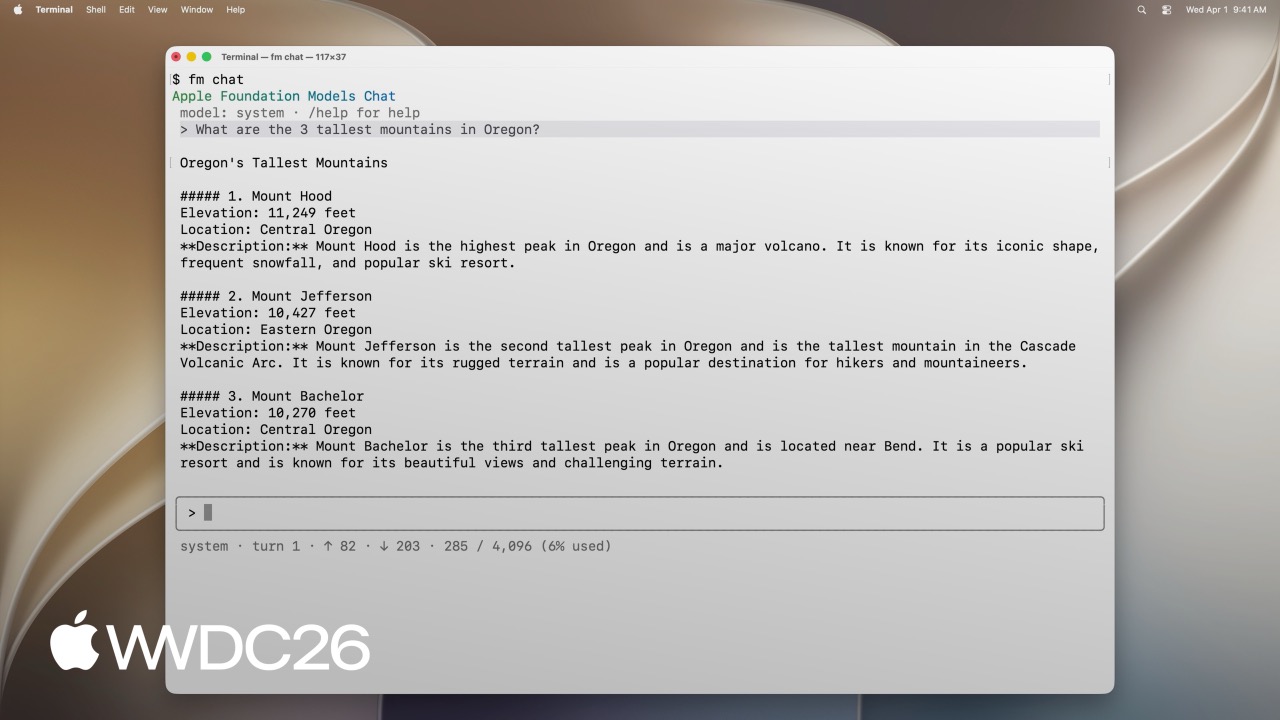
fm chat provides a terminal conversation interface similar to ChatGPT:
$ fm chat
> [User enters the first question]
> [Model answers]
> [User enters a follow-up question]
> [Model answers]
The conversation interface includes built-in commands:
/model: switch to a Private Cloud Compute model/save: save the current conversation to resume later
Key point: fm chat is suitable for quickly testing prompts while exploring new ideas, without recompiling a project.
Structured output
fm supports defining output structures with schemas:
$ fm schema object --name AppsIdentified --string app_names --array > schema.json

$ fm respond "What apps are the user actively using in this screenshot?" \
    --image Screenshot.png --model pcc --schema schema.json
# {"app_names": ["Messages", "Mail", "Calendar"]}
Key points:
fm schema objectcreates a JSON schema definition.--imagepasses an image for visual understanding.--model pccuses the larger Private Cloud Compute model.--schemaconstrains the output format to JSON.
File-classification automation script (05:58)
The talk shows a practical scenario: organizing draft files and final files in a project folder.
# Create a schema that defines the output structure
fm schema object --name "TriagedFileList" \
    --string 'final_files' --array \
    --string 'draft_files' --array > /tmp/schema.json

# Use the model to classify the file list
output=$(fm respond \
    --instructions "I just completed a project, and I need help triaging the latest version of the files from the previous versions. I will give you a list of files. Return a list of the latest files (i.e., all files that, you can infer from their name in the list, are the latest versions), and then return separately a list of all draft files (i.e., all files that weren't considered final)." \
    "This is the list of all files:\n\n${files_list}" \
    --schema /tmp/schema.json
)

# Move final files into the backup directory
echo "${output}" | jq -r '.final_files[]' | while read -r file; do
    cp "${DIRECTORY_TO_TRIAGE}/${file}" "${FINAL_FILES_STORAGE_DIRECTORY}"
done

# Move draft files into the archive directory
echo "${output}" | jq -r '.draft_files[]' | while read -r file; do
    mv "${DIRECTORY_TO_TRIAGE}/${file}" "${DRAFT_FILES_STORAGE_DIRECTORY}"
done
Key points:
--instructionssets the system prompt and tells the model the task background.- Pass the file list to the model for analysis.
- Use
jqto parse the JSON output and perform file operations. - The script can be reused and still works when file naming is inconsistent.
Foundation Models Python SDK (08:52)
The Python SDK lets developers call Apple Foundation Models from Python code. Requirements:
- Python 3.10 or later
- Apple Silicon Mac
- Xcode installed
pip install apple_fm_sdkBasic usage (09:57)
The Python SDK API closely resembles the Swift version:
import apple_fm_sdk as fm

INSTRUCTIONS = "You're an AI assistant for Cupertino Mart, a grocery store with in-app ordering."

async def answer_question(prompt: str) -> str:
    session = fm.LanguageModelSession(instructions=INSTRUCTIONS)
    return await session.respond(prompt)
Key points:
LanguageModelSessioncreates a model session.- The
instructionsparameter sets the system prompt. respond()is an async method that takes the user prompt.
Tool calling (10:21)
Like the Swift version, the Python SDK supports tool calling:
class GetPastOrdersTool(fm.Tool):
    name = "get_past_orders"
    description = "Retrieves information about this user's past orders."

    @fm.generable("Past orders query parameter")
    class Arguments:
        number_orders: str = fm.guide("How many of the last orders to retrieve")

    @property
    def arguments_schema(self) -> fm.GenerationSchema:
        return self.Arguments.generation_schema()

    async def call(self, args: fm.GeneratedContent) -> str:
        number_orders = args.value(int, for_property="number_orders")
        return await Orders.load_last_orders(user_id=user_id, amount=number_orders)
Key points:
- Inherit from
fm.Toolto define a tool. - The
@fm.generabledecorator marks the argument structure. fm.guide()adds a description for each argument.- The
arguments_schemaproperty returns the argument schema. - The
call()method executes when the model invokes the tool.
Guided generation (10:35)
Guided generation lets the model output structured Python objects:
@fm.generable("Suggested items")
class ItemsSuggestion:
    item_names: list[str] = fm.guide("Names of the suggested items")

INSTRUCTIONS = "You're an AI assistant tasked with returning potential grocery items that the user might be interested in."

async def generate_suggested_cart_items(user_input: Optional[str]) -> ItemsSuggestion:
    session = fm.LanguageModelSession(instructions=INSTRUCTIONS, tools=load_tools())
    prompt = """Using the tools to load the user's previous orders, \
              return a list of items the user has already ordered \
              and that they might be interested in again \
              as they're getting ready to place a new grocery order."""
    if user_input is not None:
        prompt += f"\nAccount for the following request from the user: {user_input}"
    return await session.respond(prompt, generating=ItemsSuggestion)
Key points:
- The
@fm.generabledecorator defines the output structure. fm.guide()adds a description for each field.- The
generatingparameter ofrespond()specifies the output type. - The return value is a type-safe Python object.
Python evaluation pipelines (10:59)
One major advantage of the Python SDK is deep integration with the Python ecosystem. The talk shows how to build a complete evaluation pipeline in Jupyter Notebook.
Scenario: for a grocery e-commerce app, build an “intelligent replenishment” feature that predicts what users may want to buy based on order history. Different prompts need to be evaluated.
Evaluation flow:
- Use a large model to generate evaluation data, including inputs and expected outputs.
- Implement multiple versions with different prompts.
- Run each version on the evaluation dataset and collect outputs.
- Use a judge model to score each output.
- Store the data with Pandas and visualize results with Matplotlib.
The talk compares three prompt strategies:
- Minimal prompt: only basic instructions
- Detailed prompt: a detailed task description
- Comprehensive prompt: a complete list of rules
The evaluation found:
- Detailed prompts easily hit the model’s context window limit, causing a high error rate.
- Minimal and detailed prompts tend to recommend too many items.
- Comprehensive prompts miss more expected items.
- Minimal prompts produce more hallucinated items.
Key point: Python’s machine-learning ecosystem, including Pandas and Matplotlib, integrates smoothly with the Foundation Models SDK, enabling rapid prompt iteration and quantitative evaluation.
Core Takeaways
1. Build a local file-classification assistant
What to build: use the fm CLI to write a script that automatically organizes the Downloads folder. Define a schema for classification output and combine it with find and mv to archive files automatically.
Why it is worth doing: messy Downloads folders are a common pain point, and manual cleanup is slow and easy to miss. The fm CLI requires no API key, is preinstalled with macOS 27, and can implement intelligent classification with a shell script more simply than training a dedicated classifier.
How to start: use fm schema object to define the output structure, such as final_files and draft_files arrays. Then pass the file list to fm respond --schema for classification and use jq to parse the JSON output and execute file operations. Entry point: fm schema object plus fm respond --schema.
2. Build a CLI copilot
What to build: use the Python SDK to build a command-line assistant that understands natural-language instructions and executes corresponding shell commands.
Why it is worth doing: developers often forget complex command parameters, and describing intent in natural language can be faster than searching documentation. Tool calling can restrict the model to a predefined safe command set and avoid accidental destructive operations.
How to start: define allowed commands by subclassing the Python SDK’s fm.Tool, use fm.generable to define argument structures, and pass the tool list when creating LanguageModelSession. Entry point: fm.Tool plus fm.generable plus LanguageModelSession(tools=...).
3. Create a prompt-evaluation workbench
What to build: use Jupyter Notebook plus the Python SDK to create a prompt lab. Design multiple prompt versions for an AI feature and use automated evaluation to find the best approach.
Why it is worth doing: prompt tuning is iterative trial and error; without quantitative evaluation, judgment is just intuition. Pandas and Matplotlib from the Python ecosystem pair with the Foundation Models SDK to compare strategies quickly.
How to start: install apple_fm_sdk, define multiple prompt versions in Jupyter Notebook, run them against the same test data, score outputs with a judge model, then summarize with Pandas and visualize with Matplotlib. Entry point: pip install apple_fm_sdk plus fm.LanguageModelSession.
4. Build an image-analysis pipeline
What to build: use fm visual understanding to batch-process screenshots and extract structured information, such as a UI component inventory from product mockups.
Why it is worth doing: manually reviewing large numbers of designs or screenshots is tedious and easy to miss details. The fm CLI supports --image, and with --schema it can turn unstructured visual information into processable data.
How to start: use fm schema object to define the fields you want, such as component type, location, and copy. Then batch-process screenshots with fm respond --image Screenshot.png --schema schema.json to produce structured JSON. Entry point: fm respond --image plus --schema.
5. Develop a data-cleaning tool
What to build: write a Python SDK script that lets a model identify and fix anomalies in a dataset. Define a schema that outputs cleaned data and a change log.
Why it is worth doing: data cleaning takes a large share of data scientists’ time, and many anomaly patterns, such as inconsistent formats or obviously wrong values, are hard to cover with rules. Models can understand context and detect semantic anomalies such as “a phone number appears in an address field”.
How to start: define the output structure with @fm.generable, including cleaned data and a change log. Read the dataset in batches, send each batch to the model, then aggregate and export the results. Entry point: @fm.generable plus session.respond(prompt, generating=CleanResult).
Related Sessions
- Core AI - An introduction to the core APIs of the Foundation Models framework
- Core AI integration - Integrate Foundation Models into Swift apps
- Core AI optimization - Optimize model performance and cost
- Evaluations - Test AI features with Xcode’s Evaluations framework
- Robust evaluations - Build a reliable evaluation system
Comments
GitHub Issues · utterances