
Highlight
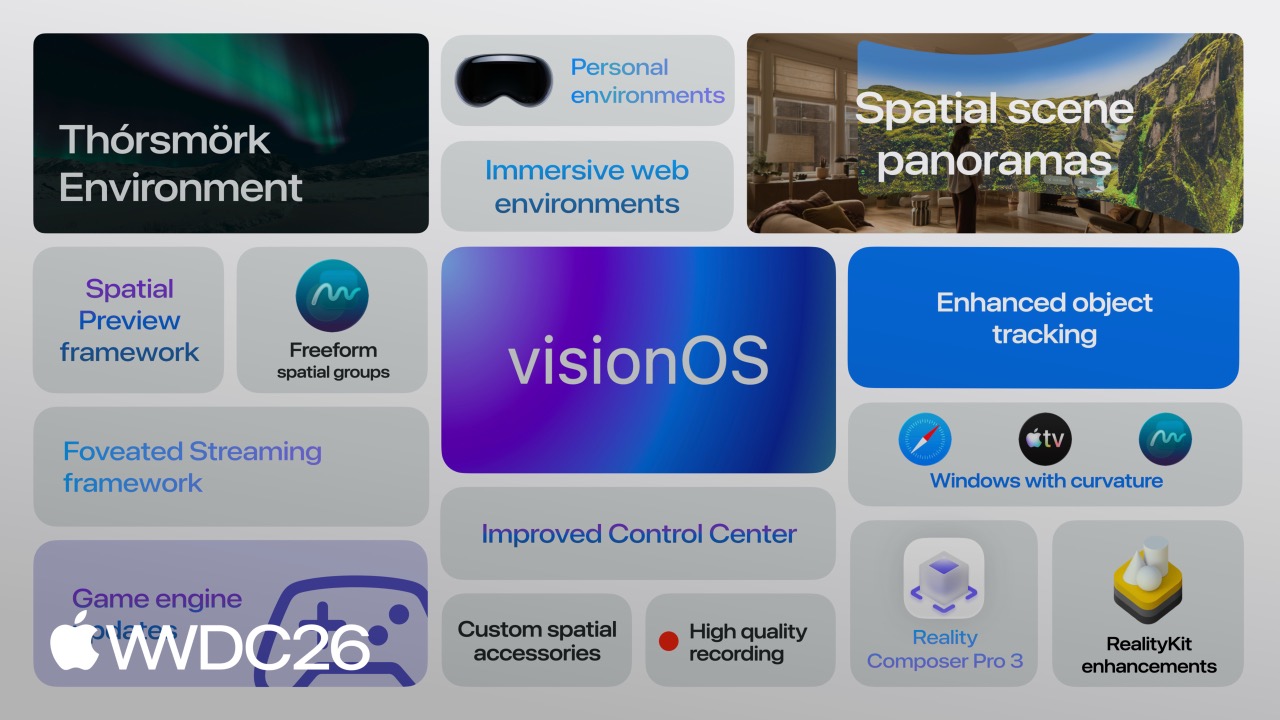
visionOS 27 gives developers three paths for bringing content to Apple Vision Pro: running existing iOS and iPadOS apps, building native spatial experiences with RealityKit and Reality Composer Pro 3, and streaming heavy Mac or PC content to the headset through Spatial Preview and Foveated Streaming. RealityKit also adds Physical Space Lighting, cloth simulation, Gaussian splatting, and custom reverb meshes, while Reality Composer Pro 3 introduces AI Assistant, Animation Graph, Script Graph, and Navigation Mesh.
Core Ideas
Three paths into visionOS
In the past, bringing content to visionOS meant choosing from a narrow set of options. You either checked the compatibility box and shipped an iOS app as-is, or you rebuilt everything from scratch with SwiftUI and RealityKit. The first path often produced a mediocre experience, while the second was expensive. (03:12)
visionOS 27 expands this into three paths:
- Compatibility mode: Existing iOS and iPadOS apps can run directly on visionOS, or you can add a visionOS deployment target in Xcode and rebuild.
- Native spatial computing: Build with SwiftUI, RealityKit, and Reality Composer Pro, or use CompositorServices to integrate a custom rendering engine. Unity, Unreal, and Godot all support visionOS as well.
- Extended streaming: Mac apps can use the Spatial Preview framework to send 3D content to the headset, while PC apps can use the Foveated Streaming framework to stream OpenXR content. (04:36)
The third path is the most pragmatic change in this update. Kia and Innoactive use Autodesk VRED, NVIDIA CloudXR, and Foveated Streaming for automotive design. Laminar Research uses X-Plane for flight simulation training. These examples show that Apple is finally acknowledging a practical reality: heavy 3D content cannot always be handled by headset compute alone, and PC streaming is a real requirement. (00:42)
RealityKit: a full upgrade from visuals to audio
RealityKit adds four core capabilities in visionOS 27.
Physical Space Lighting lets virtual lights illuminate real-world surfaces. The talk demonstrates a virtual planetarium projector whose stars and nebulae cast light around the room as the projector rotates. Under the hood, this uses the new Projective Textures API, which can attach textures to spotlights to simulate stained-glass projection or underwater caustics. (07:25)
Cloth Simulation gives virtual clothing and fabric convincing weight and drape. In the demo, a virtual mannequin walks while wearing a long skirt, and the hem swings naturally. When a virtual bedsheet is pulled, the fabric folds according to physical rules. (08:03)
Custom Reverb Mesh pushes spatial audio realism further. The system can accurately model sound absorption and scattering based on materials in the scene, such as wood, metal, and stone. In the talk’s virtual museum band demo, the sound fills the whole space from all directions instead of coming from a single point. (08:33)
Gaussian Splatting lets developers scan real objects and import them directly into virtual scenes. In the demo, a small plant is scanned into a 3D Gaussian splat model with even the soil texture clearly visible. (09:04)
Reality Composer Pro 3: artists and technical artists do not need to write Swift
Earlier versions of Reality Composer Pro felt more like static scene layout tools. Complex logic still had to move back into Xcode. RCP 3 changes that workflow completely. (09:51)
Reality Composer Pro Assistant can generate 3D models with materials and textures directly from text descriptions. The talk shows it generating a bowl of dried fruit and placing it into an empty bowl in the scene, then generating 3D candles on a table. (10:25)
Animation Graph controls animation transitions with a state machine. Developers can visually set the transition from idle to walking in the editor and preview it live in the headset. (11:12)
Navigation Mesh automatically generates walkable areas, shown as a blue mesh, then lets you manually add jump points, ladders, and obstacles so characters can navigate through the scene. (11:31)
Script Graph handles interaction logic through connected nodes. A tap event can drive character movement, and all edits happen inside RCP 3 without opening Xcode. Devs United Games used just a few nodes to implement the character entrance animation in Aquascape, and the fish’s animation playback speed automatically matches its actual movement speed. (11:55)
Shader Graph is also substantially upgraded, adding subsurface scattering for realistic skin, eyes, hair, ice surfaces, portals, and other effects. (12:49)
Spatial Preview: send Mac content to the headset with one action
Spatial Preview is a macOS framework that lets Mac apps send images, documents, and 3D content directly to Apple Vision Pro, with SharePlay collaboration support. (15:42)
Developers can walk around in the headset, reposition content, adjust material overrides, and add annotated feedback. Cinema4D and SketchUp have already integrated this feature to enable real-time collaborative 3D workflows. The Preview app in macOS 27 also includes the capability out of the box. (16:48)
Foveated Streaming: using gaze to reduce bandwidth
Foveated Streaming lets Apple Vision Pro connect to a PC and stream OpenXR content. visionOS automatically sends hand, controller position, and microphone data to the PC, while the PC sends back video and audio streams. The experience feels like a native app. (17:41)
This framework already shipped in visionOS 26.4, and X-Plane 12, iRacing, and Autodesk VRED have integrated it. The core technology is gaze-based compression: the area the user is looking at is transmitted at high quality, while peripheral vision is streamed at lower resolution. The underlying protocol uses NVIDIA CloudXR, supports wireless Wi-Fi streaming, and does not require cables or external devices. (19:26)
Apple’s measured result: an OpenXR app can be running in one day, and visionOS-specific features can be integrated within a week. (20:07)
Object tracking and spatial accessories
Object Tracking in visionOS 27 supports high-frame-rate tracking. Create ML adds extended training options to improve tracking accuracy for handheld objects, and a new API exposes metric spatial poses without display correction, which is useful for precise spatial measurement. These features also come to iOS. (21:09)
Spatial Accessories are a new direction in visionOS 27. Developers can build their own accessories from an LED constellation for headset tracking, an IMU for orientation and acceleration, and a Bluetooth chip for sending signals. Accessories can also include buttons, trackpads, and haptic feedback. DFRobot and MikroE will ship ready-made reference hardware and development kits this year. (23:21)
In the demo, a 3D-printed flashlight with a DFRobot seeMote Cap makes a virtual beam follow the physical flashlight in real time. A MikroE Spatial Anchor R1 installed in a physical steering wheel makes a virtual vehicle rotate with the wheel. (24:12)
Immersive media pipeline updates
Apple Immersive Video (AIV) supports video on demand and live streams. Each frame has more than 100 million pixels, runs at 90 fps, and is captured stereoscopically at 180 degrees. (25:38)
In visionOS 27, the Immersive Media Support (IMS) framework adds camera presentation overlay commands, the ImmersivePreviewRenderer API, and wide-aspect portal support. New sample code demonstrates how to use static foveation to compress dual-track QuickTime video so high-quality AIV can stream over ordinary bandwidth. (27:34)
The ASAF (Apple Spatial Audio Format) Production Suite is also updated with reference-video-relative positioning, a Scene Compressor plugin, heat map drawing, and enhanced spatial filtering algorithms. (30:17)
Details
Using the Projective Textures API
Scenario: Add a projected texture to a spotlight in RealityKit to simulate stained glass or underwater caustics.
import RealityKit

let spotlight = Entity()
var lightComponent = SpotLightComponent()
lightComponent.intensity = 5000
lightComponent.innerAngleInDegrees = 30
lightComponent.outerAngleInDegrees = 45

if let projectionTexture = try? TextureResource.load(named: "stained_glass") {
    lightComponent.projectedTexture = projectionTexture
}

spotlight.components.set(lightComponent)
spotlight.look(at: [0, -1, 0], from: [0, 2, 0], relativeTo: nil)
Key points:
SpotLightComponentcreates the spotlight component and sets intensity plus inner and outer cone anglesTextureResource.load(named:)loads the projected texture resource- The
projectedTextureproperty binds the texture to the spotlight, so light passes through the pattern and projects onto scene surfaces look(at:from:relativeTo:)sets the light direction and position, pointing from[0, 2, 0]toward[0, -1, 0]
Foveated Streaming gaze rendering configuration
Scenario: Enable foveated rendering in a custom rendering engine for use with CompositorServices.
import CompositorServices

struct FoveatedLayerConfiguration: CompositorLayerConfiguration {
    func makeConfiguration(
        capabilities: LayerRenderer.Capabilities,
        configuration: inout LayerRenderer.Configuration
    ) {
        configuration.foveationEnabled = true
        configuration.foveationScaling = 0.6
        configuration.isStaticFoveation = false
    }
}
Key points:
- The
CompositorLayerConfigurationprotocol configures a custom rendering layer foveationEnabled = trueenables foveated rendering, letting the system dynamically adjust rendering resolution based on eye-tracking datafoveationScaling = 0.6sets the size of the central high-resolution area; smaller values make the sharp center smaller and save more bandwidthisStaticFoveation = falseuses dynamic foveation, recalculated every frame from eye position; set it totruefor fixed-focus scenarios such as video streams
Integrating spatial accessory tracking
Scenario: Connect a spatial accessory through the Game Controller framework and track its pose with RealityKit.
import GameController
import RealityKit
import ARKit

// Listen for spatial accessory connection notifications
NotificationCenter.default.addObserver(
    forName: .GCControllerDidConnect,
    object: nil,
    queue: .main
) { notification in
    if let controller = notification.object as? GCController,
       controller.isSpatialAccessory {
        startTracking(controller)
    }
}

func startTracking(_ controller: GCController) {
    // Get the accessory's spatial pose through RealityKit or ARKit
    // The accessory's LED constellation provides visual tracking to the headset, while the IMU provides orientation data
    // Bluetooth sends button and trackpad input
}
Key points:
- The
GCControllerDidConnectnotification fires when a spatial accessory pairs controller.isSpatialAccessorychecks whether the controller is a spatial accessory, a new visionOS 27 property- The headset visually tracks accessory position through the LED constellation, while the IMU provides acceleration and orientation data
- The Bluetooth chip transmits button, trackpad, and haptic feedback signals
- Tracking frequency matches the display’s native refresh rate and remains stable in low light or brief occlusions
Key Takeaways
1. Build 3D design review tools with Spatial Preview
What to build: Add a “send to Vision Pro” button to Mac design tools such as Cinema4D or SketchUp, letting designers and clients walk around a 3D model in the headset, annotate it, and change materials together.
Why it is worth doing: The Spatial Preview framework lets Mac apps provide spatial preview without building a full visionOS app. With SharePlay support, remote design review can shrink from days to minutes.
How to start: Add the SpatialPreview framework to the macOS app, use SpatialPreview.start(configuration:) to send USDZ content, and set supportsSharePlay = true to enable collaboration.
2. Use Foveated Streaming for digital twin showcases
What to build: Render a factory or building BIM model on a PC, then stream it to Vision Pro with Foveated Streaming so engineers can walk through it at 1:1 scale.
Why it is worth doing: BIM models can have tens of millions of polygons, making local headset rendering unrealistic. Foveated Streaming lets Unreal Engine or Autodesk VRED do heavy rendering on the PC while the headset handles display and interaction. Eye-tracking compression makes Wi-Fi streaming smooth enough.
How to start: Integrate the OpenXR app on the PC with the NVIDIA CloudXR SDK, then pair the headset side with the visionOS Foveated Streaming framework. You can get basic streaming running in a day and add ARKit spatial understanding plus SwiftUI UI within a week.
3. Prototype interactions with Reality Composer Pro 3 Script Graph
What to build: Let artists and designers build entire interaction flows in RCP 3 with node graphs, such as tap-to-open doors, character pathfinding, and state transitions. Programmers can then rewrite the exported core logic in Swift.
Why it is worth doing: Script Graph, Animation Graph, and Navigation Mesh let non-programmers build runnable spatial interaction prototypes, greatly reducing the cost of validating ideas. AI Assistant can quickly generate placeholder assets as well.
How to start: Create a scene in Reality Composer Pro 3, connect event nodes such as OnTap to behavior nodes such as MoveTo in Script Graph, define walkable areas with Navigation Mesh, and click “Preview on Vision Pro” to validate.
4. Scan real spaces with Gaussian splatting for immersive tours
What to build: Scan museum galleries, historic buildings, or natural landscapes into Gaussian splat models, then build immersive tours or education experiences on Vision Pro.
Why it is worth doing: Gaussian splatting is lighter than traditional photogrammetry and can look more natural. Native RealityKit support means you can build directly with SwiftUI and RealityKit without writing your own renderer.
How to start: Capture the scene with a scanning tool that exports Gaussian splats, such as Polycam or Luma AI. Export .splat or a compatible format, import it into Reality Composer Pro 3, adjust lighting, and load the scene with SwiftUI RealityView.
5. Build industry-specific input devices with spatial accessories
What to build: Create custom physical handles, probes, or steering wheels for medical, industrial, or training scenarios. Embed a DFRobot seeMote Cap or MikroE Spatial Anchor R1 so virtual content precisely follows the physical tool.
Why it is worth doing: The open spatial accessory protocol can turn any object into a tracked controller. Combined with high-frame-rate tracking and low latency, it benefits surgical navigation training, racing simulation, industrial maintenance guidance, and similar workflows.
How to start: Buy a DFRobot or MikroE development kit, integrate the LED constellation, IMU, and Bluetooth module into the target object, listen for connection events through the GameController framework in the visionOS app, and read pose data with RealityKit or ARKit.
Related Sessions
- Explore advances in RealityKit - A deep dive into new RealityKit features, including Physical Space Lighting, cloth simulation, Gaussian splatting, and API details
- Discover the Spatial Preview framework - A detailed integration guide for the Spatial Preview framework and how Mac apps can send 3D content to Vision Pro
- Explore enhancements to visionOS object tracking - Enhancements to object tracking APIs, including high-frame-rate tracking, metric poses, and spatial accessory integration
- Build live production tools for Apple Immersive Video - Live production tools for Apple Immersive Video and the IMS framework’s real-time workflow
- Foveated Streaming - Complete technical details for the Foveated Streaming framework, including OpenXR streaming configuration and optimization
Comments
GitHub Issues · utterances