
Highlight
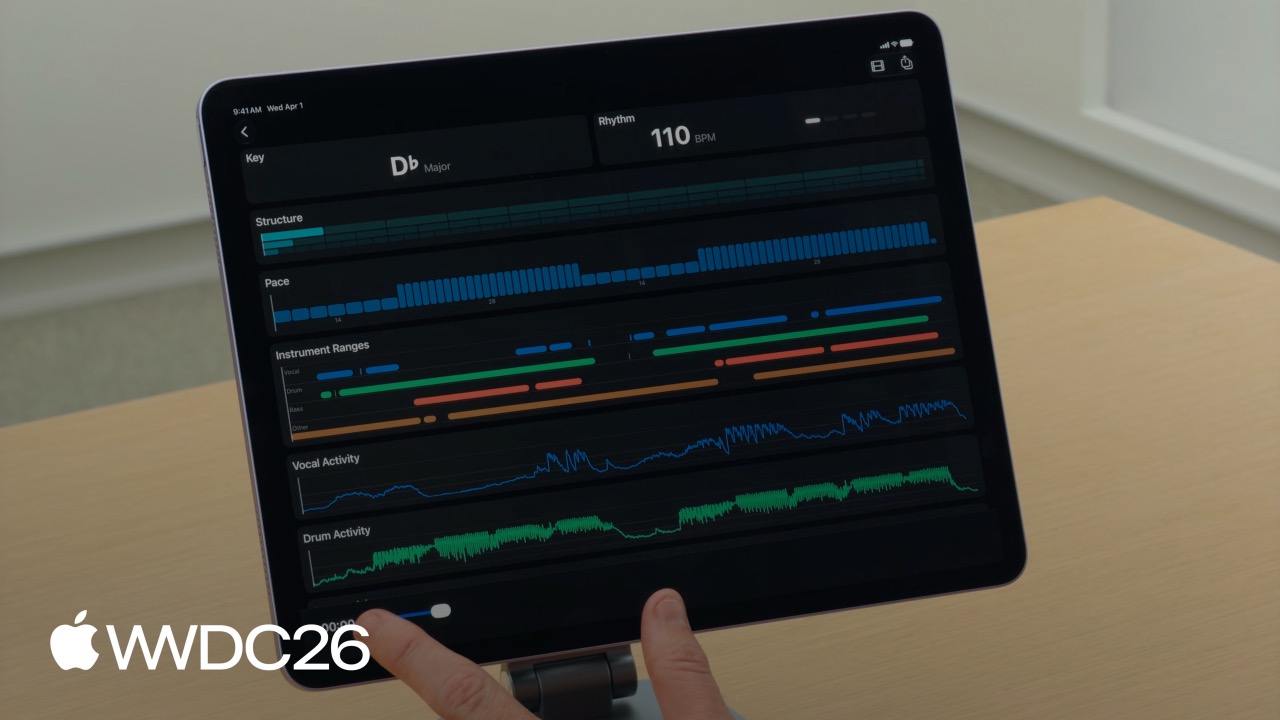
Apple introduces the Music Understanding framework, letting apps analyze audio offline on device across six dimensions — key, rhythm, structure, pace, instrument activity, and loudness — without machine learning or signal processing expertise. All result data can be encoded and exported as JSON.
Core Content
Why Music Analysis Used to Be Hard
In a video editing app, a common requirement is to make visual cuts land on musical beats. In the past, implementing this meant writing FFT algorithms to extract audio features yourself, or integrating Python libraries such as librosa and sending audio to a server for analysis. Both approaches had serious drawbacks: the first required deep signal-processing knowledge, and the second depended on the network and raised privacy risks.
The Final Cut Pro team faced the same problem. They implemented Beat Detection and Montage in FCP for macOS and iPad, but those capabilities were encapsulated inside FCP and unavailable to third-party developers.
What Apple Built
The Music Understanding framework announced at WWDC26 opens the FCP team’s music analysis capabilities to all developers. The framework encapsulates signal processing and model inference internally, so developers can call it with just a few lines of code.
(01:16) The framework provides six analysis dimensions:
- Key: the song’s tonic and mode, such as D flat major
- Rhythm: precise timestamps for each beat and bar, plus global BPM
- Structure: the song’s structural hierarchy — sections such as chorus and verse, segments, and phrases
- Pace: the perceived energy density of different sections; higher values feel faster
- Instrument Activity: when instruments appear and how strong they are
- Loudness: integrated loudness, momentary loudness, and peak values calculated according to the LUFS standard
(00:34) All analysis runs on device, and audio never leaves local storage. That means offline availability, zero network latency, and strong privacy.
How This New Capability Solves the Problem
Take beat-synced video editing as an example. What used to require hundreds of lines of DSP code now requires only:
- Pass the audio file to
MusicUnderstandingSession - Call
analyze()to get rhythm and structure data - Use the returned
CMTimearrays to driveAVPlayer’sseek(to:)directly
(15:28) FCP’s Montage feature works this way: it first identifies song sections, then calculates clip duration from each section’s pace value so the video rhythm matches the music’s energy. High-energy sections use short, fast cuts, while low-energy sections use longer, slower shots.
Details
Initialize a Session
(04:47) The framework interacts with audio through MusicUnderstandingSession. The simplest way to initialize one is from an AVAsset:
import MusicUnderstanding
import AVFoundation

.fileImporter(isPresented: $isPresented, allowedContentTypes: [.audio]) { result in
    switch result {
    case .success(let url):
        let asset = AVURLAsset(
            url: url,
            options: [AVURLAssetPreferPreciseDurationAndTimingKey: true]
        )
        let session = try await MusicUnderstandingSession(asset: asset)
        let results = try await session.analyze()
    case .failure(let error):
        print("Import failed: \(error)")
    }
}
Key points:
AVURLAssetPreferPreciseDurationAndTimingKeymust be set totrue, or beat alignment can have timing offsetsanalyze()analyzes all six dimensions by default, which can be computationally expensive- The whole flow uses
async/await, so it is best run in a background task
Analyze Only What You Need to Improve Performance
(03:45) If you need only some results, use analyze(for:) to avoid unnecessary computation:
let results = try await session.analyze(for: [.rhythm, .pace])

if let rhythm = results.rhythm {
    let bpm = rhythm.beatsPerMinute ?? 120.0
    let beatTimes = rhythm.beats
    print("BPM: \(bpm), beat count: \(beatTimes.count)")
}
Key points:
analyze(for:)returns only the requested analysis types; other fields arenilbeatsPerMinuteisFloat?; if the audio has no clear rhythm, such as pure spoken narration, it returnsnil- Always safely unwrap optional results
Time Data Types
(05:53) The framework binds time and data with two generic structs:
public struct TimedValue<Value>: Codable, Equatable, Sendable
where Value: Codable & Equatable & Sendable {
    public let time: CMTime
    public let value: Value
}

public struct RangedValue<Value>: Codable, Equatable, Sendable
where Value: Codable & Equatable & Sendable {
    public let range: CMTimeRange
    public let value: Value
}
Key points:
TimedValuebinds a value to a specific time pointRangedValuebinds a value to a time range- Both conform to
CodableandSendable, so they can be serialized directly or passed across tasks - Using
CMTimeinstead ofDoubleavoids floating-point precision issues and integrates smoothly withAVFoundation
Key Analysis
(06:27) Key analysis returns the song’s tonic and mode:
public struct KeyResult: Codable, Sendable {
    public let ranges: [MusicUnderstandingSession.RangedValue<KeySignature>]
}

public struct KeySignature: Codable, Hashable, Sendable {
    public let tonic: Tonic
    public let mode: Mode
}

@frozen public enum Tonic: String, Codable, Hashable, Sendable {
    case aFlat, aSharp, a, bFlat, b, c, cSharp,
         d, dFlat, dSharp, eFlat, e, f, fSharp,
         g, gFlat, gSharp
}

public enum Mode: String, Codable, Hashable, Sendable {
    case major, minor
}
Key points:
KeyResult.rangesis an array because a song may change key in different sections- Each
RangedValue<KeySignature>contains the time range where the key is active Toniccovers all 17 pitch spellings, including sharps and flats
Rhythm Analysis
(07:16) Rhythm analysis returns precise timestamps for every beat and bar:
public struct RhythmResult: Codable, Sendable {
    public let beats: [CMTime]
    public let bars: [CMTime]
    public let beatsPerMinute: Float?
}
Key points:
- The
beatsarray contains theCMTimefor every beat in the song - The
barsarray contains the start time of every bar beatsPerMinuteis the global average BPM, ornilif the audio has no clear rhythm
Structure Analysis
(08:42) Structure analysis breaks a song into three levels:
public struct StructureResult: Codable, Sendable {
    public let sections: [CMTimeRange]
    public let segments: [CMTimeRange]
    public let phrases: [CMTimeRange]
}
Key points:
sectionscorrespond to macro sections such as chorus, verse, intro, and bridgesegmentsare subdivisions of sectionsphrasesare the finest granularity, like musical “sentences”- Their hierarchy is: section > segment > phrase
Pace Analysis
(09:26) Pace describes how fast the music feels to listeners:
public struct PaceResult: Codable, Sendable {
    public let ranges: [MusicUnderstandingSession.RangedValue<Double>]
}
Key points:
- Pace is different from BPM; it measures the subjective feeling of “energy density”
- Higher values make the music feel faster and more energetic
- The result is an array with time ranges, because different sections may have different pace values
(14:47) Use pace to calculate video clip duration:
let timePerClip = 60 / paceValueInstrument Activity Analysis
(10:13) Instrument activity provides two granularities:
public struct InstrumentActivityResult: Codable, Sendable {
    public let ranges: [Instrument: [CMTimeRange]]
    public let activity: [Instrument: [MusicUnderstandingSession.TimedValue<Float>]]
}
Key points:
rangestells you when a given instrument appears, as a Boolean-style presence signalactivitytells you the instrument’s intensity at each time point, from 0 to 1activitydata is well suited for driving audio visualization animations
Loudness Analysis
(11:45) Loudness is calculated according to the LUFS (Loudness Units Full Scale) standard:
public struct LoudnessResult: Codable, Sendable {
    public let integrated: MusicUnderstandingSession.TimedValue<Float>
    public let momentary: [MusicUnderstandingSession.TimedValue<Float>]
    public let shortTerm: [MusicUnderstandingSession.TimedValue<Float>]
    public let peak: MusicUnderstandingSession.TimedValue<Float>
}
Key points:
integrated: the average loudness of the whole song, as a single valuemomentary: loudness every 100 ms with a 400 ms analysis window, useful for detecting sudden volume changesshortTerm: loudness every 100 ms with a 3-second analysis window, producing a smoother curvepeak: the absolute peak volume of the whole song, in decibels
Streaming Loudness API
(12:48) The framework provides AsyncSequence-style streaming loudness data, suitable for real-time scenarios:
let audioProvider = AudioProvider()
let session = MusicUnderstandingSession(audioProvider: audioProvider)

await withThrowingTaskGroup(of: Void.self) { group in
    group.addTask {
        for try await result in await session.loudnessResults {
            updateAudioLevel(result.momentary.value)
        }
    }

    group.addTask {
        try await session.analyze(for: [.loudness])
    }
}
Key points:
loudnessResultsis anAsyncSequencethat pushes results every 100 ms- It needs to be used with a custom
AudioProvider - Two tasks run concurrently: one consumes results, and one drives analysis
Custom Audio Provider
(13:19) Besides AVAsset, you can initialize the session with a real-time audio stream:
struct AudioProvider: AsyncSequence, AsyncIteratorProtocol {
    func makeAsyncIterator() -> Self {
        return self
    }

    mutating func next() async -> AVReadOnlyAudioPCMBuffer? {
        // Return the next audio buffer; pass nil to indicate the end
    }
}
Key points:
AudioProvidermust conform toAsyncSequenceandAsyncIteratorProtocol- Each
next()call returns oneAVReadOnlyAudioPCMBuffer - Return
nilwhen analysis is finished to tell the framework to stop - Suitable for real-time microphone input, network audio streams, and similar scenarios
Export Analysis Results
(13:55) All results conform to Codable and can be encoded directly as JSON:
let session = try await MusicUnderstandingSession(asset: asset)
let results = try await session.analyze()

let encoder = JSONEncoder()
let data = try encoder.encode(results)
Key points:
- No manual serialization is needed; one line exports all data
- Useful for precomputing analysis results and bundling them with the app, or uploading them to a server for sharing
- Timestamps in the JSON use the
CMTimeencoding format
Key Takeaways
1. Build an Automatic Beat-Synced Video Editing App
After users import music, the app automatically analyzes beats and structure, then inserts transition markers at beat and bar positions. Developers only need to read the RhythmResult.beats array and convert each CMTime into a marker on the timeline. The entry API is MusicUnderstandingSession.analyze(for: [.rhythm, .structure]).
2. Build an Energy Visualization Music Player
During playback, use PaceResult and InstrumentActivityResult.activity to drive particle animation or waveforms. High-pace sections speed up particle motion, and drum activity can trigger flashes. Compare TimedValue<Float> timestamps directly with the current time of AVPlayer to synchronize.
3. Build an Intelligent DJ App
Use KeyResult to analyze the key of the user’s music library and automatically recommend harmonically compatible songs for mixes. Major-to-major, minor-to-minor, or adjacent keys on the circle of fifths can all transition smoothly. The entry point is to call analyze(for: [.key]) across the library and store results in a local database.
4. Build a Rhythm Game
Precompute song beat data with analyze() and package it into game resources. At runtime, read the beats array and spawn tap targets at the corresponding time points. This is more efficient than real-time analysis and avoids the risk of analysis failure during gameplay.
5. Build a Loudness Normalization Tool
Use LoudnessResult.integrated to batch-analyze a user’s library and automatically adjust playback volume so music from different sources sounds consistent. This is useful in podcast apps and music players, solving the pain point of being startled when the next track is much louder.
Related Sessions
- Meet MusicKit for Swift — MusicKit provides music playback and library management; combined with Music Understanding analysis, it can support complete music apps
- Create 3D models for your spatial app — Use 3D models to build spatial audio visualization scenes and map Music Understanding results into three-dimensional space
- What’s new in SwiftUI — SwiftUI Canvas and animation APIs are well suited for drawing real-time visualization interfaces in the style of Music Understanding Lab
- Explore machine learning on Apple platforms — Learn about the underlying mechanisms of on-device ML on Apple devices and understand the inference optimization strategy of the Music Understanding framework
Comments
GitHub Issues · utterances