
Highlight
App Attest uses the Secure Enclave to generate non-exportable, hardware-bound keys, giving servers cryptographic proof that a request comes from an untampered app running on a real Apple device. iOS 27 adds launch validation category and bundle version extension fields. macOS 27 supports App Attest for the first time and introduces ACL Blob OID to validate system integrity. The new Fraud Metric can detect abnormal behavior when one device has generated too many keys in the last 30 days.
Core Ideas
You built an online exam app. After students answer questions, the app submits their answers to your server for scoring. An attacker reverse engineers your app, builds a modified version, and submits fake high scores directly to your server. To your server, the requests look exactly like normal requests. It cannot tell the difference.
App Attest is designed to solve that problem.
The core idea is simple: the Secure Enclave on the device generates a key pair. The private key always stays inside the hardware, while the hash of the public key is returned to the app as the key ID. The app sends this key ID to your server. The server sends back a challenge. The app uses the challenge to ask Apple to generate an attestation. That attestation contains a certificate chain, a hardware snapshot of the device, and app identity information. After the server validates it, the server can confirm that the request really comes from an untampered app running on a real Apple device.
(01:53) Older anti-tampering approaches relied on jailbreak detection, device fingerprinting, and a constant cat-and-mouse game with attackers. App Attest anchors the root of trust in Apple hardware and the Secure Enclave. Attackers cannot export the private key or reuse an attestation on another device.
(02:15) Beyond proving that the device is real, App Attest can expose whether the app has been modified. It identifies your app with a relying party identifier, which is the Team ID plus Bundle ID. If an attacker resigns the app, the Team ID changes, and that difference appears in the attestation.
(03:03) iOS 27 adds two important signals: launch validation category tells you whether the app launched from the App Store, TestFlight, or another channel; bundle version lets you confirm whether the running app is a version you released. If an attacker bumps the Bundle Version and resigns the app, those changes are exposed in the attestation.
(04:08) macOS 27 supports App Attest for the first time, which matters a lot for high-value Mac businesses such as finance and game anti-cheat. The Mac ecosystem is more open than iOS: users can disable SIP (System Integrity Protection) or downgrade security policies. Apple adds ACL Blob OID to the macOS certificate chain, recording whether the device was in Full Security mode and whether SIP was enabled when the key was generated.
(16:27) Fraud Metric is the most interesting new capability in this release. It answers an old problem: attackers can build a device farm with hundreds of real devices. Each device is genuine, so attestation alone cannot block it. Fraud Metric returns an approximate count of the unique attested keys a device has generated in the last 30 days. A normal user has one key per device. If this metric spikes, it suggests the device is generating credentials in bulk or acting as a broker that signs attestations for other devices.
Details
Checking availability
(04:26) App Attest supports all Apple platforms, including the newly added macOS 27. But it is not available to every app type, so you need to check isSupported:
import DeviceCheck

if DCAppAttestService.shared.isSupported {
    // App Attest is available; continue with normal integration
} else {
    // Treat this as a risk signal and limit sensitive functionality
}
Key points:
- Action and SSO app extensions are supported; other extension types are not.
isSupported == falsecan itself be used as a fraud signal in risk assessment.- If a device that claims to be an iPhone 15 frequently reports unsupported, it may have been tampered with.
Generating a key
(05:07) The app calls generateKey() to generate a Secure Enclave-bound key pair:
import DeviceCheck

let keyID = try await DCAppAttestService.shared.generateKey()
// Store the keyID in Keychain
Key points:
- The private key is stored in the Secure Enclave and cannot be exported.
- Generate one key per user or one key per device. Do not share keys across users.
- The key remains valid after app updates, but becomes invalid if the app is reinstalled or the device is restored, including from an iCloud backup.
- Keys do not sync across devices.
Requesting attestation
(06:32) After generating the key, the app requests a challenge from the server and then calls the attestation API:
import DeviceCheck

let keyId: String = fetchKeyIdFromKeychain()
let clientDataHash: Data = sha256(serverChallenge)

let attestation = try await DCAppAttestService.shared.attestKey(
    keyId: keyId,
    clientDataHash: clientDataHash
)
// Send the attestation to the server for validation
Key points:
- The server must initiate attestation and control request frequency.
- Implement exponential back-off on failure, instead of hard-coding retry loops.
- Run it in a background task so it does not block the user’s flow.
- Validation must happen on the server. Do not trust validation results from the client.
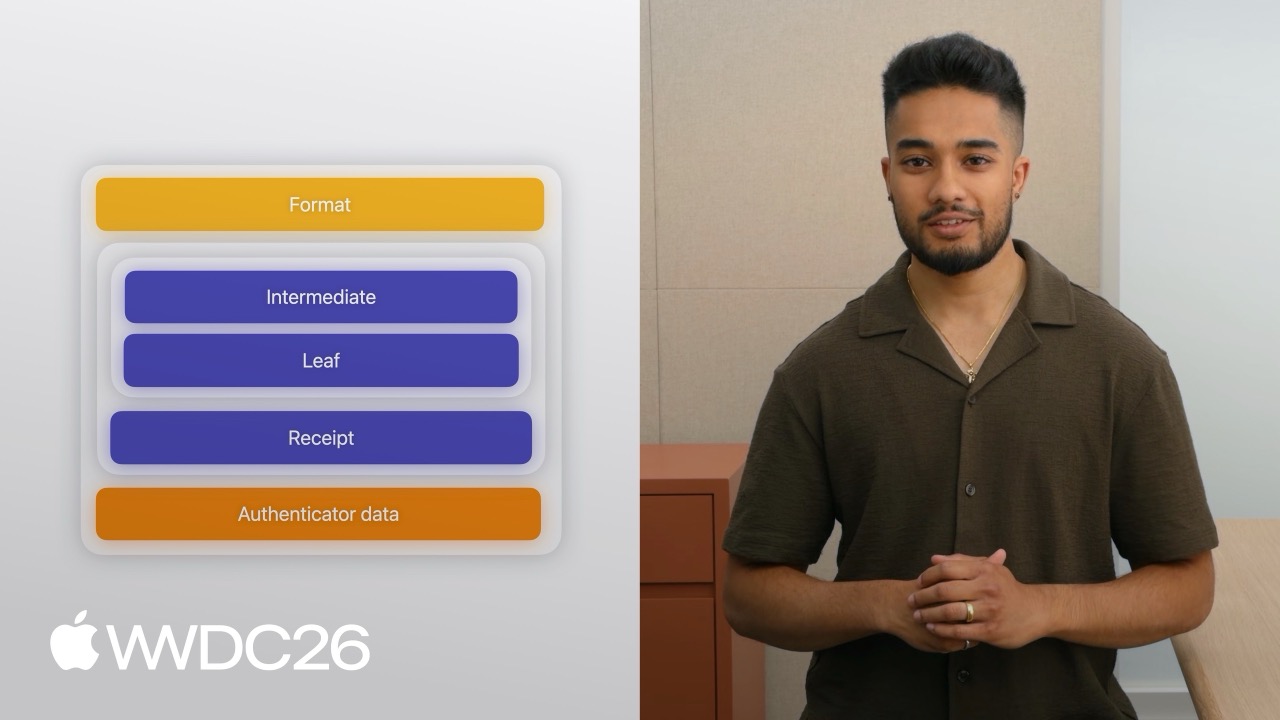
The attestation object has three parts: format, a fixed string that identifies Apple’s anonymous attestation format; attestation statement, which contains the certificate chain and receipt; and authenticator data, which contains the app and attestation information.
The certificate chain proves that the key was generated on real Apple hardware. The leaf certificate contains the nonce, key ID, and relying party identifier. On macOS 27, it also contains ACL Blob OID, which records Full Security mode and SIP state.
(10:28) iOS 27 adds an extensions structure at the end of authenticator data, with two fields:
launch validation category: App Store, TestFlight, or otherbundle version: the currently running app version
Servers should monitor abnormal values in these fields and feed them into risk assessment.
Generating assertions to protect communication
(12:33) After attestation succeeds, the app can use the same key to generate an assertion that protects later requests:
import DeviceCheck

let keyId: String = fetchKeyIdFromKeychain()
let clientDataHash: Data = sha256(serverChallenge)

let assertion = try await DCAppAttestService.shared.generateAssertion(
    keyId: keyId,
    clientDataHash: clientDataHash
)
// Embed the assertion in the request payload and send it to the server
Key points:
- Assertions are generated locally on the device and do not go through Apple’s servers, so they can be generated in real time as needed.
- They involve cryptographic computation and have CPU cost, so avoid high-frequency bulk generation.
- The server must verify that the counter in the assertion strictly increases to prevent replay attacks.
- If the counter stays the same or decreases, it may indicate a tampered copy of the app.
Common pitfalls
(15:02) A few easy traps:
When a user reinstalls the app or restores a device, key rotation happens. Do not immediately reject the new key. Keep historical key records and combine them with Fraud Metric to decide whether the behavior is abnormal.
Do not immediately block users when validation fails. First degrade functionality, such as limiting withdrawal amounts or hiding sensitive data, while increasing monitoring and allowing limited access.
Fraud Metric
(16:35) Fraud Metric detects the attack pattern where a compromised device acts as a broker and signs attestations for other devices. The server sends a POST request to Apple’s App Attest data server using the receipt in the attestation, then receives the fraud metric.
The returned receipt contains a signature, certificate chain, and payload. The risk metric field is the fraud metric count. This count is approximate and represents the number of unique attested keys generated on that device in the last 30 days.
The receipt has a refresh window controlled by the not before and expiration time fields. Normal user behavior, such as reinstalling the app or restoring a device, can also contribute to the fraud metric. Do not use it as a direct blocking rule. Treat it as an investigation signal, monitor the baseline, and look for abnormal spikes.
Key Takeaways
Add transaction signing to finance apps
What to do: before key actions such as transfers or payments, sign the transaction payload with an App Attest assertion, and execute it only after the server validates it.
Why it is worth doing: even if an attacker gets the user’s password, they cannot initiate a valid transaction request from a tampered app.
How to start: call generateAssertion before transaction submission, send the assertion and transaction data to the server, and verify the assertion signature and counter on the backend.
Add leaderboard anti-cheat to games
What to do: attach an assertion when players submit scores, and count the score only after the server verifies the app has not been modified. Why it is worth doing: it prevents attackers from submitting fake high scores after injecting a cheat menu. How to start: require an assertion in the score submission API, and also monitor launch validation category and bundle version. Reject abnormal values directly.
Use Fraud Metric to identify device farms
What to do: integrate Fraud Metric into your risk engine and flag abnormal devices. Why it is worth doing: every device in a device farm can be real, so traditional device fingerprinting cannot stop it. Fraud Metric reveals when one device is generating keys in bulk. How to start: have the server periodically refresh receipts to get fraud metrics, set threshold alerts, and combine them with other risk-control signals.
Add integrity checks to macOS apps
What to do: macOS 27 supports App Attest for the first time. Use ACL Blob OID to verify whether the device has Full Security and SIP enabled. Why it is worth doing: high-value Mac businesses, such as enterprise software and paid tools, previously lacked a reliable anti-tampering mechanism. How to start: parse the ACL Blob OID in the attestation certificate chain, check Full Security and SIP state, and mark devices with SIP disabled as high risk.
Use isSupported as the first risk-control gate
What to do: include the return value of isSupported in user risk assessment.
Why it is worth doing: jailbroken devices or tampered environments may make App Attest unavailable, and that signal is itself suspicious.
How to start: record each user’s isSupported response history and closely monitor devices where large numbers of false responses suddenly appear.
Related Sessions
- 101 Keynote — WWDC26 opening keynote, with an overview of the new security direction for Apple platforms
- 347 Security agentic — Agentic applications in security, complementing App Attest’s risk-control model
- 379 Trust Insights — A Trust Insights session covering security assessment and risk control
- 205 App Store — App Store distribution and validation, related to launch validation category
- 262 Swift — Swift language updates that may include security-related language-level improvements
Comments
GitHub Issues · utterances