
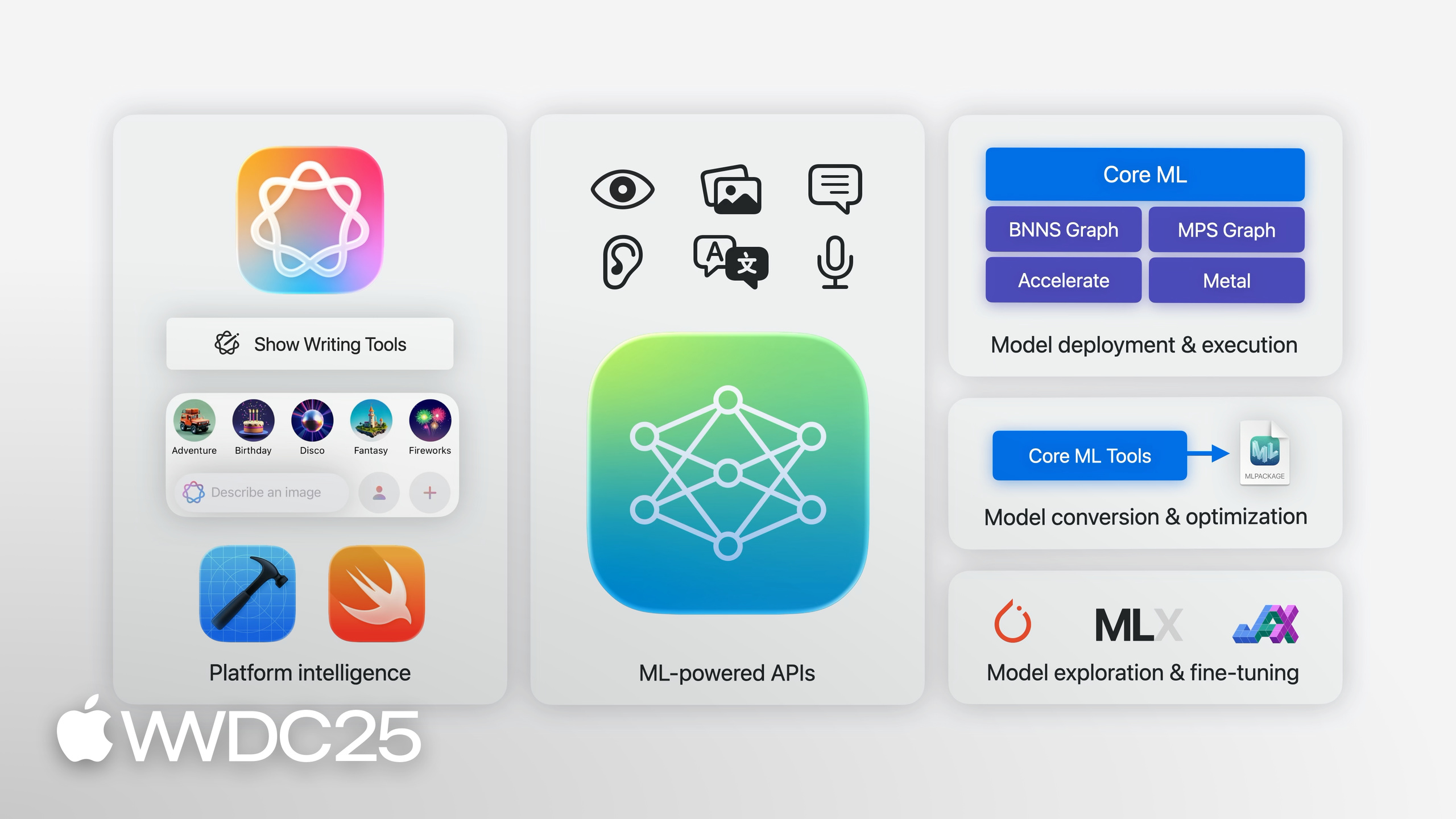
Highlight
Jaimin Upadhyay organizes the Apple ML/AI stack into five layers, from top to bottom: Platform Intelligence, ML-powered APIs, domain frameworks, Core ML, and MLX. The new Foundation Models framework lets developers call on-device language models with just three lines of Swift.
Core Content
Since iOS 18, developers wanting to add AI to apps often reach for cloud APIs like OpenAI or Gemini. This means managing API keys, bearing per-request costs, sending user data off-device, and requiring network connectivity. For many lightweight, local features—like trip summaries, smart search suggestions, game dialogue generation—cloud solutions feel too heavy.
Jaimin Upadhyay’s answer in this session: organize the entire Apple ML/AI stack into five layers, from high to low, so you can use what you need. At the top are system-built Writing Tools, Genmoji, and Image Playground—standard UI controls support them automatically, almost no code required (02:03). Below that is the Foundation Models framework new in iOS 26—three lines of Swift call on-device language models, fully offline, zero cost, privacy stays on-device (05:05). Below that are domain frameworks like Vision, Speech, and Natural Language, each with built-in task-specific optimized models. At the bottom is Core ML for deploying any custom model, and MLX, an open-source array compute framework for research frontiers. Every layer is optimized for Apple Silicon, scheduling across CPU / GPU / Neural Engine.
Details
Layer 1: Platform Intelligence (01:16)
Writing Tools and Genmoji are built into standard text controls—almost zero code to integrate. Image Playground framework pops up an image generation panel via the SwiftUI extension imagePlaygroundSheet.
Layer 2: ML-powered APIs (02:45)
ImageCreator, introduced in iOS 18.4, lets you bypass the system panel and generate images directly from text prompts (03:08):
let creator = ImageCreator()
let images = try await creator.images(
    for: [.text("a corgi surfing at sunset")],
    style: .illustration,
    limit: 1
)
// After getting images, decide how to display them
Key points:
ImageCreator()instantiates directly, no entitlement required.- First parameter is an array of
ImagePlaygroundConcept,.text(...)means text prompt; you can also pass a starting image as concept. styleselects style (.illustration/.animation/.sketch),limitcontrols return count.- Return is async sequence/array—after getting images, the app decides display method, no system UI pops up.
Smart Reply API (03:29) generates smart replies in the candidate area by “donating” conversation context to the keyboard:
// In the input view for messages scenario
let context = UIMessageConversationContext(messages: recentMessages)
textView.conversationContext = context

// For mail scenario, implement delegate to generate reply yourself
func insertInputSuggestion(_ suggestion: UIInputSuggestion) {
    let reply = await generateLongerReply(from: suggestion)
    textView.insertText(reply)
}
Key points:
UIMessageConversationContext/UIMailConversationContextcarry conversation history—must be set on the entry view before keyboard appears.- In messaging scenarios, selected replies insert directly into document, app needs no handling.
- In mail scenarios, system calls back
insertInputSuggestion, letting app generate longer body from suggestion. - All inference runs on-device, using Apple foundation models.
Foundation Models framework (04:24) is a new on-device language model API in iOS 26—three lines to run:
import FoundationModels

let session = LanguageModelSession()
let response = try await session.respond(to: "Summarize this trip in 3 bullets: ...")
Key points:
import FoundationModelsbrings in the module, no extra initialization needed.LanguageModelSession()creates a session, reusable, automatically maintains context.respond(to:)is async, returns structured result, text is inresponse.content.- Entirely on-device, no API keys, no network requests, zero cost for users and developers.
Guided Generation (05:38) treats Swift types directly as output schemas, skipping JSON parsing:
@Generable
struct Itinerary {
    @Guide("City name") var city: String
    @Guide("3 to 7 days of itinerary") var days: [DayPlan]
}

@Generable
struct DayPlan {
    @Guide("Theme for the day, such as food or museums") var theme: String
    @Guide("List of activities for the day") var activities: [String]
}

let itinerary = try await session.respond(
    to: "Plan a 5-day trip to Kyoto",
    generating: Itinerary.self
)
Key points:
@Generablemarks existing Swift types as generable; nested types need separate marking.@Guide("...")writes natural language descriptions for each property, letting the model understand field meaning.respond(to:generating:)specifies output type, framework customizes decode loop, prevents generating structures that don’t match schema.- You get strongly-typed instances, no need to hand-write JSON schema, parsing, or error handling.
Tool Calling (07:02) lets models access real-time/personal data on demand and execute real actions. Citing data sources lets users fact-check outputs, bypassing training data cutoff limits.
Layer 3: Domain-specific frameworks (08:21)
Vision this year adds Document Recognition (recognizing titles, paragraphs, table groupings beyond “read text lines”) and Lens Smudge Detection (09:13). Speech framework introduces SpeechAnalyzer to replace the old SFSpeechRecognizer (09:56), paired with new speech models significantly more accurate and faster for long audio and far-field recordings like lectures, meetings, conversations. Usage is to feed audio buffers to an analyzer instance, which routes to the model:
let analyzer = SpeechAnalyzer(modules: [transcriber])
try await analyzer.start(inputAudioFile: audioFile)

for try await result in transcriber.results {
    print(result.text)
}
Key points:
SpeechAnalyzer(modules:)uses modular structure to combine different analysis capabilities,transcriberhandles speech-to-text.start(inputAudioFile:)accepts file input; real-time scenarios can feed audio buffers instead.transcriber.resultsis async sequence, streams recognition results, suitable for real-time display.- Runs entirely on-device, specifically optimized for long audio and far-field scenarios.
Natural Language, Translation, Sound Analysis each target language identification, text translation, sound classification. Create ML (10:55) lets you fine-tune system models with your own data—image classifiers for Vision, word taggers for Natural Language, even specific object recognition with 6DOF tracking on Vision Pro.
Layer 4: Core ML and lower layers (11:16)
Models come from two sources: the Core ML model gallery at developer.apple.com, organized by category with device performance data; Hugging Face’s Apple space provides both Core ML format and PyTorch source definitions. Core ML Tools converts PyTorch models to Core ML, automatically fusing operators, eliminating redundancy, with optional pruning/quantization for trade-offs. Xcode integration (13:09) shows prediction latency, load time, and which op runs on CPU / GPU / ANE on any connected device; this year adds full architecture visualization, drillable into each op.
Finer control has two layers: MPS Graph + Metal embed Core ML models into graphics pipelines; Accelerate’s BNNS Graph API does real-time signal processing on CPU with strict latency and memory control. BNNS Graph adds Graph Builder (14:36), allowing direct operator graph construction, writing pre/post-processing or small ML models running real-time on CPU.
Layer 5: MLX (15:33)
Array compute framework designed by Apple’s ML research team, fully open-source. One command runs LLM inference like Mistral (demo generated quicksort code, max token = 1024). MLX community on Hugging Face has hundreds of frontier models, loadable in one line. Using Apple Silicon unified memory (16:30), arrays in MLX aren’t device-bound, operations are device-bound, letting CPU/GPU run different operations in parallel on the same buffer. Provides Python / Swift / C++ / C bindings, supports one-line fine-tuning and distributed training scaling. If you use PyTorch or JAX, Apple provides Metal backend—explore frontiers on Apple Silicon without switching frameworks.
Key Takeaways
-
What to do: Add “smart summarization / smart classification” features powered by Foundation Models to your app.
- Why worth doing: Runs entirely on-device, zero API cost, works offline, user data stays on-device—better for compliance and cost than cloud LLMs.
- How to start:
import FoundationModels, createLanguageModelSession, send a prompt. Get the simplest version working in three lines, then stuff domain data into prompts to verify quality.
-
What to do: Replace existing “LLM + JSON parsing” pipelines with
@Generable+ Guided Generation.- Why worth doing: Custom decode loop prevents structural errors, skip hand-writing schemas, parsers, handling LLM’s occasional invalid JSON; Swift type is schema, updating data structure updates prompt output.
- How to start: Add
@Generableto your existing Codable structs, add@Guide("...")descriptions to fields, add.range,.countconstraints when needed.
-
What to do: Migrate long recording/meeting features from old
SFSpeechRecognizertoSpeechAnalyzer.- Why worth doing: New API’s paired models are significantly more accurate and faster for long audio and far-field (lectures, meetings, conversations); old API was designed for short dictation, poor experience for long recordings.
- How to start: Create
SpeechAnalyzerinstance, configuretranscribermodule, feed audio buffers streamingly, collect text fromresultssequence.
-
What to do: Use Tool Calling instead of “stuffing all context into prompt”.
- Why worth doing: On-device models have knowledge cutoffs, feeding all data via prompt is slow and exceeds context window; tool calling lets models query weather, calendar, your app data on demand, and cite sources, execute real actions.
- How to start: Define Tool (with description, parameter schema, execution closure), pass tools array to session; describe task in prompt, let model decide when to call which tool.
-
What to do: Before launch, use Xcode’s Core ML performance/architecture visualization for model checkup.
- Why worth doing: See which ops land on CPU / GPU / ANE, prediction latency and load time per device—avoid discovering post-launch that an op doesn’t support ANE and drags down overall latency.
- How to start: Drag
.mlpackageinto Xcode, open Performance tab, connect real device to benchmark; use this year’s new architecture view to drill into suspicious operators.
Related Sessions
- Meet the Foundation Models framework — Foundation Models introduction, deep dive into sessions, guided generation, tool calling, streaming
- Explore prompt design and safety for on-device Foundation models — Writing good prompts, AI safety, practical guide to evaluating quality and safety
- Bring advanced speech-to-text to your app with SpeechAnalyzer — SpeechAnalyzer API + new speech models, specialized for long audio and far-field
- Explore large language models on Apple silicon with MLX — Running DeepSeek-R1 and other large models on Apple Silicon with MLX
- What’s new in BNNS Graph — BNNS Graph Builder for building real-time ML / signal processing pipelines on CPU
Comments
GitHub Issues · utterances