
Highlight
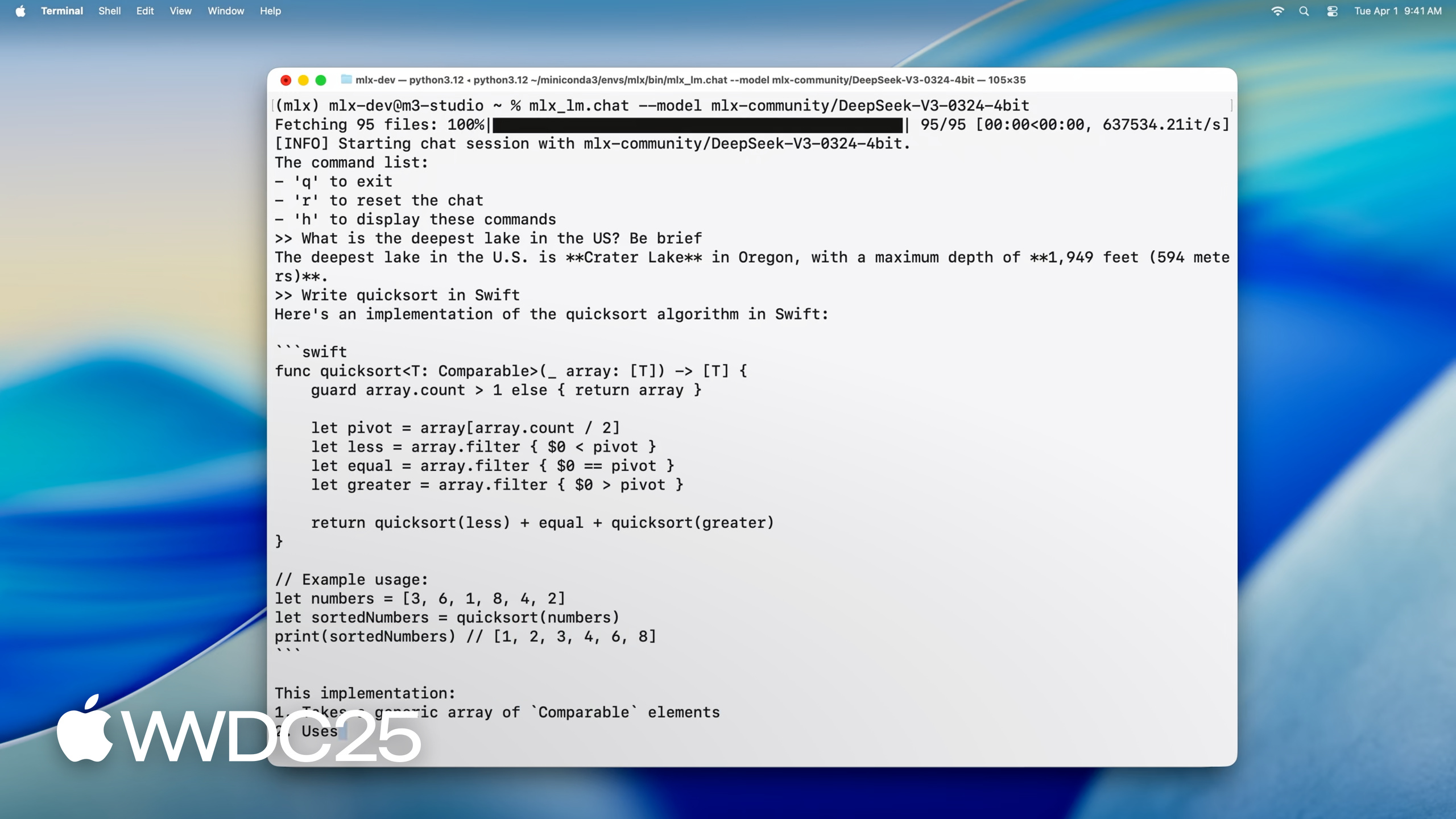
On an M3 Ultra with 512GB of unified memory, MLX LM runs DeepSeek 670B at 4.5-bit quantization (about 380GB of weights) with a single command.
Core content
Running a large model locally used to mean a PC with a discrete GPU, the CUDA toolchain, Hugging Face conversion scripts, quantization plugins, and various offload tricks when VRAM ran out. Mac users were left out, since there was no NVIDIA card and no tens of GB of VRAM to spare.
At WWDC 2025, Apple shipped MLX LM and collapsed that chain into two steps: pip install mlx-lm, then one command. MLX is an open-source machine learning library built on Metal acceleration and unified memory, where CPU and GPU share the same data and you no longer copy back and forth between VRAM and RAM. On top of MLX, MLX LM wraps a CLI and a Python API that cover text generation, model quantization, LoRA fine-tuning, and adapter fusion end-to-end, and talks directly to Hugging Face. In the demo, Angelos ran DeepSeek V3 with 670B parameters at 4.5-bit quantization on an M3 Ultra. The weights are about 380GB, and the generation rate beats reading speed. This is the first time consumer hardware can interact with a model of this size locally.
Details
Minimal text generation (03:51). A single CLI command handles download, load, and inference:
mlx_lm.generate --model "mlx-community/Mistral-7B-Instruct-v0.3-4bit" \
                --prompt "Write a quick sort in Swift"
Key points:
--modelaccepts a Hugging Face repo ID or a local path. The model is downloaded automatically if it is not on disk.--promptis the input text. The tool wraps it in a chat template internally.- You can also pass
--top-p,--temp, and--max-tokensto tune sampling, with the same flags as mainstream inference tools.
Python API gives you the full model object (05:26). load returns a real MLX neural network whose structure and parameters you can inspect:
from mlx_lm import load, generate

model, tokenizer = load("mlx-community/Mistral-7B-Instruct-v0.3-4bit")

prompt = "Write a quick sort in Swift"
messages = [{"role": "user", "content": prompt}]
prompt = tokenizer.apply_chat_template(
    messages, add_generation_prompt=True
)

text = generate(model, tokenizer, prompt=prompt, verbose=True)
Key points:
loadreturns both the model and the tokenizer, fetched from Hugging Face and cached.apply_chat_templaterenders the messages into the prompt string the model expects.generateis a blocking call. Withverbose=True, it prints tokens and throughput as it generates.- The returned
modellets you callprint(model.layers[0].self_attn)to inspect its structure, which makes layer swaps and low-level surgery straightforward.
KV cache for multi-turn dialogue (08:01). With long prompts and multi-turn sessions, recomputing attention is very expensive:
from mlx_lm import load, generate
from mlx_lm.models.cache import make_prompt_cache

model, tokenizer = load("mlx-community/Mistral-7B-Instruct-v0.3-4bit")

prompt = "Write a quick sort in Swift"
messages = [{"role": "user", "content": prompt}]
prompt = tokenizer.apply_chat_template(
    messages, add_generation_prompt=True
)

cache = make_prompt_cache(model)

text = generate(model, tokenizer, prompt=prompt, prompt_cache=cache, verbose=True)
Key points:
make_prompt_cache(model)builds a reusable KV cache object.- Pass the cache through
prompt_cache=togenerate, and each call resumes from the last token position. - The cache can be edited in place, saved, and swapped between sessions, which fits chatbots and agents.
Per-layer mixed-precision quantization (10:33). Embedding layers and lm_head are more sensitive to quantization, so you can keep them at higher precision:
from mlx_lm.convert import convert

def mixed_quantization(layer_path, layer, model_config):
    if "lm_head" in layer_path or "embed_tokens" in layer_path:
        return {"bits": 6, "group_size": 64}
    elif hasattr(layer, "to_quantized"):
        return {"bits": 4, "group_size": 64}
    else:
        return False

convert(
    hf_path="mistralai/Mistral-7B-Instruct-v0.3",
    mlx_path="./mistral-7b-v0.3-mixed-4-6-bit",
    quantize=True,
    quant_predicate=mixed_quantization
)
Key points:
quant_predicateis a function called per layer that returns the quantization parameters for that layer orFalseto skip.lm_headandembed_tokensuse 6-bit withgroup_size64; the rest go to 4-bit.convertdownloads, converts, and saves in one step. Addupload_repoto push the result back to Hugging Face.
LoRA fine-tuning (13:37). Train an adapter directly on a 4-bit quantized model:
mlx_lm.lora --model "mlx-community/Mistral-7B-Instruct-v0.3-4bit" \
            --train \
            --data /path/to/our/data/folder \
            --iters 300 \
            --batch-size 16
Key points:
- Training an adapter on a quantized model uses far less memory than training the full-precision model.
--datapoints to a local data directory in the standard Hugging Face dataset format.- After training, the adapter is saved separately and loaded at inference time with
--adapter. - Then
mlx_lm.fuse(16:29) merges the adapter back into the base model, so deployment ships a single quantized model file.
Swift integration (17:14). Drop LLM inference into a Mac or iOS app:
import Foundation
import MLX
import MLXLMCommon
import MLXLLM

@main
struct LLM {
    static func main() async throws {
        let modelId = "mlx-community/Mistral-7B-Instruct-v0.3-4bit"
        let modelFactory = LLMModelFactory.shared
        let configuration = ModelConfiguration(id: modelId)
        let model = try await modelFactory.loadContainer(configuration: configuration)

        try await model.perform({context in
            let prompt = "Write a quicksort in Swift"
            let input = try await context.processor.prepare(input: UserInput(prompt: prompt))

            let params = GenerateParameters(temperature: 0.0)
            let tokenStream = try generate(input: input, parameters: params, context: context)
            for await part in tokenStream {
                print(part.chunk ?? "", terminator: "")
            }
        })
    }
}
Key points:
LLMModelFactory.shared.loadContainer(configuration:)returns aModelContainer, a Swift 6 actor that handles concurrency safety on its own.context.processor.prepare(input:)runs tokenization and applies the chat template.generate(...)returns anAsyncSequence, so you can stream tokens withfor await.- For multi-turn dialogue, call
context.model.newCache(parameters:)beforegenerateto build a KV cache and pass it into theTokenIterator(18:00).
Takeaways
-
What to do: stand up a local inference service on a Mac to replace cloud APIs for privacy-sensitive data
- Why it pays off: unified memory on M-series Macs lets a 70B 4-bit model run on a 64–128GB machine. Sensitive data never leaves the box, and inference cost drops to zero.
- How to start:
pip install mlx-lm, getmlx_lm.generate --model "mlx-community/Mistral-7B-Instruct-v0.3-4bit"running first, then wrap it in an HTTP endpoint with the Python API.
-
What to do: use LoRA fine-tuning to inject domain knowledge into a quantized base model
- Why it pays off: training an adapter on a 4-bit model uses little memory and fits on a 32GB Mac. The adapter is only tens of MB, which makes per-customer or per-scenario distribution easy.
- How to start: format your data as standard Hugging Face jsonl, run
mlx_lm.lora --train --data ./data --iters 300, then merge withmlx_lm.fusefor deployment.
-
What to do: embed MLX Swift directly into a Mac or iOS app for on-device chat or code completion
- Why it pays off: the built-in model in the Foundation Models framework is size-limited. Bringing your own MLX model lets you pick anything from 7B to 70B and raises the quality ceiling.
- How to start: add the MLXLLM dependency to your Xcode project, follow the 28-line example at 17:14 to set up a
ModelContainer, then add a KV cache for multi-turn dialogue.
-
What to do: use per-layer mixed-precision quantization as a middle ground for quality-sensitive workloads
- Why it pays off: pure 4-bit can drop scores noticeably, especially on math and code tasks. Lifting
embed_tokensandlm_headto 6-bit usually recovers most of the loss and only adds a few percent to the file size. - How to start: reuse the
mixed_quantizationfunction above, callconvert(quant_predicate=...), and compare scores on your own evaluation set before and after.
- Why it pays off: pure 4-bit can drop scores noticeably, especially on math and code tasks. Lifting
Related sessions
- Get started with MLX for Apple silicon — an introduction to the MLX framework, covering unified memory and Metal acceleration.
- Code-along: Bring on-device AI to your app using the Foundation Models framework — building on-device AI with Apple’s Foundation Models framework, a counterpart to self-hosted MLX models.
- Deep dive into the Foundation Models framework — a deeper look at guided generation and tool use in Foundation Models.
- Bring advanced speech-to-text to your app with SpeechAnalyzer — another core on-device ML capability: the new SpeechAnalyzer speech-to-text API.
- Design interactive snippets — design guidance for App Intents snippets, which pair well with local LLM output for interactive presentation.
Comments
GitHub Issues · utterances