
Highlight
FinanceKit is a new iOS 18 framework providing standardized APIs to access financial data in Apple Wallet, aggregating Apple Card, Apple Savings, and Apple Cash into a local store—all processing on device with no network connection required.
Core Content
The biggest pain point for finance apps is getting data. Bank APIs vary in format and integration flow; many have no open interface at all. Users manually enter transactions—poor experience, error-prone data.
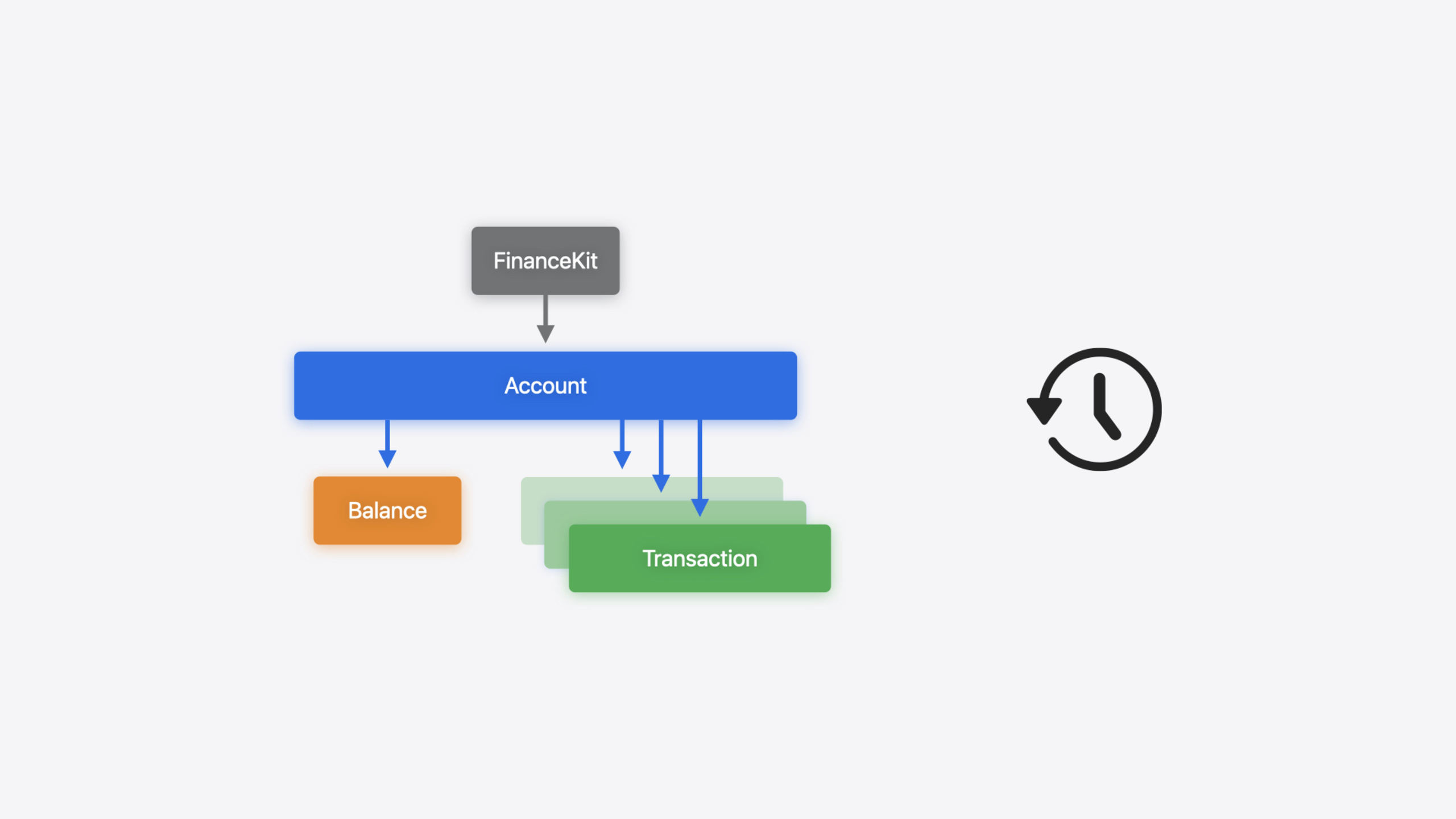
FinanceKit changes this. It reads financial data directly from Apple Wallet—Apple Card, Apple Savings, Apple Cash accounts, balances, and transactions, all aggregated in one local store. No network; all data processed on device. Your app does not need to integrate multiple financial institutions—just FinanceKit.
Three data access methods, weakest to strongest permission. Lightest is Transaction Picker—a system UI where users manually select transactions to share; authorization is ephemeral. Next is the query API, requiring explicit user authorization, fetching financial data matching specific criteria in one shot. Finally, the long-lived query API based on Swift Async Sequences continuously monitors financial data changes, with History Tokens for resumable sync—after app restart, continue from the last position.
Detailed Content
Data availability check
Before calling any FinanceKit API, check isDataAvailable. If it returns false and you continue, the framework terminates your app—mandatory, not a suggestion (05:38).
import FinanceKit

let available = FinanceStore.isDataAvailable(
    .financialData
)

guard available else {
    // No meaningful action can be performed
    return
}
Key points:
FinanceStore.isDataAvailable(.financialData)is static—no instance needed- Never call other FinanceKit APIs when it returns
false, or the app is terminated - This value does not change within the same iOS version—safe to cache
Transaction Picker
If you only need users to pick a few transactions (e.g., expense reimbursement), Transaction Picker is the simplest approach (08:08).
import SwiftUI
import FinanceKit
import FinanceKitUI

struct TransactionSelector: View {
  @State private var selectedItems: [FinanceKit.Transaction] = []

  var body: some View {
    if FinanceStore.isDataAvailable(.financialData) {
      TransactionPicker(selection: $selectedItems) {
        Text("Show Transaction Picker")
      }
    }
}
Key points:
- Requires additional import of
FinanceKitUI selectionbinds aTransactionarray; user selections fill it directly- Closure contains the trigger button ViewBuilder
- Authorization is ephemeral—the Picker does not remember selections
Authorization and query API
The query API requires explicit user authorization. Add NSFinancialDataUsageDescription to Info.plist, then call requestAuthorization() (12:16).
import FinanceKit

let store = FinanceStore.shared

guard store.isDataAvailable(for: .financialData) else {
    return
}

let authStatus = await store.requestAuthorization()

guard authStatus == .authorized else {
    return
}
Key points:
requestAuthorization()shows a system dialog; users choose which accounts to share- After authorization, users can modify or revoke access in Settings anytime
- App Store distribution requires an additional distribution entitlement
Query accounts
After authorization, query accounts with AccountQuery (15:24).
let store = FinanceStore.shared

let sortDescriptor = SortDescriptor(\Account.displayName)

let predicate = #Predicate<Account> { account in
   account.institutionName == "Apple"
}

let query = AccountQuery(
   sortDescriptors: [sortDescriptor],
   predicate: predicate
)

let accounts : [Account] = try await store.accounts(query: query)
Key points:
- Use Swift’s
#Predicatemacro for filter conditions SortDescriptorcontrols sort order—specify at least one- Each data type has a corresponding Query class
Query balances
Balance queries can limit returned count—good for trend charts (18:12).
func getBalances(account: Account) async throws -> [AccountBalance] {

    let sortDescriptor = SortDescriptor(\AccountBalance.asOfDate, order: .reverse)

    let predicate = #Predicate<AccountBalance> { balance in
        balance.available != nil &&
        balance.accountId == account.id
    }

    let query = AccountBalanceQuery(
        sortDescriptors: [sortDescriptor],
        predicate: predicate,
        limit: 7
    )
    return try await store.accountBalances(query: query).reversed()
}
Key points:
- Fetch latest 7 in reverse date order, then
reversed()for chronological order asOfDaterecords when the balance was computed—useful for freshness- Amounts are always positive; direction comes from
creditDebitIndicator
Long-lived queries and resumable sync
transactionHistory returns an Async Sequence that continuously pushes changes (20:27).
import FinanceKit

let store = FinanceStore.shared
let account: Account = ...

let transactionSequence = store.transactionHistory(
    forAccountID: account.id
)

for try await change in transactionSequence {
    processChanges(change.inserted, change.updated, change.deleted)
}
Pass the last saved History Token via the since parameter to resume from a checkpoint (21:04).
import FinanceKit

let store = FinanceStore.shared
let account: Account = ...
let currentToken = loadToken()

let transactionSequence = store.transactionHistory(
    forAccountID: account.id,
    since: currentToken
)

for try await change in transactionSequence {
    processChanges(change.inserted, change.updated, change.deleted)
    persist(token: change.newToken)
}
Key points:
- Each change contains
inserted,updated, anddeletedarrays change.newTokenis Codable and can be serialized to disk- With
since: token, only incremental changes after that token are returned - Add
isMonitoring: falseif you do not need real-time monitoring—the Sequence terminates after processing existing changes
Core Takeaways
-
What to do: Use Transaction Picker for “manual transaction import”. Why it matters: No Info.plist description, no authorization dialog, no entitlement—lowest integration cost. How to start: Import
FinanceKitUI, add aTransactionPickerin your view, bind a@Statearray. -
What to do: Use History Token for incremental sync. Why it matters: Full fetch on every launch is slow and wasteful with large datasets. Tokens process only increments—a clear performance win. How to start: Persist
change.newTokento disk after each change; pass it totransactionHistory(forAccountID:since:)on next launch. -
What to do: Interpret amount direction correctly by account type. Why it matters: Amounts are always positive; debit/credit meaning depends on account type—asset accounts (Apple Cash) debit means balance decrease; liability accounts (Apple Card) debit means available credit decrease. Mixing these up shows wrong income/expense stats. How to start: When displaying transactions, determine if the account is asset or liability, then map
creditDebitIndicatorto income or expense. -
What to do: Monitor data restriction state changes. Why it matters: Data availability (
isDataAvailable) is constant, but restrictions can change while the app runs—e.g., MDM policy updates. The framework throws errors but does not terminate the app—you must handle them. How to start: Handle restriction errors in catch blocks and inform users that financial data is currently unavailable.
Related Sessions
- What’s new in Wallet and Apple Pay — Latest Wallet and Apple Pay enhancements
- What’s new in privacy — New permission flows and privacy protection mechanisms
- Bring your app’s core features to users with App Intents — Core App Intents framework concepts
- Track model changes with SwiftData history — Track data changes with History API, similar to FinanceKit’s History Token mechanism
Comments
GitHub Issues · utterances