
Highlight
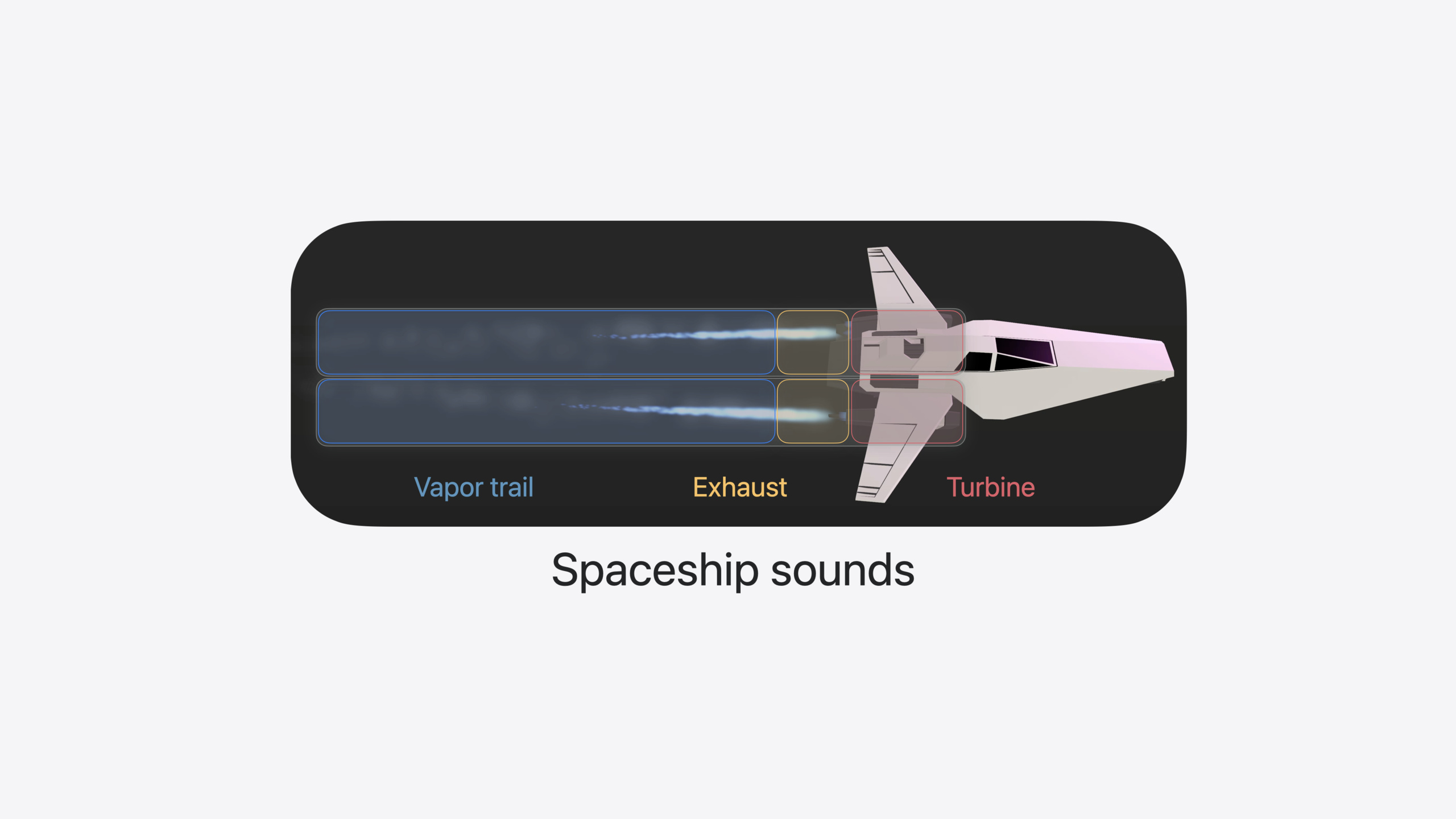
This session uses a spaceship game to demonstrate the full RealityKit audio API. The ship’s sound design uses a layered structure—each engine has three sound layers (vapor trail, exhaust, turbine), implemented with file playback and real-time generation.
Core Content
The most common problem in spatial computing apps: 3D objects feel volumetric, but sound is flat. A ship flies overhead without volume changing with distance or directional cues—the experience breaks immediately. RealityKit’s audio APIs solve this at the root: all sounds played through Entity.playAudio are spatialized by default, with six-degrees-of-freedom rendering, physics-based distance attenuation, and reverb simulated from your real environment in real time.
This session walks through the entire audio toolchain with a spaceship game. The ship has two engines, each with three sound layers: vapor trail via looping file playback, exhaust volume following throttle, and turbine generated in real time with an AU audio unit. Collision sounds are selected by material pairing via AudioFileGroupResource, with gain driven by collision velocity. In an immersive environment, ReverbComponent switches reverb presets. Background music uses a four-channel layout with AmbientAudioComponent. Finally, AudioMixGroupsComponent lets users adjust volume ratios for each sound category.
From the simplest two-line playback to directivity control, real-time audio generation, material-driven collision sounds, reverb presets, ambient music, and mix groups—this path covers nearly every spatial computing audio scenario.
Detailed Content
Spatial audio file playback
The most basic usage is two lines (03:11):
func playVaporTrailAudio(from engine: Entity) async throws {
    let resource = try await AudioFileResource(named: "VaporTrail")
    engine.playAudio(resource)
}AudioFileResource(named:)loads an audio file from the bundleengine.playAudio(resource)plays on the engine entity with automatic spatial rendering
Playback is spatialized—no extra configuration. Two details matter: audio files should be mono (spatialization downmixes to mono anyway—using mono files avoids downmix artifacts); short files with looping and random start points make identical sources sound distinct (04:02):
let resource = try await AudioFileResource(
    named: "VaporTrail",
    configuration: AudioFileResource.Configuration(
       shouldLoop: true,
       shouldRandomizeStartTime: true
    )
)
let controller: AudioPlaybackController = engine.playAudio(resource)
controller.gain = -.infinity
controller.fade(to: .zero, duration: 1)
shouldLoop: trueloops short files seamlesslyshouldRandomizeStartTime: truestarts two engines at different positions in the filecontroller.gain = -.infinitystarts silent to avoid pops when loopingcontroller.fade(to: .zero, duration: 1)fades in to nominal volume over one second
Directivity and independent audio sources
For directional engine sound—bright when facing you, muffled when behind—set SpatialAudioComponent’s directivity property (04:02):
let audioSource = Entity()
audioSource.orientation = .init(angle: .pi, axis: [0, 1, 0])
audioSource.components.set(
    SpatialAudioComponent(directivity: .beam(focus: 0.25))
)
engine.addChild(audioSource)
let controller = audioSource.playAudio(resource)- Create a separate
Entityas the audio source, child of the engine—position follows the engine, direction controlled independently .beam(focus: 0.25)sets beam directivity; focus ranges from 0 (omnidirectional) to 1 (narrow beam); 0.25 is slight directionality- Rotate audioSource so sound emits from the engine nozzle direction
Throttle-driven gain
Exhaust volume follows throttle linearly (07:10):
func updateAudio(for exhaust: Entity, throttle: Float) {
    let gain = decibels(amplitude: throttle)
    exhaust.components[SpatialAudioComponent.self]?.gain = Audio.Decibel(gain)
}

func decibels(amplitude: Float) -> Float { 20 * log10(amplitude) }- Linear throttle (0~1) converts to logarithmic decibels, matching human perception
- Modify
SpatialAudioComponent’sgaindirectly—it conforms to Component, so update every frame in a custom System
Real-time audio generation (AudioGeneratorController)
Turbine sound is generated in real time by a custom AU audio unit (08:17):
var turbineController: AudioGeneratorController?

func playTurbineAudio(from engine: Entity) {
    let audioUnit = try await AudioUnitTurbine.instantiate()
    let configuration = AudioGeneratorConfiguration(layoutTag: kAudioChannelLayoutTag_Mono)
    let format = AVAudioFormat(
        standardFormatWithSampleRate: Double(AudioGeneratorConfiguration.sampleRate),
        channelLayout: .init(layoutTag: configuration.layoutTag)!
    )
    try audioUnit.outputBusses[0].setFormat(format)
    try audioUnit.allocateRenderResources()
    let renderBlock = audioUnit.internalRenderBlock
    turbineController = try engine.playAudio(configuration: configuration) {
        isSilence, timestamp, frameCount, outputData in
        var renderFlags = AudioUnitRenderActionFlags()
        return renderBlock(&renderFlags, timestamp, frameCount, 0, outputData, nil, nil)
    }
}AudioUnitTurbineis a custom AU using multiple oscillators driven by throttleAudioGeneratorConfigurationconfigures mono output- In
engine.playAudio(configuration:callback:), write directly to the audio buffer in the callback - The returned
AudioGeneratorControllermust be retained or audio stops
Custom distance attenuation
To hear cabin music only when the ship is nearby, increase distance attenuation (11:28):
func configureDistanceAttenuation(for spaceshipHifi: Entity) {
    spaceshipHifi.components.set(
        SpatialAudioComponent(
            gain: -18,
            distanceAttenuation: .rolloff(factor: 4)
        )
    )
}
.rolloff(factor: 1)is natural attenuation default; factor 4 means four times faster falloffgain: -18further lowers volume so music is audible only at very close range
Material-driven collision sounds
Collision sounds are selected by material pairing of both objects (15:04):
func handleCollisionBegan(_ collision: CollisionEvents.Began) {
    guard
        let audioMaterials = audioMaterials(for: collision),
        let resource: AudioFileGroupResource = collisionAudio[audioMaterials]
    else {
        return
    }
    let controller = collision.entityA.playAudio(resource)
    controller.gain = relativeLoudness(for: collision)
}AudioFileGroupResourcecontains multiple variants; each playback picks randomly to avoid repetitionrelativeLoudness(for:)computes gain from collision velocity- Materials are tagged on entities via custom
AudioMaterialComponent(rock, plastic, metal, etc.) - Real-world collisions map ARKit scene reconstruction mesh face classifications to material enums
Reverb presets
Set reverb when entering a virtual environment (17:18):
func prepareStudioEnvironment() async throws {
    let studio = try await Entity(named: "Studio", in: studioBundle)
    studio.components.set(
       ReverbComponent(reverb: .preset(.veryLargeRoom))
    )
    rootEntity.addChild(studio)
}ReverbComponentin the entity hierarchy takes effect; only one reverb active at a time- In progressive immersion, real acoustics blend with preset reverb by immersion level
- In full immersion, spatial sources use preset reverb entirely
Ambient music and mix groups
Four-channel music renders with AmbientAudioComponent (20:05):
let resource = try await AudioFileResource(
    named: "JoyRideMusic",
    configuration: .init(
        loadingStrategy: .stream,
        shouldLoop: true
    )
)
entity.components.set(AmbientAudioComponent())
entity.playAudio(resource)
loadingStrategy: .streamstreams large files, reducing memoryAmbientAudioComponentuses three-degrees-of-freedom rendering: responds to head and source rotation, not translation- Four-channel files must embed channel layout in the file for RealityKit to render each channel from the correct angle
Mix groups let users control each sound category independently (21:57):
let resource = try await AudioFileResource(
    named: "JoyRideMusic",
    configuration: .init(
        loadingStrategy: .stream,
        shouldLoop: true,
        mixGroupName: "Music"
    )
)

var audioMixerEntity = Entity()

func updateMixGroup(named mixGroupName: String, to level: Audio.Decibel) {
    var mixGroup = AudioMixGroup(name: mixGroupName)
    mixGroup.gain = level
    let component = AudioMixGroupsComponent(mixGroups: [mixGroup])
    audioMixerEntity.components.set(component)
}
mixGroupName: "Music"assigns the resource to the Music groupAudioMixGroupsComponentconforms to Component—update from UI interaction or a custom System
Core Takeaways
-
Create a separate Entity child node for each audio source: Visual entity position and orientation may not suit sound propagation. Mount audio sources as child nodes to control sound direction and position independently—e.g., engine sound from the nozzle, not the engine center. How to start: Create
Entity()for sources needing direction control, setorientationandSpatialAudioComponent, thenaddChildto the visual entity. -
Use AudioFileGroupResource to eliminate mechanical collision sounds: Provide several subtle variants per collision set; pick randomly each playback. Gain driven by logarithmic decibels from collision velocity—quiet slow collisions, powerful fast ones. How to start: Make 3~5 variant files per material pairing, build
AudioFileGroupResource, compute gain from velocity inCollisionEvents.Began. -
Use
.streamfor large files;shouldLoop+shouldRandomizeStartTimefor short files: A 10-second loop saves memory vs. a 5-minute full track; different start positions avoid in-phase stacking. How to start: Make continuous background sounds short loops withshouldLoop: true+shouldRandomizeStartTime: true; useloadingStrategy: .streamfor large background music. -
Use AudioMixGroupsComponent to give users volume control: Split effects, music, and voice into different mix groups so users adjust each independently. How to start: Set
mixGroupNameinAudioFileResource.Configuration, create a dedicatedaudioMixerEntityholdingAudioMixGroupsComponent, update each group’sgainvia UI sliders.
Related Sessions
- Discover RealityKit APIs for iOS, macOS, and visionOS — Full build of this session’s example game, covering physics forces, joints, and portal traversal
- Build a spatial drawing app with RealityKit — Another RealityKit hands-on case with a spatial drawing app
- Compose interactive 3D content in Reality Composer Pro — Orchestrate 3D content in Reality Composer Pro, compatible with the audio workflow
- Enhance the immersion of media viewing in custom environments — Reverb preset usage in the Destination Video example
Comments
GitHub Issues · utterances