
Highlight
Apple platform machine learning capabilities fall into four layers: built-in system intelligence, ML-powered system APIs, Create ML customization, and Core ML deployment.
Core Content
This session divides Apple platform machine learning into four layers.
The first layer is built-in system intelligence, used directly in apps through Apple Intelligence. Writing Tools provides rewrite, proofreading, and summarization, integrated into system text and web views (02:24). Image Playground offers on-device image generation—a few lines of code get you a prebuilt UI, models run locally, and users can generate unlimited images at no cost (03:01). Siri understands and executes app functionality through App Intents, with more natural, personalized, context-aware experiences this year (03:27).
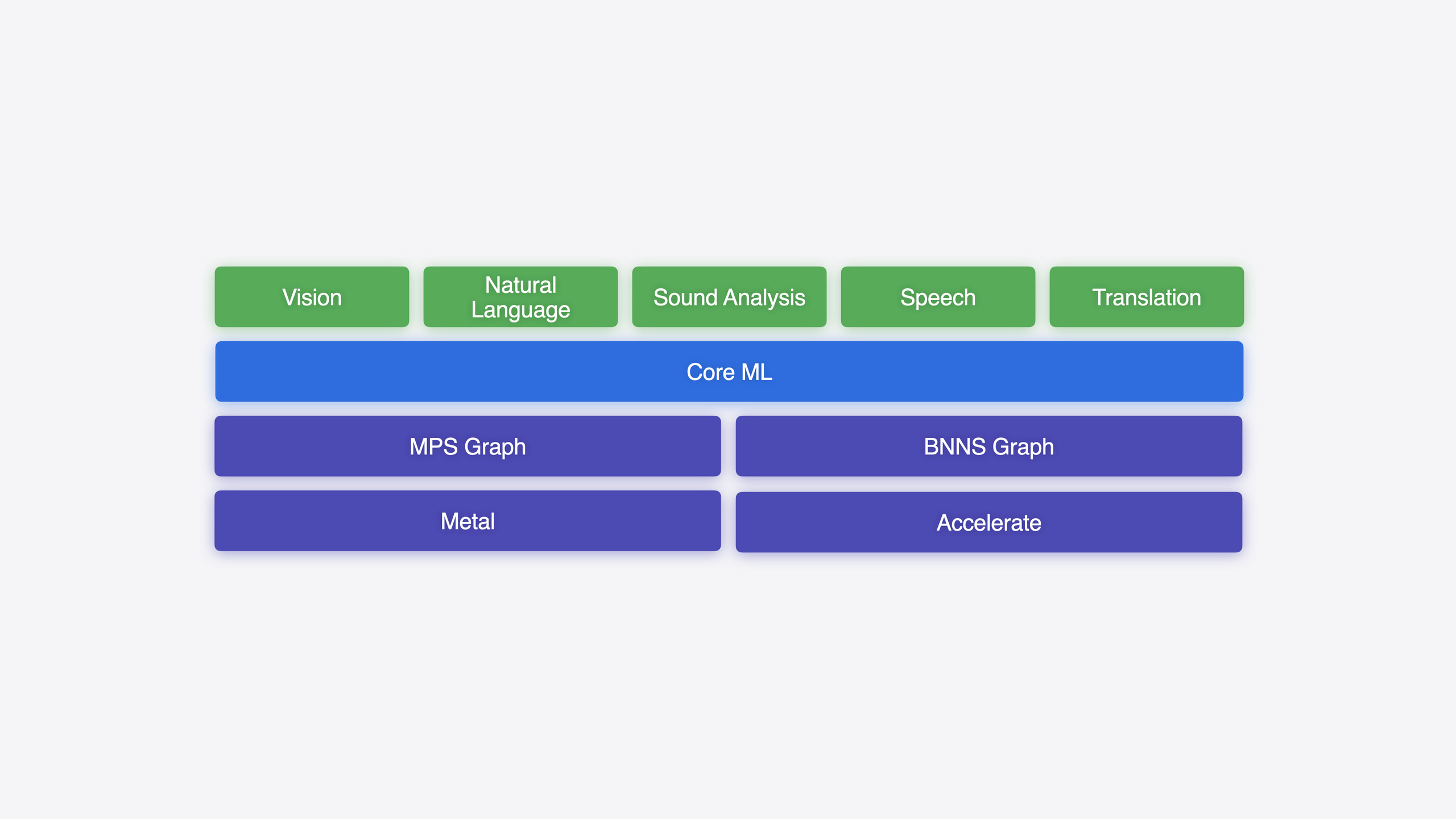
The second layer is ML-powered system APIs. Vision added a Swift API this year (with Swift 6 support), hand pose detection, and aesthetics scoring requests (04:23). The new Translation framework provides direct translation APIs and translation UI, supporting batch text translation (05:11). Natural Language, Sound Analysis, Speech, and other frameworks continue to provide text analysis, sound recognition, and speech-to-text.
The third layer is Create ML, customizing system models with your own data. This year adds an object tracking template (for anchoring spatial experiences on visionOS), time series classification/prediction components, and data annotation visualization (06:40).
The fourth layer is Core ML for deploying custom models (including open-source models from Hugging Face such as Whisper, Stable Diffusion, and Mistral). The workflow has three steps: train (PyTorch/TensorFlow/JAX/MLX on Mac with Metal acceleration) → prepare (Core ML Tools conversion and optimization) → integrate (Core ML framework loading and inference) (07:51).
Detailed Content
Apple’s on-device machine learning is built on Apple silicon’s unified memory architecture, with CPU, GPU, and Neural Engine ML accelerators working together for efficient, low-latency inference (00:59). This enables features like gesture recognition, Portrait mode, ECG, and heart rate monitoring to run entirely on device—interactive and privacy-preserving (00:22).
Apple Intelligence: built-in system intelligence
Writing Tools is a new Apple Intelligence language capability integrated directly into system text views and web views. Users can rewrite, proofread, and summarize within your app without extra development. See “Get started with Writing Tools” (10168) for best practices (02:24).
Image Playground provides on-device image generation—no model training or safety guardrails to build. A few lines of code get a prebuilt UI. Because models run locally, users can generate unlimited images at no cost (03:01).
Siri gets major improvements this year through App Intents—more natural speech, more personalization, more relevant context. See “Bring your app to Siri” (10133) to enhance your app’s Siri capabilities (03:27).
ML-powered system APIs
Vision provides an all-new Swift API with Swift 6 support this year. New features include hand pose detection (part of Body Pose requests) and aesthetics scoring requests (04:23). See “Discover Swift enhancements in the Vision framework” (10163) to integrate visual understanding easily.
The Translation framework is new this year, with two integration paths: a simple translation UI (programmatically launchable) and a direct translation API (display output in any UI). Batch requests translate more text efficiently (05:11). See “Meet the Translation API” (10117) for language resource download and management.
Natural Language, Sound Analysis, Speech, and other frameworks continue to provide text analysis, sound recognition, and speech-to-text (04:49).
Create ML: customize models with your own data
Create ML lets you customize models that power system frameworks with your own data. The Create ML app offers template selection, train-in-a-few-clicks, evaluation, and iteration. Under the hood, Create ML and Create ML Components support in-app model training on all platforms (06:07).
New this year:
- Object tracking template: train reference objects to anchor spatial experiences on visionOS (06:40)
- Data annotation visualization: explore and inspect annotations more easily before training (06:52)
- Time series classification and prediction components: integrate within the framework (06:59)
See “What’s new in Create ML” (10183) for details (07:07).
Core ML workflow: train, prepare, integrate
For advanced use cases (fine-tuned diffusion models or large language models from Hugging Face), Core ML provides a complete workflow in three stages (07:51):
# Stage 1: Train on Mac with PyTorch, TensorFlow, JAX, or MLX.
# Use Apple silicon and unified memory architecture to accelerate training with Metal.

import torch
import coremltools as ct  # Stage 2: Prepare by converting with Core ML Tools.

# Start from a PyTorch model.
torch_model = MyTrainedModel()
torch_model.eval()

# Convert to Core ML format.
mlmodel = ct.convert(
    torch_model,
    inputs=[ct.TensorType(shape=(1, 3, 224, 224), dtype=np.float32)]
)

# Optimize the model with quantization, compression, and similar techniques.
mlmodel = ct.optimization.layerwise_compression(mlmodel)

# Save the Core ML model.
mlmodel.save("MyModel.mlmodel")
Key points:
torch_model.eval()ensures inference mode, disabling training-specific behavior like dropoutct.convert()converts a PyTorch model to Core ML format, specifying input tensor shape and data typect.optimization.layerwise_compression()applies layer-wise compression to reduce model sizemlmodel.save()saves as a.mlmodelfile usable directly in Xcode
// Stage 3: Integrate by loading and running inference with the Core ML framework.
import CoreML

struct ModelPredictor {
    let model: MyModel

    init() throws {
        // Load the compiled model from the bundle.
        self.model = try MyModel(configuration: MLModelConfiguration())
    }

    func predict(image: CVPixelBuffer) throws -> MyModelOutput {
        // Run inference.
        let input = MyModelInput(image: image)
        return try model.prediction(input: input)
    }
}
Key points:
MyModel(configuration:)loads the model from the bundle, supporting compute unit configuration (CPU/GPU/Neural Engine)MyModelInputwraps model input with type safetymodel.prediction(input:)runs inference and returns typed output- Core ML automatically partitions the model across CPU, GPU, and Neural Engine to maximize hardware utilization
Training stage (08:28):
- Leverage Apple silicon and unified memory architecture
- Support PyTorch, TensorFlow, JAX, and MLX
- Efficient training on Apple GPU via Metal
- See “Train your machine learning and AI models on Apple GPUs” (10160)
Preparation stage (09:14):
- Use Core ML Tools to convert trained models to Core ML format
- Optimize models with compression for good performance
- New this year: new model compression techniques, model state representation, Transformer-specific operations, multi-function model support
- See “Bring your machine learning and AI models to Apple silicon” (10159) for tradeoffs between storage size, latency, and accuracy
Integration stage (10:16):
- Core ML is the gateway for deploying models on Apple devices, used by thousands of apps
- Xcode integration simplifies the development workflow
- Automatically partitions models across CPU, GPU, and Neural Engine
- See “Deploy machine learning and AI models on-device with Core ML” (10161) for new features:
- New
MLTensortype simplifies glue code for computations - State management for LLM key-value caches
- Functions to select specific style adapters for image generation models at runtime
- Updated performance reports with more insight into per-operation cost
- New
Lower-level frameworks: MPS Graph and BNNS Graph
When Core ML’s automatic management is not enough, use lower-level frameworks (11:41):
MPS Graph (12:25):
- Built on Metal Performance Shaders
- Can load Core ML models or programmatically build, compile, and execute computation graphs
- Good for apps with heavy graphics workloads that need to schedule ML alongside other work
- See “Accelerate machine learning with Metal” (10218) for efficient Transformer execution on GPU
BNNS Graph (13:12):
- New Accelerate framework API for optimized ML on CPU
- Significantly faster than the legacy kernel-based BNNS API
- Supports Core ML models for real-time, latency-sensitive CPU inference
- Tight control over memory allocation—good for audio processing and similar use cases
Research tools: MLX and CoreNet
Apple open-sourced research tools to support ML research (14:47):
MLX (15:09):
- Designed by Apple ML researchers for other researchers
- Familiar, extensible API for exploring new ideas on Apple silicon
- Unified memory model with efficient CPU/GPU operations
- Supports Python, C++, or Swift
CoreNet (15:42):
- Powerful neural network toolkit for researchers and engineers
- Train a wide range of models from standard to novel architectures
- Scales up or down for diverse tasks
- Includes OpenELM, an efficient language model family
Core Takeaways
-
Prioritize built-in system intelligence and ML-powered APIs
Why it matters: Apple Intelligence, Writing Tools, Image Playground, Vision, Translation, and other system features are well optimized and tested—low integration cost, great user experience.
How to start: Writing Tools and Image Playground integrate in a few lines of code. Vision’s new Swift API is easier to use. Translation provides out-of-the-box translation UI. Prefer these over training similar functionality yourself.
-
Create ML fits mid-tier scenarios needing customization with your own data
Why it matters: When system models do not meet specific needs, Create ML offers a low-barrier way to customize with your data—no deep ML expertise required.
How to start: Use the Create ML app to pick a template, train, evaluate, and iterate with your data. The new object tracking template suits visionOS spatial experiences; time series components suit prediction apps.
-
Core ML workflow fits deploying custom and open-source models
Why it matters: When you need pretrained open-source models (Whisper, Stable Diffusion, Mistral) or your own trained models, Core ML provides complete on-device deployment leveraging Apple hardware acceleration.
How to start: Train on Mac with PyTorch/TensorFlow/JAX/MLX, convert and optimize with Core ML Tools, integrate with the Core ML framework. Use
MLTensor, state, and functions to simplify generative AI deployment. -
Use MPS Graph or BNNS Graph when you need fine-grained control
Why it matters: When Core ML’s automatic management cannot meet performance or latency requirements, MPS Graph and BNNS Graph offer lower-level control.
How to start: MPS Graph suits apps with heavy graphics workloads—schedule ML alongside other GPU work. BNNS Graph suits real-time, latency-sensitive CPU inference such as audio processing.
Related Sessions
- Get started with Writing Tools — Integrate Apple Intelligence writing capabilities into your app
- Discover Swift enhancements in the Vision framework — Explore Vision framework’s Swift 6 APIs
- Meet the Translation API — Learn about the new language translation framework
- What’s new in Create ML — Explore Create ML’s new templates and features
- Train your machine learning and AI models on Apple GPUs — Best practices for training models on Mac
Comments
GitHub Issues · utterances