
Highlight
Deploying machine learning models on Apple platforms has three stages: training, deployment preparation, and app integration. This session focuses on inference performance optimization.
Core Content
Deploying machine learning models on Apple platforms has three stages: training, deployment preparation, and app integration. This session focuses on inference performance optimization.
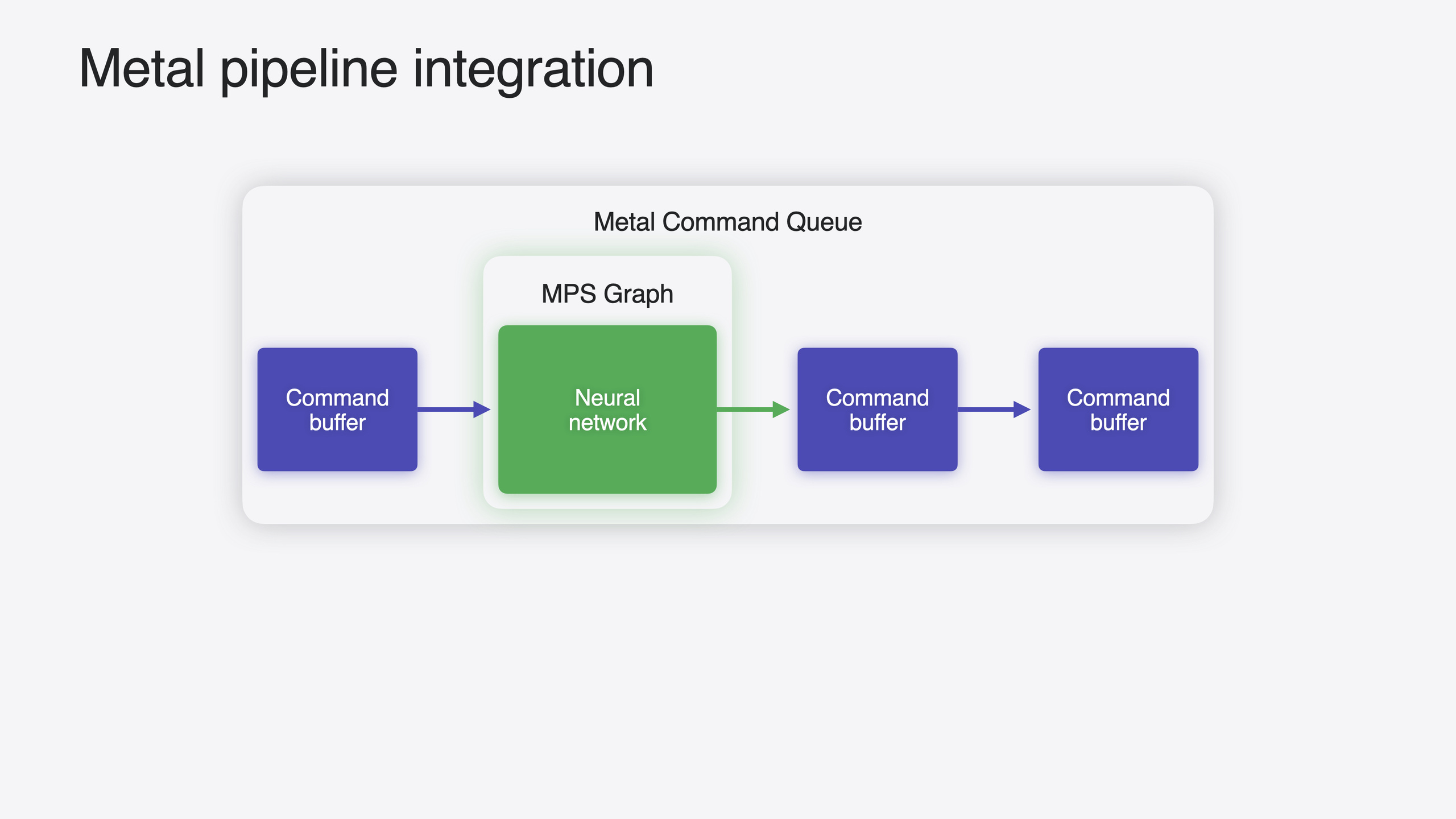
If your app deploys models with Core ML, MPSGraph already provides GPU acceleration underneath. You can also train models with PyTorch, TensorFlow, JAX, and other frameworks—all built on Metal Performance Shaders Graph (MPSGraph). You may need MPSGraph directly when your app already uses Metal and you need to schedule ML tasks alongside other GPU work, or when you need to share underlying Metal resources like buffers.
This year’s updates go in three directions. Compute performance optimization for Transformer models, including fused Scaled Dot-Product Attention (SDPA) ops and in-place KV Cache updates. Memory bandwidth optimization with new 4-bit integer quantization support. Quality improvements including block quantization and Adapters. Plus FFT acceleration and the MPSGraph Viewer visualization tool.
Detailed Content
Fused Scaled Dot-Product Attention (SDPA)
The core of Transformer models is the Multi-Head Attention block, where Scaled Dot-Product Attention consists of a series of operations. MPSGraph adds fused ops this year, merging these operations into a single kernel (03:56).
Usage:
let sdpaResult = graph.scaledDotProductAttention(
    query: queryTensor,
    key: keyTensor,
    value: valueTensor
)
Key points:
scaledDotProductAttentiontakes Q, K, V tensors as parameters- Merges multiple operations into a single kernel, reducing intermediate result read/write overhead
- Replace manually implemented SDPA for performance gains with minimal code changes
In-place KV Cache updates
During autoregressive generation, each new token resends all previous tokens through matrix multiplication, causing K and V projections to be recomputed repeatedly. KV Cache stores computed K and V values for reuse, simplifying matrix-matrix multiplication to matrix-vector multiplication (05:00).
Implement in-place updates with Variable + sliceUpdate:
// Create a placeholder for the cache; dimensions depend on the model.
let keyCachePlaceholder = MPSGraphTensor(
    shape: [batch, heads, maxLength, headDim],
    dataType: .float32
)

// Create a Variable that represents the current cache state.
let keyCacheVariable = graph.makeVariable(
    name: "keyCache",
    shape: [batch, heads, maxLength, headDim],
    dataType: .float32
)

// Insert the new key projection into the cache with sliceUpdateDataTensor.
let updatedCache = graph.sliceUpdateDataTensor(
    newKeyProjection,
    updateTensor: keyCacheVariable,
    startIndex: [0, 0, currentPosition, 0],
    endIndex: [batch, heads, currentPosition + 1, headDim],
    stride: [1, 1, 1, 1],
    name: "updateKeyCache"
)

// Assign the updated cache back to the Variable; MPSGraph optimizes it into an in-place update.
keyCacheVariable.assign(updatedCache)

// Extract the computed portion with a slice operation.
let validCache = graph.slice(
    tensor: keyCacheVariable,
    startIndex: [0, 0, 0, 0],
    endIndex: [batch, heads, currentPosition + 1, headDim],
    stride: [1, 1, 1, 1],
    name: "extractValidCache"
)
Key points:
makeVariablecreates mutable tensors, unlike ordinary graph operation results—they can be reassignedsliceUpdateDataTensoruses start/end arrays to determine where new values are inserted- Assigning
updatedCacheback tokeyCacheVariablelets MPSGraph optimize to in-place update, avoiding new memory allocation each iteration sliceextracts the valid computed portion of the cache to pass to SDPA
4-bit integer quantization
Large language model weights can reach tens of GB, typically represented in 16-bit floating point. MPS previously supported 8-bit integer quantization (halving memory); this year adds 4-bit format (halving memory again) (07:46).
MPS offers two quantization schemes. Linear (affine) quantization suits uniformly distributed weights—8-bit has 256 quantization points, 4-bit has 16, mapping values to the nearest point during quantization. LUT quantization suits weights concentrated in different regions—you choose quantization points based on data distribution and store them in a lookup table; each weight needs only a 4- or 8-bit index.
// Linear quantization: dequantize back to floating point.
let dequantized = graph.dequantize(
    quantizedTensor: quantizedWeights,
    scale: scaleValue,
    zeroPoint: zeroPointValue,
    dataType: .float32,
    name: "dequantize"
)

// LUT quantization: pass in a lookup table.
let dequantizedLUT = graph.dequantize(
    quantizedTensor: quantizedWeights,
    lut: lookupTable,  // 32-bit floating-point lookup table.
    dataType: .float32,
    name: "dequantizeLUT"
)
Key points:
dequantizeconverts quantized values back to 32-bit float- Linear quantization passes
scaleandzeroPoint; LUT quantization passes alutlookup table - When dequantization is immediately followed by matrix multiplication, MPSGraph automatically fuses both into quantized matrix multiplication—element-wise dequantization instead of storing a full dequantized copy first
Block quantization
Using a single scale and zeroPoint for all weights limits precision. Block quantization splits weights into small blocks, each with its own scale and zeroPoint for higher precision (10:45).
// Block quantization: pass tensor-form scale and zeroPoint values, one set per block.
let dequantizedBlocked = graph.dequantize(
    quantizedTensor: quantizedWeights,
    scale: scalePerBlock,        // tensor, one value per block.
    zeroPoint: zeroPointPerBlock, // tensor, one value per block.
    dataType: .float32,
    name: "dequantizeBlocked"
)
Key points:
- Same code structure as global quantization; difference is
scaleandzeroPointchange from scalars to tensors - Each block has independent scale/zeroPoint, matching local weight distribution more precisely
Adapters (Callables)
Adapters are small layers inserted into models that update only adapter parameters. They can adapt to new tasks or compensate for quantization error. MPSGraph implements this via callables (11:48).
// 1. Call the adapter in the main graph.
let adapterOutput = graph.call(
    "myAdapter",
    inputs: [inputTensor],
    outputTypes: [MPSGraphTensorDataType.float32]
)

// 2. Create the adapter's subgraph.
let adapterGraph = MPSGraph()
let adapterInput = adapterGraph.placeholder(
    shape: nil,  // unranked
    dataType: .float32,
    name: "input"
)
let adapterOutputTensor = adapterGraph.multiplication(
    adapterInput,
    adapterGraph.constant(2.0, dataType: .float32),
    name: "output"
)

// 3. Compile the adapter into a GraphExecutable.
let adapterExecutable = adapterGraph.compile(
    device: metalDevice,
    inputs: [MPSGraphInput(shape: [batch, dim], dataType: .float32)],
    outputTensor: adapterOutputTensor
)

// 4. Map the adapter name to the executable through the descriptor when compiling the main graph.
let descriptor = MPSGraphCompilationDescriptor()
descriptor.callables = ["myAdapter": adapterExecutable]
let mainExecutable = mainGraph.compile(
    device: metalDevice,
    inputs: mainInputs,
    outputTensors: mainOutputs,
    descriptor: descriptor
)
Key points:
graph.calldeclares an adapter call in the main graph, providing name, inputs, and output types- The adapter itself is an independent MPSGraph compiled as a
GraphExecutable - When compiling the main graph, map names to executables via
MPSGraphCompilationDescriptor’scallablesdictionary - Can compensate for quantization error by fine-tuning only adapter parameters
FFT acceleration
MPSGraph adds FFT support this year, suitable for audio preprocessing and similar scenarios (13:49). Sliding window views via the strided NDArray API require no memory copy:
// Create the sliding-window view.
let windowedView = inputTensor.arrayView(
    shape: [1, numWindows, windowSize],
    strides: [1, hopSize, 1],
    name: "stftView"
)

// Windowing plus FFT.
let windowed = graph.multiplication(windowedData, hannWindow, name: "applyWindow")
let fftResult = graph.fft(
    tensor: windowed,
    axes: [2],
    name: "computeFFT"
)
Key points:
arrayViewcreates views via memory aliasing—zero copystridesparameter controls window hop size; e.g., 256-element stride for 50% overlap- Multiply by window function (Hann/Gaussian) first, then call
fftto compute each window’s spectrum
MPSGraph Viewer
Xcode 16 adds MPSGraph Viewer to open MPSGraph package files directly and visualize computation graph connections (17:25). Features: view optimized Stitched Shader regions per device; Operations Navigator lists all ops; Constants Navigator ranks constants by size and previews weights; Inspector shows where variables are created and used.
Create package files via MPSGraphExecutable’s serialize API, or convert from CoreML or ONNX models with mpsgraphtool convert.
Core Takeaways
-
What to do: Replace manually implemented SDPA with MPSGraph’s fused op Why it’s worth it: Minimal change, maximum benefit—multiple operations fused into one kernel, reducing intermediate read/write How to start: Find hand-written attention code, replace with
graph.scaledDotProductAttention(query:key:value:), verify output consistency -
What to do: Implement KV Cache + Variable in-place updates for autoregressive inference Why it’s worth it: Avoids recomputing all K/V projections each iteration—speedup grows with sequence length; in-place updates avoid repeated memory allocation How to start: Create cache with
makeVariable, insert new values withsliceUpdateDataTensor, assign back withassign, extract valid portion withslice -
What to do: Evaluate 4-bit quantization impact on model accuracy and choose the right scheme Why it’s worth it: Dropping from 8-bit to 4-bit halves memory bandwidth again, but output quality must be verified as acceptable How to start: Use linear quantization for uniform weight distribution, LUT for concentrated distribution; run benchmarks then compare post-quantization accuracy; use MPSGraph Viewer to compare computation graphs before and after quantization
-
What to do: Use Adapters (Callables) to compensate for quantization error Why it’s worth it: Quantization saves bandwidth but introduces precision loss; adapters need only a few parameters to fine-tune output quality How to start: Insert adapter calls in the main graph with
graph.call; map names to executables at compile time viaCompilationDescriptor.callables
Related Sessions
- Bring your machine learning and AI models to Apple silicon — Complete model conversion and Apple Silicon optimization workflow
- Train your machine learning and AI models on Apple GPUs — Train models with Metal for PyTorch, JAX, and TensorFlow
- Deploy machine learning and AI models on-device with Core ML — Core ML conversion and deployment performance optimization
- Support real-time ML inference on the CPU — BNNSGraph accelerates ML inference on the CPU
- Explore machine learning on Apple platforms — Overview of ML frameworks on Apple platforms
Comments
GitHub Issues · utterances