
Highlight
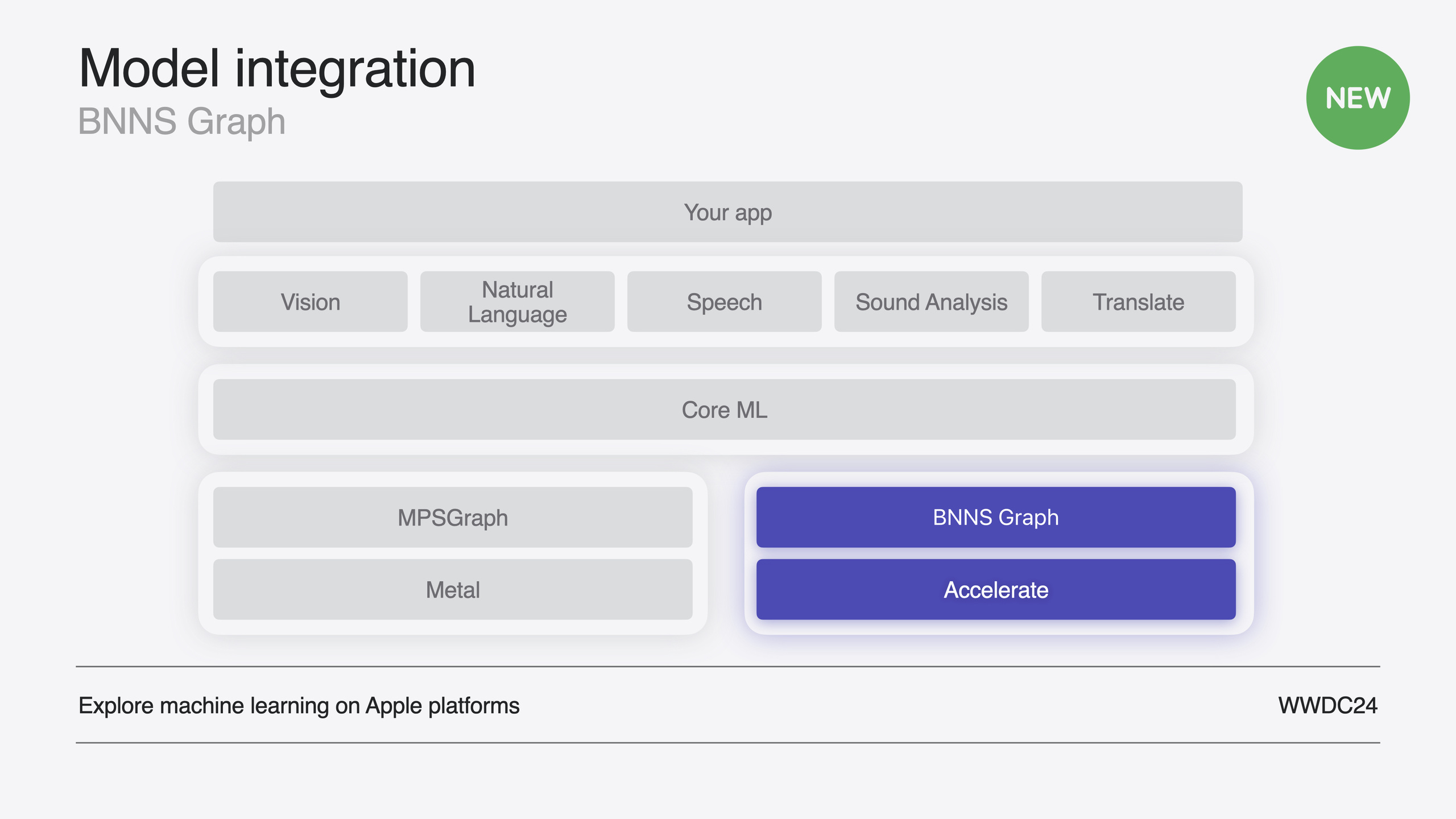
BNNS Graph is a new graph-level ML inference API in Accelerate that consumes entire Core ML models and automatically applies math transforms, layer fusion, copy elimination, and weight reordering—on average more than 2× faster than traditional BNNS primitives.
Core Content
Traditional BNNS APIs work layer by layer: for every convolution, activation, and normalization you manually create n-dimensional array descriptors for inputs, outputs, weights, and biases, assemble parameter structs, create layer objects, and execute inference layer by layer. A full model means repeating this for every layer and managing intermediate tensor memory yourself. Lots of code, and no cross-layer optimization.
BNNS Graph changes the model: provide a compiled .mlmodelc file and BNNSGraphCompileFromFile compiles the entire model into an optimized graph object—kernel list plus intermediate tensor memory layout. Create the graph once, wrap it in a mutable context with BNNSGraphContextMake, and run inference repeatedly. Because BNNS Graph sees the full computation graph, it can optimize what layer-by-layer APIs cannot: move trailing slice ops forward (math transforms), fuse convolution and activation into one kernel (layer fusion), replace copies with window views (copy elimination), and reorder weights from row-major to blocked iteration order for cache hits (weight reordering). Apple claims these optimizations average 2×+ speedup with no extra code from you.
The session also focuses on real-time audio—Audio Unit render callbacks require zero allocation and single-thread execution or kernel context switches miss real-time deadlines. BNNS Graph offers fine control: single-thread target at compile time, preallocated page-aligned workspace, dynamic shape declaration, and direct pointer arguments.
Detailed Content
Compiling the graph object
Compiling from .mlmodelc is the first step. Compile options control single-thread execution, optimization preference (performance vs size), and more. (00:44)
// Get the path to the mlmodelc.
NSBundle *main = [NSBundle mainBundle];
NSString *mlmodelc_path = [main pathForResource:@"bitcrusher"
                                         ofType:@"mlmodelc"];

// Specify single-threaded execution.
bnns_graph_compile_options_t options = BNNSGraphCompileOptionsMakeDefault();
BNNSGraphCompileOptionsSetTargetSingleThread(options, true);

// Compile the BNNSGraph.
bnns_graph_t graph = BNNSGraphCompileFromFile(mlmodelc_path.UTF8String,
                                              NULL, options);
assert(graph.data);
BNNSGraphCompileOptionsDestroy(options);
Key points:
BNNSGraphCompileFromFiletakes a.mlmodelcpath and returns an immutable graph object- Pass
NULLas the second parameter to compile all functions in the source model; specify a function name for multi-function models BNNSGraphCompileOptionsSetTargetSingleThreaddisables multithreading—required for real-time audio- Call
BNNSGraphCompileOptionsDestroyafter use to release compile options
Creating context and workspace
The graph object is immutable; inference needs a mutable context for dynamic shapes and execution options. Real-time scenarios also need preallocated workspace to avoid allocation during execution. (10:41)
// Create the context.
context = BNNSGraphContextMake(graph);
assert(context.data);

// Set the argument type.
BNNSGraphContextSetArgumentType(context, BNNSGraphArgumentTypePointer);

// Specify the dynamic shape.
uint64_t shape[] = {mMaxFramesToRender, 1, 1};
bnns_graph_shape_t shapes[] = {
    (bnns_graph_shape_t) {.rank = 3, .shape = shape},
    (bnns_graph_shape_t) {.rank = 3, .shape = shape}
};
BNNSGraphContextSetDynamicShapes(context, NULL, 2, shapes);

// Create the workspace.
workspace_size = BNNSGraphContextGetWorkspaceSize(context, NULL) + NSPageSize();
workspace = (char *)aligned_alloc(NSPageSize(), workspace_size);
Key points:
BNNSGraphContextMakewraps the immutable graph in a mutable contextBNNSGraphArgumentTypePointerpasses raw pointers instead of tensor structs—good for direct audio buffer wiringBNNSGraphContextSetDynamicShapesdeclares max input/output shapes based on audio unit max frames- Workspace must be page-aligned; size from
BNNSGraphContextGetWorkspaceSize - Add
NSPageSize()for alignment slack
Computing argument indices
Parameter order in the compiled model may differ from your Python code—query with BNNSGraphGetArgumentPosition. (11:58)
// Calculate indices into the arguments array.
dst_index = BNNSGraphGetArgumentPosition(graph, NULL, "dst");
src_index = BNNSGraphGetArgumentPosition(graph, NULL, "src");
resolution_index = BNNSGraphGetArgumentPosition(graph, NULL, "resolution");
saturationGain_index = BNNSGraphGetArgumentPosition(graph, NULL, "saturationGain");
dryWet_index = BNNSGraphGetArgumentPosition(graph, NULL, "dryWet");
Key points:
- Names (“dst”, “src”, etc.) match model definitions
- Indices locate parameters in the
argumentsarray - Query once at initialization
Executing inference
In the audio render callback, run inference with preallocated workspace and indices. (13:29)
// Set the size of the first dimension.
BNNSGraphContextSetBatchSize(context, NULL, frameCount);

// Specify the direct pointer to the output buffer.
arguments[dst_index] = {
    .data_ptr = outputBuffers[channel],
    .data_ptr_size = frameCount * sizeof(outputBuffers[channel][0])
};

// Specify the direct pointer to the input buffer.
arguments[src_index] = {
    .data_ptr = (float *)inputBuffers[channel],
    .data_ptr_size = frameCount * sizeof(inputBuffers[channel][0])
};

// Specify the direct pointer to the resolution scalar parameter.
arguments[resolution_index] = {
    .data_ptr = &mResolution,
    .data_ptr_size = sizeof(float)
};

// Specify the direct pointer to the saturation gain scalar parameter.
arguments[saturationGain_index] = {
    .data_ptr = &mSaturationGain,
    .data_ptr_size = sizeof(float)
};

// Specify the direct pointer to the mix scalar parameter.
arguments[dryWet_index] = {
    .data_ptr = &mMix,
    .data_ptr_size = sizeof(float)
};

// Execute the function.
BNNSGraphContextExecute(context, NULL,
                        5, arguments,
                        workspace_size, workspace);
Key points:
BNNSGraphContextSetBatchSizesets current frame sample count—may vary per frame- Each argument uses
data_ptranddata_ptr_sizefor memory location and size - Scalar parameters (resolution, dryWet) point directly at UI slider values
BNNSGraphContextExecuteruns inference; results write directly to outputBuffers- Zero allocation, zero multithreading—meets real-time audio requirements
Additional compile options
Two more compile settings worth noting: (12:24)
- Optimization preference: Default optimizes performance (may increase graph size); switch to size optimization if app size matters, with possible runtime cost
- NaNAndInfinityChecks: Debug NaN/infinity checks useful for 16-bit accumulator overflow—don’t ship with this enabled
Core Takeaways
-
What to do: Replace Core ML with BNNS Graph for CPU inference to cut latency. Why: Graph-level optimizations (layer fusion, math transforms, copy elimination) average 2×+ faster than layer-by-layer BNNS without changing training—the same
.mlmodelcworks. How to start: Swap existing Core ML inference forBNNSGraphCompileFromFile+BNNSGraphContextExecute. -
What to do: Integrate ML models for real-time effects in audio apps. Why: BNNS Graph single-thread mode, preallocated workspace, and direct pointer args naturally satisfy Audio Unit render callback constraints—zero allocation, zero context switches. How to start: Use Xcode’s Audio Unit Extension App template, drag in
.mlpackage, compile graph and create workspace in DSP Kernel init, onlyBNNSGraphContextExecutein the render callback. -
What to do: Show ML processing effects live in SwiftUI. Why: One model can use separate contexts for audio and UI threads—preview effects in UI for better UX. How to start: Create an independent graph context for UI (contexts are single-thread at a time), run inference with Swift BNNS Graph API, feed output buffers to Swift Charts for waveforms.
Related Sessions
- Bring your machine learning and AI models to Apple silicon — Optimizing ML/AI models for Apple silicon
- Deploy machine learning and AI models on-device with Core ML — New Core ML conversion and on-device deployment optimizations
- Explore the Accelerate framework — Accelerate overview; BNNS is a sublibrary
Comments
GitHub Issues · utterances