
Highlight
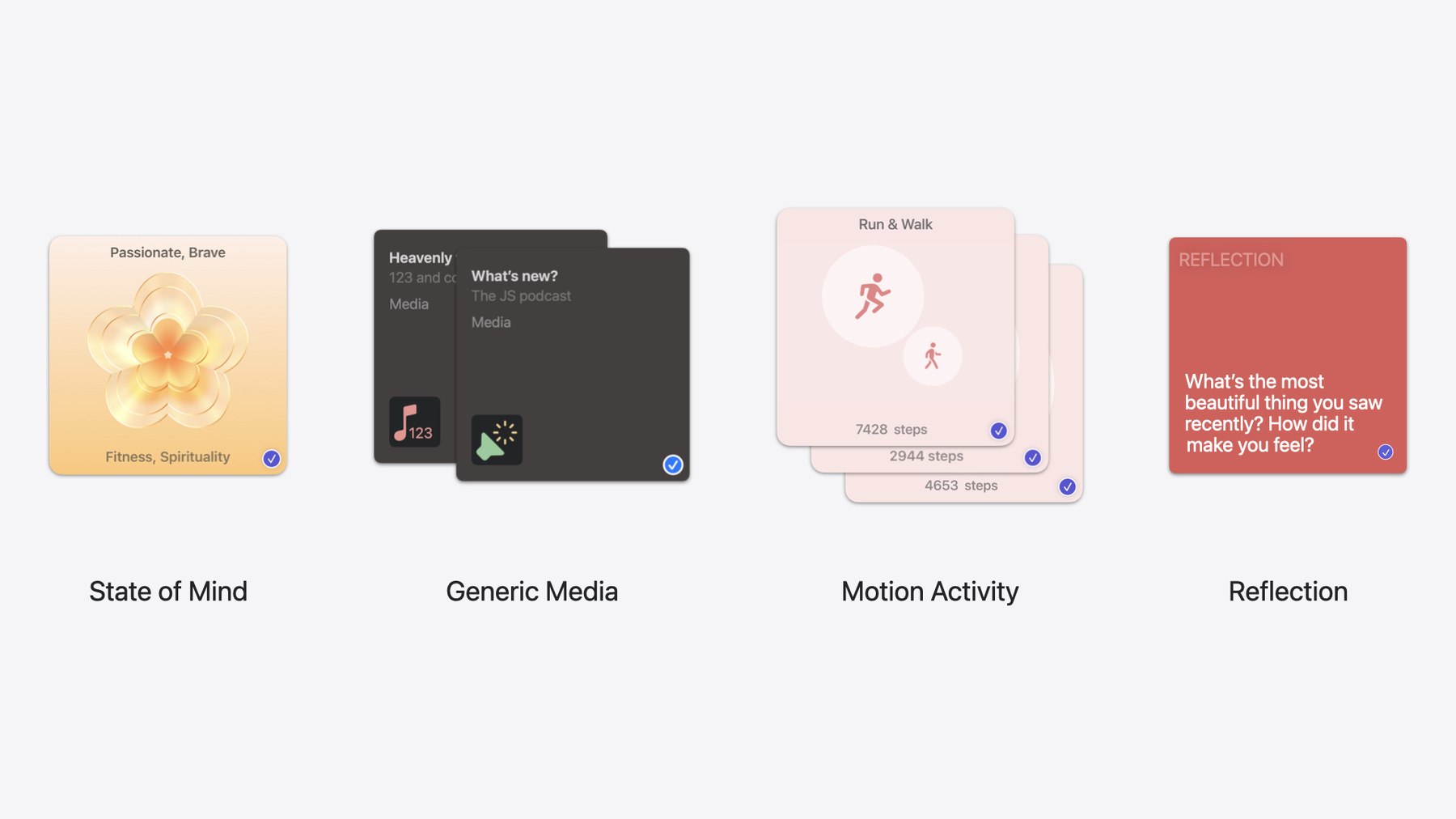
iOS 18 adds four asset types to the Journaling Suggestions API: State of Mind, Motion Activity run types, Generic Media (third-party media), and Reflection Prompts—journaling apps get richer writing material with minimal code changes.
Core Content
Journaling apps face a core problem: users open the app and don’t know what to write. The Journaling Suggestions API in iOS 17.2 tried to solve this—iOS automatically detects photos, workouts, places, and other life events and suggests them as starting points for journal entries. Within months of launch, many apps adopted the API.
iOS 18 makes suggested content richer. Previously, apps could only get material from inside Apple’s ecosystem: Apple Music songs, Apple Podcasts episodes, iPhone-detected walks. But life doesn’t happen only in Apple apps—users listen on third-party apps, log moods in Health, and sometimes need a writing prompt rather than sensed data. iOS 18’s four updates target these gaps.
First, State of Mind: mood data logged in the Health app can appear in journal suggestions. Second, Motion Activity adds running and mixed walk/run types, covering runners without Apple Watch. Third, Generic Media supports music and podcasts consumed in non-Apple apps. Fourth, Reflection Prompts opens prompts previously exclusive to Apple Journal to all developers. With automatic landscape support, Journaling Suggestions in iOS 18 is a broad update.
Detailed Content
Landscape support (01:59)
The Journaling Suggestions picker in iOS 17.2 was locked to portrait. From iOS 18, the picker follows your app’s orientation settings. The confirmation screen (where users review what they’ll share) also uses the wider screen for larger asset previews. No developer changes needed—the picker adapts automatically when your app supports landscape.
State of Mind assets (02:50)
State of Mind, introduced in iOS 17 in the Health app, lets users record two mood sample types: Momentary Emotions for how they feel right now, and Daily Moods for how the day felt overall. Each sample has three dimensions:
- Valence: how positive or negative the mood is
- Labels: specific mood types such as “calm” or “content”
- Associations: factors that contributed, such as “family,” “work,” or “fitness”
State of Mind suggestions can appear alone or attached to existing trip, activity, or at-home suggestions. The new asset type is JournalingSuggestion.StateOfMind, containing an HKStateOfMind sample, image URL, light/dark theme colors, and timestamp. Code pattern from the session:
// Extract State of Mind assets from the suggestion.
let stateOfMindItems = suggestion.content.compactMap { $0 as? JournalingSuggestion.StateOfMind }

for item in stateOfMindItems {
    // Display the asset icon with AsyncImage.
    AsyncImage(url: item.icon)
    // Convert valence to an emoji with a custom function.
    Text(getEmotionEmoji(valence: item.stateOfMind.valence))
}

func getEmotionEmoji(valence: Double) -> String {
    if valence > 0 { return "😊" }
    else if valence < 0 { return "😔" }
    else { return "😐" }
}
Key points:
compactMap { $0 as? JournalingSuggestion.StateOfMind }filters State of Mind assets from suggestion contentitem.iconprovides the asset icon URL forAsyncImageitem.stateOfMind.valenceaccesses valence—positive means upbeat, negative means down- Use
labelsandassociationsto build richer mood-writing experiences
Motion Activity updates (07:20)
iOS 17.2 Motion Activity only supported walking detection (iPhone-based, no Apple Watch). iOS 18 adds running and mixed walk/run. Asset type remains JournalingSuggestion.MotionActivity with a new movementType field. Each movement type has a matching icon.
// Extract Motion Activity assets from the suggestion.
let motionItems = suggestion.content.compactMap { $0 as? JournalingSuggestion.MotionActivity }

for item in motionItems {
    AsyncImage(url: item.icon)
    Text(getMotionActivityLabel(type: item.movementType))
}

func getMotionActivityLabel(type: MovementType) -> String {
    switch type {
    case .running: return "Running"
    case .walking: return "Walking"
    case .mixedWalkRun: return "Walk + Run"
    default: return "Activity"
    }
}
Key points:
movementTypeis the new field distinguishing walk, run, and mixed activity- Suggestions use iPhone sensors—no Apple Watch required
- Motion suggestions can still combine with photos and music
Generic Media (09:17)
iOS 17.2 Song and Podcasts assets only covered Apple Music and Apple Podcasts. iOS 18 adds JournalingSuggestion.GenericMedia for music and podcasts consumed in third-party apps. Assets include title, artist, album, appIcon, and timestamp. Third-party media apps donate data via the Now Playing API and can opt out.
// Extract Generic Media assets from the suggestion.
let mediaItems = suggestion.content.compactMap { $0 as? JournalingSuggestion.GenericMedia }

for item in mediaItems {
    AsyncImage(url: item.appIcon)
    if let title = item.title { Text(title) }
    if let artist = item.artist { Text(artist) }
    if let album = item.album { Text(album) }
}
Key points:
compactMap { $0 as? JournalingSuggestion.GenericMedia }filters third-party media assetsappIconis the playing app’s icon, not album arttitle,artist, andalbummay be nil depending on donated data—always optional bind- Controlled by the Media toggle in Settings
Reflection Prompts (11:39)
Reflection prompts are general writing guides on themes like gratitude, kindness, and goals. Unlike sensed suggestions, they’re generic and timeless—users can return to the same prompt anytime. Enabled by default with a dedicated Reflection Prompts toggle in Settings. Users can switch prompts in the suggestion picker.
Asset type is JournalingSuggestion.Reflection with prompt text and backgroundColor.
// Extract Reflection assets from the suggestion.
let reflectionItems = suggestion.content.compactMap { $0 as? JournalingSuggestion.Reflection }

for item in reflectionItems {
    item.backgroundColor.map { color in
        Text(item.prompt)
            .foregroundStyle(getForegroundColor(for: color))
            .background(color)
    }
}

func getForegroundColor(for backgroundColor: Color) -> Color {
    // Choose the foreground color based on background brightness.
    backgroundColor.isLight ? .black : .white
}
Key points:
item.promptis the selected prompt stringitem.backgroundColoris the color shown in the suggestion picker—use it for visual consistency in your app- Compute foreground color from background brightness for readability
- Reflection prompts are on by default—no manual user opt-in
Integration guidance (13:54)
If your app doesn’t adopt new asset types, new content from the completion block is ignored and users get confused. Support fallback asset types (UIImage and Image) so you have basic display even without handling every field. All data sharing is user-controlled: users choose which content types to include, which suggestion to send, and which assets to include.
Core Takeaways
-
What to do: Integrate State of Mind assets and show mood data as journal context. Why: Mood and journaling naturally align; Health mood data lowers the writing barrier. How to start: Add
JournalingSuggestion.StateOfMindto your existingcompactMapchain and build UI withvalence,labels, andassociations. -
What to do: Integrate Reflection Prompts as daily writing guides. Why: Lowest integration cost (one string and one color) with immediate impact on “don’t know what to write.” How to start: Filter
JournalingSuggestion.Reflection, displayprompt, and matchbackgroundColor. -
What to do: Support Generic Media for music and podcasts from third-party apps. Why: Many users’ primary players aren’t Apple Music—this content was invisible in journals before. How to start: Filter
JournalingSuggestion.GenericMedia, useappIconfor source app, and nil-checktitle,artist,album. -
What to do: Add UI for new Motion Activity types. Why: Runners are a large group, and detection is iPhone-based without Apple Watch. How to start: Check
movementTypeand provide icons and copy for.runningand.mixedWalkRun.
Related Sessions
- Explore wellbeing APIs in HealthKit — Full HealthKit API for State of Mind, including writing mood samples
- Get started with HealthKit in visionOS — HealthKit capabilities and adaptation on spatial computing platforms
- What’s new in privacy — New permission flows and privacy controls
- Bring your app to Siri — App Intents and Now Playing API integration for third-party media donation
Comments
GitHub Issues · utterances