
Highlight
Xcode Cloud adds manual start conditions, custom aliases, and webhooks so workflows can automate everything from code pushes to production deployment.
Core Content
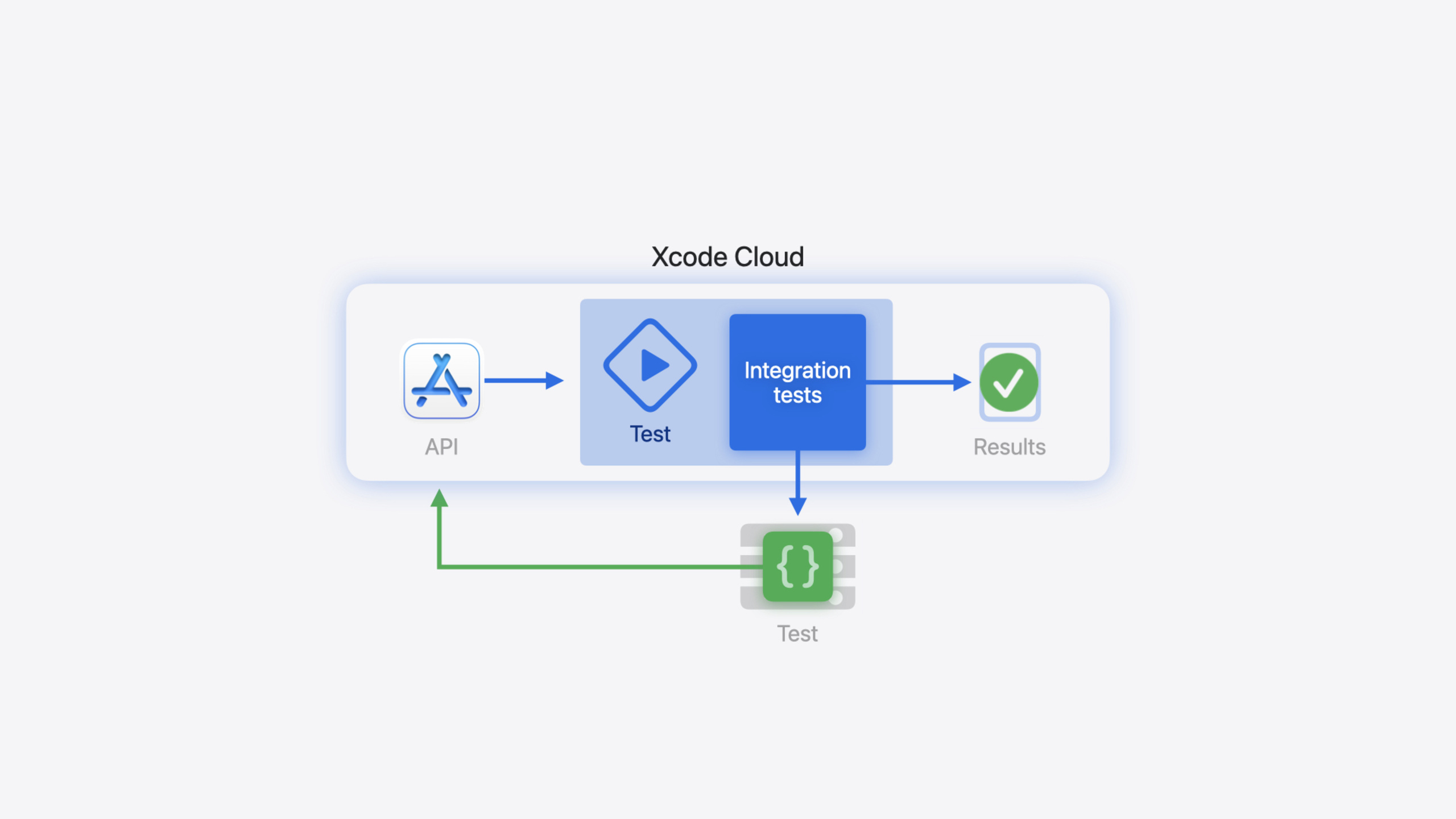
Many teams use Xcode Cloud workflows for one thing: push to main, run tests, ship to TestFlight. That works early on, but once your app depends on backend services, you need integration tests—and those depend on test servers, take longer, and can fail due to network issues. You don’t want them on every push, but you still need to verify compatibility when the server changes.
Apple introduced Manual Start Conditions in Xcode 15.1 so you can create workflows that run only when needed. For example, build a dedicated integration-test workflow triggered manually after server deployment. Then Xcode 15.3 brought Custom Aliases—you define team-level Xcode/macOS version aliases like “Team Preference” and every workflow references that alias. Upgrade the toolchain in one place and all workflows update together. Pair that with ci_scripts custom scripts to check whether the server is online before tests; if not, terminate the build early.
That solves when to run. After server code changes, someone still has to manually trigger the integration-test workflow. The second half of the session shows how to use the App Store Connect API to trigger builds automatically, then pass test results to your deployment service via webhooks—closing the loop from code push to production deployment.
Detailed Content
Four components of a workflow
Every workflow has four parts: Environment (environment variables and Xcode/macOS versions), Start Conditions (branch/PR/tag events, scheduled runs, manual triggers), Build Actions (build, test, analyze, archive), and Post Actions (Slack notifications, TestFlight distribution, etc.).
Custom scripts (ci_scripts)
Custom scripts live in a ci_scripts folder at the project root; filenames determine when they run. ci_pre_xcodebuild.sh runs before xcodebuild—ideal for preflight checks. Scripts can use workflow environment variables like CI_XCODEBUILD_ACTION and CI_WORKFLOW_ID (10:02).
#!/bin/sh

set -e

if [[ $CI_XCODEBUILD_ACTION == "test-without-building" && $CI_WORKFLOW_ID == "82D89C93-B69C-46B5-A794-A2BCFD3EE487" ]]
then
    curl https://example.com/health --fail
fi
Key points:
set -eexits the script on error and stops the workflow—exactly what you want when the server is unreachable$CI_XCODEBUILD_ACTIONis an Xcode Cloud environment variable;test-without-buildingmeans the current action is testing$CI_WORKFLOW_IDlimits the script to a specific workflow; copy it from Xcode’s Cloud reports navigator by right-clicking the workflow and choosing Copy Workflow IDcurl --failreturns a non-zero exit code on non-2xx HTTP status, triggeringset -e
Triggering builds with the App Store Connect API
The CiBuildRuns endpoint lets you start builds remotely. It takes three API calls: look up repositoryID with workflowID, look up the target branch’s gitReferenceID with repositoryID, then create a build with both (14:01).
extension Client {
    func repoID(workflowID: String) async throws -> String {
        return try await ciWorkflowsGetInstance(
            path: .init(id: workflowID),
            query: .init(include: [.repository])
        ).ok.body.json.data.relationships!.repository!.data!.id
    }

    func branchID(repoID: String, name: String) async throws -> String {
        return try await scmRepositoriesGitReferencesGetToManyRelated(
            path: .init(id: repoID)
        )
        .ok.body.json.data
        .filter { $0.attributes!.kind == .BRANCH && $0.attributes!.name == name }
        .first!.id
    }

    func startBuild(workflowID: String, gitReferenceID: String) async throws {
        _ = try await ciBuildRunsCreateInstance(
            body: .json(.init(
                data: .init(
                    _type: .ciBuildRuns,
                    relationships: .init(
                        workflow: .init(data: .init(
                            _type: .ciWorkflows,
                            id: workflowID
                        )),
                        sourceBranchOrTag: .init(data: .init(
                            _type: .scmGitReferences,
                            id: gitReferenceID
                        ))
                    )
                )
            ))
        ).created
    }
}
Key points:
ciWorkflowsGetInstancefetches workflow details;include: [.repository]attaches the related repository so you can readrepositoryIDscmRepositoriesGitReferencesGetToManyRelatedlists all Git references; filter bykind == .BRANCHandnameto find the target branchciBuildRunsCreateInstancecreates a build run with workflow and sourceBranchOrTag relationships- The API is defined in OpenAPI; use Swift OpenAPI Generator for a typed client
The main function chains the three steps (14:43):
static func main() async throws {
    let client = try Client(
        serverURL: Servers.server1(),
        configuration: .init(dateTranscoder: .iso8601WithFractionalSeconds),
        transport: URLSessionTransport(),
        middlewares: [AuthMiddleware(token: ProcessInfo.processInfo.environment["TOKEN"]!)]
    )

    let workflowID = "82D89C93-B69C-46B5-A794-A2BCFD3EE487"
    let repoID = try await client.repoID(workflowID: workflowID)

    let branchName = "main"
    let branchID = try await client.branchID(repoID: repoID, name: branchName)

    try await client.startBuild(workflowID: workflowID, gitReferenceID: branchID)
}
Key points:
AuthMiddlewareinjects the API token read from theTOKENenvironment variable—avoid hardcoding- Builds started via API count as manual triggers, so the workflow must have a manual start condition matching that Git reference
Webhooks for build results
Webhooks notify external services when build events occur. Xcode Cloud sends JSON with build details to your configured HTTP endpoint (17:09).
struct WebhookPayload: Content {
    let ciWorkflow: CiWorkflow
    let ciBuildRun: CiBuildRun

    struct CiWorkflow: Content {
        let id: String
    }

    struct CiBuildRun: Content {
        let id: String
        let executionProgress: String
        let completionStatus: String
    }
}
Key points:
executionProgressindicates whether the build is running or complete (RUNNINGorCOMPLETE)completionStatusindicates success or failure (SUCCEEDEDorFAILED)- Compare
ciWorkflow.idto your target workflow ID to respond only to specific workflows - Configure the endpoint URL under App Store Connect Settings > Webhooks
Full pipeline: after server code deploys to the test environment, trigger the integration-test workflow via API → on completion, webhook notifies the deployment service → pass tests auto-deploy to production; failures block deployment.
Core Takeaways
-
Build a dedicated integration-test workflow: Split tests that depend on external services from your main workflow and use manual start conditions to control timing. Why it’s worth it: Avoid slow, fragile integration tests on every push—save build time and reduce false failures from network jitter. How to start: Duplicate an existing workflow, remove automatic start conditions, switch to Manual Start, and point the Test Action at your integration test plan.
-
Unify toolchain versions with custom aliases: Define Xcode and macOS aliases like “Team Preference” and reference them from every workflow. Why it’s worth it: Upgrade Xcode in one place—no inconsistent builds from a forgotten workflow. How to start: Create aliases in Xcode’s Manage Custom Aliases, then update each workflow’s Environment.
-
Preflight health checks with ci_scripts: In
ci_pre_xcodebuild.sh, curl your dependency service’s health endpoint and fail early if unreachable. Why it’s worth it: Don’t waste a full test run when the server is down. How to start: Createci_scripts/ci_pre_xcodebuild.shat the project root, scope withCI_WORKFLOW_ID, addset -eandcurl --fail. -
Connect upstream/downstream automation with API + webhooks: After server deployment, trigger client integration tests via the App Store Connect API; return results via webhook to decide whether to release. Why it’s worth it: Eliminate manual handoffs—client and server release loops close automatically. How to start: Generate an API client with Swift OpenAPI Generator, write a three-step script (repo → branch → start build), and host a webhook listener with Vapor.
Related Sessions
- Create practical workflows in Xcode Cloud — Real-world scenarios for creating and configuring Xcode Cloud workflows
- Customize your advanced Xcode Cloud workflows — Deep dive into custom scripts and advanced workflow configuration
- Meet Swift OpenAPI Generator — Generate Swift code from OpenAPI specs—the tool used for the session’s API client
- Meet Xcode Cloud — Xcode Cloud introduction: concepts and getting started
Comments
GitHub Issues · utterances