
Highlight
Swift 6 language mode enforces data isolation at compile time, preventing data races from sharing mutable state across actors.
Core Content
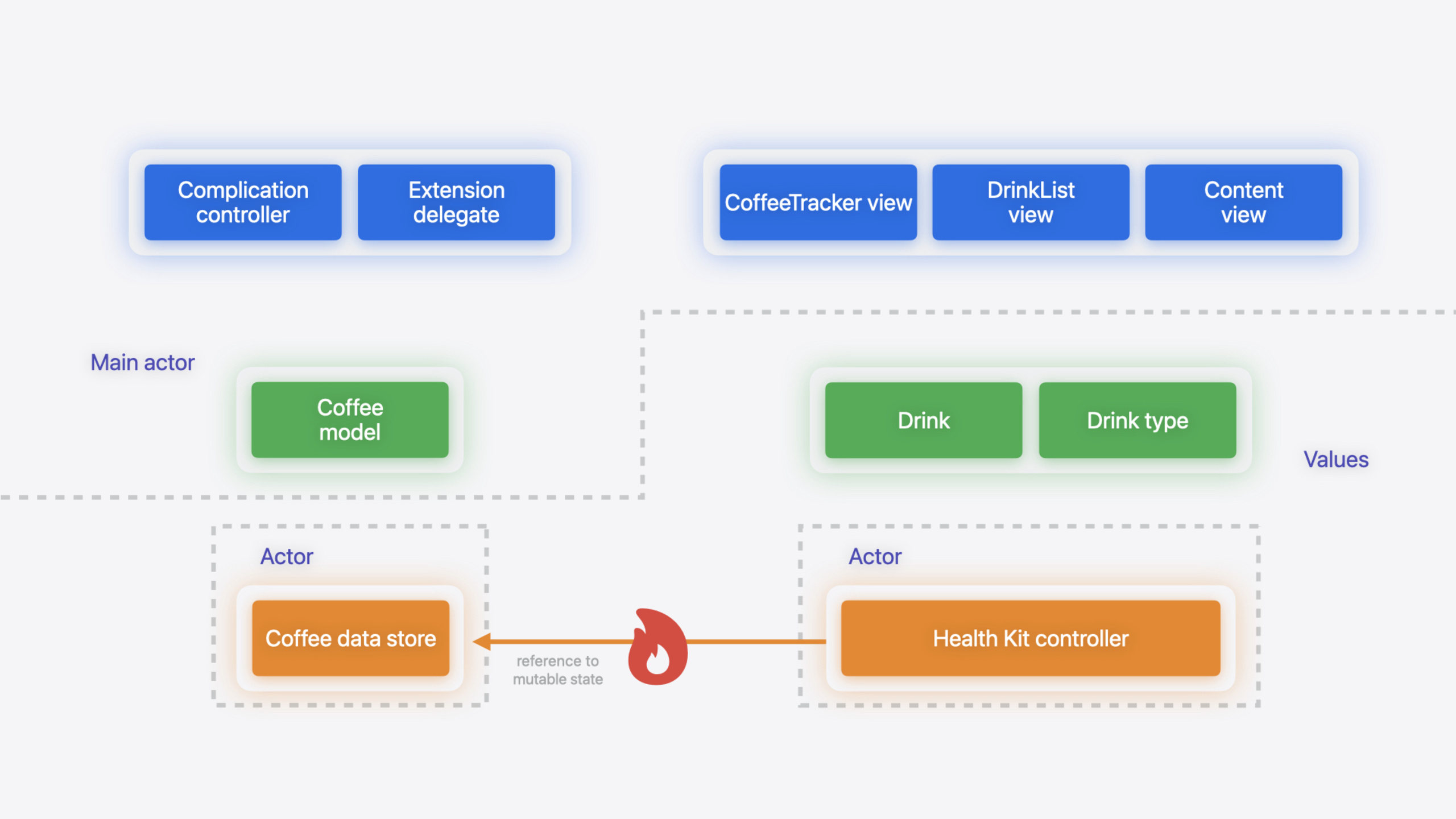
You built an app using @MainActor, async/await, and Sendable—it looks “safe.” But the compiler wasn’t actually stopping you from passing a class instance from the main actor to another actor—two actors holding the same reference type simultaneously can cause data races, from crashes to corrupted user data.
Swift 6 language mode solves this. It introduces full data isolation enforcement: the compiler blocks all unsafe cross-actor shared state at compile time. When you add features or refactor, the compiler guards for you—new concurrency bugs can’t slip in quietly.
The session demonstrates the full migration flow using the CoffeeTracker app. This app had already migrated to Swift concurrency, but enabling Swift 6’s Complete Concurrency Checking still surfaced over a dozen warnings. The migration strategy is target-by-target: first enable Complete Concurrency Checking for each target (warnings but no build failure), fix them one by one, then enable Swift 6 Language Mode (upgrading warnings to errors, locking in safety). The session repeatedly emphasizes one principle: don’t do large-scale refactoring and enable Swift 6 at the same time—do them separately.
Detailed Content
Migration Steps: Target by Target
Each target follows a fixed flow (07:35):
- Enable Complete Concurrency Checking—the project stays in Swift 5 mode, but the compiler warns about all code that may be unsafe under Swift 6
- Fix all warnings one by one
- Enable Swift 6 Language Mode—lock in changes, preventing subsequent code from reverting to unsafe state
- Move to the next target and repeat
Ben recommends starting migration from app extensions / the UI layer, not low-level frameworks. Two reasons: most UI code already runs on the main thread, so fewer warnings; and after migrating upper layers, interaction issues with unmigrated frameworks surface, which you can handle with tools like @preconcurrency.
Global Variables: Changing var to let Is the Most Common Quick Fix
The most common warning after enabling Complete Checking is global var. Global variables are shared mutable state—any thread can read/write them, inherently risking data races. The compiler offers three fixes (13:38):
// Option 1: change var to let. Logger is Sendable, and a let declaration is immutable and thread-safe.
let logger = Logger(
    subsystem:
        "com.example.apple-samplecode.Coffee-Tracker.watchkitapp.watchkitextension.ContentView",
    category: "Root View")

// Option 2: isolate with @MainActor. All access must happen on the main actor.
@MainActor var logger = Logger(
    subsystem:
        "com.example.apple-samplecode.Coffee-Tracker.watchkitapp.watchkitextension.ContentView",
    category: "Root View")

// Option 3: nonisolated(unsafe). Bypass checking and guarantee safety yourself.
nonisolated(unsafe) var logger = Logger(
    subsystem:
        "com.example.apple-samplecode.Coffee-Tracker.watchkitapp.watchkitextension.ContentView",
    category: "Root View")
Key points:
letis the preferred approach—once a Sendable type is declared aslet, there’s no shared mutable state problem@MainActorsuits global variables that need to be mutable but are only accessed from the main actornonisolated(unsafe)is a last resort—it puts safety responsibility on you, and the compiler no longer checks; you should later replace it with proper architecture
Ben specifically notes that Swift global variables are lazily initialized and atomically created (16:29)—two threads can’t simultaneously first-access and create two instances.
Sending Data Across Actors: Make Types Conform to Sendable
When CoffeeData on the main actor sends a [Drink] array to CoffeeDataStore on another actor, the compiler warns: sending self.currentDrinks may cause a data race (30:38). The fix is making Drink conform to Sendable (33:29):
public struct Drink: Hashable, Codable, Sendable {
    public let mgCaffeine: Double
    public let date: Date
    public let uuid: UUID
    public let type: DrinkType?
    // ...
}
Key points:
Drinkis a struct with allletvalue-type properties—naturally fits Sendable semantics- Swift auto-infers Sendable for
internaltypes, butpublictypes must explicitly declare it—Sendable is a promise to callers, and you may need internal mutable state later without locking in early - Adding
SendabletoDrinkeliminated three warnings in one change—finding these “one fix, many warnings” root causes is key to efficient migration
After adding Sendable, DrinkType also needs the same marking (35:04):
public enum DrinkType: Int, CaseIterable, Identifiable, Codable, Sendable {
  // ...
}
If DrinkType is an Objective-C type that can’t conform to Sendable, mark that property with nonisolated(unsafe) as a transitional approach—but you take on the safety responsibility.
Handling Protocol Isolation with Unmigrated Frameworks
When your @MainActor type needs to conform to a protocol without actor isolation marking, the compiler errors: main actor-isolated method can’t satisfy nonisolated protocol requirement (9:38). The session shows two approaches:
Approach one—@preconcurrency on conformance (25:21):
extension Recaffeinater: @preconcurrency CaffeineThresholdDelegate {
    public func caffeineLevel(at level: Double) {
        if level < minimumCaffeine {
            // TODO: alert user to drink more coffee!
        }
    }
}
Key points:
@preconcurrencyis equivalent to wrapping the method body withMainActor.assumeIsolated—it tells the compiler “I know this callback will run on the current actor”- If the callback actually runs off the main actor at runtime, the program traps (rather than producing hard-to-trace data races)
- When the underlying framework migrates to Swift 6 and adds
@MainActorto the protocol,@preconcurrencyproduces a “no longer needed” warning—just remove it (26:50)
Approach two—manual nonisolated + MainActor.assumeIsolated (24:15):
nonisolated public func caffeineLevel(at level: Double) {
    MainActor.assumeIsolated {
        if level < minimumCaffeine {
            // TODO: alert user to drink more coffee!
        }
    }
}
This is the manual expansion of @preconcurrency, suited for scenarios needing finer control.
CoreLocation Delegate Callback Isolation
CoreLocation’s CLLocationManagerDelegate callback thread depends on which thread created the CLLocationManager—a dynamic property the compiler can’t statically check. The session’s approach is putting the entire delegate class on @MainActor, ensuring the manager is created on the main thread so callbacks arrive on the main thread (39:32):
@MainActor
class CoffeeLocationDelegate: NSObject, CLLocationManagerDelegate {
  var location: CLLocation?
  var manager: CLLocationManager!

  var latitude: CLLocationDegrees? { location?.coordinate.latitude }
  var longitude: CLLocationDegrees? { location?.coordinate.longitude }

  override init () {
    super.init()
    manager = CLLocationManager()
    manager.delegate = self
    manager.startUpdatingLocation()
  }

  nonisolated func locationManager (
    _ manager: CLLocationManager,
    didUpdateLocations locations: [CLLocation]
  ) {
    MainActor.assumeIsolated { self.location = locations.last }
  }
}
Key points:
- With the class marked
@MainActor,CLLocationManageris created on the main thread, and CoreLocation dispatches callbacks to the main thread accordingly locationManager(_:didUpdateLocations:)is markednonisolatedbecause the protocol requirement has no actor isolation- Use
MainActor.assumeIsolatedinternally to access main actor properties—traps if not on the main actor at runtime
Core Takeaways
-
What to do: Enable Complete Concurrency Checking first, then fix warnings one by one—not manual auditing. Why it’s worth it: The compiler precisely identifies unsafe code, far more efficient than line-by-line manual review. After enabling, the project still compiles and runs—doesn’t block delivery. How to start: In Xcode, select target -> Build Settings -> search “Swift Concurrency Checking” -> set to Complete.
-
What to do: Prioritize changing global
vartolet. Why it’s worth it: The most numerous and simplest warning type in migration. In the session, 7 of CoffeeKit’s 11 warnings were globalvar—oneletreplacement each. How to start: After enabling Complete Checking, go through the warning list and change globalvarthat won’t be reassigned tolet. -
What to do: Add
Sendableto public value types passed across actors. Why it’s worth it: OneSendableannotation often eliminates multiple “Sending … risks causing data races” warnings. In the session, addingSendabletoDrinkfixed three warnings in one line. How to start: Find types involved in “Sending … risks causing data races” warnings—if the type is a struct/enum with all value-type or Sendable properties, addSendableconformance directly. -
What to do: Use
@preconcurrencyfor protocol conformance to unmigrated frameworks. Why it’s worth it: When you’re sure callbacks actually run on a specific actor but the protocol isn’t marked yet,@preconcurrencyis the most concise declaration. After the underlying framework migrates, the compiler automatically reminds you to remove it. How to start: When you see “Main actor-isolated instance method cannot satisfy nonisolated protocol requirement”, add@preconcurrencyat the conformance declaration.
Related Sessions
- A Swift Tour: Explore Swift’s features and design — Overview of Swift language core features and design philosophy
- Demystify explicitly built modules — Changes to explicit module builds in Xcode 16
- Consume noncopyable types in Swift — Usage and concurrency safety of Swift noncopyable types
- Explore Swift performance — Swift compilation mechanisms and how different code patterns affect performance
Comments
GitHub Issues · utterances