
Highlight
iPhone’s standard photo pipeline pursues “aesthetic effects”—ambient light color temperature, direction, and intensity all become part of the photo’s mood. But some scenarios need “color truth”: e-commerce product photos must show accurate colors, wound tracking needs to see skin color changes. Constant Color API is designed for these scenarios.
Core Content
E-commerce sellers shoot product photos; buyers receive items and say “the color is wrong”—a common return reason. The problem isn’t seller or buyer—it’s the shooting environment. Warm lights, colored fill lights, even daylight through windows make the same product look completely different in photos. Professionals use studios and lighting rigs, but small sellers and independent creators don’t have that.
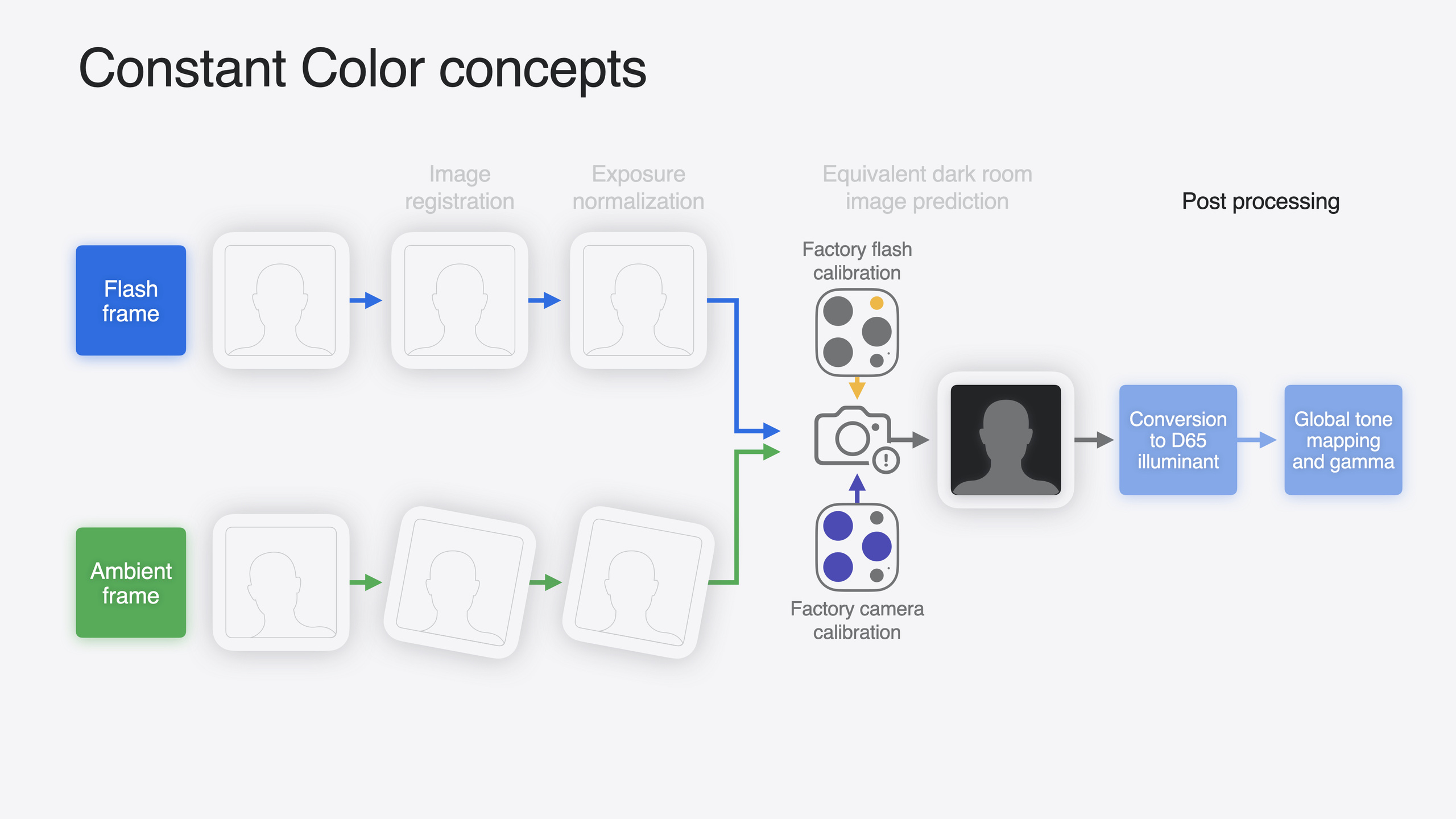
Apple’s Constant Color API in iOS 18 puts studio-level color consistency into iPhone. It leverages improved flash hardware from iPhone 14 onward—each iPhone’s flash and camera sensor are precisely measured at the factory. The API first captures a flash photo, then a no-flash photo in rapid succession and compares them: the brightness increase from flash is the difference between known light source and unknown ambient light. Through computational photography and machine learning, the API estimates “what the scene would look like lit only by flash” and renders the result under D65 standard illuminant.
The session shows extensive comparisons: under warm indoor light, red/green/blue strong lighting, 2800K extremely warm light, Constant Color produces nearly identical violet pot and skin tones, while standard mode shows severe color cast. Critically, iPhone 15 reduces ambient-light-induced color variance by 87%. The same wound under different lighting—Constant Color captures reliable bruise range and color changes for comparison; standard mode makes judgment impossible.
Detailed Content
Device support and pipeline configuration
Constant Color supports photo mode only, not video. Requires iPhone 14 series, iPhone 15 series, or 2024 iPad Pro. Camera type must be builtInWideAngleCamera or builtInDualWideCamera.
Check device support:
// Check whether the current device supports Constant Color ([10:33](https://developer.apple.com/videos/play/wwdc2024/10162/?time=633))
if photoOutput.isConstantColorSupported {
    // The device supports it, so it can be enabled
}isConstantColorSupportedis anAVCapturePhotoOutputproperty- Value may change after switching cameras or formats
Configure pipeline:
// Enable Constant Color on AVCaptureSession ([11:59](https://developer.apple.com/videos/play/wwdc2024/10162/?time=719))
photoOutput.isConstantColorEnabled = photoOutput.isConstantColorSupported- Must set
AVCaptureFlashModeto.autoor.on;.offthrows an exception (11:24) - RAW output not supported;
rawPhotoPixelFormatTypemust be 0 (11:39) - Changing
isConstantColorEnabledtriggers lengthy pipeline reconfiguration—set once at app launch (12:25)
Triggering capture and getting results
Control whether to request Constant Color per capture via AVCapturePhotoSettings:
// Set whether Constant Color is enabled per frame ([12:48](https://developer.apple.com/videos/play/wwdc2024/10162/?time=768))
let settings = AVCapturePhotoSettings()
settings.flashMode = flashToggleIsOn ? .on : .auto
settings.isConstantColorEnabled = constantColorToggleIsOn
photoOutput.capturePhoto(with: settings, delegate: self)isConstantColorEnabledis anAVCapturePhotoSettingsproperty, defaultfalse- If not set, standard aesthetic pipeline is used
Confidence map
Flash power is limited—distant or strong-light environments may not illuminate effectively. The API provides two ways to judge color accuracy:
// Get the 2D confidence map ([16:12](https://developer.apple.com/videos/play/wwdc2024/10162/?time=972))
let confidenceMap = photo.constantColorConfidenceMap
// Float values from 0 to 1, where 1 means fully confident and 0 means no confidence

// Get the center-weighted mean confidence level ([17:00](https://developer.apple.com/videos/play/wwdc2024/10162/?time=1020))
let meanConfidence = photo.constantColorCenterWeightedMeanConfidenceLevel- Confidence map is a second
CVPixelBufferoutput; each pixel corresponds to a region in the photo - Center-weighted mean suits quick judgment; start tuning threshold from 0.8–0.9 (16:39)
- iPad Pro document scanning uses threshold 0.9 (22:47)
- Specular reflection areas (such as flash glare on a spoon) are marked low confidence because pixel values have clipped
Fallback frame
When confidence is insufficient, get a standard ambient-light photo as fallback:
// Enable fallback photo delivery ([17:47](https://developer.apple.com/videos/play/wwdc2024/10162/?time=1067))
settings.isConstantColorFallbackPhotoDeliveryEnabled = true

// Distinguish them in the delegate callback ([18:09](https://developer.apple.com/videos/play/wwdc2024/10162/?time=1089))
func photoOutput(_ output: AVCapturePhotoOutput,
                 didFinishProcessingPhoto photo: AVCapturePhoto) {
    if photo.isConstantColorFallbackPhoto {
        // This is an ambient-light fallback photo
    } else {
        // This is a Constant Color photo
    }
}- When enabled,
didFinishProcessingPhotois called twice - Low-confidence regions in Constant Color images remain viewable—no strange colors or excessive noise, just reduced color accuracy
Ambient light shadow removal
Constant Color predicts a “dark room with flash only” scene, so ambient-light shadows are reduced or fully eliminated. 2024 iPad Pro document scanning uses Constant Color for shadow removal (22:36).
Validation methodology
Apple tested from 10 Lux to 800 Lux brightness and 3000K to 7500K color temperature, with Planckian white point, magenta shift, and green shift at each combination. Used Calibrite ColorChecker and Pantone 138 skin tone guide plus live subjects. Converted P3 RGB output to CIELab* to compute cross-condition color variance. iPhone 15 reduces ambient-light color variance by 87% (21:59).
Core Takeaways
-
What to build: Add Constant Color mode to e-commerce app “product photo” flow. Why it’s worth doing: “Color mismatch” is among the most common return reasons; Constant Color eliminates environment-induced color cast so buyers see colors closer to the actual product. How to start: Add a “Color accuracy” toggle on the product photo page mapping to
settings.isConstantColorEnabled = true; show Constant Color photo instead of standard photo after capture. -
What to build: Use Constant Color in health tracking apps to record skin changes. Why it’s worth doing: Bruise, rash, and wound color changes are often slow and hard to judge across different lighting; Constant Color enables cross-time comparison. How to start: Enable Constant Color by default in “photo record” feature; save
constantColorCenterWeightedMeanConfidenceLevelwith storage; prompt retake when below threshold. -
What to build: Use Constant Color shadow removal in document scanning apps. Why it’s worth doing: Desktop documents always have ambient-light shadows affecting OCR and visual experience—iPad Pro document scanning already uses this approach. How to start: Enable Constant Color, validate scan area with confidence map (threshold 0.9); shadow areas are naturally eliminated without extra shadow detection algorithms.
Related Sessions
- Build a great Lock Screen camera capture experience — Launch camera capture directly from Lock Screen, extending camera app use cases
- What’s new in camera capture & camera bundles — AVFoundation camera capture framework annual update overview
- Deploy machine learning and AI models on-device with Core ML — Constant Color uses ML models internally; understanding Core ML deployment optimization helps understand the underlying stack
- Explore HDR images and video — Constant Color outputs Display P3 color space; HDR rendering is the subsequent display step
Comments
GitHub Issues · utterances