
Highlight
SwiftUI adds
ForEach(subviewOf:),Group(subviewsOf:),ForEach(sectionOf:), andContainerValuesAPIs, enabling developers to build container views that support arbitrary content combinations, grouping, and custom modifiers.
Core Content
SwiftUI’s List already supports flexible content composition — you can mix static views with views generated dynamically by ForEach, group with Section, and customize row styling with modifiers like listRowSeparator(). But if you want to build your own container views (such as card grids or kanban layouts), you previously had to rely on data-driven initializers, which limited flexibility.
Apple introduced three new APIs this year to address this. ForEach(subviewOf:) iterates over the “resolved subviews” of any view — whether those subviews are statically declared or dynamically generated by ForEach. Group(subviewsOf:) retrieves the full collection of resolved subviews at once, suitable for scenarios that need to count or batch-process subviews. ForEach(sectionOf:) detects and iterates over Sections in a view, letting custom containers support grouping like List. Combined with ContainerValues, containers can read custom values set on subviews, enabling container-specific modifiers similar to listRowSeparator().
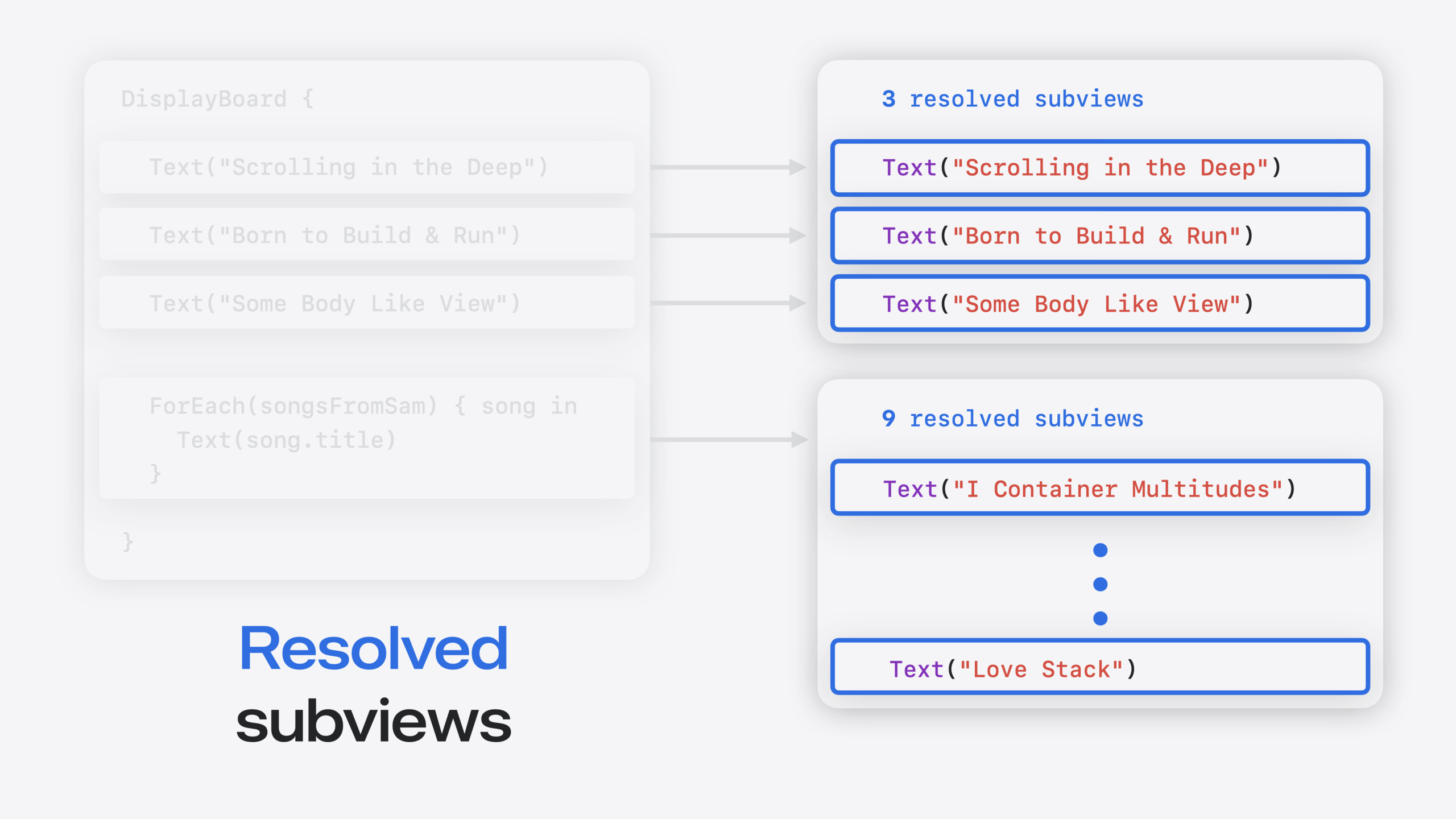
The key to these APIs is understanding the difference between “declared views” and “resolved views.” Declared views are the ViewBuilder content you write in code; resolved views are what SwiftUI actually renders at runtime — ForEach expands into multiple views based on data, and if statements decide whether to render. The new APIs operate on resolved views, making container implementations much cleaner.
Detailed Content
Basic Container Implementation
A data-driven DisplayBoard container (05:27):
struct DisplayBoard<Data: Collection, Content: View>: View {
  var data: Data
  @ViewBuilder var content: (Data.Element) -> Content

  var body: some View {
    DisplayBoardCardLayout {
      ForEach(data) { item in
        CardView {
          content(item)
        }
      }
    }
    .background { BoardBackgroundView() }
  }
}
Key points:
- The
datacollection is mapped to views through a@ViewBuilderclosure ForEachiterates over data and generatesCardViewinstances- The container only supports this single data-driven pattern
Supporting Arbitrary Content Combinations
Refactored to use ViewBuilder and ForEach(subviewOf:) (05:27):
struct DisplayBoard<Content: View>: View {
  @ViewBuilder var content: Content

  var body: some View {
    DisplayBoardCardLayout {
      ForEach(subviewOf: content) { subview in
        CardView {
          subview
        }
      }
    }
    .background { BoardBackgroundView() }
  }
}

// Usage example
DisplayBoard {
  Text("Scrolling in the Deep")
  Text("Born to Build & Run")
  Text("Some Body like View")

  ForEach(songsFromSam) { song in
    Text(song.title)
  }
}
Key points:
- Removed data-driven parameters in favor of a single
@ViewBuilder content ForEach(subviewOf:)iterates over “resolved subviews,” whether static or dynamically generated- The container can now mix static views and ForEach without changing its implementation
Declared Views vs. Resolved Views
Understanding SwiftUI’s view resolution process (08:00):
// 1 declared view
ForEach(songsFromSam) { song in
  Text(song.title)
}

// 9 resolved subviews
Text("I Container Multitudes")
...
Text("Love Stack")
Key points:
- ForEach is a declared view with no visual appearance
- Its role is to generate multiple resolved subviews from data
- Group expands its content directly into resolved subviews
- EmptyView resolves to zero subviews
- if statements determine the resolution result based on conditions
Batch Processing Subviews
Using Group(subviewsOf:) to count subviews (10:00):
var body: some View {
  DisplayBoardCardLayout {
    Group(subviewsOf: content) { subviews in
      ForEach(subviews) { subview in
        CardView(
          scale: subviews.count > 15 ? .small : .normal
        ) {
          subview
        }
      }
    }
  }
  .background { BoardBackgroundView() }
}
Key points:
Group(subviewsOf:)retrieves the collection of resolved subviews- You can access collection properties like
count - Suitable for dynamically adjusting layout based on subview count
Supporting Section Grouping
Using ForEach(sectionOf:) to iterate over Sections (11:42):
var body: some View {
  HStack(spacing: 80) {
    ForEach(sectionOf: content) { section in
      VStack(spacing: 20) {
        if !section.header.isEmpty {
          DisplayBoardSectionHeaderCard { section.header }
        }
        DisplayBoardSectionContent {
          section.content
        }
        .background { BoardSectionBackgroundView() }
      }
    }
  }
  .background { BoardBackgroundView() }
}
Key points:
ForEach(sectionOf:)detects and iterates over Sections in content- Each section has
headerandcontentproperties header.isEmptychecks whether header content exists- The container can create independent layouts for each Section
Custom Container Modifiers
Defining container-specific modifiers with ContainerValues (14:46):
extension ContainerValues {
  @Entry var isDisplayBoardCardRejected: Bool = false
}

extension View {
  func displayBoardCardRejected(_ isRejected: Bool) -> some View {
    containerValue(\.isDisplayBoardCardRejected, isRejected)
  }
}
Key points:
ContainerValuesis a new key-value storage type- The
@Entrymacro declares new container value entries - The
containerValue()modifier sets values
Reading container values inside the container (15:42):
struct DisplayBoardSectionContent<Content: View>: View {
  @ViewBuilder var content: Content

  var body: some View {
    DisplayBoardCardLayout {
      Group(subviewsOf: content) { subviews in
        ForEach(subviews) { subview in
          let values = subview.containerValues
          CardView(
            scale: (subviews.count > 15) ? .small : .normal,
            isRejected: values.isDisplayBoardCardRejected
          ) {
            subview
          }
        }
      }
    }
  }
}
Key points:
- Subviews have a
containerValuesproperty for reading values - Sections also have
containerValues - Modifiers applied to a Section affect all of its subviews
Using custom modifiers (16:15):
DisplayBoard {
  Section("Matt's Favorites") {
    Text("Scrolling in the Deep")
      .displayBoardCardRejected(true)
    Text("Born to Build & Run")
    Text("Some Body like View")
  }
  Section("Sam's Favorites") {
    ForEach(songsFromSam) { song in
      Text(song.title)
        .displayBoardCardRejected(song.samHasDibs)
    }
  }
}
Key points:
- Modifiers can be applied to individual views
- They can also be applied to each view in a ForEach
- Applying to a Section affects all subviews
Core Takeaways
-
Build card grid containers: Use
ForEach(subviewOf:)to build card grid containers like DisplayBoard that support mixed static and dynamic cards. This is more reliable than manually parsing ViewBuilder output and adapts better to SwiftUI’s declarative update mechanism. Start with a simple grid layout and verify subview iteration before extending functionality. -
Implement kanban column grouping: Use
ForEach(sectionOf:)to add column grouping to kanban layouts — each Section corresponds to a column, with the Section header as the column title. This is more intuitive than defining your own data model for columns; users can organize content directly with SwiftUI’s Section API, lowering the learning curve. -
Add decorative modifiers to containers: Use
ContainerValuesto add container-specific decoration options, such as grid item column spanning, card emphasis styles, or disabling certain interactions. These modifiers are tightly coupled to the container and are not suited for Environment or Preference —ContainerValuesis designed for exactly this: values visible only to the direct container, without leaking into the view hierarchy.
Related Sessions
- What’s new in SwiftUI — Annual highlights from SwiftUI updates
- Advanced SwiftUI containers — Advanced techniques for building containers
- Meet SwiftUI for spatial computing — SwiftUI containers in spatial computing
- Build accessible apps with SwiftUI — Container considerations for accessible apps
Comments
GitHub Issues · utterances