
Highlight
SwiftData in iOS 18 adds the DataStore protocol, letting you switch underlying storage backends—JSON files, REST APIs, Realm—with a single configuration line, while Model definitions and SwiftUI view code remain completely unchanged.
Core Content
When SwiftData launched in iOS 17, it hid Core Data complexity behind a clean Swift-native API, but the underlying storage was locked—you could only use Apple’s DefaultStore (Core Data based). Fine for most scenarios, but if you need custom storage formats, integration with existing backends, or just lightweight JSON file persistence, you hit a wall. Community feedback was direct: SwiftData’s API could be elegant, but non-swappable storage was a hard limitation.
iOS 18 introduces three key protocols: DataStoreConfiguration, DataStoreSnapshot, and DataStore, forming a complete storage abstraction layer. SwiftData’s ModelContext no longer couples directly to DefaultStore; it communicates with concrete Stores through DataStoreSnapshot (a Sendable + Codable value type container). ModelContext sends DataStoreFetchRequest or DataStoreSaveChangesRequest; the Store returns corresponding result types. Implement just fetch and save, and you can replace the entire storage backend.
The session uses a SampleTrips example app throughout. It displays a travel list with CRUD support. After switching to JSONStore, all functionality works normally, data persisted to a JSON file. The key: replace ModelConfiguration with JSONStoreConfiguration—Model definitions, SwiftUI Views, and @Query need no changes (00:40).
Detailed Content
Communication Model: Snapshot as Bridge
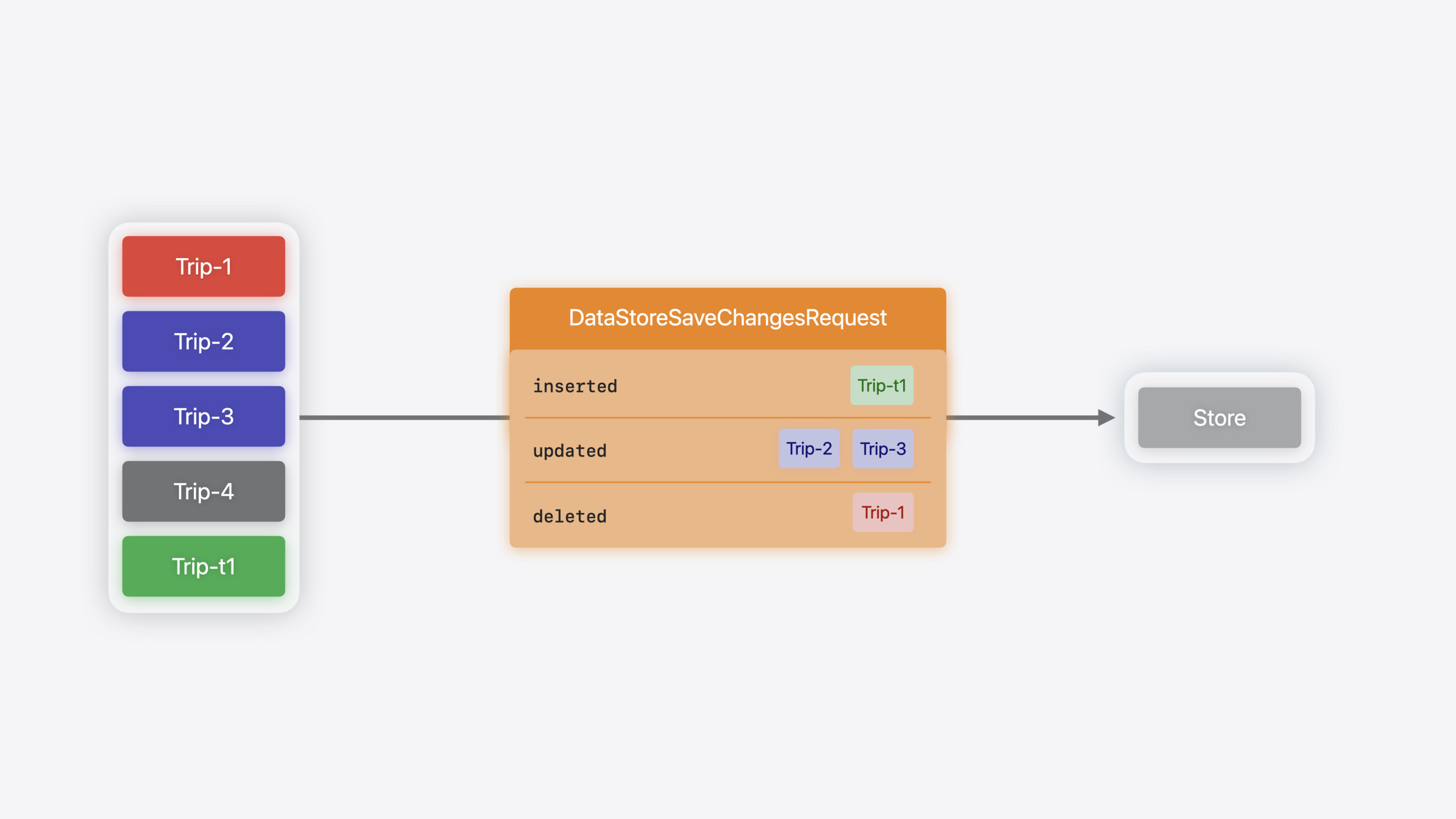
Communication between ModelContext and Store is based on Snapshots. When ModelContext needs to save data, it creates a Snapshot for each modified Model, puts them in DataStoreSaveChangesRequest, and sends to the Store. Conversely, after reading data, the Store creates Snapshots for each record, puts them in DataStoreFetchResult, returns to ModelContext, which restores them to PersistentModel (03:42).
Snapshots are Sendable and Codable, so you can serialize them directly with JSONEncoder/JSONDecoder—the approach used in the official JSONStore example.
Temporary to Permanent Identifier Mapping
Newly inserted Models hold temporary identifiers in ModelContext (like Trip-t1). When the Store processes inserts, it assigns permanent identifiers (like Trip-5) and returns the temporary-to-permanent mapping in DataStoreSaveChangesResult’s remappedPersistentIdentifiers (02:52). ModelContext updates its state after receiving this, so the UI renders correctly.
Complete Code: Implementing a JSONStore
The following code from the official example (08:15) shows a complete JSON file storage implementation:
@available(swift 5.9) @available(macOS 15, iOS 18, tvOS 18, watchOS 11, visionOS 2, *)
final class JSONStoreConfiguration: DataStoreConfiguration {
    typealias StoreType = JSONStore

    var name: String
    var schema: Schema?
    var fileURL: URL

    init(name: String, schema: Schema? = nil, fileURL: URL) {
        self.name = name
        self.schema = schema
        self.fileURL = fileURL
    }

    static func == (lhs: JSONStoreConfiguration, rhs: JSONStoreConfiguration) -> Bool {
        return lhs.name == rhs.name
    }

    func hash(into hasher: inout Hasher) {
        hasher.combine(name)
    }
}

@available(swift 5.9) @available(macOS 15, iOS 18, tvOS 18, watchOS 11, visionOS 2, *)
final class JSONStore: DataStore {
    typealias Configuration = JSONStoreConfiguration
    typealias Snapshot = DefaultSnapshot

    var configuration: JSONStoreConfiguration
    var name: String
    var schema: Schema
    var identifier: String

    init(_ configuration: JSONStoreConfiguration, migrationPlan: (any SchemaMigrationPlan.Type)?) throws {
        self.configuration = configuration
        self.name = configuration.name
        self.schema = configuration.schema!
        self.identifier = configuration.fileURL.lastPathComponent
    }

    func save(_ request: DataStoreSaveChangesRequest<DefaultSnapshot>) throws -> DataStoreSaveChangesResult<DefaultSnapshot> {
        var remappedIdentifiers = [PersistentIdentifier: PersistentIdentifier]()
        var serializedTrips = try self.read()

        for snapshot in request.inserted {
            let permanentIdentifier = try PersistentIdentifier.identifier(for: identifier,
                                                                          entityName: snapshot.persistentIdentifier.entityName,
                                                                          primaryKey: UUID())
            let permanentSnapshot = snapshot.copy(persistentIdentifier: permanentIdentifier)
            serializedTrips[permanentIdentifier] = permanentSnapshot
            remappedIdentifiers[snapshot.persistentIdentifier] = permanentIdentifier
        }

        for snapshot in request.updated {
            serializedTrips[snapshot.persistentIdentifier] = snapshot
        }

        for snapshot in request.deleted {
            serializedTrips[snapshot.persistentIdentifier] = nil
        }

        try self.write(serializedTrips)
        return DataStoreSaveChangesResult<DefaultSnapshot>(for: self.identifier,
                                                           remappedPersistentIdentifiers: remappedIdentifiers,
                                                           deletedIdentifiers: request.deleted.map({ $0.persistentIdentifier }))
    }

    func fetch<T>(_ request: DataStoreFetchRequest<T>) throws -> DataStoreFetchResult<T, DefaultSnapshot> where T : PersistentModel {
        if request.descriptor.predicate != nil {
            throw DataStoreError.preferInMemoryFilter
        } else if request.descriptor.sortBy.count > 0 {
            throw DataStoreError.preferInMemorySort
        }

        let objs = try self.read()
        let snapshots = objs.values.map({ $0 })
        return DataStoreFetchResult(descriptor: request.descriptor, fetchedSnapshots: snapshots, relatedSnapshots: objs)
    }

    func read() throws -> [PersistentIdentifier: DefaultSnapshot] {
        if FileManager.default.fileExists(atPath: configuration.fileURL.path(percentEncoded: false)) {
            let decoder = JSONDecoder()
            decoder.dateDecodingStrategy = .iso8601

            let trips = try decoder.decode([DefaultSnapshot].self, from: try Data(contentsOf: configuration.fileURL))
            var result = [PersistentIdentifier: DefaultSnapshot]()
            trips.forEach { s in
                result[s.persistentIdentifier] = s
            }
            return result
        } else {
            return [:]
        }
    }

    func write(_ trips: [PersistentIdentifier: DefaultSnapshot]) throws {
        let encoder = JSONEncoder()
        encoder.dateEncodingStrategy = .iso8601
        encoder.outputFormatting = [.prettyPrinted, .sortedKeys]
        let jsonData = try encoder.encode(trips.values.map({ $0 }))
        try jsonData.write(to: configuration.fileURL)
    }
}
Key points:
JSONStoreConfigurationdeclaresStoreType = JSONStore; SwiftData finds the corresponding Store implementation through this associated typeJSONStoredeclaresSnapshot = DefaultSnapshotbecause no custom encoding logic is needed—reuse SwiftData’s provided value type container- In
fetch, when the request contains a predicate or sort descriptor, throwDataStoreError.preferInMemoryFilter/preferInMemorySortso ModelContext completes filtering and sorting in memory—the simplest approach for small datasets (09:47) savehandles three change types:request.insertedneeds permanent identifier assignment and mapping;request.updatedoverwrites directly;request.deletedremoves from the dictionary (10:13)readandwriteare helper methods using Foundation’s JSONEncoder/JSONDecoder;DefaultSnapshotis Codable and serializes directly
DefaultStore Remains the Best Choice
The session clearly states DefaultStore supports Migration, History Tracking, CloudKit sync, and all SwiftData advanced features, with platform-level performance and scalability best practices (05:37). Only when you explicitly need non-Apple storage backends should you implement a custom Store.
Core Takeaways
-
Use a custom Store to connect to existing REST API backends: If your app already has a backend API, write a CustomStore mapping
saveto POST/PUT requests andfetchto GET requests—SwiftUI-side@Queryand Model definitions stay untouched. Why it’s worth doing: frontend teams can seamlessly switch from local storage to remote API without changing UI code. How to start: conform toDataStore, call the API infetchand convert returned JSON toDefaultSnapshot, send requests by inserted/updated/deleted insave. -
Use JSONStore for lightweight config file persistence: Many utility apps only need to store dozens of config entries—Core Data is too heavy, UserDefaults too weak. JSONStore gives you SwiftData’s Model macro and
@Queryreactive updates, with human-readable JSON data files. Why it’s worth doing: reduces persistence complexity while keeping SwiftData’s declarative API advantages. How to start: copy the official JSONStore example, pointfileURLto a JSON file in App Support. -
Progressive migration: wrap legacy persistence with a custom Store: If migrating from Realm or Firebase to SwiftData, first write a custom Store wrapping the old solution to get the app running, then gradually switch to DefaultStore in later versions. Why it’s worth doing: avoids risk of rewriting the persistence layer at once; migration can proceed in phases. How to start: call old SDK read/write interfaces in
fetchandsave, keep data models unchanged, later just swapModelConfigurationback to DefaultStore.
Related Sessions
- What’s new in SwiftData — SwiftData new features including indexes and uniqueness constraints
- Track model changes with SwiftData History — How to view Store change history
- Model your schema with SwiftData — Define and evolve data models with SwiftData macros
- Meet SwiftData — SwiftData basics: PersistentModel introduction
Comments
GitHub Issues · utterances