
Highlight
iOS 18 Core Spotlight natively supports semantic search—users can find targets with synonyms without developers building their own search models.
Core Content
Core Spotlight has long been the standard way to index app content for system Spotlight on iOS. But it had a weakness: search was exact-match. Searching “travel” wouldn’t find a note titled “trip”; searching “image” wouldn’t match “photo.” Apple optimized global Spotlight search, but for in-app search, exact matching often frustrates users. Many apps built their own fuzzy search or third-party libraries—non-trivial development cost.
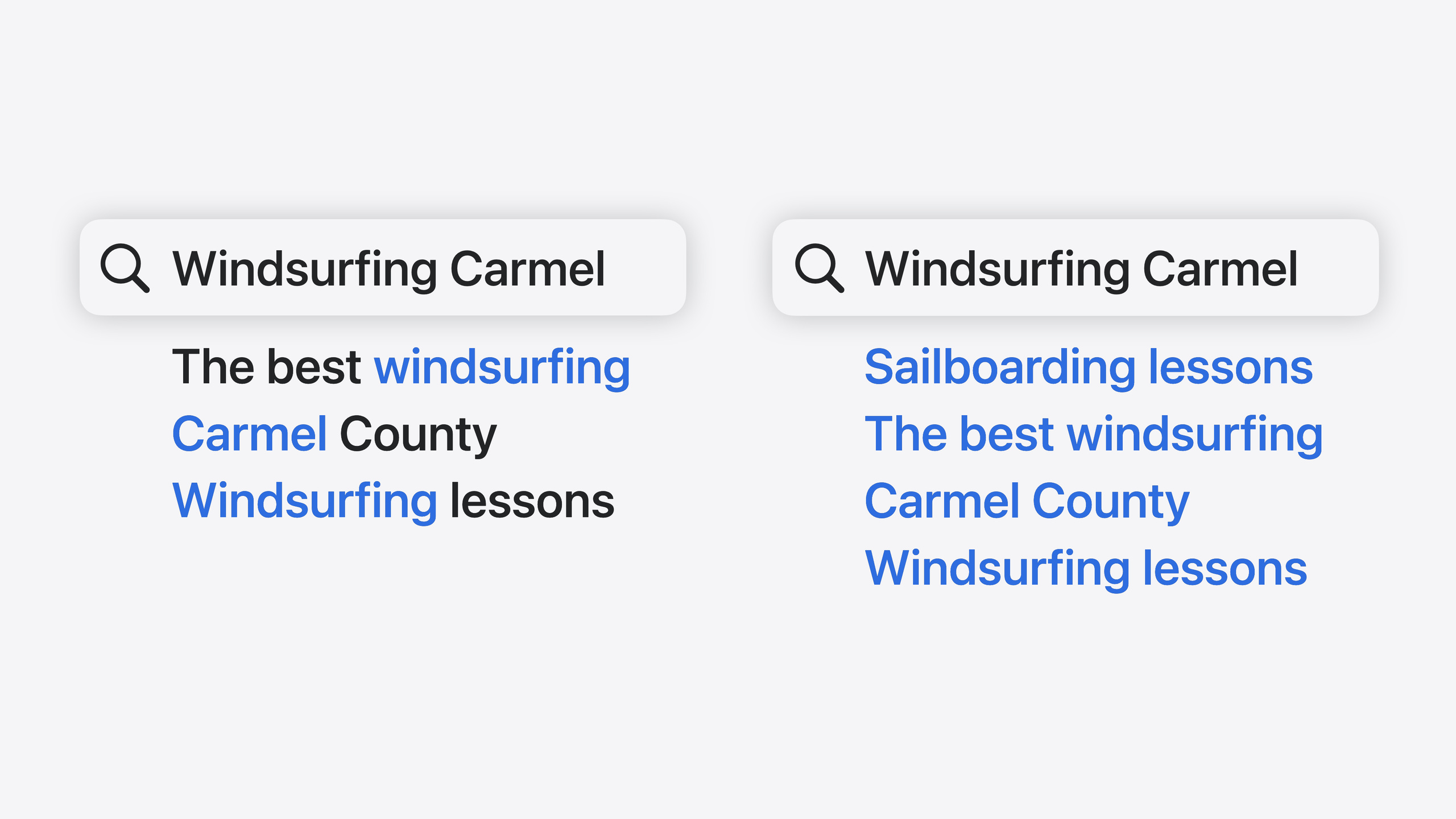
iOS 18 Core Spotlight natively supports semantic search. User queries are processed by Spotlight’s query understanding model, so semantically similar terms can hit the right items. Semantic search is on by default—no extra configuration, no training your own model, no Natural Language framework integration, no backend. Donate content correctly to Spotlight and in-app search gets a major upgrade.
The session also covers supporting infrastructure: batch indexing with client state for efficient large-scale indexing, a new CoreSpotlight Delegate Extension so Spotlight can trigger re-index when the device is idle, a new ranked results API to show Top Hits like Spotlight, and engagement signals so ranking improves with user behavior. Everything runs on-device; indexed data never leaves the device and other apps can’t see your index.
Detailed Content
Creating Searchable Items
First, donate searchable content to Spotlight. When creating a CSSearchableItem, provide a unique identifier, optional domain identifier, and attribute set (2:14):
// Creating searchable items for donation

let item = CSSearchableItem(uniqueIdentifier: uniqueIdentifier, domainIdentifier: domainIdentifier, attributeSet: attributeSet)- Store
uniqueIdentifierin your app’s persistence so you can restore full data later domainIdentifieris optional, for grouping searchable items
Next create a CSSearchableAttributeSet and set a valid contentType (2:28):
// Creating searchable content for donation

let attributeSet = CSSearchableItemAttributeSet(contentType: UTType.text)
attributeSet.contentType = UTType.text.identifiercontentTypedetermines how semantic indexing processes the item- For text items, set
titleandtextContent—both are processed for semantic indexing - For image/video items, set
contentURLto the resource file path - Donate attachments or web content as separate items, linked with
relatedUniqueIdentifier
Batch Indexing and Client State
For large datasets, iOS 18 offers batch indexing with client state (3:31):
// Batch indexing with client state

let index = CSSearchableIndex(name: "SpotlightSearchSample")
index.fetchLastClientState { state, error in
    if state == nil {
        index.beginBatch()
        index.indexSearchableItems(items)
        index.endIndexBatch(expectedClientState: state, newClientState: newState) { error in
        }
    }
}- Create a named
CSSearchableIndexand usefetchLastClientStateto get the last index state - Wrap indexing with
beginBatch()andendIndexBatch();newClientStaterecords progress - Client state prevents duplicate donations and performance issues
- With the new
isUpdateflag, donate only necessary updates (3:56):
// Make it an update to avoid overwriting existing attributes

item.isUpdate = true
CoreSpotlight Delegate Extension
When Spotlight needs to migrate an index or recover from corruption, it asks the app to re-index. iOS 18 provides a new CoreSpotlight Delegate Extension template so Spotlight can schedule re-index requests when the device is idle (sleep or unused), completing data migration gradually with minimal impact on existing search.
Setup: In Xcode, File > New > Target, search for “CoreSpotlight Delegate extension.” For debugging, use the mdutil command-line tool to simulate re-index requests to your bundle ID.
Query Configuration and Semantic Search
Semantic search is on by default. Configure queries with CSUserQueryContext (7:19):
// Configure a query

let queryContext = CSUserQueryContext()
queryContext.fetchAttributes = ["title", "contentDescription"]- Set
fetchAttributesonly to what the UI needs, reducing unnecessary reads
Enable ranked results for Top Hits (7:33):
// Ranked results

queryContext.enableRankedResults = true
queryContext.maxRankedResultCount = 2- Ranked results use the same ML model as Spotlight
- Sort returned results with the
compareByRanksorter
Configure search suggestions (7:47):
// Suggestions

queryContext.maxSuggestionCount = 4
Filter by content type with filter queries (7:55):
// Filter queries

queryContext.filterQueries = ["contentTypeTree=\"public.image\""]- Filter queries use metadata syntax to limit results to specific types
- Useful for tab switching (e.g., images only) or breadcrumb navigation
Running Queries and Handling Results
Create a CSUserQuery to run search (8:23):
// Query for searchable items and suggestions

let query = CSUserQuery(userQueryString: "windsurfing carmel", userQueryContext: queryContext)
for try await element in query.responses {
    switch(element) {
        case .item(let item):
            self.items.append(item)
            break
        case .suggestion(let suggestion):
            self.suggestions.append(suggestion)
            break
    }
}CSUserQuerytakes the user’s search string and query context- Results return via async responses; handle items and suggestions separately
- Suggestions provide
localizedAttributedSuggestionfor display - When the user taps a suggestion, replace the search bar text and trigger a new search
Semantic search downloads ML models to the device and runs them in the app process. Models may load or unload to save memory. Call CSUserQuery.prepare before each search UI appears to ensure resources are ready (8:56):
// Preparing for queries

CSUserQuery.prepare
CSUserQuery.prepareWithProtectionClasses
Engagement Signals for Better Ranking
When users browse content or tap search results, the app can send engagement signals to Spotlight to improve future ranking (9:50):
// Set the lastUsedDate when the user interacts with the item

item.attributeSet.lastUsedDate = Date.now
item.isUpdate = true
Mark interactions when users engage with results or suggestions (10:00):
// Interactions with items and suggestions from a query

query.userEngaged(item, visibleItems: visibleItems, interaction: CSUserQuery.UserInteractionKind.select)

query.userEngaged(suggestion, visibleSuggestions: visibleSuggestions, interaction: CSUserQuery.UserInteractionKind.select)lastUsedDateis a freshness signal indicating recent useuserEngagedis an engagement signal including which result was tapped and what else was visible- Both signals help Spotlight’s ranking model learn user preferences
Core Takeaways
-
What to do: Add ranked results and search suggestions to your existing Core Spotlight integration. Why it’s worth it: Ranked results use the same ML model as Spotlight, showing a Top Hits section—search goes from “flat list” to “smart recommendations.” How to start: On your existing
CSUserQueryContext, setenableRankedResults = trueandmaxRankedResultCount, then sort withcompareByRank. -
What to do: Replace item-by-item indexing with batch indexing + client state. Why it’s worth it: Client state records last index progress so restarts or Spotlight re-index requests can resume instead of full re-donation. How to start: Create a named
CSSearchableIndex, check state withfetchLastClientState, batch index betweenbeginBatch/endIndexBatch, store the cursor innewClientState. -
What to do: Send engagement signals when search results are tapped. Why it’s worth it: Spotlight’s ranking model learns from behavior—frequently tapped items rank higher over time. How to start: Set
lastUsedDatewhen users browse content and write back withisUpdate = true; callquery.userEngaged()on result taps with the tapped item and visible results list. -
What to do: Add a CoreSpotlight Delegate Extension for index recovery. Why it’s worth it: Spotlight indexes may need rebuilding after system upgrades or corruption; without a delegate extension, search can break until the user manually restarts the app. How to start: Create a target with the CoreSpotlight Delegate extension template in Xcode, implement
reindexAllItemsandreindexItemsWithIdentifiers, debug withmdutil.
Related Sessions
- Bring your app to Siri — Expose app functionality to Siri and Apple Intelligence with App Intents, including Spotlight indexing
- What’s new in App Intents — App Intents framework updates including Transferable API, file representations, and Spotlight indexing
- Bring your app’s core features to users with App Intents — Core App Intents concepts: intents, entities, and queries
- Design App Intents for system experiences — Designing App Intents for Spotlight, Siri, Controls, and other system experiences
Comments
GitHub Issues · utterances