
Highlight
Apple opens the Translate app’s on-device ML models to developers, offering two layers of capability: the
.translationPresentation()system overlay and the flexibleTranslationSessionAPI.
Core Content
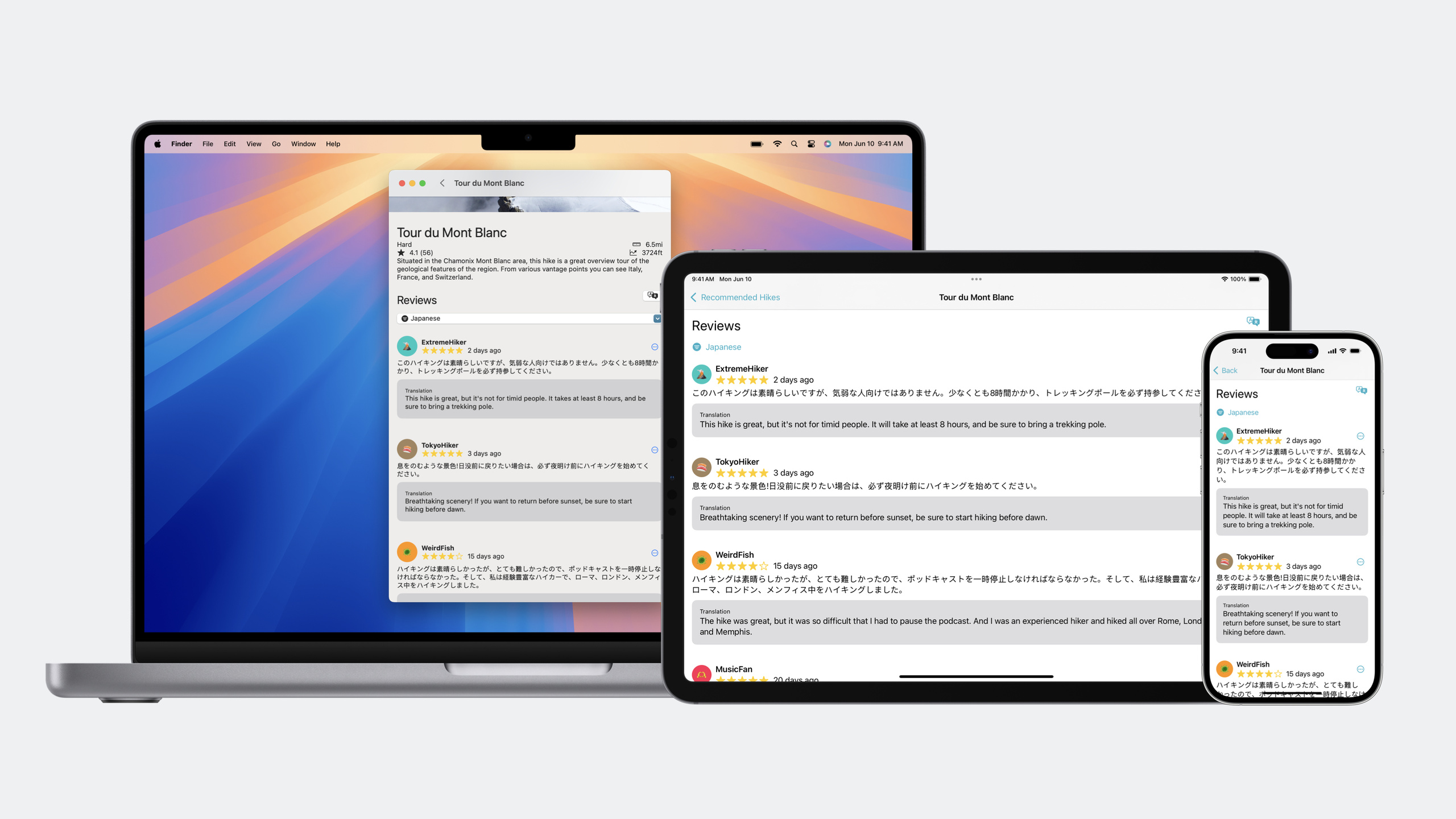
You built a pan-European hiking app, and user reviews might be in German, Japanese, or Dutch—localization alone isn’t enough because you can’t control the language of user-generated content. Previously, solving this meant integrating a third-party translation service or having users copy text to the system Translate app and switch back.
In iOS 18, Apple exposes the on-device ML models behind the Translate app through the Translation framework. The first layer is .translationPresentation()—a SwiftUI modifier that adds one line of code to pop up the system translation overlay in your app, with the same experience as system-wide translation. The second layer is TranslationSession—a more flexible async API that lets you get translation results and decide how to display them yourself, supporting batch translation, language detection, and automatic language selection.
Both APIs share the same on-device ML models. Language packs already exist on the system (ones the user has downloaded), and your app can use them directly. If the user hasn’t downloaded a language, the framework automatically shows a download prompt; downloads happen in the background and continue even if the user leaves your app. Hindi support was added this year, covering the same language list as the Translate app.
Detailed Content
The system overlay translation suits “translate this once” scenarios—a user encounters unfamiliar text, taps once, and sees the result. Implementation is adding a .translationPresentation() modifier to a view, with a state variable controlling visibility (03:00):
// Store state controlling the translation overlay
@State private var showsTranslation = false

// Add a button in the context menu to trigger translation
ContextMenu {
  Button("Translate") {
    showsTranslation = true
  }
} // ([02:51-03:09](https://developer.apple.com/videos/play/wwdc2024/10117/?time=171))

// Add translationPresentation modifier to the view
.translationPresentation(isPresented: $showsTranslation, text: reviewText)
Key points:
@State private var showsTranslation = false— stores whether the translation overlay is shownshowsTranslation = true— set to true when the user taps Translate, triggering the overlay.translationPresentation(isPresented:text:)— automatically shows the system translation overlay when isPresented is true; text is the content to translate
This implementation is very lightweight, and users can switch the target language themselves. But if you need to show multiple translations at once (such as an entire review list), or embed translation results in your own UI, you need TranslationSession.
TranslationSession is an async API—you can’t instantiate it directly; instead you get an instance from the framework via the .translationTask() modifier (04:30):
// Store translation session configuration
@State private var configuration: TranslationSession.Configuration?

// Add translationTask modifier to the view
.translationTask(configuration) { session in
  // This closure is called when configuration changes
  let requests = filteredReviews.map { review in
    TranslationSession.Request(text: review.text)
  }

  // Batch translate; results stream back
  for await result in session.translate(requests) {
    switch result {
    case .success(let translation):
      updateReview(with: translation)
    case .failure(let error):
      handleError(error)
    }
  }
}
Key points:
@State private var configuration— stores translation configuration; setting it to nil won’t trigger translation.translationTask(configuration:)— when configuration changes from nil to non-nil, the framework calls the closure and passes in a sessionTranslationSession.Request(text:)— wraps the text to translatesession.translate(requests)— returns an AsyncSequence with streaming resultsfor await result in— handle each result: update UI on success, handle errors on failure
The logic to trigger translation is assigning a new value to configuration (06:48):
if configuration == nil {
  // First translation: use default config (auto-detect source, auto-select target)
  configuration = TranslationSession.Configuration()
} else {
  // Repeat translation: call invalidate() so the framework knows content changed
  configuration?.invalidate()
}
Key points:
configuration == nilchecks whether this is the first translationTranslationSession.Configuration()default initializer auto-selects languagesconfiguration?.invalidate()tells SwiftUI the config changed, re-running the translationTask closure
For language selection, you can manually specify source and target languages, or pass nil and let the framework handle it (09:00):
// Manually specify languages
TranslationSession.Configuration(
  source: Locale.Language(identifier: "es"),
  target: Locale.Language(identifier: "en")
)

// Auto-detect source, auto-select target
TranslationSession.Configuration(
  source: nil,  // Auto-detect content language
  target: nil   // Auto-select based on user preferred languages
)
Key points:
source: nil— the framework auto-identifies text language; asks the user if it can’ttarget: nil— the framework auto-selects target language based on source and user preferences
For language detection, the framework recommends passing nil to TranslationSession rather than calling NLLanguageRecognizer yourself (10:03). If you do need standalone detection:
let recognizer = NLLanguageRecognizer()
recognizer.processString(text)
if let dominantLanguage = recognizer.dominantLanguage {
  let language = Locale.Language(identifier: dominantLanguage.rawValue)
  // Pass language to TranslationSession
}
Check language support with the LanguageAvailability API (11:53):
// Get all languages that support translation
let supportedLanguages = LanguageAvailability.supportedLanguages

// Check whether a language pair supports translation
let status = LanguageAvailability.status(
  from: Locale.Language(identifier: "en"),
  to: Locale.Language(identifier: "hi")
)

switch status {
case .supported:
  print("Supported")
case .installed:
  print("Supported and downloaded")
case .unsupported:
  print("Unsupported")
}
Key points:
supportedLanguages— returns all languages supporting translation, same as the Translate appstatus(from:to:)— checks whether translation from source to target is supported.installedmeans the language pair supports translation and the language pack is downloaded on device
An important constraint for batch translation: all text in the same batch of requests must be the same language (13:37). Mixing German and Spanish in one batch produces garbled output. The correct approach is batching by language:
// Wrong: mix different languages in one batch
let mixedRequests = [
  TranslationSession.Request(text: germanText1),
  TranslationSession.Request(text: spanishText1)
]

// Correct: translate in separate batches
for await result in session.translate(germanRequests) {
  // Handle German translation results
}

for await result in session.translate(spanishRequests) {
  // Handle Spanish translation results
}
When batching by language, the session source language must be nil so the framework can detect language per batch. To let users approve language pack downloads in advance (such as for offline translation), call prepareTranslation() (14:50):
try await session.prepareTranslation(
  from: Locale.Language(identifier: "en"),
  to: Locale.Language(identifier: "ja")
)
Finally, note TranslationSession lifecycle—it is bound to a view; if the view disappears, the session is unavailable. Don’t store the session in persistent model objects (15:13).
Core Takeaways
-
Start with
.translationPresentation()to validate demand, then useTranslationSessionfor deep integration- Why it’s worth doing: the system overlay is zero-cost to integrate and quickly validates whether translation adds value—if users rarely use it, UI integration isn’t worth the investment
- How to start: add
.translationPresentation()to views that need translation, trigger it with a menu button, and observe usage frequency
-
Download language packs ahead of time for offline scenarios
- Why it’s worth doing: translation is most valuable in weak-network scenarios like outdoor travel or subway commutes; pre-downloading ensures uninterrupted experience
- How to start: when detecting offline mode or unstable network, call
prepareTranslation()to request download approval
-
Batch translations by language
- Why it’s worth doing: mixing different languages in one batch produces garbled output; batching by language ensures translation quality
- How to start: use
NLLanguageRecognizeror let the framework auto-detect each text’s language, group by detected language, then callsession.translate()separately for each group
Related Sessions
- Bring your app to Siri — Expose translation to Siri so users can say “translate this review”
- Bring your app’s core features to users with App Intents — Let system search and Shortcuts invoke your translation features via App Intents
- What’s new in Foundation — Learn about Foundation language APIs such as Locale.Language
- Integrate your app with Productivity broadcasts — Trigger translation tasks and other automation scenarios through broadcasts
Comments
GitHub Issues · utterances