
Highlight
iOS 18’s AVMetrics turns every step of the AVPlayerItem playback lifecycle—playlist requests, segment downloads, content key retrieval, stalls, variant switches—into a subscribable event stream, letting you pinpoint root causes of slow startup and playback stuttering directly from the client.
Core Content
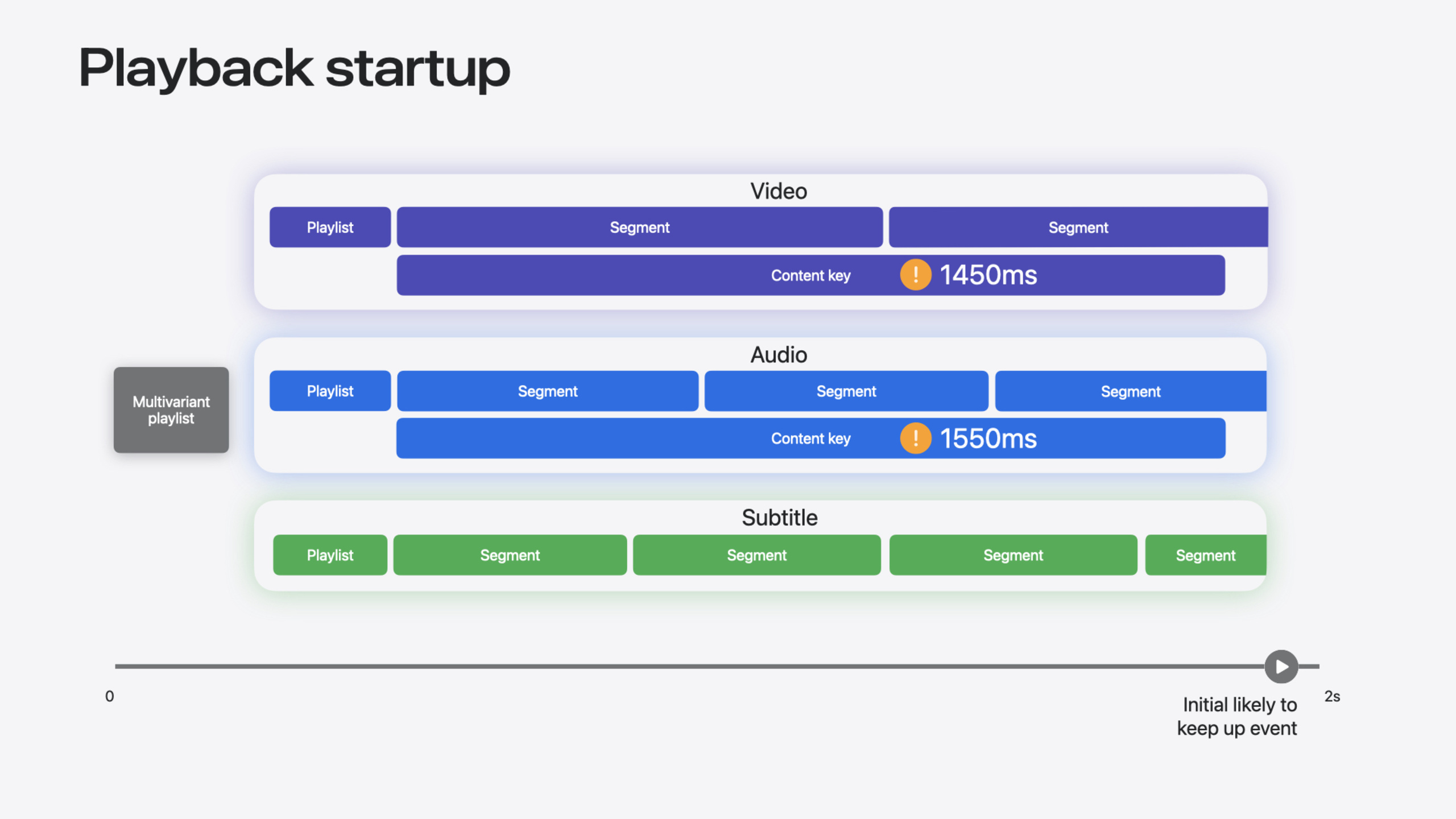
A 2-second startup delay, then a sudden freeze at minute 7—these are the two most common complaints about media apps. Before iOS 18, you had access logs, error logs, and various AVPlayer notifications. The data was too coarse: you knew a stall happened, but not which step failed before it; you knew startup was slow, but not whether time went to content key requests or segment downloads.
iOS 18 introduces AVMetrics, an event stream system based on a publisher/subscriber model. Once AVPlayerItem conforms to AVMetricEventStreamPublisher, each completed activity during playback produces an event: multi-variant playlist request complete, media segment download complete, content key retrieval complete, stall occurred, variant switch. Each event carries a timestamp and context, letting you chain them into a complete event sequence. The session demonstrated diagnostic power with two real scenarios: in slow startup, the event chain showed most time spent on content key requests—the fix is preloading keys or optimizing the key server; in stuttering, segment events showed the server returned HTTP 404, dropping the variant from 20Mbps to 15Mbps, then another 404 on the new variant, buffer exhaustion, and stall. This information was nearly impossible to locate from client data under the old approach.
Detailed Content
Core AVMetrics protocol definition (6:27):
public protocol AVMetricEventStreamPublisher
{
    func metrics<MetricType: AVMetricEvent>(forType metricType: MetricType.Type) -> AVMetrics<MetricType>

    func allMetrics() -> AVMetrics<AVMetricEvent>
}

extension AVPlayerItem : AVMetricEventStreamPublisher
Key points:
metrics(forType:)returns a strongly typedAVMetrics<MetricType>async sequence containing only the event type you specifyallMetrics()returns a merged sequence of all event typesAVPlayerItemconforms directly—no extra wrapper needed
Swift subscription for “likely to keep up” and “summary” events (6:50):
let playerItem : AVPlayerItem = ...

let ltkuMetrics = item.metrics(forType: AVMetricPlayerItemLikelyToKeepUpEvent.self)
let summaryMetrics = item.metrics(forType: AVMetricPlayerItemPlaybackSummaryEvent.self)

for await (metricEvent, publisher) in ltkuMetrics.chronologicalMerge(with: summaryMetrics)
{
    // send metricEvent to server
}
Key points:
- Pass the event type’s
.selftometrics(forType:)to get the corresponding async sequence chronologicalMerge(with:)merges multiple event streams in chronological order—no manual sortingfor awaitconsumes events one by one; serialize and send to your analytics server- Events are generated when the corresponding activity completes (e.g., after a media playlist request finishes), not at start
Objective-C approach (7:26):
AVPlayerItem *item = ...

AVMetricEventStream *eventStream = [AVMetricEventStream eventStream];
id<AVMetricEventStreamSubscriber> subscriber = [[MyMetricSubscriber alloc] init];
[eventStream setSubscriber:subscriber queue:mySerialQueue]

[eventStream subscribeToMetricEvent:[AVMetricPlayerItemLikelyToKeepUpEvent class]];
[eventStream subscribeToMetricEvent:[AVMetricPlayerItemPlaybackSummaryEvent class]];

[eventStream addPublisher:item];
Key points:
- Create an
AVMetricEventStreaminstance first, then set subscriber and queue subscribeToMetricEvent:registers each event type of interestaddPublisher:binds AVPlayerItem to the event stream; subscriber starts receiving events
AVMetrics supports event types covering the full playback lifecycle: playlist events (multi-variant playlist, media playlist), media segment events (including NSURLSessionTaskMetrics), content key events, stall events, variant switch events, likely to keep up events, rate change events, seek events, error events, and final summary events. Summary events provide KPIs like stall count and switch count, suitable for large-scale monitoring (4:44).
Core Takeaways
-
What to do: Integrate AVMetrics from day one for new playback items. Why it matters: The sooner you monitor playback quality, the better—waiting for user complaints is too late. How to start: At minimum, subscribe to summary events and report stall count and switch count to your analytics system—just a dozen lines of code.
-
What to do: Replace existing access log / error log approaches with AVMetrics. Why it matters: AVMetrics events carry timestamps and contextual associations, reconstructing complete event chains at far finer granularity than the old approach. How to start: Roll out AVMetrics to a small percentage of users first, compare data consistency with the old approach, then switch fully once confirmed.
-
What to do: Share NSURLSessionTaskMetrics data from media segment events with your CDN vendor. Why it matters: NSURLSessionTaskMetrics includes complete network transaction details—DNS, TCP, TLS, TTFB—and response headers, letting CDN vendors quickly pinpoint edge node issues. How to start: When users in a region frequently hit segment download failures, extract session identifiers and response headers from events and send them to your CDN vendor.
Related Sessions
- Enhance ad experiences with HLS interstitials — HLS ad interstitials, another new capability in the HLS ecosystem
- Migrate your TVML app to SwiftUI — Migrating from TVML to SwiftUI, for teams refactoring media apps
- Use HDR for dynamic image experiences in your app — HDR image processing, another dimension of media experience
- What’s new in HLS authoring — Latest HLS authoring updates, complementary to client-side metrics
Comments
GitHub Issues · utterances