
Highlight
The next generation of CarPlay delivers content to every vehicle screen through a four-layer UI architecture (Overlay, Remote, Local, Punch-through) and a dedicated compositor for seamless iPhone and vehicle system integration.
Core Content
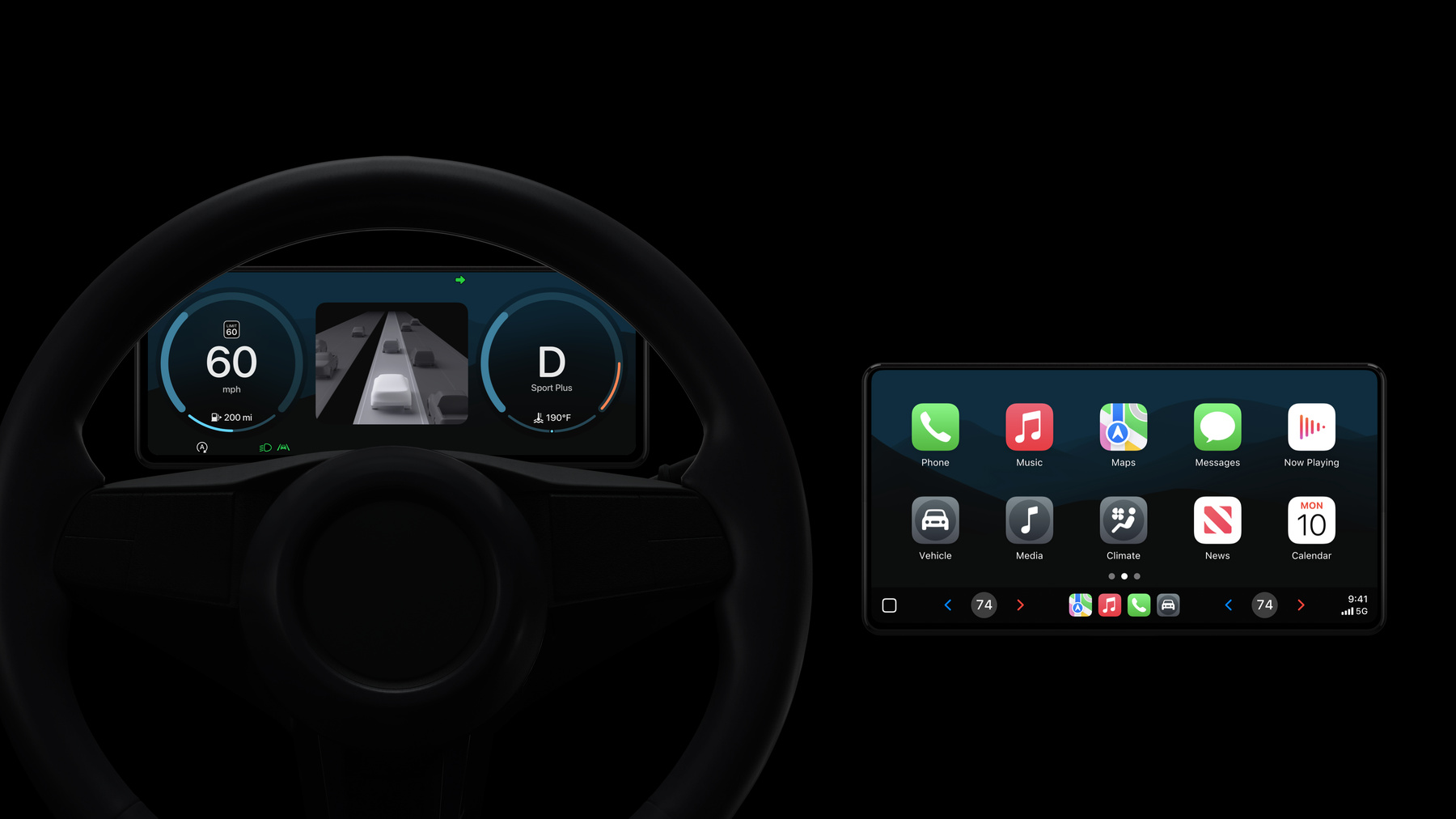
Since CarPlay launched, cars have changed dramatically—screens are larger, more numerous, and more capable. Traditional CarPlay needed only a single iPhone video stream output to the vehicle system. But the next generation of CarPlay aims to provide content for every driver-facing screen: instrument cluster, center display, passenger display, and more, forming a fully integrated interface.
The biggest architectural change is expanding from a single video stream to multiple streams. The next generation of CarPlay needs a separate iPhone video stream for each in-vehicle screen. That sounds like a quantity increase, but it introduces new technical challenges: how do locally rendered vehicle UI and remotely rendered iPhone UI blend visually into one experience?
Apple’s solution splits UI into four layers. Overlay UI is the top layer, containing vehicle-specific warning telltales and critical indicators, fully rendered by the vehicle system. Remote UI is the rich content layer from iPhone—maps, audio, tire pressure, trip information, and more. Local UI is locally rendered driving-related gauges and indicators, characterized by low latency, Wi-Fi interference resistance, and fast startup. Punch-through UI allows vehicle-specific UI (such as driver assistance, external cameras) to embed seamlessly into the experience.
These four layers are handled by a dedicated compositor that receives iPhone video streams, locally rendered UI, and Punch-through UI, composites them with OpenGL into unified output frames, and passes them to the system compositor for display on each screen. The most critical technology is frame-level synchronization—iPhone carefully orchestrates UI element movement on screen through a UI sync channel, maintaining coherence at 60fps regardless of rendering source.
Detailed Content
The next generation of CarPlay architecture builds on existing CarPlay foundations but adds substantial new capabilities. It is a wireless experience supporting enhanced Siri, buffered media playback, and HEVC video streaming. The most important architectural change is how UI is rendered and composited.
Four-layer UI architecture
(03:03) UI is split into four layers, each with a specific purpose:
Overlay UI is the top layer, containing vehicle-specific warning telltales and critical indicators. These elements may be redesigned or repositioned to match the new experience but are fully rendered by the vehicle system.
Remote UI is the rich content layer from iPhone. Maps and audio apps run here, along with tire pressure, trip information, and more. Each screen needs a separate iPhone video stream.
Local UI is locally rendered driving-related gauges. It provides low latency and high-frequency response, is unaffected by Wi-Fi interference, and starts extremely fast. (05:03) Local UI is based on an OpenGL renderer paired with resource bundles transferred from iPhone (containing images and behavior scripts). Resource bundles are vehicle-specific, transferred during pairing, and the vehicle verifies authenticity before use.
Punch-through UI allows vehicle-specific features (such as driver assistance, external cameras) to integrate seamlessly into the experience. These pixels are fully rendered by the vehicle but blend into the overall experience through carefully designed transition animations.
Compositor architecture
(08:02) These three layers (Remote, Local, Punch-through) are handled by a dedicated compositor using OpenGL to provide unified output frames for each screen. Overlay UI goes directly to the vehicle compositor, bypassing this dedicated compositor.
Frame-level synchronization
(08:51) To achieve smooth layout transitions and animations, the system uses frame-level synchronization. Each iPhone video frame carries a presentation timestamp. The next generation of CarPlay adds a dedicated low-latency channel called UI sync from iPhone to each display. Behavior scripts interpret this information, matching Local UI, Punch-through UI, and Remote UI frame by frame at 60fps or higher.
Vehicle state protocol
(11:03) The next generation of CarPlay relies on the vehicle system always providing the latest state information. Multiple interfaces are available depending on where information is rendered. The instrument cluster has a dedicated interface; center display Local UI has a similar interface; Remote UI is supported through an extended Communication plug-in. This design also protects privacy—data is used only where needed and in many cases never leaves the vehicle.
(18:29) Apple provides rich vehicle state categories for developers:
Audio settings
Charging
Climate control
Closures
Drive state
Driver assistance
Electric engine
Fuel
High voltage battery
Internal combustion engine
Media
Notification history
Notifications
Now playing information
Paired devices
Request content
Seat
Tire
Trip computer
UI control
Units
Vehicle motion
Vehicle resources
Key points:
- These categories cover all major vehicle state information
- Data is transmitted via the vehicle state protocol; UI directly reflects vehicle state
- High-frequency updates (such as speedometer) require continuously providing precise values
- UI performs no math—it simply displays values the vehicle sends
Customization and configuration
(21:55) Automakers can run custom UI on iPhone through the Automaker App, leveraging iOS’s full capabilities. Custom settings use the Automaker Settings API with fully custom labels, icons, features, and structure. The ProminenceInfo API can elevate important settings to the top level. Deep links can guide users to the automaker’s own iOS app.
(25:08) Custom notifications are fully flexible—labels, icons, and buttons are all customizable. Developers decide what to display, when, and when to remove it, choosing local or remote rendering.
Core Takeaways
-
Layered architecture is key to complex systems. The next generation of CarPlay splits UI into four layers with clear responsibilities: Overlay for safety-critical vehicle control, Remote for rich iPhone content, Local for low-latency local rendering, Punch-through for vehicle-specific features. This layering lets different rendering sources collaborate seamlessly.
-
Frame-level synchronization enables smooth animations across rendering sources. Whether pixels come from iPhone or the vehicle, the UI sync channel and presentation timestamps keep all layers synchronized at 60fps. This is an important reference for real-time UI systems.
-
Resource bundle verification balances flexibility and security. An OpenGL renderer paired with updatable resource bundles lets UI evolve over time, while verification ensures only authorized resources execute. This design lets automakers continuously improve the experience while maintaining system security.
-
State-driven UI decouples display from logic. The vehicle state protocol serves as a single source of truth—UI is simply a reflection of state. This unidirectional data flow keeps UI simple and predictable—“UI simply shows what you provide” (17:07).
-
Privacy protection is embedded in the architecture. Data is used only where needed and in many cases never leaves the vehicle. This privacy-first design is a foundational layer—the distribution logic of vehicle state interfaces determines data minimization from the start.
Related Sessions
- Say hello to the next generation of CarPlay design system — Explore the next generation CarPlay design system—deep customization of instrument cluster, layout, and dynamic content
- Optimize CarPlay for vehicle systems — Learn how to integrate CarPlay into modern vehicle systems and prepare for the next generation
- Q&A: CarPlay — Two-hour text Q&A with Apple engineers for code-level guidance
- Meet AccessorySetupKit — Improve accessory pairing with AccessorySetupKit, relevant to in-vehicle system integration
Comments
GitHub Issues · utterances