
Highlight
The App Store subscription offer system already has introductory offers (acquisition), promotional offers (engagement), and offer codes (marketing distribution). This year’s updates go in two directions: filling in missing information for existing APIs, and launching the all-new win-back offers to re-engage churned users.
Core Content
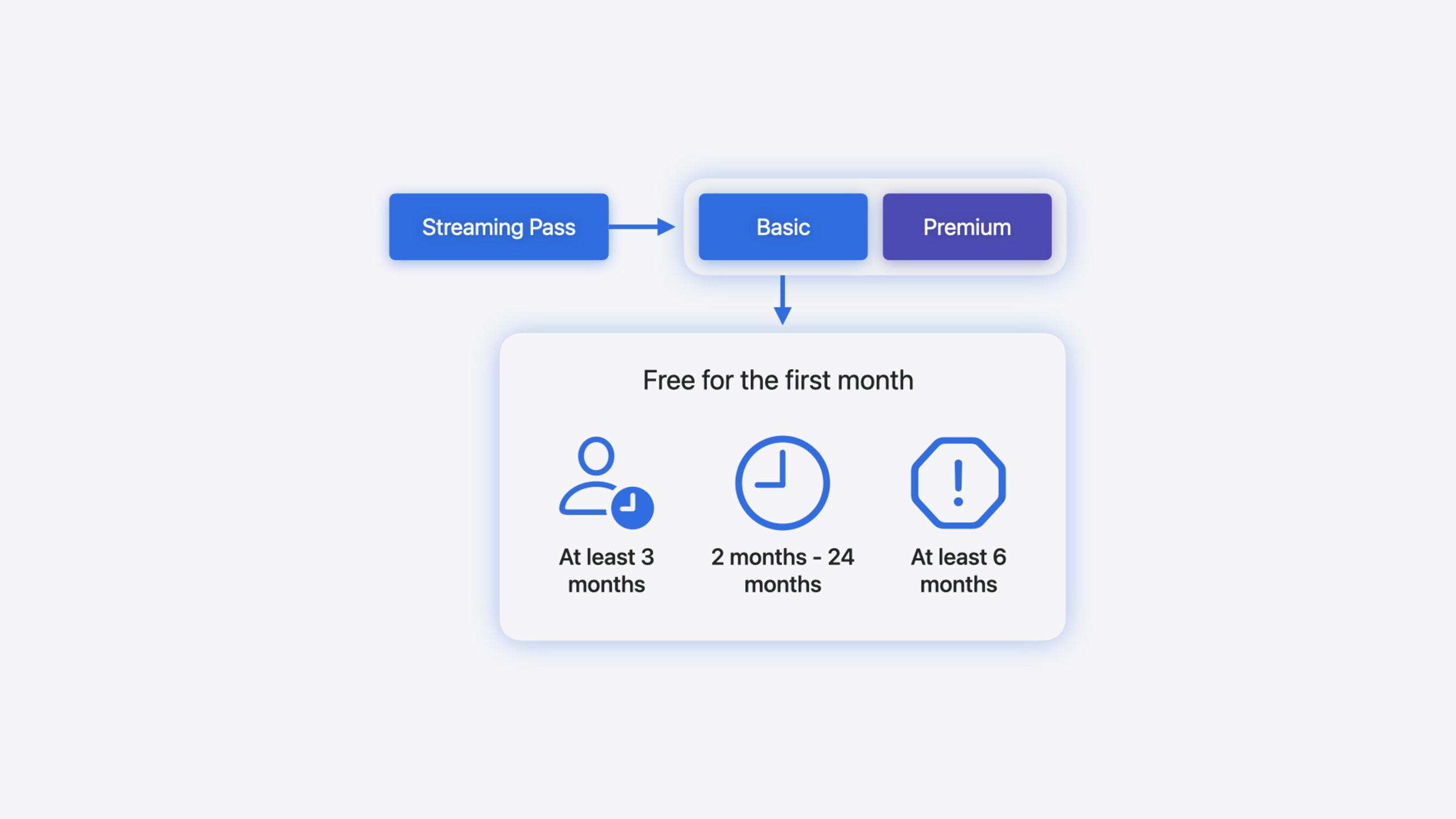
The core challenge for subscription products is churn. After a user cancels auto-renewal, developers have almost no way to reach them again—promotional offers require you to verify eligibility and send pushes yourself, making the conversion path long and costly. Apple’s answer this year is win-back offers: a new offer type specifically for users whose subscription has expired and auto-renewal is off.
Win-back offers differ most from previous offers in that Apple handles user segmentation and channel distribution for you. Configure eligibility criteria in App Store Connect (paid duration, churn duration, interval between offers), and Apple automatically matches qualifying users and displays offer cards on the product page, Today tab, subscription settings page, and more. Users tap the card and confirm payment in one flow. You can even set priority for win-back offers in App Store Connect, which Apple uses for personalized recommendations.
There are API updates too. The Transaction and RenewalInfo structs gain an offer field that unifies offer ID, type, and payment mode; StoreKit Views adds subscriptionPromotionalOffer and preferredSubscriptionOffer View Modifiers to control which offer displays in SubscriptionStoreView; macOS 15 finally supports the offer code redemption sheet.
Detailed Content
New offer field on Transaction and RenewalInfo
The Transaction struct added an offer member in iOS 17.2—an optional value containing id, type, and paymentMode. It is populated only when the user purchased with an offer. The same field on RenewalInfo is available from iOS 18.0, representing the offer that will apply in the next renewal cycle (02:02).
On the App Store Server API side, the corresponding fields are offerIdentifier, offerType (existing), and the new offerDiscountType (backfilled for historical transactions). offerDiscountType values correspond to paymentMode in StoreKit, distinguishing free trial / pay-as-you-go / pay-up-front (02:53).
macOS 15 supports offer code redemption sheet
// Present offer code redemption sheet on macOS - SwiftUI API

import SwiftUI
import StoreKit

struct MyView: View {

    @State var showOfferCodeRedemption: Bool = false

    var body: some View {
        Button("Redeem Code") {
            showOfferCodeRedemption = true
        }
        .offerCodeRedemption(isPresented: $showOfferCodeRedemption) { result in
            // Handle result
        }
    }
}
@State var showOfferCodeRedemption: Boolean state controls sheet show/hide.offerCodeRedemption(isPresented:): Same API as iOS from macOS 15—the sheet handles redemption automaticallyresultclosure: Handle the redemption result for follow-up (04:25)
preferredSubscriptionOffer: Choose which offer to display in SubscriptionStoreView
// Choose preferred offer in a SubscriptionStoreView

import SwiftUI
import StoreKit

struct MyView: View {
    let groupID: String

    var body: some View {
        SubscriptionStoreView(groupID: groupID)
            .preferredSubscriptionOffer { product, subscription, eligibleOffers in
                let freeTrialOffer = eligibleOffers
                    .filter { $0.paymentMode == .freeTrial }
                    .max { lhs, rhs in
                        lhs.period.value < rhs.period.value
                    }
                return freeTrialOffer ?? eligibleOffers.first
            }
    }
}preferredSubscriptionOffer: Closure parameters are product, subscription, eligibleOffers—StoreKit automatically passes all offers the current user qualifies for$0.paymentMode == .freeTrial: Filter for free trial offers.max { lhs.period.value < rhs.period.value }: Find the longest free trialfreeTrialOffer ?? eligibleOffers.first: Fall back to the first available offer if no free trial is found (20:15)
Check subscription entitlement and win-back offer display logic
// Check subscription entitlement and offer eligibility

import StoreKit

func shouldShowMerchandising(
    for groupID: String,
    productIDs: [Product.ID]
) async throws -> MerchandisingVisibility {
    // Get subscription status
    let statuses = try await Product.SubscriptionInfo.status(for: groupID)

    // Check if the customer is already entitled to the subscription
    let entitlement = SubscriptionEntitlement(for: statuses)
    if entitlement.autoRenewalEnabled {
        return .hidden
    }

    // Check for offers to show in merchandising UI
    let products = try await Product.products(for: productIDs)

    let isEligibleForIntroOffer = await Product.SubscriptionInfo.isEligibleForIntroOffer(for: groupID)
    if isEligibleForIntroOffer {
        let subscriptions = products.map {
            ($0, $0.subscription?.introductoryOffer)
        }
        return .visible(subscriptions)
    }

    // Check for eligible win-back offers
    let purchasedStatus = statuses.first {
        $0.transaction.unsafePayloadValue.ownershipType == .purchased
    }
    let renewalInfo = try purchasedStatus?.renewalInfo.payloadValue
    let bestWinBackOfferID = renewalInfo?.eligibleWinBackOfferIDs.first

    // Return the product with the offer if there is one
    if let bestWinBackOfferID {
        let subscriptions: [(Product, Product.SubscriptionOffer?)] = products.map {
            let winBackOffer = $0.subscription?.winBackOffers.first {
                $0.id == bestWinBackOfferID
            }
            return ($0, winBackOffer)
        }
        return .visible(subscriptions)
    }

    // Only return the product if there is no offer
    return .visible(products.map { ($0, nil) })
}Product.SubscriptionInfo.status(for:): Fetch current subscription group statusSubscriptionEntitlement: Custom struct determining entitlement and auto-renewal from status listisEligibleForIntroOffer: Check introductory offer eligibility first—show trial for new users$0.transaction.unsafePayloadValue.ownershipType == .purchased: Only look at self-purchased records, exclude Family SharingrenewalInfo?.eligibleWinBackOfferIDs.first: First item in Apple’s list is the best win-back offer$0.subscription?.winBackOffers.first { $0.id == bestWinBackOfferID }: Match the full offer object by ID in product info (23:05)
Add win-back offer to purchase
// Add a win-back offer to a purchase

import StoreKit

func purchase(
    _ product: Product,
    with offer: Product.SubscriptionOffer?
) async throws {
    // Prepare the purchase options
    var purchaseOptions: Set<Product.PurchaseOption> = []

    // Add win-back offer to the purchase
    if let offer, offer.type == .winBack {
        purchaseOptions.insert(.winBackOffer(offer))
    }

    // Make the purchase
    try await product.purchase(options: purchaseOptions)
}.winBackOffer(offer): New PurchaseOption in iOS 18.0—pass the win-back offer object into the purchase flowproduct.purchase(options:): App Store automatically verifies user eligibility before showing the payment sheet (25:26)
Streamlined Purchasing and PurchaseIntent
If you enable App Store promotion in App Store Connect (enabled by default), users can complete win-back offer purchases directly in the App Store without opening the app first. This is called streamlined purchasing. If you need custom logic before purchase (such as an onboarding screen), disable it in App Store Connect and use the PurchaseIntent API in your app to receive purchases initiated from the App Store (28:48). PurchaseIntent adds an offer field in iOS 18.0—it is populated only when a win-back offer is included.
Core Takeaways
-
What to build: Configure win-back offer segmentation for churned users. Use “paid subscription duration ≥ 3 months + churned 2–6 months” as initial criteria and create a free trial win-back offer in App Store Connect. Why it’s worth doing: Apple handles distribution—you don’t write eligibility verification or push logic, and coverage is broader than promotional offers. How to start: On the subscription pricing page in App Store Connect, find the Win-Back Offers tab, click Create Offer, and configure eligibility and pricing.
-
What to build: Integrate
preferredSubscriptionOfferin SubscriptionStoreView so StoreKit Views automatically show the best offer. Why it’s worth doing: When users qualify for both introductory and win-back offers, you need to decide which to show—this View Modifier completes selection logic in a few lines. How to start: Add the.preferredSubscriptionOffermodifier to your existing SubscriptionStoreView and return the appropriate SubscriptionOffer by business priority in the closure. -
What to build: Migrate offer checks on Transaction and RenewalInfo to the new
offerfield. Why it’s worth doing: Theofferfield unifies offer ID, type, and payment mode—Apple’s recommended query path; legacy scattered fields may be deprecated. How to start: When parsing JWSTransaction on the server, readofferDiscountTypealongsideofferIdentifier+offerType; on the client, usetransaction.offeras the primary check entry point. -
What to build: Add offer code redemption sheet support to your macOS app. Why it’s worth doing: macOS 15 finally adds this capability—macOS users previously had to enter codes manually with a poor experience. How to start: Use the
.offerCodeRedemption(isPresented:)SwiftUI modifier—code is identical to iOS.
Related Sessions
- What’s new in StoreKit and In-App Purchase — StoreKit Views styling controls, new Transaction fields, StoreKit Testing improvements
- Explore App Store server APIs for In-App Purchase — Server-side offerDiscountType field, consumption reporting, and notification type updates
- What’s new in App Store Connect — App Store Connect featured nominations, marketing asset generation, and TestFlight improvements
Comments
GitHub Issues · utterances