
Highlight
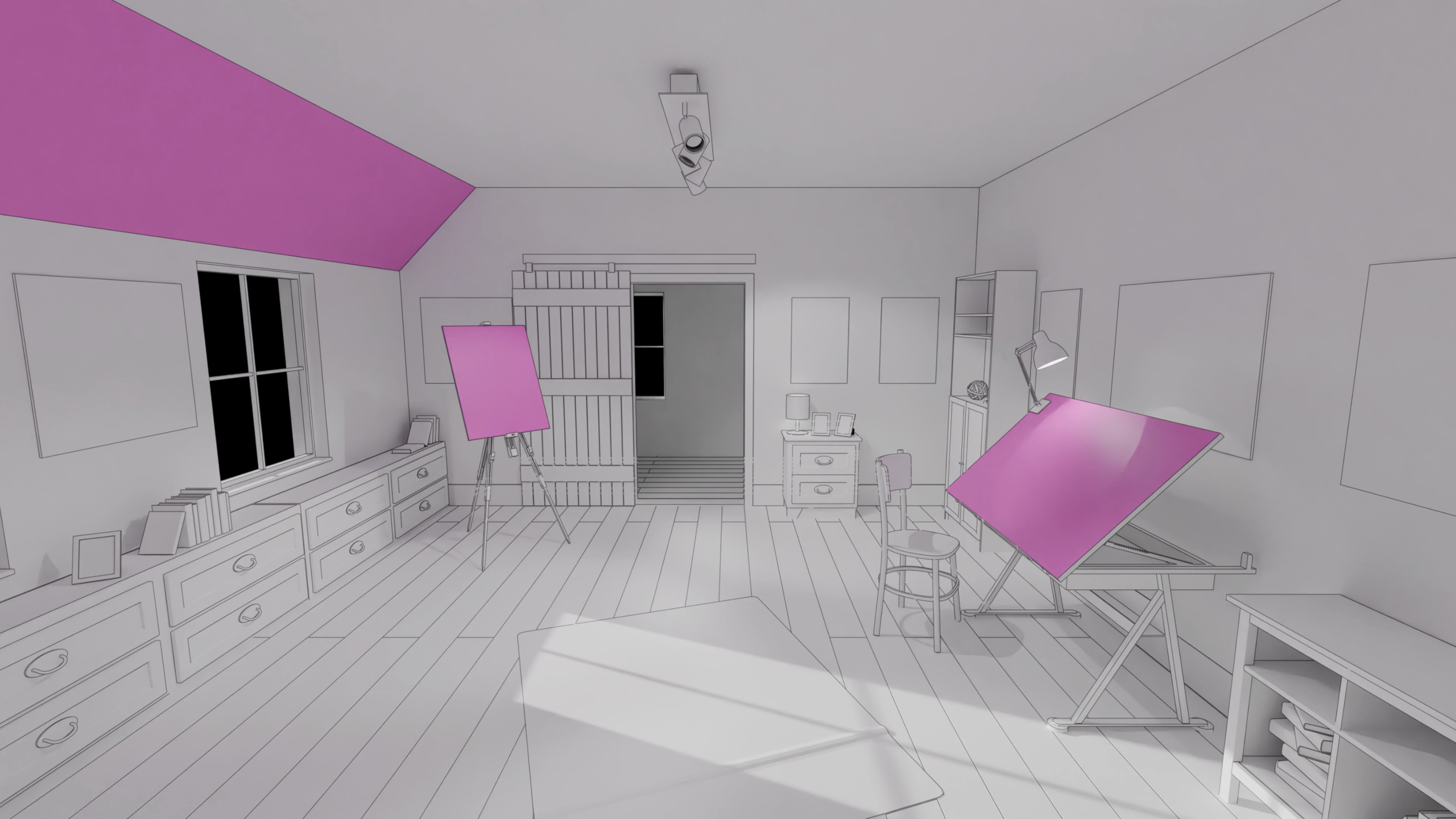
ARKit in visionOS 2.0 adds Room Tracking, upgrading mesh data that previously had only geometric vertices to RoomAnchors with room-boundary semantics, letting apps switch virtual content by room.
Core Content
Every visionOS developer hits the same problem: ARKit gives you mesh vertices and plane anchors, but your code can’t tell “which room the user is in.” You guess from coordinates and geometry—and when you’re wrong, virtual content lands in the wrong place. Super Fruit Ninja splashes fruit debris on the floor thanks to scene understanding, but last year’s API could only recognize planes and mesh, not room-level semantics.
This year ARKit adds Room Tracking, directly telling you the current room’s boundaries, wall and floor geometry, and automatically switching data sources when users walk from the living room to the bedroom. New Object Tracking lets you register a real object with a USDZ model and have ARKit continuously track its position and orientation—ideal for education and industry scenarios that overlay virtual content on real items. Plane Detection also adds Slanted alignment for detecting angled surfaces. Additionally, World Tracking automatically degrades to orientation-only tracking in low light, and Hand Tracking supports display-rate output and hand prediction to reduce interaction latency.
Detailed Content
Room Tracking
RoomTrackingProvider is a new DataProvider this year, requiring world sensing authorization. It provides the current room’s RoomAnchor and an async sequence of anchor updates (03:35).
// RoomTrackingProvider

@available(visionOS, introduced: 2.0)
public final class RoomTrackingProvider: DataProvider, Sendable {

    /// The room which a person is currently in, if any.
    public var currentRoomAnchor: RoomAnchor? { get }

    /// An async sequence of all anchor updates.
    public var anchorUpdates: AnchorUpdateSequence<RoomAnchor> { get }

    ...
}
Key points:
currentRoomAnchordirectly returns the current room’s anchor;nilmeans ARKit hasn’t recognized an enclosed spaceanchorUpdatesis an async sequence suited for listening to room-switch events- RoomTrackingProvider only updates anchor data for the current room, not all historical rooms simultaneously
Each RoomAnchor contains room geometry information (04:20):
@available(visionOS, introduced: 2.0)
public struct RoomAnchor: Anchor, Sendable, Equatable {
    /// True if this is the room which a person is currently in.
    public var isCurrentRoom: Bool { get }

    /// Get the geometry of the mesh in the anchor's coordinate system.
    public var geometry: MeshAnchor.Geometry { get }
    /// Get disjoint mesh geometries of a given classification.
    public func geometries(of classification: MeshAnchor.MeshClassification) ->
        [MeshAnchor.Geometry]

    /// True if this room contains the given point.
    public func contains(_ point: SIMD3<Float>) -> Bool

    /// Get the IDs of the plane anchors associated with this room.
    public var planeAnchorIDs: [UUID] { get }
    /// Get the IDs of the mesh anchors associated with this room.
    public var meshAnchorIDs: [UUID] { get }
}
Key points:
isCurrentRoomindicates whether this anchor represents the user’s current room, for switching virtual content by roomgeometryreturns mesh that fits room boundaries better than ordinary mesh anchorsgeometries(of:)returns separated geometry by classification (wall/floor), useful for occlusion or full-wall virtual portalscontains(_:)checks whether a 3D point is inside the room; combined with world tracking, enables “trigger only when entering a room” effectsplaneAnchorIDsandmeshAnchorIDslet you filter anchors belonging to the current room, avoiding expensive computation on out-of-room data
Object Tracking
Object Tracking requires first generating a ReferenceObject with CreateML, then loading and starting tracking at runtime (08:06).
// Object tracking

Task {
    do {
        let url = URL(fileURLWithPath: "/path/to/globe.referenceobject")
        let referenceObject = try await ReferenceObject(from: url)
        let objectTracking = ObjectTrackingProvider(referenceObjects: [referenceObject])
    } catch {
        // Handle reference object loading error.
    }
    ...
}
Key points:
- ReferenceObject loads from a file URL or from a Bundle
- One ObjectTrackingProvider can track multiple ReferenceObjects simultaneously
- Loading failures throw exceptions and need catch handling
Start the session and listen for state (08:27):
let session = ARKitSession()

Task {
    do {
        try await session.run([objectTracking])
    } catch {
        // Handle session run error.
    }

    for await event in session.events {
        switch event {
        case .dataProviderStateChanged(_, newState: let newState, _):
            if newState == .running {
                // Ready to start processing anchor updates.
            }
        ...
        }
    }
}
Key points:
session.run()is async and requires await- Anchor updates can only be processed after the DataProvider enters
.runningstate - Listen for state changes asynchronously via
session.events
Tracking results return as ObjectAnchor (08:43):
// ObjectAnchor

@available(visionOS, introduced: 2.0)
public struct ObjectAnchor: TrackableAnchor, Sendable, Equatable {

    /// An axis-aligned bounding box.
    public struct AxisAlignedBoundingBox: Sendable, Equatable {
        ...
    }

    /// The bounding box of this anchor.
    public var boundingBox: AxisAlignedBoundingBox { get }

    /// The reference object which this anchor corresponds to.
    public var referenceObject: ReferenceObject { get }
}
Key points:
boundingBoxprovides an axis-aligned bounding box for the detected object, with center, extent, min/max coordinatesreferenceObjectpoints to the matched ReferenceObject, from which you can get the original USDZ file path- Object Tracking only tracks statically placed objects, not moving ones
World Tracking Light Degradation
In low light, ARKit automatically degrades from full tracking to orientation-only tracking. SwiftUI adds the worldTrackingLimitations environment value to notify apps (11:03):
struct WellPreparedView: View {
    @Environment(\.worldTrackingLimitations) var worldTrackingLimitations

    var body: some View {
        ...

        .onChange(of: worldTrackingLimitations) {
            if worldTrackingLimitations.contains(.translation) {
                // Rearrange content when anchored positions are unavailable.
            }
        }
    }
}
Key points:
- When
.translationappears in limitations, positional tracking is unavailable and only orientation tracking remains - In this callback you can rearrange placed virtual content or prompt users to move to a brighter environment
- At the system level, tracking already degrades to orientation-only automatically—it won’t be completely lost
Hand Tracking Prediction
HandTrackingProvider now outputs data at display rate. A new hand prediction API lets you predict hand position ahead of time in Compositor Services rendering scenes (12:51):
// Hands prediction

func submitFrame(_ frame: LayerRenderer.Frame) {
    ...

    guard let drawable = frame.queryDrawable() else { return }

    // Get the trackable anchor time to target.
    let trackableAnchorTime = drawable.frameTiming.trackableAnchorTime

    // Convert the timestamp into units of seconds.
    let anchorPredictionTime = LayerRenderer.Clock.Instant.epoch.duration(to:
        trackableAnchorTime).timeInterval

    // Predict hand anchors for the time that provides best content registration.
    let (leftHand, rightHand) = handTracking.handAnchors(at: anchorPredictionTime)

    ...
}
Key points:
trackableAnchorTimeis a new timestamp in visionOS 2.0 representing the best content alignment moment- Convert it to seconds and pass to
handAnchors(at:)for ARKit forward prediction - Prediction results have lower latency but sacrifice some accuracy—suited for scenes needing tight hand alignment
- For accuracy over latency (gesture detection, drawing), async display-rate updates are better
Core Takeaways
-
Room-based experience switching: Use RoomTrackingProvider’s
isCurrentRoomandcontains(_:)to customize virtual content per room. Why it’s worth doing: Users intuitively expect “different things in different rooms”—more reliable than manual coordinate partitioning. How to start: Enable RoomTrackingProvider in Full Space, listen to anchorUpdates, swap scene content on switch. -
Overlay virtual info on real objects: Use Object Tracking to overlay 3D labels or animations on industrial equipment, teaching models, and tabletop game pieces. Why it’s worth doing: Education, repair, and museum scenarios naturally need “look at the real thing for explanation” interactions; few visionOS apps do this today. How to start: Train a ReferenceObject with CreateML, run in ObjectTrackingProvider, use ObjectAnchor’s boundingBox to position overlays.
-
Graceful degradation in low light: Listen to
worldTrackingLimitationsand automatically switch virtual content from anchored mode to view-following mode when positional tracking is lost. Why it’s worth doing: Users won’t always be in bright environments; without degradation, content drifts or disappears. How to start: In SwiftUI views,.onChange(of: worldTrackingLimitations)detect.translationrestriction and trigger content rearrangement. -
Low-latency hand interaction: For scenes needing tight hand alignment (such as grabbing virtual objects), use the hand prediction API instead of default async updates. Why it’s worth doing: Async HandAnchor has inherent latency—when hands move fast, virtual objects “can’t keep up”; prediction narrows the gap. How to start: In Compositor Services render loop, get target time from
drawable.frameTiming.trackableAnchorTime, callhandAnchors(at:)for predicted results.
Related Sessions
- Explore object tracking for visionOS — Detailed guide to generating ReferenceObjects with CreateML and training object tracking models
- Dive deep into volumes and immersive spaces — Deep dive into customizing Volumes and Immersive Spaces in visionOS
- Create custom environments for your immersive apps in visionOS — Visual and performance best practices for custom immersive app environments
- Build a spatial drawing app with RealityKit — Build a spatial drawing app with RealityKit, demonstrating hand tracking in practice
Comments
GitHub Issues · utterances