
Highlight
This session uses Apple’s own Encounter Dinosaurs experience as its through-line, sharing practical design lessons for interactive narrative on Apple Vision Pro. Interactive narrative combines film’s storytelling, games’ interactivity, and live performance’s immersion. The audience isn’t a passive observer—they’re a participant in the story.
Core Content
People building immersive visionOS content quickly hit a problem: you design a spatial experience, users put on the headset, and they stand there not knowing what to do. Apple’s design team ran into this with Encounter Dinosaurs—early tests found many participants thought it was passive viewing and didn’t realize they could interact with the dinosaurs.
The root cause is that spatial interaction is a new medium with no precedents. Film has a century of viewing habits; games have decades of controller conventions—but nobody has taught users what to do standing in front of Vision Pro. Apple’s solution has three layers: first use clear visual guidance to tell users “you can interact,” then implicit cues (butterflies flying close, dinosaurs looking at you) to draw users to reach out, finally establish consistent interaction rules so users form expectations. These three layers form the session’s core framework.
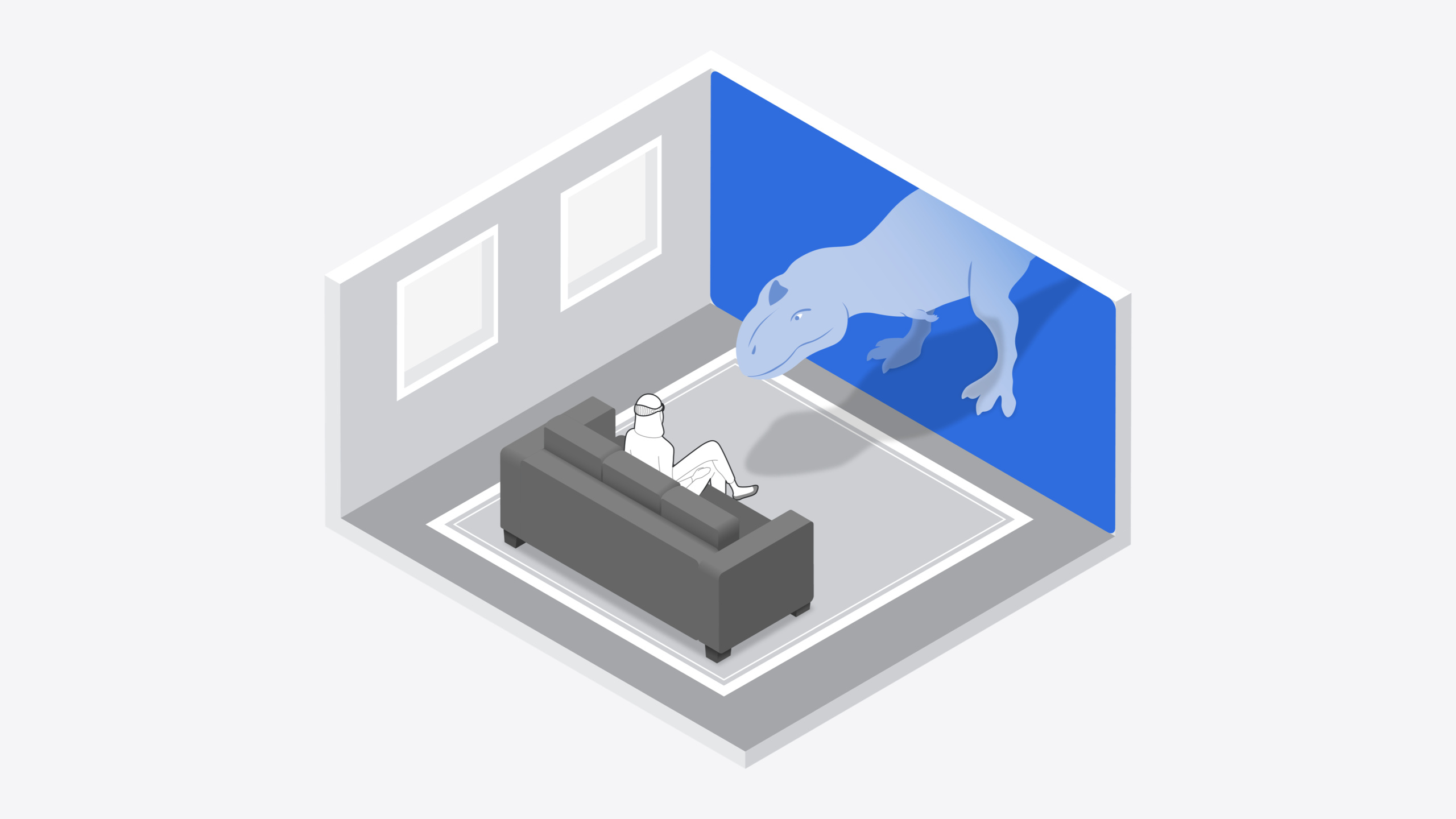
The session covers three themes: Setting (bringing the story world into user space), Interaction (using interaction to drive narrative), and Accessibility (letting everyone participate). Each theme includes real Encounter Dinosaurs design decisions—portals expanding 4 meters wide in large rooms, curving around users in small rooms, fixed distance and dimmed passthrough on airplanes—all from repeated on-device testing, none from theoretical deduction.
Detailed Content
Setting: Placing the Story World in User Space
visionOS offers three content forms: Window, Volume, and Immersive Space. You can pick one or combine them (02:22). Encounter Dinosaurs chose a custom RealityKit portal, separating the user’s world from the Cretaceous with a boundary. The portal’s rectangular shape evokes movies and TV screens, lowering the psychological barrier (03:00).
For content placement, visionOS Windows and Volumes auto-position; Immersive Space origin defaults to the user’s head position. But if you create custom content like Encounter Dinosaurs, you decide how content appears. Apple uses ARKit scene understanding and head tracking to scan the room in the background while users watch opening titles, automatically finding the best portal placement (04:01).
Spatial adaptation is critical. Apple designed different solutions for large, medium, and small spaces (04:52):
- Large space: Portal expands along walls, up to 4 meters wide.
- Medium space: Portal curves around the user, avoiding wall-clipping that breaks immersion.
- Small space/transport: Portal fixed at a distance in front of the user, with dimmed passthrough to maintain immersion.
Rose repeatedly emphasized: “everything changes once you’re testing on device” (05:54). What looks good on screen may be completely wrong in the headset, and vice versa. Test frequently on real hardware.
Interaction: Pulling Users Into the Story
The core tension in interaction design is balancing narrative control and user agency. James’s words: “The best interactive stories are a harmony of storytelling and interactive agency” (06:41).
Guiding users to discover interaction: Early tests found users didn’t know they could interact, so the team added guidance graphics after opening titles, clearly stating “these creatures can see you and may react to you” (07:35). Then butterfly characters provided implicit guidance—butterflies fly toward users and circle in front of them; users naturally reach out, and butterflies briefly land on fingers (08:05).
Character interaction design: When designing spatial characters, use eye contact, proximity sensing, and hand/body interaction to make characters feel alive (08:54). Baby dinosaur Izzy references puppy/kitten interaction—the team built gesture and motion detection so Izzy recognizes and sniffs users’ hands; users can pet her to build trust (09:55). Large carnivore Raja uses curiosity rather than aggression to reduce fear—he tracks users’ head and hand movement; when users approach he retreats, when users retreat he advances, and he bites if pushed too close (10:20).
Consistent interaction rules: The team set one rule—interaction only happens when characters are at the portal boundary or enter user space. Characters must also look at users; eye contact plus close proximity naturally implies “you can interact.” When character attention is drawn elsewhere, users naturally don’t expect interaction (11:20). Consistency maintains immersion: if butterflies and baby dinosaurs respond to hand gestures but the large dinosaur suddenly doesn’t, users feel the experience is broken (12:40).
Spatial audio: Each character has multiple spatial audio sources—feet and tail use omnidirectional emitters, mouth uses directional emitters. Music uses surround mix, guiding attention before the portal opens and after it closes (13:22). Audio also directs attention: Izzy’s calls from the crack, Raja’s footsteps from the left, Isisaurus calls from behind when lured (13:56).
Accessibility: Letting Everyone Participate
Rose’s core view: if you’re designing interactive experiences, you must design around your audience (14:57).
Respecting user choice: The team initially wanted users to experience things a specific way—but the more they prescribed, the less natural it felt. Watching teammates spontaneously try interacting with baby dinosaurs opened more possibilities (15:31). Not interacting is also a choice—users who prefer a cinematic experience can sit through the whole story and still get a complete narrative arc (conflict, climax, resolution) (16:28). The more users interact, the more dinosaur behavior changes—even story outcomes can shift.
Emotional pacing: Sustained high-intensity interaction exhausts users physically and mentally. Encounter Dinosaurs intersperses high-action peaks with low-intensity rest in the Raja sequence (17:59).
Accessibility design: visionOS provides closed captions, VoiceOver navigation, audio descriptions, and Dynamic Type. Encounter Dinosaurs, as a highly audiovisual experience, requires audio descriptions—content adjusts dynamically based on user choices (18:42). For interactions requiring physical movement, the team designed alternative interaction systems: modal menus similar to games, responding to system gestures, VoiceOver, Dwell, and other assistive features. Users choose “Be friendly” or “Be forceful” and dinosaurs react the same as to actual gestures (19:09). Both interaction systems can switch anytime—even with alternatives enabled, dinosaurs still see users and react to their movements.
Core Takeaways
-
What to do: Design a “guided discovery” flow for spatial experiences—first clearly tell users they can interact, then use character or object movement and proximity to draw users to reach out. Why it’s worth it: Apple’s testing showed many users assumed passive viewing without guidance, with very low interaction rates. How to start: In the first 60 seconds, place a small, friendly interactive object (like a butterfly) that actively approaches the user, using motion to guide gaze and hand movement.
-
What to do: Prepare large, medium, and small spatial adaptation schemes for your immersive content, with ARKit scene understanding auto-selecting. Why it’s worth it: users may use Vision Pro in a living room, park, or airplane—content designed only for large spaces will clip through walls in small spaces, breaking immersion. How to start: Use ARKit Scene Understanding API to detect available space size, switch layout modes by threshold; in small space mode consider curving content or dimming passthrough.
-
What to do: Design alternative input systems for custom gesture interactions, supporting VoiceOver and Dwell. Why it’s worth it: Encounter Dinosaurs’ core interactions require physical movement—without alternatives, some users can’t participate at all. How to start: Abstract gesture interactions into “intents” (like “friendly”/“forceful”), let users choose intents via modal menus, characters react the same as to gestures; keep gesture system as a parallel option switchable anytime.
-
What to do: Establish consistent interaction rules in narrative experiences, using character attention direction to hint at interaction windows. Why it’s worth it: inconsistent rules break immersion—if the first three characters respond to gestures and the fourth suddenly doesn’t, users think the experience is buggy. How to start: Set clear rule boundaries (e.g., “characters must be at portal boundary and looking at user to interact”), naturally pause interaction when character attention is elsewhere, resume when back in user’s gaze.
Related Sessions
- Bring your iOS or iPadOS game to visionOS — Technical path for porting existing iOS/iPadOS games to visionOS
- Create custom environments for your immersive apps in visionOS — Design and performance practices for custom immersive app environments
- Create enhanced spatial computing experiences with ARKit — Building richer spatial computing experiences with ARKit
- Dive deep into volumes and immersive spaces — Deep dive into Volume and Immersive Space customization
Comments
GitHub Issues · utterances