
Highlight
Since WorkoutKit launched in watchOS 10, custom workout plans could only be built for land activities like running and cycling. watchOS 11 fills the biggest gap—pool swimming. All existing steps, goals, and alerts APIs now work unchanged for the swimming activity type.
Core Content
If you’ve used WorkoutKit to build custom workouts, you’ve likely hit this wall: running and cycling support fine-grained steps, goals, and alerts, but swimming was completely unsupported. Users design an interval swim plan in your app, then on Apple Watch they can only operate manually—the continuity of workout planning breaks.
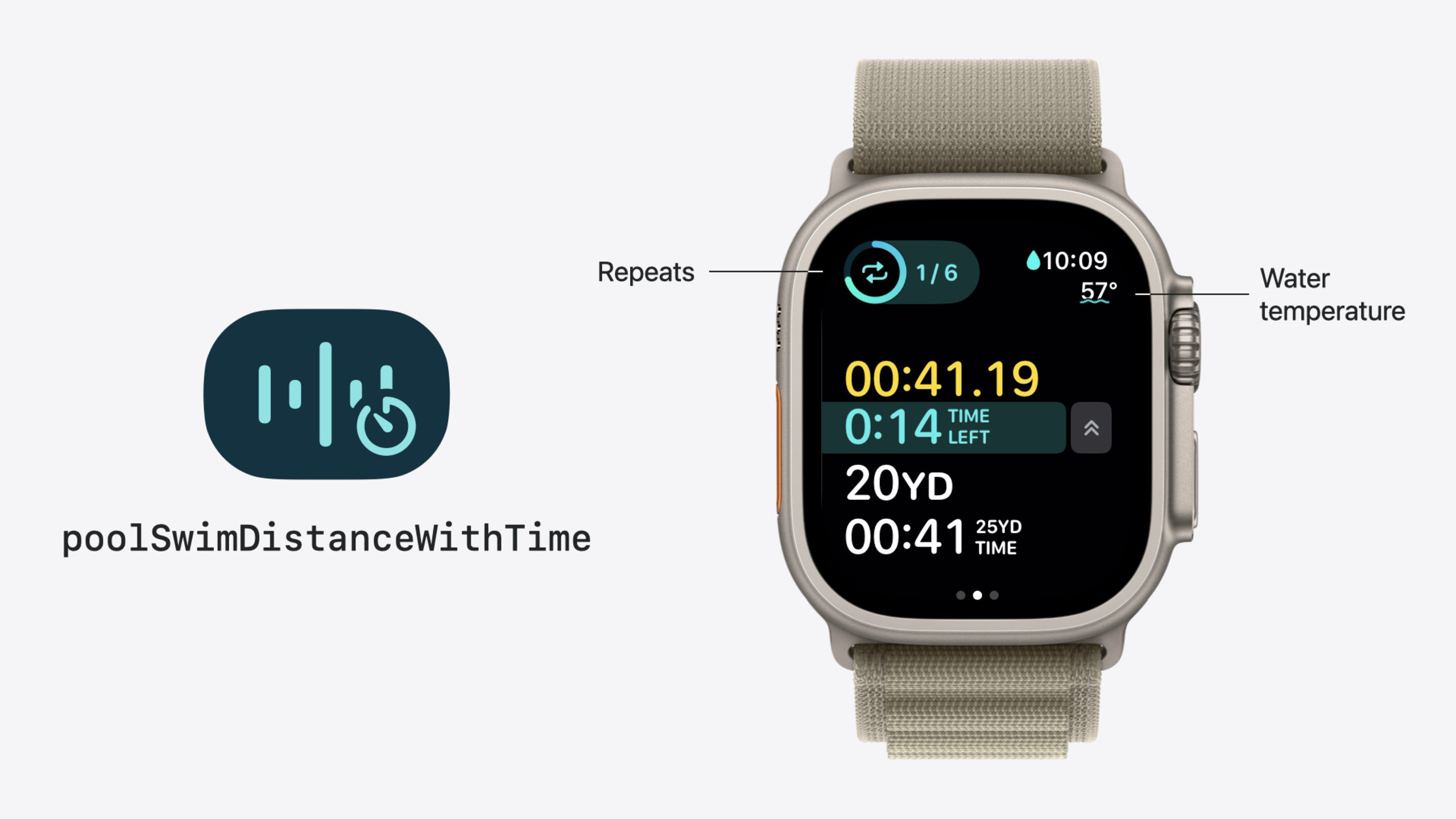
watchOS 11 extends the full custom workout capability to pool swimming. steps, goals, and alerts APIs are fully available for the swimming activity type—you can reuse workout planning logic written for running directly. WorkoutKit also adds a swimming-specific poolSwimDistanceWithTime goal type—swimmers often do interval training of “swim X meters within Y time,” and this goal type binds distance and time together, advancing only when both conditions are met.
Beyond swimming, the past year brought a series of incremental updates: watchOS 10.1 lets workouts omit indoor/outdoor location; watchOS 10.4 adds average power alerts for running and cycling; watchOS 11 adds pace alerts for indoor running, expands distance goals to more outdoor activity types, and opens custom step names for all workout types. These changes transform WorkoutKit from “barely covering land sports” into a fairly complete workout planning framework.
Detailed Content
Custom pool swimming workouts
Custom swimming workout structure is identical to land workouts: warmup → interval blocks → cooldown. The difference is the new poolSwimDistanceWithTime goal type, which accepts both distance and time parameters.
The following code is from the session demo (05:05):
// Create a distance-with-time goal: 50 meters plus 1 minute
let distanceGoal = WorkoutGoal(
    poolSwimDistanceWithTime: .init(
        distance: Measurement(value: 50, unit: UnitLength.meters),
        time: Duration.seconds(60)
    )
)

// Apply it to the work step and customize the step name
let workStep = WorkoutStep(
    goal: distanceGoal,
    displayName: "Freestyle"
)

// Put it in an interval block and repeat it 6 times
let intervalBlock = IntervalBlock(
    workStep: workStep,
    repeats: 6
)

// Warm-up and cool-down steps
let warmupStep = WorkoutStep(
    goal: .init(distance: Measurement(value: 200, unit: UnitLength.meters)),
    displayName: "Kickboard"
)
let cooldownStep = WorkoutStep(
    goal: .init(distance: Measurement(value: 200, unit: UnitLength.meters)),
    displayName: "Free swim"
)

// Assemble the complete pool swim workout
let swimmingWorkout = CustomWorkout(
    activity: .swimming,
    displayName: "Pool Swim Intervals",
    blocks: [
        .warmup(warmupStep),
        .interval(intervalBlock),
        .cooldown(cooldownStep)
    ]
)

// Use WorkoutScheduler to schedule the workout
try await WorkoutScheduler.shared.schedule(swimmingWorkout)
Key points:
poolSwimDistanceWithTimeis a swimming-specific goal type requiring bothdistance(Measurement<UnitLength>) andtime(Duration) (05:05)- The workout advances only after both goals are met. If distance completes first, a checkmark appears indicating it’s waiting for the time goal (07:30)
- The
displayNameproperty is new in watchOS 11 and applies to every step across all workout types (03:35) - When starting a workout, Apple Watch asks for pool length. If the actual pool length differs from the workout design, the system automatically scales distance and time proportionally (06:54)
Other updates at a glance
User-selectable location (watchOS 10.1): Scheduling no longer requires specifying indoor/outdoor—users decide when starting the workout (01:25).
Average power alerts (watchOS 10.4): Running and cycling now support averagePower alerts, distinguishing current power from average power, with both range and threshold alert modes (01:49).
Indoor running pace alerts (watchOS 11): Previously only outdoor running supported pace alerts; indoor running now does too (02:06).
Expanded distance goals (watchOS 11): More outdoor activity types support distance goals, including new outdoor rowing and outdoor skating. Use the supportsGoal function to check whether a specific activity + location combination supports a given goal type (02:47).
Custom step names (watchOS 11): WorkoutStep adds a displayName property for all workout types. When unspecified, the default step type is shown (such as “Work Step”). Names appear in full-screen alerts during step transitions and in workout detail views (03:13).
Core Takeaways
-
Build a swimming interval training app:
poolSwimDistanceWithTimedirectly maps to swimmers’ “distance within time limit” training pattern. Why it’s worth it: Mainstream training apps have weak pool swimming support, while Apple Watch swimming tracking is mature at the hardware level (lap detection, underwater heart rate)—combined with custom workout planning, the experience can surpass Garmin and other professional devices. How to start: Start with the simplest interval template—warmup + N sets of “X meters / Y seconds” + cooldown—and sync to the watch withWorkoutScheduler. -
Add displayName to existing workout steps: watchOS 11’s
displayNameapplies to all workout types. Why it’s worth it: Seeing “Work Step 3” during a workout conveys no information; changing it to “Bench Press 60kg” or “Sprint 400m” reduces cognitive load and lowers operation errors. How to start: Iterate through yourWorkoutStepcreation logic and adddisplayNameto each step—content can include exercise name, weight, pace, and other context. -
Use supportsGoal for runtime compatibility checks: Distance goal support expanded in watchOS 11, but support varies by activity type and location combination. Why it’s worth it: Hard-coding “this activity supports distance goals” misses support on new systems or crashes on old ones. How to start: Call
supportsGoalbefore creating a goal and decide whether to show that goal option or fall back to time/energy goals based on the return value.
Related Sessions
- Build custom workouts with WorkoutKit — Last year’s session with detailed coverage of custom workout steps, goals, and alerts structure
- Get started with HealthKit in visionOS — Building health data experiences with HealthKit on visionOS
- Explore wellbeing APIs in HealthKit — New HealthKit mental health and mood state APIs
- What’s new in watchOS 11 — watchOS 11 platform-wide updates including double tap and Smart Stack improvements
Comments
GitHub Issues · utterances