
Highlight
SwiftData History uses Transaction and Token mechanisms so your app can incrementally query insert, update, and delete changes produced by each save in the data store.
Core Content
SwiftData queries have always had a blind spot: ModelContext.fetch() only returns the current snapshot of the data store. If your Widget modifies a record in the background, when the main app reopens the result looks exactly the same—you have no way to know what happened in between. Developers resort to manual diffs or piecing together similar logic with NotificationCenter—neither elegant nor reliable.
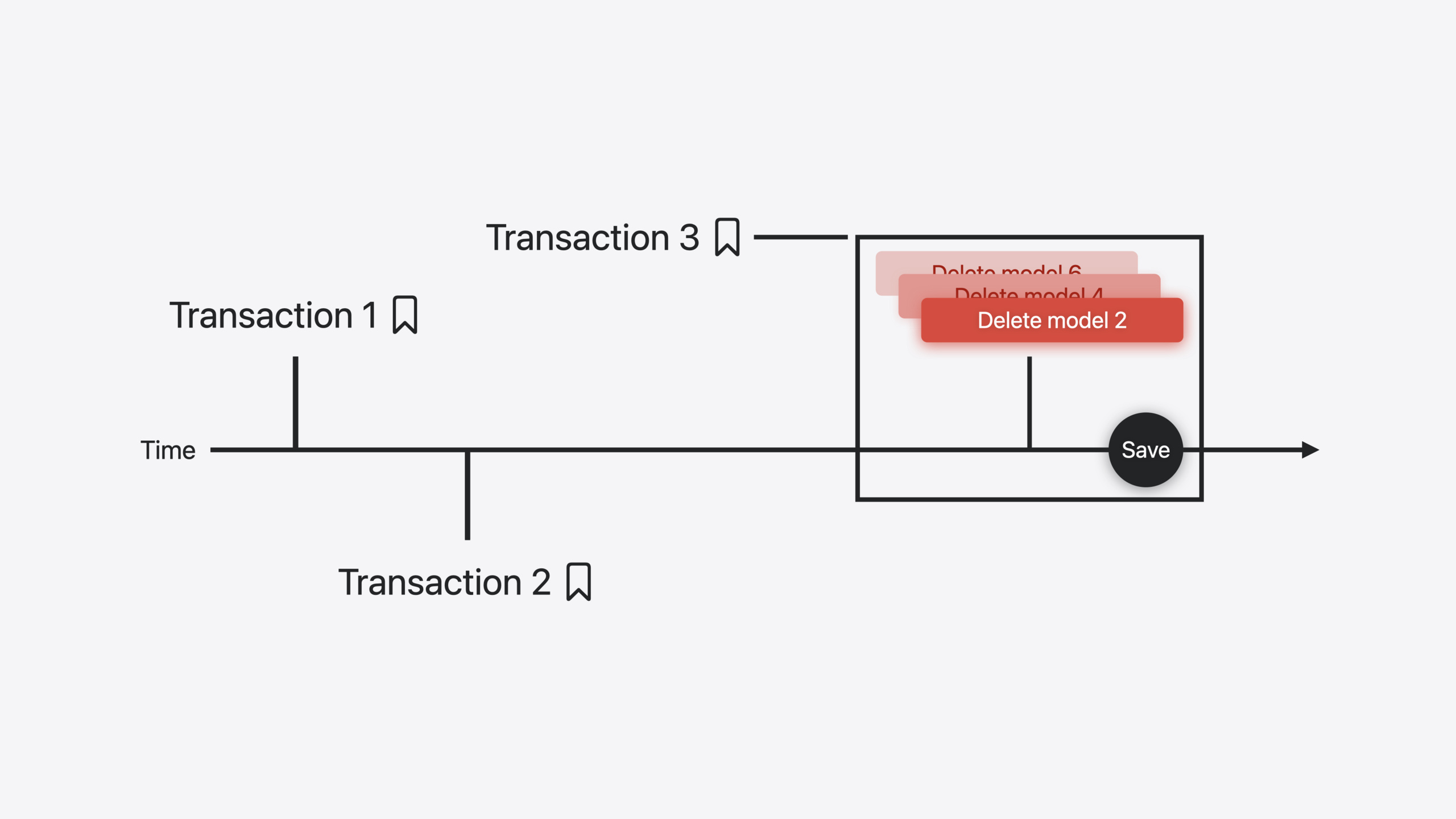
SwiftData History fills this gap. Its core mechanism: each time ModelContext.save() runs, SwiftData automatically generates a Transaction recording all Changes (insert, update, delete) in chronological order. You query these Transactions with HistoryDescriptor, use Tokens as bookmarks, and incrementally consume the change stream. Using SampleTrips as an example, the session demonstrates how after a Widget confirms accommodation, the main app uses the History API to discover the change and mark the corresponding Trip as unread—walking through the complete fetch → process → update flow.
Detailed Content
1. Preserving deleted model identity with .preserveValueOnDeletion
When a model is deleted, its property data disappears too. If you need to process that deletion record in History later, you may not even know “who” it was. SwiftData provides the .preserveValueOnDeletion attribute modifier—marked properties are retained as tombstones for History queries.
(04:57)
@Model
class Trip {
    #Unique<Trip>([\.name, \.startDate, \.endDate])

    @Attribute(.preserveValueOnDeletion)
    var name: String
    var destination: String

    @Attribute(.preserveValueOnDeletion)
    var startDate: Date

    @Attribute(.preserveValueOnDeletion)
    var endDate: Date

    var bucketList: [BucketListItem] = [BucketListItem]()
    var livingAccommodation: LivingAccommodation?
}
Key points:
- Properties marked with
@Attribute(.preserveValueOnDeletion)remain in the tombstone after model deletion - The
#Uniquemacro declares uniqueness constraints usable to locate records during History queries - Typically preserve identifying fields (name, date); non-identifying fields (destination) need not be marked
2. Querying Transactions with HistoryDescriptor
HistoryDescriptor is the entry point for querying History, supporting filtering by token and author. Token acts as a bookmark; Author distinguishes change sources (such as main app vs Widget).
(06:26)
private func findTransactions(after token: DefaultHistoryToken?, author: String) -> [DefaultHistoryTransaction] {
    var historyDescriptor = HistoryDescriptor<DefaultHistoryTransaction>()
    if let token {
        historyDescriptor.predicate = #Predicate { transaction in
            (transaction.token > token) && (transaction.author == author)
        }
    }

    var transactions: [DefaultHistoryTransaction] = []
    let taskContext = ModelContext(modelContainer)
    do {
        transactions = try taskContext.fetchHistory(historyDescriptor)
    } catch let error {
        print(error)
    }

    return transactions
}
Key points:
- “Default” in
DefaultHistoryTokenandDefaultHistoryTransactioncorresponds to DefaultStore; type names differ if you use a custom DataStore transaction.token > tokenfilters all Transactions after the last processed onetransaction.author == authorfilters by source; set viaModelContext.author = TransactionAuthor.widgetin the Widget- Without a token, all available History is returned
fetchHistory()is a new ModelContext method specifically for querying History
3. Processing Changes: matching insert, update, and delete by type
After obtaining Transactions, iterate through their Changes and match specific types with switch. Change is generic-parameterized and can be matched directly by model type.
(07:34)
private func findTrips(in transactions: [DefaultHistoryTransaction]) -> (Set<Trip>, DefaultHistoryToken?) {
    let taskContext = ModelContext(modelContainer)
    var resultTrips: Set<Trip> = []
    for transaction in transactions {
        for change in transaction.changes {
            let modelID = change.changedPersistentIdentifier
            let fetchDescriptor = FetchDescriptor<Trip>(predicate: #Predicate { trip in
                trip.livingAccommodation?.persistentModelID == modelID
            })
            let fetchResults = try? taskContext.fetch(fetchDescriptor)
            guard let matchedTrip = fetchResults?.first else {
                continue
            }
            switch change {
            case .insert(_ as DefaultHistoryInsert<LivingAccommodation>):
                resultTrips.insert(matchedTrip)
            case .update(_ as DefaultHistoryUpdate<LivingAccommodation>):
                resultTrips.update(with: matchedTrip)
            case .delete(_ as DefaultHistoryDelete<LivingAccommodation>):
                resultTrips.remove(matchedTrip)
            default: break
            }
        }
    }
    return (resultTrips, transactions.last?.token)
}
Key points:
change.changedPersistentIdentifiergets the changed model’s PersistentIdentifier- Use FetchDescriptor to look up the associated Trip instance
DefaultHistoryInsert<LivingAccommodation>generic matching handles only LivingAccommodation insertionsdefault: breakskips changes for other model types- Returns the last Transaction’s token as the starting point for the next query
4. Persisting Tokens with UserDefaults
Tokens must be persisted—otherwise the app cannot incrementally query after restart. The session recommends UserDefaults rather than storing in SwiftData itself (to avoid circular dependencies when clearing History).
(10:19)
private func findUnreadTrips() -> Set<Trip> {
    let tokenData = UserDefaults.standard.data(forKey: UserDefaultsKey.historyToken)

    var historyToken: DefaultHistoryToken? = nil
    if let tokenData {
        historyToken = try? JSONDecoder().decode(DefaultHistoryToken.self, from: tokenData)
    }
    let transactions = findTransactions(after: historyToken, author: TransactionAuthor.widget)
    let (unreadTrips, newToken) = findTrips(in: transactions)

    if let newToken {
        let newTokenData = try? JSONEncoder().encode(newToken)
        UserDefaults.standard.set(newTokenData, forKey: UserDefaultsKey.historyToken)
    }
    return unreadTrips
}
Key points:
- Token supports
Codableand can be serialized directly with JSONEncoder/JSONDecoder - On first call with no token, all History is returned
- Save the new token immediately after querying to ensure the next call only fetches increments
- Token is valid only for the associated DataStore; if History data is cleared, the token expires and
fetchHistorythrowshistoryTokenExpired—discard the old token and re-query
5. Custom DataStore History support
If your app uses a custom DataStore, you must implement History-related types yourself: custom Transaction, Change (Insert/Update/Delete), and Token. The DataStore must also conform to the HistoryProviding protocol. The session highlights several key considerations:
- Transaction boundaries must be clearly defined—in DefaultStore, all changes from one
savebelong to one Transaction - Change boundaries are typically at the granularity of a single model instance
- Your app may not need all Change types (for example, a time-series logging scenario may only need Insert)
- Consider whether to support
.preserveValueOnDeletionand how to store data after deletion - Token requires a custom type conforming to
HistoryTokenprotocol, with state that uniquely identifies your position in the Transaction stream; if the app uses multiple associated Stores, the Token should include state for all Stores
Core Takeaways
-
Widget and main app data change sync: When a Widget modifies SwiftData data, the main app can filter by
authorthrough the History API to process only Widget-originated changes, enabling precise UI updates (such as unread markers). How to start: Set.authoron the Widget’s ModelContext; in the main app, filter by author in HistoryDescriptor’s predicate. -
Incremental sync of offline changes: Local modifications during offline periods can be recorded as chronologically ordered Transactions in History; after reconnecting, sync incrementally to the server by Token, avoiding full comparison. How to start: Save the Token after each successful sync; next time pull only Transactions after the Token; clear processed History data after sync completes.
-
Tracing information after model deletion: Use
.preserveValueOnDeletionto retain key fields so deletion operations remain traceable in History. How to start: Add@Attribute(.preserveValueOnDeletion)to identifying model properties; when processing History, use tombstone values to identify deleted records.
Related Sessions
- What’s new in SwiftData — Overview of SwiftData framework updates in 2024
- Create a custom data store with SwiftData — Building custom DataStores, closely related to custom History support
- Bring your app’s core features to users with App Intents — App Intents framework design principles and the underlying mechanism for Widget interactions
Comments
GitHub Issues · utterances