
Highlight
iOS 18 introduces Broadcast Push Notifications, letting your server send one push to a channel and update all Live Activities subscribed to that channel—no more per-token delivery.
Core Content
A soccer match, one hundred thousand people watching the score. Each person has a Live Activity on their phone, and each Live Activity has its own push token. What the server needs to do is simple—push the same score update to everyone. Under the old push model, that meant sending per token: store one hundred thousand tokens, loop through APNs one hundred thousand times, with identical payloads.
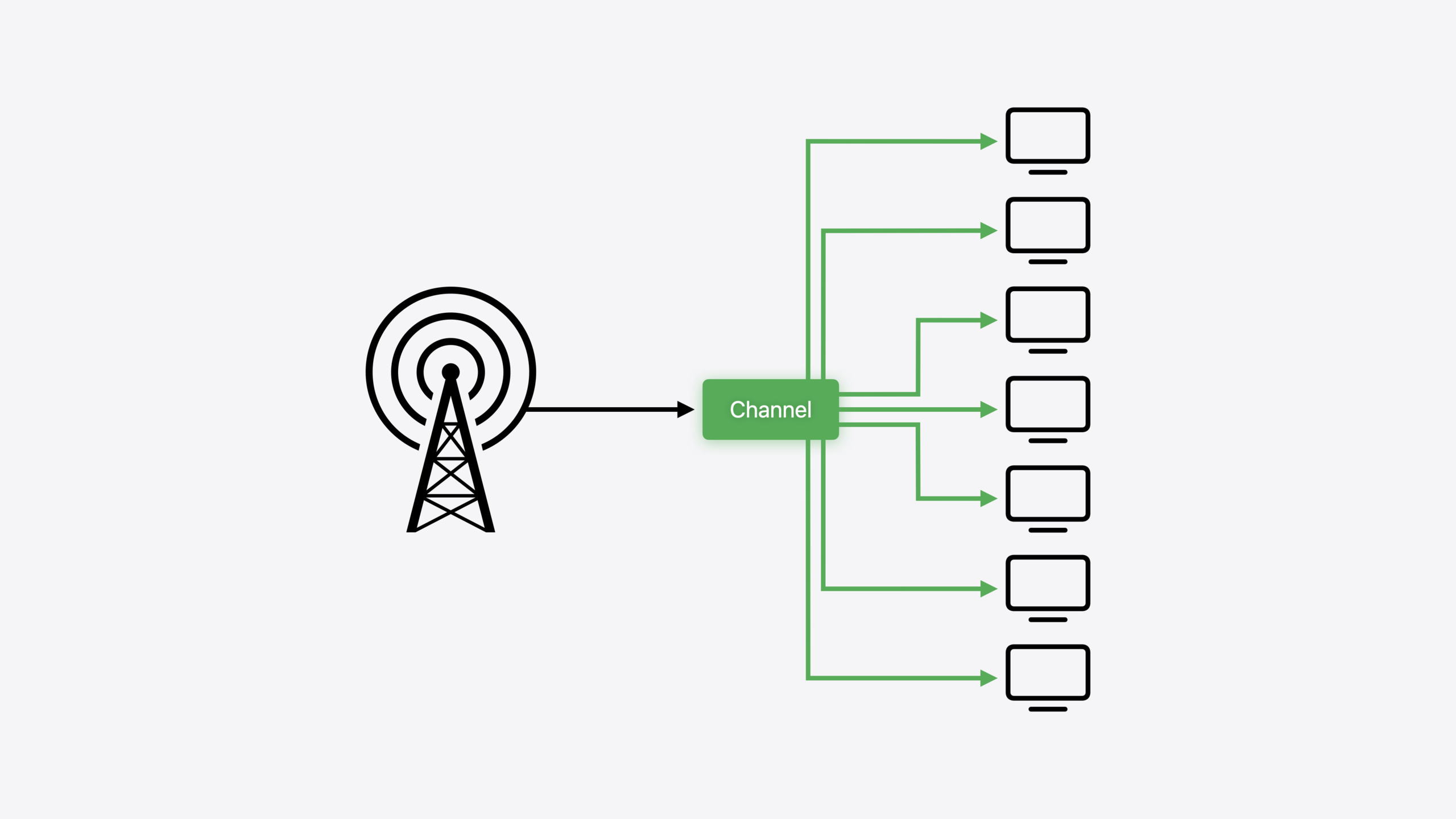
iOS 18 introduces Broadcast Push Notifications to solve this scale problem. The core concept is a Channel, similar to a TV broadcast: one channel corresponds to one event, and all devices subscribed to that channel receive the same push simultaneously. The server only needs to send one request; APNs handles distribution to all subscribers.
The flow has three steps: first, after enabling Broadcast Capability in the Developer Portal, create a channel and obtain its channel ID; second, on the app side, subscribe to that channel when starting a Live Activity via pushType: .channel(channelId); third, send a broadcast push to the channel from the server. Channels can be created manually in Push Notifications Console for testing; in production, the server calls APNs channel management APIs directly.
Detailed Content
Enabling Broadcast Capability
In the Developer Portal, under your app’s Capabilities list, a new Broadcast toggle appears below Push Notifications. Turn it on so your app can use channels (00:14).
Creating a Channel
During development, use Push Notifications Console: go to the Channels tab and click New Channel. Configure two settings: environment and message storage policy (01:41).
There are two message storage policies:
- No Storage: Pushes are delivered only to devices online at that moment; offline messages are not stored, but higher send quotas are allowed. Suitable for high-frequency updates such as match scores.
- Most Recent Message: Stores the most recent message for each offline device and delivers it when the device reconnects. Suitable for low-frequency but critical scenarios such as flight status.
After creation, the channel is assigned a randomly generated base64-encoded channel ID. In production, create channels via the server using APNs Channel Management API (04:58).
Subscribing to a Channel
On the app side, specify channel push type when starting a Live Activity:
// Request a Live Activity and subscribe to broadcast push notifications

import ActivityKit

func startLiveActivity(channelId: String) {
    let gameAttributes = GameAttributes()
    let initialState = GameAttributes.ContentState(
            home: 0, away: 0, update: "First Half"
    )
    try Activity.request(
            attributes: gameAttributes,
            content: .init(state: initialState, staleDate: nil),
            pushType: .channel(channelId)
    )
}
Key points:
channelIdis created by the server in advance; the app obtains it from the server before starting the Live ActivitypushType: .channel(channelId)tells ActivityKit to subscribe to broadcast pushes for that channel, replacing the previous.tokenapproach- After the call, ActivityKit automatically registers the device’s subscription to that channel with APNs—no manual push token management
- Channel lifecycle is independent of Live Activity: even if the user dismisses the Live Activity, the channel still exists and future Live Activities can continue subscribing
Sending a Broadcast Push
For testing, use Push Notifications Console: select a channel → New Notification → fill in priority and payload → Send. One push, all subscribed devices receive the update simultaneously (07:47).
In production, send via the new APNs API using the same authentication as existing APNs connections (certificate or token). Payload format matches ordinary Live Activity pushes, including update data in content-state and a timestamp.
Channel Lifecycle Management
The total number of channels is limited. The server should delete channels no longer needed after an event ends via Channel Management API. For example, delete the channel for a match after it ends to free quota (10:18).
Core Takeaways
-
Real-time sports score pushes: Create a channel for each match; when users tap to follow, they subscribe to that channel, and a single broadcast push on score change updates everyone’s Live Activity. Why it’s worth doing: Eliminates server cost of storing and managing tens of thousands of push tokens; latency drops from “send one by one” to “one broadcast.” How to start: Create channels on the server via Channel Management API; start Live Activities on the app side with
.channel(channelId). -
Flight status tracking: Each flight number maps to a channel; passengers subscribe to their flight’s channel for gate changes, delays, and cancellations. Why it’s worth doing: All passengers on the same flight share the same state, so broadcast push is a natural fit; the Most Recent Message policy ensures offline passengers receive the latest status when they reconnect. How to start: Choose Most Recent Message storage policy when creating the channel; delete the channel after takeoff or cancellation.
-
Real-time status sync for multi-party collaborative tasks: For example, rider location sharing on a delivery platform—multiple parties on the same order (customer, rider, merchant) can subscribe to the same channel, and one broadcast push on location update syncs to all relevant parties. Why it’s worth doing: Compared to maintaining independent push tokens per user, channel mode merges N pushes into 1. How to start: Create a channel when an order is placed, start Live Activity with the channel ID, and send broadcast pushes to the channel when the rider updates location.
Related Sessions
- Bring your Live Activity to Apple Watch — Live Activity extended to Apple Watch Smart Stack
- Bring your app to Siri — Expose app capabilities to Siri via SiriKit and App Intents
- Bring your app’s core features to users with App Intents — App Intents framework core concepts: Intents, Entities, and Queries
- Build custom swimming workouts with WorkoutKit — Create and schedule custom swimming workouts with WorkoutKit
Comments
GitHub Issues · utterances