
Highlight
App Store Server API now supports the ONE_TIME_CHARGE notification covering all one-time purchases, CONSUMPTION_REQUEST has been expanded to auto-renewable subscription refunds, and Get Transaction History V2 returns the customer’s complete transaction history.
Core Content
Many developers still handle in-app purchase validation entirely on the client side: StoreKit receives the transaction, finishes it locally, and that’s it. The problem is that client-side data can be tampered with, devices may be offline, and refunds happen when the user isn’t using the app — your server has no visibility into these events. The result: users get refunded but you don’t revoke entitlements, renewals happen but you don’t provision access in time, and consumable balances get out of sync.
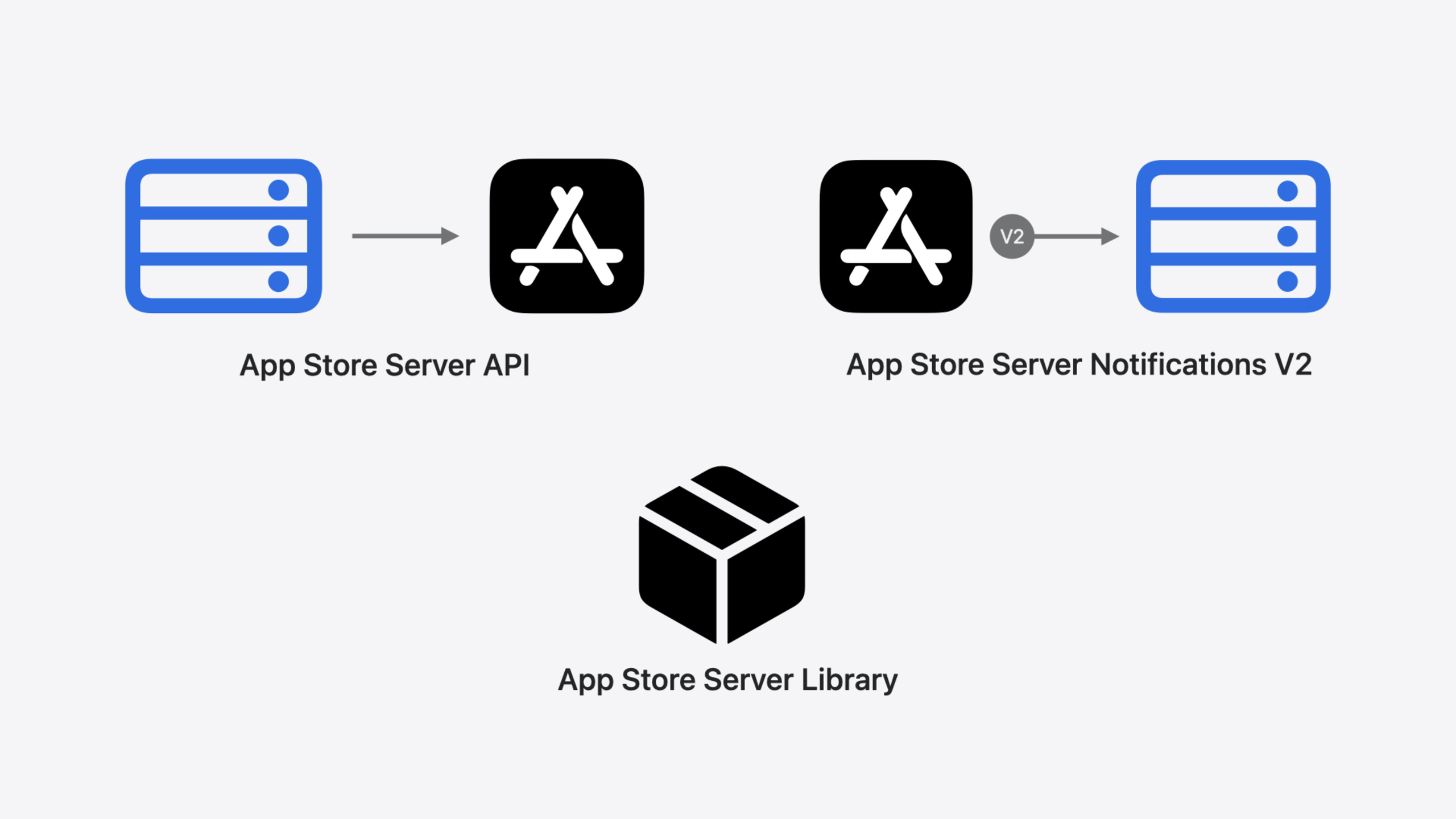
App Store Server exists to close this information gap. It consists of three parts: the App Store Server API lets your server proactively query the App Store (12 endpoints covering transaction history, consumption information submission, and notification management); App Store Server Notifications V2 lets the App Store proactively notify your server (subscription renewals, refunds, price changes, and other events); and the App Store Server Library (Java / Python / Node.js / Swift) wraps signature verification, data decoding, and promotional offer signing into ready-to-use interfaces, open-sourced on GitHub.
This year’s updates focus on three areas. First, purchase lifecycle: a new ONE_TIME_CHARGE notification type covers one-time purchases for consumables, non-consumables, and non-renewing subscriptions. Combined with existing subscription notifications, your server now receives a notification for every in-app transaction. Second, refund participation: CONSUMPTION_REQUEST notifications have expanded from consumables to auto-renewable subscriptions, with a new consumptionRequestReason field indicating the user’s refund reason. You can also submit a refundPreference when calling Send Consumption Information to express whether you agree with the refund. Third, transaction history: the Get Transaction History endpoint has been upgraded to V2, returning all of a customer’s transactions without filtering by product type or completion status.
Detailed Content
Consumption Information Submission Flow (07:02)
When a user requests a refund for a consumable in-app purchase, the App Store sends a CONSUMPTION_REQUEST notification to your server. You must call the Send Consumption Information endpoint within 12 hours to submit consumption data. Below is an implementation using the App Store Server Library (Java):
// 1. Create verifier and API client
SignedDataVerifier verifier = new SignedDataVerifier(/* configuration parameters */);
AppStoreServerAPIClient apiClient = new AppStoreServerAPIClient(/* configuration parameters */);

// 2. Verify and decode the received notification
DecodedSignedData notification = verifier.verifyAndDecodeNotification(signedNotification);

// 3. Check the notification type
if (notification.getNotificationType() == NotificationTypeV2.CONSUMPTION_REQUEST) {
    // 4. Extract and verify transaction information
    String signedTransactionInfo = notification.getData().getSignedTransactionInfo();
    JWSVerificationHeader header = verifier.verifyAndDecodeTransaction(signedTransactionInfo);
    String transactionId = header.getTransactionId();

    // 5. Build consumption information request (new refundPreference field this year)
    ConsumptionRequest consumptionRequest = new ConsumptionRequest();
    consumptionRequest.setCustomerConsumedValue("SAMPLE_CONTENT_PROVIDED");
    consumptionRequest.setDeliveryStatus("DELIVERED");
    consumptionRequest.setRefundPreference(determineRefundPreference(
        notification.getData().getConsumptionRequestReason(), header));

    // 6. Submit consumption information
    apiClient.sendConsumptionInformation(transactionId, consumptionRequest);
}
Key points:
SignedDataVerifieruniformly handles verification and decoding of all signed data, regardless of whether it comes from the device, the API, or a notification (02:59)consumptionRequestReasonis a new field this year, containing the user’s stated refund reason (e.g., “UNINTENTIONAL_PURCHASE”), which you can use to determinerefundPreference(11:15)refundPreferencelets you express a preference ofPREFER_GRANT(agree to refund) orPREFER_DENY(refuse refund), which Apple will factor into the final refund decision (12:06)- Starting this year, CONSUMPTION_REQUEST notifications are also sent for auto-renewable subscription refund requests, not just consumable in-app purchases (11:02)
Get Transaction History V2 (16:42)
// Use any transactionId to get the customer's complete transaction history
String transactionId = "existing_transaction_id";
GetTransactionHistoryRequest request = new GetTransactionHistoryRequest()
    .setSort(Order.ASCENDING)
    .setProductTypes(/* optional filter */);

HistoryResponse response = apiClient.getTransactionHistory(transactionId, null, request, "v2");
//                                                                              version parameter ↑
Key points:
- V1 only returned refunded, revoked, or unfinished consumable transactions on the device; V2 returns all customer transactions regardless of product type, refund status, or completion status (18:52)
- The endpoint is paginated; use the
revisionparameter to track the position from the last request, with subsequent requests only fetching newly added or updated transactions (17:24) - Migration only requires changing the URL path version to V2 and being prepared to handle completed consumable transactions (which didn’t appear before) (19:50)
- V1 has been marked as deprecated (19:44)
New Fields in Transaction and Renewal Information (25:25)
New fields in TransactionInfo:
price: The displayed price at the time of purchase, expressed in milliunits of the currency (e.g., 4990 = $4.99)currency: The currency code used at the time of purchase (e.g., “USD”)offerDiscountType: If the purchase used an offer, identifies its payment mode:FREE_TRIAL,PAY_UP_FRONT, orPAY_AS_YOU_GO
New fields in RenewalInfo:
renewalPrice: The expected displayed price at the next renewalcurrency: The currency code for the renewal priceofferDiscountType: The expected offer payment mode at the next renewal
These fields let you determine the user’s current payment price and next renewal price on the server side, without needing to check App Store Connect. For example, with a PAY_UP_FRONT offer the initial price might be $4.99, and after renewal renewalPrice shows $9.99 — you can use this to decide whether to push a promotional offer to that user.
Core Takeaways
-
What to do: Adopt the ONE_TIME_CHARGE notification and track all one-time purchases on the server side. Why it’s worth it: Previously, consumable and non-consumable purchases had no server-side notification; you had to rely on client-side reporting, and device offline states or tampering would cause missed transactions. How to start: Enable Server Notifications V2 in App Store Connect, then add a
ONE_TIME_CHARGEtype branch in your notification handling logic, using theappAccountTokenfrom the notification to directly associate with the user and deliver content. -
What to do: Implement the full CONSUMPTION_REQUEST flow, including consumption information submission for subscription refunds and refundPreference. Why it’s worth it: Now subscription refunds also trigger CONSUMPTION_REQUEST; you can decide whether to agree to the refund based on
consumptionRequestReasonand the user’s historical consumption data, directly influencing the refund decision outcome. How to start: Add a subscription transaction handling branch to your existing consumption information submission code, set therefundPreferencefield (PREFER_GRANT/PREFER_DENY), and use adetermineRefundPreferencemethod to make a judgment based on the refund reason and transaction data. -
What to do: Migrate to Get Transaction History V2. Why it’s worth it: V1 only returned partial consumable transactions; V2 returns complete history, enabling purchase record display, server-side entitlement auditing, and consumable balance reconciliation. How to start: Change the version in your API path from V1 to V2, store the
revisionreturned from each request for incremental syncing, and be prepared to handle completed consumable transactions (which didn’t appear before). -
What to do: Use the new
price/currency/offerDiscountTypefields to build precise promotional offer targeting strategies. Why it’s worth it: These fields let you know the user’s actual current and next renewal prices, so you can determine which users are suitable for discount offers (for example, users who have been on low prices can be nudged toward premium products). How to start: Extract these three new fields after decodingtransactionInfoandrenewalInfo, build a user price profile, and trigger offer evaluation logic when receivingDID_CHANGE_RENEWAL_STATUS/AUTO_RENEW_DISABLEDnotifications.
Related Sessions
- What’s new in StoreKit and In-App Purchase — New client-side in-app purchase features in StoreKit, complementing the server-side perspective in this article.
- Meet AdAttributionKit — New privacy-preserving ad attribution framework, relevant for in-app purchase conversion tracking.
- What’s new in App Store Connect — New features in App Store Connect, including featuring nominations and marketing asset generation.
Comments
GitHub Issues · utterances