
Highlight
StoreKit transaction history API finally covers completed consumable transactions. Transaction and RenewalInfo gain new currency and price fields. The Original API for In-App Purchase is officially marked as deprecated in iOS 18.
Core Content
When developing in-app purchase functionality, tracking consumable purchase records has always been a pain point. A user buys 100 coins, consumes them, and the transaction is finished—after that, the record disappears from the transaction history. If you need to display a “purchase history” or implement duplicate prevention for consumables, you have to build your own database to track them. iOS 18 finally fills this gap: the transaction history API now includes completed consumable transactions. Simply set SKIncludeConsumableInAppPurchaseHistory to true in your Info.plist, and the framework will include all consumable transactions—whether finished or not—in the query results.
Another long-standing pain point is price display. You can set product prices in App Store Connect, but the app could never get the specific amount and currency information directly, relying on server-side relay or hardcoding. iOS 18 adds currency and price to Transaction, and currency and renewalPrice to RenewalInfo. These fields are backward compatible to iOS 15 via Swift’s @backDeployed attribute, so they work on older systems too.
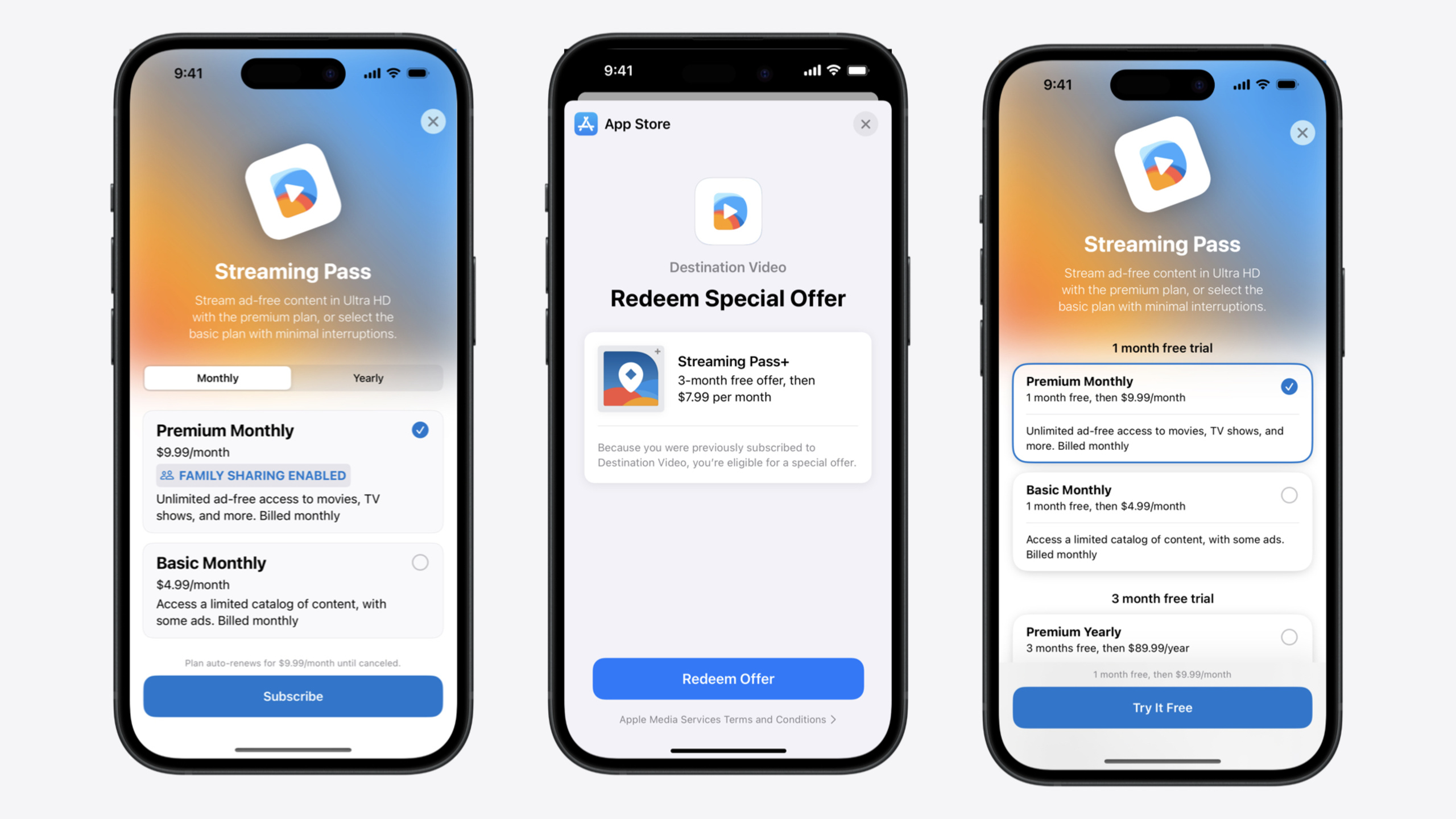
On the UI front, StoreKit Views introduced at WWDC23 have been significantly expanded this year. SubscriptionOptionGroup was added to group subscription options by service tier. Three new control styles were added: compactPicker, pagedPicker, and pagedProminentPicker. A placement API was added to control the position of the purchase button. The SubscriptionStoreControlStyle protocol was opened up, allowing you to write fully custom subscription store controls. Win-back offers are a new subscription offer type introduced this year, specifically targeting churned users, and they may be featured by Apple’s editorial team on the App Store’s Today / Games / Apps tabs.
Detailed Content
Completed Consumable Transactions Added to History API (00:40)
Previously, Transaction.currentEntitlements and Transaction.all only returned transactions for subscriptions, non-consumables, and unfinished consumables. Starting in iOS 18, set the following in your Info.plist:
<key>SKIncludeConsumableInAppPurchaseHistory</key>
<true/>
After this, normal Transaction.updates listeners and Transaction.all queries will include completed consumable transactions, with no additional code needed.
New Fields on Transaction and RenewalInfo (01:32)
- Transaction.currency: The currency code used at the time of purchase (e.g., “USD”)
- Transaction.price: The price configured in App Store Connect
- RenewalInfo.currency: The currency code for renewal
- RenewalInfo.renewalPrice: The amount that will be charged for the next renewal
These fields are available at compile time with Xcode 16 via Swift’s @backDeployed attribute, with a minimum runtime support of iOS 15.
SubscriptionOptionGroup and compactPicker Style (04:26)
The official Destination Video subscription store example code:
import StoreKit
import SwiftUI

struct DestinationVideoShop: View {

  var body: some View {
    SubscriptionStoreView(groupID: Self.subscriptionGroupID) {
      SubscriptionOptionGroupSet { product in
        StreamingPassLevel(product)
      } label: { streamingPassLevel in
        Text(streamingPassLevel.localizedTitle)
      } marketingContent: { streamingPassLevel in
        StreamingPassMarketingContent(level: streamingPassLevel)
        StreamingPassFeatures(level: streamingPassLevel)
      }
    }
    .subscriptionStoreControlStyle(.compactPicker, placement: .bottomBar)
  }

}
Key points:
- SubscriptionOptionGroupSet automatically groups by the enum value returned from the closure (here, StreamingPassLevel)—each unique value generates a group
- The label closure provides the group title (e.g., “Premium” / “Basic”), and the framework automatically renders it as tab switching
- The marketingContent closure returns different marketing views based on the currently active group
- The .compactPicker style compresses subscription options into a single horizontal selector; placement: .bottomBar pins the control to the bottom bar, remaining visible while scrolling through marketing content
Group Style Switching (09:06)
In addition to the default .tabs style, you can also use the .links style:
.subscriptionStoreOptionGroupStyle(.tabs)   // Tab switching, suitable for different service tiers
.subscriptionStoreOptionGroupStyle(.links)   // Navigation links, suitable for more options that expand in a sheet
Custom Control Styles (13:41)
iOS 18 opens up the SubscriptionStoreControlStyle protocol. Combined with SubscriptionPicker and SubscribeButton primitives, you can build your own controls from scratch:
import StoreKit
import SwiftUI

struct BadgedPickerControlStyle: SubscriptionStoreControlStyle {
  func makeBody(configuration: Configuration) -> some View {
    SubscriptionPicker(configuration) { pickerOption in
      HStack(alignment: .top) {
        VStack(alignment: .leading) {
          Text(pickerOption.displayName)
            .font(title2.bold())
          Text(priceDisplay(for: pickerOption))
          if pickerOption.isFamilyShareable {
            FamilyShareableBadge()
          }
          Text(pickerOption.description)
        }
        Spacer()
        SelectionIndicator(pickerOption.isSelected)
      }
    } confirmation: { option in
      SubscribeButton(option)
    }
  }
}

struct DestinationVideoShop: View {

  var body: some View {
    SubscriptionStoreView(groupID: Self.subscriptionGroupID) {
      SubscriptionPeriodGroupSet { _ in
        StreamingPassMarketingContent()
      }
    }
    .subscriptionStoreControlStyle(BadgedPickerControlStyle())
  }

}
Key points:
- Conform to the SubscriptionStoreControlStyle protocol by implementing just the makeBody method
- configuration contains all the data needed to build the control
- SubscriptionPicker is a framework-provided primitive that manages selection state
- Properties like pickerOption.displayName, .isFamilyShareable, and .description are read directly from product metadata
- SubscribeButton(option) is a framework-provided purchase button primitive; tapping it triggers the purchase flow
- SubscriptionPeriodGroupSet is a convenience API for grouping by subscription period
Win-back Offers (02:34)
Win-back offers target churned users who have canceled their subscriptions. You can configure eligibility rules in App Store Connect, with no need for hardcoded checks in your app. There are two display methods: popping up in-app via the StoreKit Message API (no extra code needed), or being featured by Apple’s editorial team on the App Store’s Today / Games / Apps tabs.
Xcode Testing Enhancements (15:38)
- StoreKit configuration adds an App Policies section for local testing of privacy policies and terms of service
- Supports localization testing for subscription group display names
- Can test in-app purchase images (via ProductView’s prefersPromotionalIcon)
- Dialogs settings can disable system alerts, facilitating UI automation testing
- Transaction Manager supports sending Purchase Intent for testing App Store promotional purchases
- Supports testing billing issue messages, simulating subscription renewal failure scenarios
Original API for In-App Purchase Deprecated (21:06)
Starting in iOS 18, SKPaymentQueue and other original APIs are marked as deprecated, as is the unified receipt. Existing apps are unaffected and can continue to run, but these APIs will no longer receive new features. StoreKit 2 is the only path that will continue to be updated.
Core Takeaways
-
What to do: Use the currency and price fields instead of server-side price queries. Why it’s worth doing: Reduces a network request, makes price display more real-time, and users switching regions don’t need to wait for server sync. How to start: In your SwiftUI view that displays prices, read currency and price from Transaction, and format the display with NumberFormatter; for renewal prices, similarly read from RenewalInfo.renewalPrice.
-
What to do: Refactor your subscription store UI with SubscriptionOptionGroupSet. Why it’s worth doing: Replace hand-written grouping logic with declarative code; tab switching and marketing content linkage are handled by the framework, significantly reducing code volume. How to start: Define an enum representing service tiers (e.g., premium / basic), return that enum value in the SubscriptionOptionGroupSet closure, and the framework will automatically group by value and render in tabs or links style.
-
What to do: Enable SKIncludeConsumableInAppPurchaseHistory and remove your custom consumable purchase tracking logic. Why it’s worth doing: Eliminates the cost of maintaining a local database; Transaction.all returns the complete consumable history directly, making refund and duplicate prevention logic simpler. How to start: Add this key to your Info.plist and set it to true, then use Transaction.updates to listen for completed consumable transactions.
-
What to do: Integrate win-back offers for churned users. Why it’s worth doing: Apple will feature your offers in App Store editorial placements, giving you free traffic; eligibility rules are configured in App Store Connect, with no app update needed. How to start: Create a win-back offer in App Store Connect and set eligibility criteria, display it in-app via the StoreKit Message API, or distribute it server-side through the App Store Server API.
Related Sessions
- Explore App Store server APIs for In-App Purchase — Server-side perspective: new transaction fields and notification types in the App Store Server API
- Implement App Store Offers — Complete implementation flow and sandbox testing methods for win-back offers
- What’s new in App Store Connect — New featuring nomination and marketing asset generation features in App Store Connect
Comments
GitHub Issues · utterances