
Highlight
Apple has introduced AdAttributionKit, a brand-new ad attribution framework for iOS and iPadOS, built on top of SKAdNetwork. Like SKAdNetwork, it is based on crowd anonymity: when conversion volume is low, only a small amount of data is returned; as the crowd grows, more data becomes available.
Core Content
Developers who work with ad attribution are no strangers to SKAdNetwork—Apple has used it since 2018 to replace device-level identifiers for privacy-preserving attribution. However, SKAdNetwork has always been limited: no view-through attribution, no re-engagement tracking, and postback data granularity is coarse when constrained by crowd anonymity.
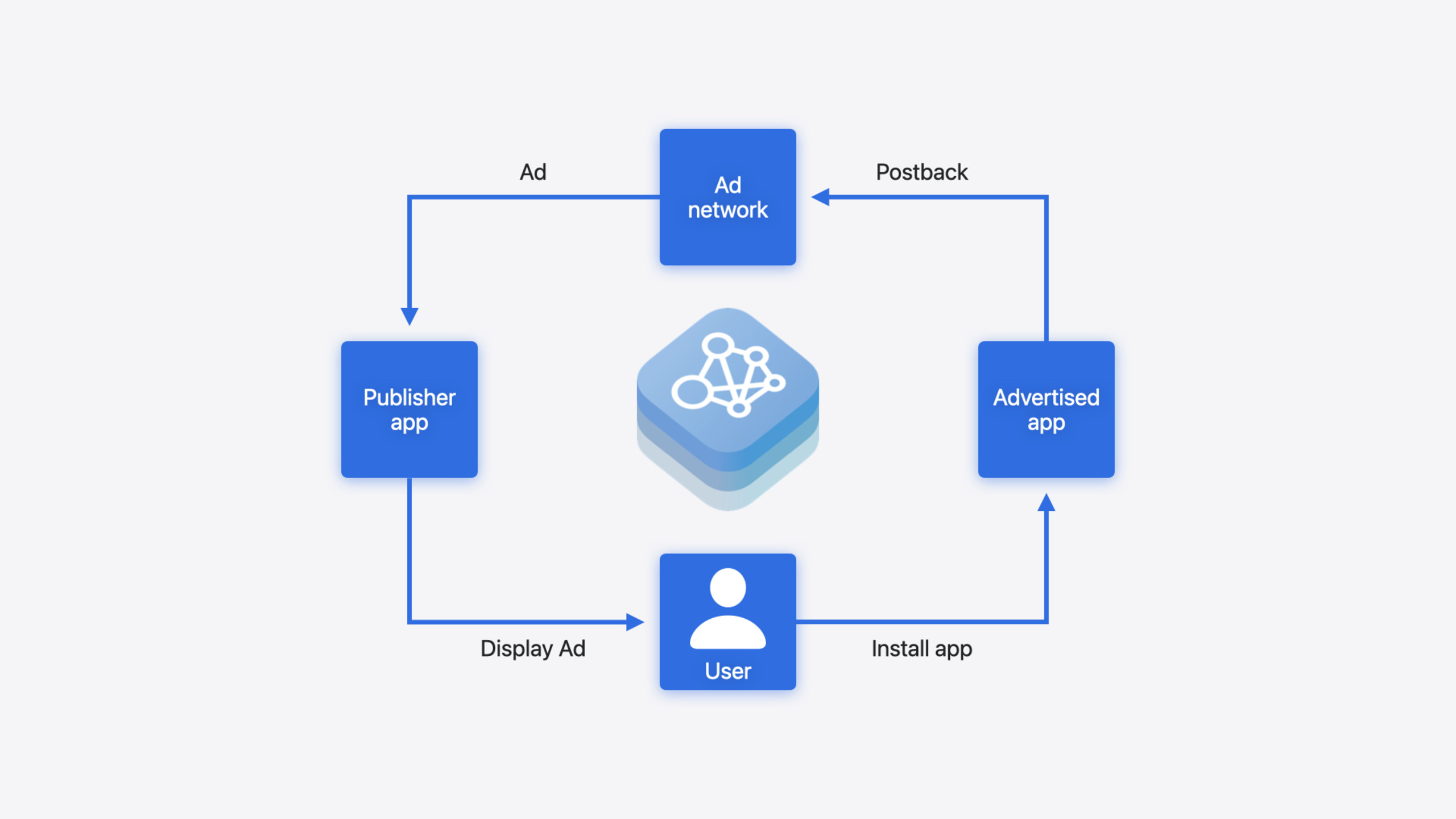
AdAttributionKit is Apple’s answer. It retains SKAdNetwork’s core crowd anonymity design (less data at low conversion volumes, more data at high volumes), while filling three critical gaps. The first ad impression type is custom click, where ad networks can display ads using their own UI, and users are redirected to the install page after clicking. The second is view-through, where an impression is considered valid if the ad is displayed for at least 2 seconds—something SKAdNetwork never supported. The third is SKOverlay and SKStoreProductViewController, which follow the SKAdNetwork pattern but add a new appImpression parameter. The more important change is re-engagement attribution—when the target app is already installed on the user’s device, clicking an ad no longer triggers an install but instead opens the app directly with a universal link, allowing advertisers to measure the effectiveness of “bringing back churned users.” Postbacks are now in compact JWS format, carrying fields like conversion-type (download / redownload / re-engagement) and source-identifier (2–4 digits, controlled by crowd anonymity). AdAttributionKit is fully interoperable with SKAdNetwork; already registered SKAdNetwork ad networks can use it without additional registration.
Detailed Content
JWS Format for Ad Impression Data
AdAttributionKit ad impressions use the compact JWS format. Key fields include:
advertised-item-identifier: The App ID of the promoted apppublisher-item-identifier: The App ID of the app displaying the adsource-identifier: A 4-digit integer representing campaign information, behaving the same as SKAdNetwork 4.0
Code to create an AppImpression instance from JWS (03:27):
// Fetch the compact JWS string from the ad network
let jwsString = fetchAdImpressionJWS()
// Initialize AppImpression with the JWS
let appImpression = AppImpression(jwsRepresentation: jwsString)
Key points:
fetchAdImpressionJWS()is implemented by the developer, depending on how you integrate with the ad network- The
AppImpressioninstance is valid for 15 minutes after creation; it must be recreated after that - This
appImpressioninstance is used later for displaying ads and handling taps
Custom Click Ad Implementation
Custom click is the first ad impression type supported by AdAttributionKit (05:03):
// Create a custom ad view
let customAdView = UIView()
// Create a UIEventAttributionView and add it as a subview
let attributionView = UIEventAttributionView()
customAdView.addSubview(attributionView)
// The attributionView must be on top to receive user interactions

// Handle tap
func handleAdTap() {
    appImpression.handleTap()
}
Key points:
UIEventAttributionViewmust be placed above all views that receive user interactionshandleTap()must be called within 15 minutes ofAppImpressioninitialization- After calling
handleTap(), AdAttributionKit automatically navigates the user to the store page where they can install the advertised app
View-Through Ad Implementation
View-through is a feature missing from SKAdNetwork, which AdAttributionKit now fills (06:07):
// Video starts playing
appImpression.beginView()
// Video playback ends
appImpression.endView()
Key points:
beginView()andendView()must be called on the sameAppImpressioninstance- The time interval between the two calls must be at least 2 seconds, which is the industry standard
- The same ad network cannot have multiple active view-through impressions for the same advertised app at the same time
- Every
beginView()must be paired with anendView()
Conversion Value Updates
Conversion values are used to measure ad effectiveness and ROAS (Return on Ad Spend) (11:46):
// Scenario 1: User registers an account — low-value event
let update1 = PostbackUpdate(
    fineConversionValue: 10,
    lockPostback: false,
    coarseConversionValue: .low
)
Postback.updateConversionValue(update1)

// Scenario 2: User watches a video — medium-value event
let update2 = PostbackUpdate(
    fineConversionValue: 38,
    lockPostback: false,
    coarseConversionValue: .medium
)
Postback.updateConversionValue(update2)

// Scenario 3: User uploads a video — high-value event, lock the postback
let update3 = PostbackUpdate(
    fineConversionValue: 42,
    lockPostback: true,
    coarseConversionValue: .high
)
Postback.updateConversionValue(update3)
Key points:
fineConversionValueis an integer from 0–63; the specific semantics are agreed upon by the advertiser, ad network, and MMP- Setting
lockPostbacktotruemeans no further updates within this conversion window; AdAttributionKit will freeze and schedule the postback - Locking does not immediately send the postback; there is still a delay to protect privacy
coarseConversionValue(low / medium / high) is a fallback when crowd anonymity does not allow sending the fine value
Re-engagement Attribution
Re-engagement is the most significant new capability in AdAttributionKit, used to track the effectiveness of ads that “bring churned users back to the app” (16:32):
The ad impression JWS needs an additional "eligible-for-re-engagement" field. Code implementation:
// Create an AppImpression with a JWS that has re-engagement enabled
let appImpression = AppImpression(jwsRepresentation: jwsString)

// Pass a re-engagement URL in the tap handler
func handleAdTap() {
    let reengagementURL = URL(string: "https://example.com/offer")!
    appImpression.handleTap(reengagementURL: reengagementURL)
}
Key points:
handleTap(reengagementURL:)opens the already-installed target app and passes the URL to it- AdAttributionKit automatically appends a query parameter to the re-engagement URL; the app can check this parameter to determine whether the open was triggered by re-engagement
- The
conversion-typein the re-engagement postback is"re-engagement", and the ad interaction type can only be"click"(view-through re-engagement is not supported) - The first conversion value update must occur within 48 hours after the conversion
Re-engagement conversion values can be updated separately from install conversion values (20:25):
// Update only the re-engagement postback
let update = PostbackUpdate(
    fineConversionValue: 20,
    lockPostback: false,
    coarseConversionValue: .medium
)
Postback.updateConversionValue(update, conversionTypes: .reengagement)

// Update only the install postback
Postback.updateConversionValue(update, conversionTypes: .install)

// Update all postbacks
Postback.updateConversionValue(update, conversionTypes: [.install, .reengagement])
Key points:
- The
conversionTypesparameter controls which postback type to update:.reengagement,.install, or both - Passing
nilis equivalent to updating all types - This means re-engagement and install conversion logic can be managed independently
Developer Mode Testing
Because the attribution flow is asynchronous and has time randomization, testing is difficult. AdAttributionKit provides Developer Mode (21:27): by turning on the AdAttributionKit Developer Mode switch in iOS Settings > Developer, the system removes time randomization, shortens conversion windows, and accelerates postback transmission, making local testing easier.
Core Takeaways
-
Attribute re-engagement ads for already-installed apps: If your app has a user churn problem, you can use re-engagement attribution to track the effectiveness of “ads that bring churned users back.” Add the
"eligible-for-re-engagement"field to the ad impression JWS, pass a universal link when handling the tap, and check the query parameter appended by AdAttributionKit on the app side to determine whether the open was triggered by a re-engagement ad. Why it’s worth doing: SKAdNetwork has no such capability at all, and re-engagement is a key growth lever for many apps. How to start: Support universal links in your app, then add the re-engagement field to the JWS on the ad network side. -
Use view-through attribution to complete the exposure attribution chain: Previously, SKAdNetwork only supported click attribution, so the effectiveness of purely impression-based ads like video ads could not be measured. AdAttributionKit’s view-through counts as a valid impression if displayed for at least 2 seconds, and the postback’s
ad-interaction-typeis"view". Why it’s worth doing: Many ad campaigns are primarily impression-based rather than click-based; without view-through attribution, a large portion of ad spend cannot be properly evaluated. How to start: CallbeginView()andendView()in the show/hide callbacks of your video or banner ads. -
Use Developer Mode to run through the full attribution flow locally: AdAttributionKit’s attribution flow has random delays and waiting windows in production, making it hard to verify before shipping. Developer Mode shortens all time windows, allowing you to run through the complete chain of “impression → click → install → update conversion value → receive postback” in minutes. Why it’s worth doing: Attribution bugs are often discovered after launch, and the cost of fixing them is extremely high. How to start: Enable AdAttributionKit Developer Mode in Settings > Developer on your test device, then run tests with Xcode.
Related Sessions
- What’s new in StoreKit and In-App Purchase — Latest updates to StoreKit and in-app purchases, part of the same App Store ecosystem as AdAttributionKit
- Explore App Store server APIs for In-App Purchase — Receiving App Store notifications on the server side, complementary to parsing attribution postbacks
- Implement App Store Offers — Implementation of App Store offer codes and promotional offers, working together with re-engagement scenarios
- What’s new in privacy — Overall updates to Apple’s privacy framework; AdAttributionKit’s crowd anonymity is part of this ecosystem
Comments
GitHub Issues · utterances