
Highlight
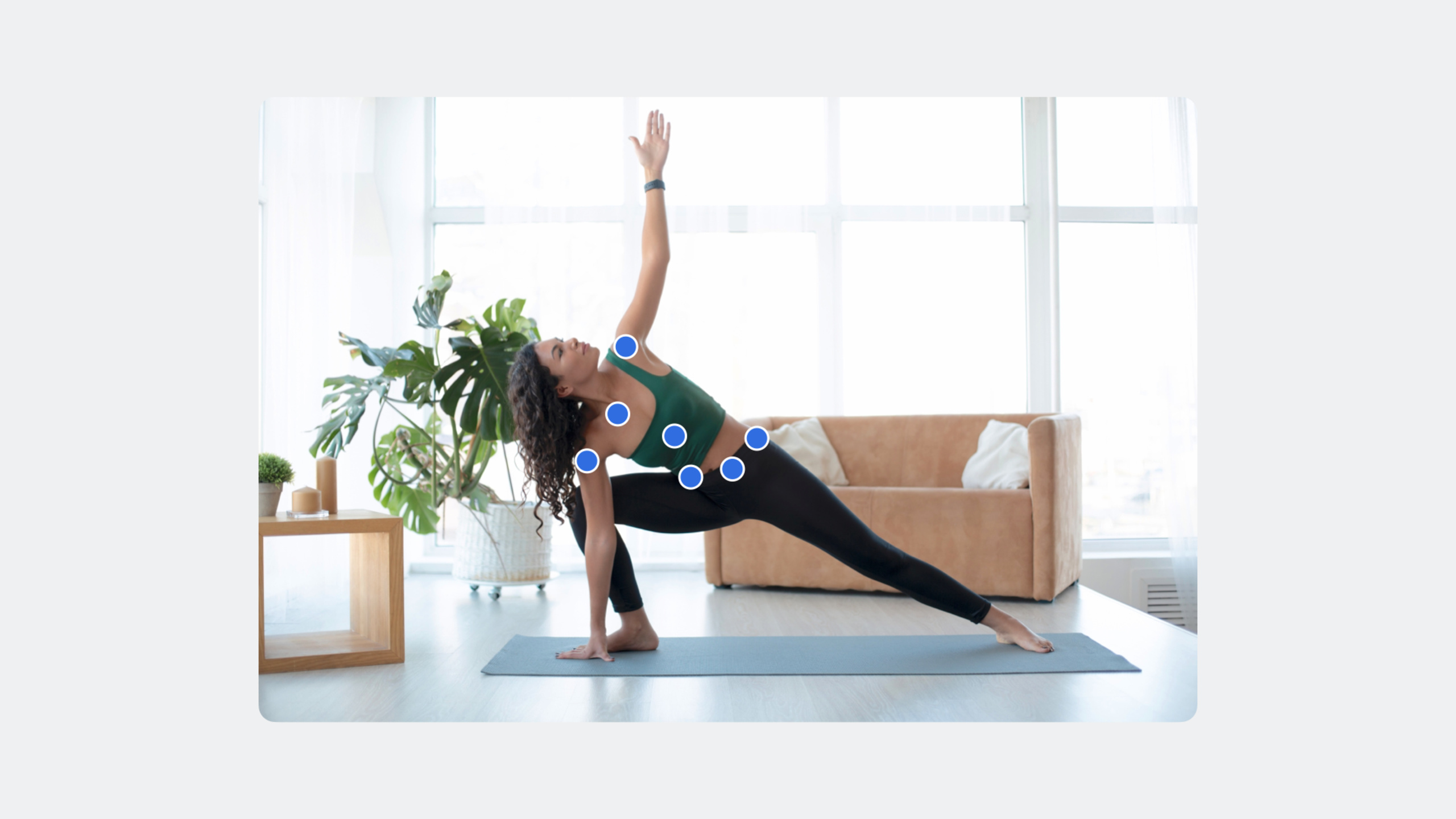
The Vision framework adds 3D human pose detection (VNDetectHumanBodyPose3DRequest), which can extract the 3D positions (in meters) of 17 joints from ordinary photos without ARKit; it also supports depth data input and instance segmentation of up to four people, allowing human body understanding to move from a 2D plane to a real space.
Core Content
From 2D to 3D: The evolution of human pose detection
The Vision framework previously provided 2D human pose detection and returned normalized pixel coordinates. WWDC23 introducedVNDetectHumanBodyPose3DRequest,extract 3D joint positions directly from the image.
The 3D pose returns 17 joints, organized into groups:
- Head: top of head, center of head
- Torso: left shoulder, right shoulder, spine, hip center (root joint), left hip, right hip
- Left arm: left wrist, left shoulder, left elbow
- Right arm: right wrist, right shoulder, right elbow
- Left Leg: Left hip, left knee, left ankle
- Right leg: right hip, right knee, right ankle
The left and right are relative to the person being detected, not the left and right of the image.
(00:51)
Unlike 2D detection, 3D joint positions are returned in meters with the origin at the center of the hip (root joint). This allows you to directly measure real-world distances, such as how high a person’s wrist is above the ground.
Depth data: making 3D more accurate
Vision now accepts depth data as input.VNImageRequestHandlerAdded supportAVDepthDataInitialization method, applicable toCVPixelBufferandCMSampleBuffer。
If the image file itself contains depth data (such as a portrait mode photo), Vision will automatically extract it without modifying existing APIs.
Depth data includes:
- Depth map: stored in disparity or depth format
- Camera calibration data: internal parameters, external parameters, lens distortion parameters
When there is depth data,bodyHeightReturns the actual measured height; if not available, returns the reference value of 1.8 meters. you can passheightEstimationWhich method is used for attribute judgment.
(10:41)
Multi-person instance split: from “everyone” to “everyone”
previousGeneratePersonSegmentationThe request returns a single mask that includes everyone. The newly introduced person instance mask request can output masks for up to four independent people, each with a confidence score.
You can individually select and extract a person in the image. If you only need the background, select instance 0.
For scenes with more than four people, it is recommended to first use Vision’s face detection API to count, and fall back to the traditional single-person segmentation request when there are more than four people.
(12:20)
Detailed Content
Workflow of 3D human pose detection
useVNDetectHumanBodyPose3DRequestThe process is the same as for 2D requests:
import Vision
import UIKit

func detect3DBodyPose(in image: UIImage) {
    // 1. Create a 3D human body pose detection request
    let request = VNDetectHumanBodyPose3DRequest()

    // 2. Initialize the image request handler
    guard let cgImage = image.cgImage else { return }
    let handler = VNImageRequestHandler(cgImage: cgImage)

    // 3. Perform the request
    do {
        try handler.perform([request])

        // 4. Get the result
        if let observation = request.results?.first as? VNHumanBodyPose3DObservation {
            process3DPose(observation)
        }
    } catch {
        print("3D pose detection failed: \(error)")
    }
}
Key points:
VNDetectHumanBodyPose3DRequestis the new 3D pose detection request class -VNImageRequestHandlerUsage is exactly the same as for 2D requests -resultsreturnVNHumanBodyPose3DObservationArray, the current version only returns one result for the most prominent person- Error handling uses standard
do-catchmodel
Get joint position data
import Vision
import simd

func process3DPose(_ observation: VNHumanBodyPose3DObservation) {
    // Get the 3D position of a specific joint
    do {
        let leftWrist = try observation.recognizedPoint(.leftWrist)
        print("Left wrist position: \(leftWrist.position)")

        // position is a simd_float4x4 matrix, and the third column contains the translation values
        let translation = leftWrist.position.columns.3
        print("Translation - x: \(translation.x), y: \(translation.y), z: \(translation.z)")
    } catch {
        print("Failed to get left wrist point: \(error)")
    }

    // Get a group of joints
    do {
        let torsoPoints = try observation.recognizedPoints(.torso)
        for (jointName, point) in torsoPoints {
            print("\(jointName): \(point.position)")
        }
    } catch {
        print("Failed to get torso points: \(error)")
    }

    // Get the estimated body height
    print("Estimated body height: \(observation.bodyHeight) meters")
    print("Height estimation method: \(observation.heightEstimation)")
}
Key points:
recognizedPoint(_:)Get a single joint by joint name and returnVNHumanBodyRecognizedPoint3DrecognizedPoints(_:)Get a group of joints by group name and return a dictionary -positionyessimd_float4x4Matrix, compatible with ARKit, the third column (columns.3) contains the x/y/z translation values -bodyHeightReturns estimated height (meters) -heightEstimationIndicates whether the height is an actual measured value or a reference value
Understanding the 3D geometry class hierarchy
Vision introduces a new 3D geometry base class:
- VNPoint3D: base class, definition
simd_float4x4Matrix stores 3D positions - VNRecognizedPoint3D: Inherit position information and add identifiers (such as joint names)
- VNHumanBodyRecognizedPoint3D: Add local position (localPosition) and parent joint reference
func analyzeJointHierarchy(_ observation: VNHumanBodyPose3DObservation) {
    do {
        let leftWrist = try observation.recognizedPoint(.leftWrist)

        // model position: global position relative to the root joint, the center of the hips
        let globalPosition = leftWrist.position
        print("Global position relative to root: \(globalPosition)")

        // local position: local position relative to the parent joint, the left elbow here
        let localPosition = leftWrist.localPosition
        print("Local position relative to parent: \(localPosition)")

        // Calculate the joint angle from the local position
        let angle = calculateLocalAngleToParent(localPosition)
        print("Joint angle: \(angle)")

    } catch {
        print("Error: \(error)")
    }
}

func calculateLocalAngleToParent(_ localPosition: simd_float4x4) -> (pitch: Float, yaw: Float, roll: Float) {
    let pos = localPosition.columns.3
    let vectorLength = sqrt(pos.x * pos.x + pos.y * pos.y + pos.z * pos.z)

    // pitch: a 90-degree rotation adjusts the geometry from its default downward direction to the bone direction
    let pitch = Float.pi / 2

    // yaw: calculated with arccosine
    let yaw = acos(pos.z / vectorLength)

    // roll: calculated with arctangent
    let roll = atan2(pos.y, pos.x)

    return (pitch, yaw, roll)
}
Key points:
positionAlways relative to the skeleton’s root joint (hip center) -localPositionRelative to the parent joint, suitable for analyzing local motion of the body -simd_float4x4Consistent with ARKit and SceneKit coordinate systems- Pass
localPositionCan calculate angles between joints (pitch/yaw/roll)
Project 3D joints back to 2D images
func projectJointsToImage(_ observation: VNHumanBodyPose3DObservation, imageSize: CGSize) {
    do {
        // Get the root joint position in the 2D image
        let rootJointInImage = try observation.pointInImage(.root)
        print("Root joint in image: \(rootJointInImage)")

        // Get the left shoulder position in the 2D image
        let leftShoulderInImage = try observation.pointInImage(.leftShoulder)
        print("Left shoulder in image: \(leftShoulderInImage)")

        // To align the 3D skeleton with the original image, you need:
        // 1. Scale: scale the image plane based on the ratio between known 3D and 2D joint distances
        // 2. Translate: use the 2D position of the root joint to determine the offset

    } catch {
        print("Projection failed: \(error)")
    }
}
Key points:
pointInImage(_:)Project 3D joint coordinates back to 2D image coordinates- The return value uses the VNPoint coordinate system with the lower-left origin
- Need to be converted to a coordinate system with the image center as the origin in the rendering environment
- combine
cameraOriginMatrixAbility to render scenes from camera perspective
Use camera origin matrix
func setupCameraPerspective(_ observation: VNHumanBodyPose3DObservation) {
    // cameraOriginMatrix contains the camera's position and rotation relative to the detected person
    let cameraMatrix = observation.cameraOriginMatrix
    print("Camera origin matrix: \(cameraMatrix)")

    // Use the rotation information to orient the image plane toward the camera
    // Use only the rotation portion, the 3x3 submatrix, and ignore translation, the last column
    let rotationMatrix = simd_float3x3(
        columns: (
            simd_float3(cameraMatrix.columns.0.x, cameraMatrix.columns.0.y, cameraMatrix.columns.0.z),
            simd_float3(cameraMatrix.columns.1.x, cameraMatrix.columns.1.y, cameraMatrix.columns.1.z),
            simd_float3(cameraMatrix.columns.2.x, cameraMatrix.columns.2.y, cameraMatrix.columns.2.z)
        )
    )

    // Calculate the inverse rotation so the image plane faces the camera
    let inverseRotation = rotationMatrix.inverse
    print("Inverse rotation: \(inverseRotation)")
}
Key points:
cameraOriginMatrixreturnsimd_float4x4Matrix representing the camera’s position and orientation in 3D space- The camera may not be facing the subject, this matrix helps understand the relative position
- When rendering from the camera perspective, use the rotation part of the matrix (ignore translation)
- Make the image plane face the camera correctly through inverse transformation
Request processing with depth data
import Vision
import AVFoundation

func detectPoseWithDepth(image: CGImage, depthData: AVDepthData) {
    // Use the initializer that includes depth data
    let handler = VNImageRequestHandler(
        cgImage: image,
        depthData: depthData,
        options: [:]
    )

    let request = VNDetectHumanBodyPose3DRequest()

    do {
        try handler.perform([request])
        if let observation = request.results?.first as? VNHumanBodyPose3DObservation {
            // With depth data, bodyHeight returns a measured value
            print("Measured height: \(observation.bodyHeight)")
            print("Estimation: \(observation.heightEstimation)") // .measured
        }
    } catch {
        print("Detection failed: \(error)")
    }
}

// Automatically extract depth from a portrait photo
func detectPoseFromPortraitPhoto(imageURL: URL) {
    // If the file contains depth data, Vision extracts it automatically
    let handler = VNImageRequestHandler(url: imageURL)
    let request = VNDetectHumanBodyPose3DRequest()

    do {
        try handler.perform([request])
        // Process the result...
    } catch {
        print("Detection failed: \(error)")
    }
}
Key points:
VNImageRequestHandlerAdd new acceptAVDepthDataParameter overloaded methods -AVDepthDataIs a unified container for deep metadata in the Apple SDK- Portrait mode photos automatically include depth data (stored as a disparity map)
- When there is depth data
heightEstimationreturn.measured, otherwise return.reference- LiDAR devices provide more precise scene measurements when capturing in real time
Multi-person instance segmentation
import Vision

func segmentMultiplePeople(in image: UIImage) {
    guard let cgImage = image.cgImage else { return }

    // Create a multi-person instance segmentation request
    let request = VNGeneratePersonInstanceMaskRequest()

    // Optional: specify that only a particular instance should be returned
    // request.instanceNumber = 1  // Return only the first person

    let handler = VNImageRequestHandler(cgImage: cgImage)

    do {
        try handler.perform([request])

        if let observation = request.results?.first as? VNGeneratePersonInstanceMaskObservation {
            // Get all available instances
            let instanceCount = observation.allInstances.count
            print("Detected \(instanceCount) people")

            // Extract each person's mask
            for instanceIndex in observation.allInstances {
                let mask = try observation.generateMaskedImage(
                    ofInstances: [instanceIndex],
                    from: handler,
                    croppedToInstancesExtent: false
                )
                print("Instance \(instanceIndex) mask generated")
            }

            // Extract the background, instance 0
            let backgroundMask = try observation.generateMaskedImage(
                ofInstances: [0],
                from: handler,
                croppedToInstancesExtent: false
            )
        }
    } catch {
        print("Instance segmentation failed: \(error)")
    }
}

// Handle scenes with more than four people
func handleCrowdedScene(image: UIImage) {
    // Count people with face detection first
    let faceRequest = VNDetectFaceRectanglesRequest()
    let handler = VNImageRequestHandler(cgImage: image.cgImage!)

    do {
        try handler.perform([faceRequest])
        let faceCount = faceRequest.results?.count ?? 0

        if faceCount > 4 {
            // Fall back to the traditional single-person segmentation request
            let segmentationRequest = VNGeneratePersonSegmentationRequest()
            try handler.perform([segmentationRequest])
            // Process the single mask...
        } else {
            // Use instance segmentation
            let instanceRequest = VNGeneratePersonInstanceMaskRequest()
            try handler.perform([instanceRequest])
            // Process independent masks...
        }
    } catch {
        print("Error: \(error)")
    }
}
Key points:
VNGeneratePersonInstanceMaskRequestis a new multiplayer instance split request- Supports up to 4 people, each person has an independent mask
-
instanceNumberProperties can be specified to only return specific instances (0 is background) -allInstancesReturns all detected instance indices -generateMaskedImage(ofInstances:from:croppedToInstancesExtent:)Generate a mask image of the specified instance - For scenes with more than 4 people, it is recommended to use face detection and counting first, and then decide which segmentation strategy to use
Core Takeaways
-
Make a “posture correction” fitness app
- What to do: When the user does yoga or fitness movements, the 3D posture is detected in real time and compared with the standard posture, and corrective suggestions are given
- Why it’s worth doing: 3D joint positions are returned in meters, which can accurately measure joint angles and determine whether the action is standard.
- How to start: Use
VNDetectHumanBodyPose3DRequestGet the joint position bylocalPositionCalculate joint angles (pitch/yaw/roll) and compare with the preset standard angle range
-
Make a “height measurement” tool
- What it does: Automatically measure people’s height from portrait photos
- Why it’s worth doing: Vision returns measured height when depth data is available, no ARKit or specialized hardware required
- How to start: Load portrait mode photos (automatically include depth data), execute
VNDetectHumanBodyPose3DRequest, readbodyHeightproperties, viaheightEstimationConfirm that it is an actual measured value
-
Make a “photo background replacement” application
- What to do: Extract a person individually from a group photo, replace the background or combine it into a new scene
- Why it’s worth doing: The instance splitting API can independently extract up to 4 people, each person has a separate mask
- How to start: Use
VNGeneratePersonInstanceMaskRequestGet each instance mask, select the instance index of the target person, and usegenerateMaskedImageExtract and combine with custom background
-
Make a “3D human body model” preview tool
- What it does: Generate 3D skeleton visualization from ordinary photos, support rotation viewing
- Why it’s worth it: Get 3D joint positions from regular photos without ARKit or depth camera
- How to start: Use
VNDetectHumanBodyPose3DRequestTo get 3D joints, usecameraOriginMatrixGet the camera position, render the skeleton in SceneKit or RealityKit, and support perspective switching
Related Sessions
- Detect animal poses in Vision — Vision’s animal pose detection is complementary to human pose detection
- Lift subjects from images in your app — Extract subjects from images, related to person segmentation
- Discover advancements in iOS camera capture — Advanced features in iOS camera capture, including depth data acquisition
- Build spatial experiences with RealityKit — Combine 3D human pose data with RealityKit to create spatial experiences
Comments
GitHub Issues · utterances