
Highlight
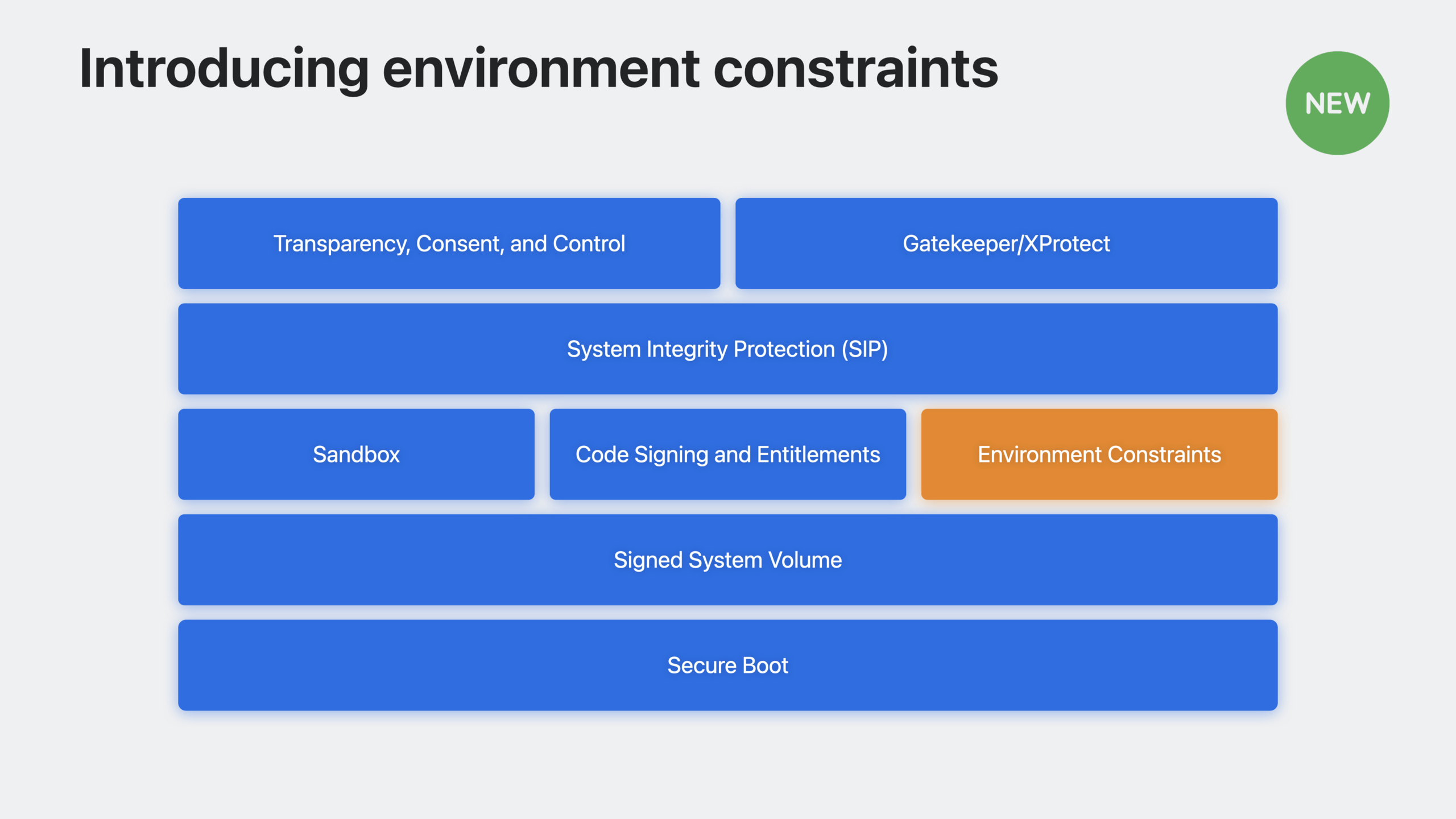
macOS Sonoma introduces Environment Constraints, allowing developers to embed launch constraints and library loading constraints in binaries to precisely control which processes can launch their own auxiliary tools, XPC services, and which code can be loaded into the process address space.
Core Content
Why do we need environmental constraints?
Feature-rich Mac apps typically contain multiple components: frameworks, accessibility tools, XPC services, launch agents, and more. These components run in potentially hostile environments and face multiple security threats:
- Malicious processes may pass
posix_spawnControl input and resource access to child processes - An attacker may modify disk files and inject unexpected data into the victim process
- Auxiliary tools may leak keychain or iCloud data when called illegally
(00:48)
Existing security mechanisms (App Sandbox, Hardened Runtime, Gatekeeper) mainly focus on the running process itself, rather than the execution environment of the process. Environmental constraints fill this gap.
Three types of environmental constraints
Launch Constraints are embedded in specific binary files and define three types of attributes:
- Self Constraints: Attribute requirements of the process itself
- Parent Process Constraints: Which parent processes can start it
- Responsible Process Constraints: Which processes can be responsible for it
(04:54)
Launchd Plist Constraints PassedSpawnConstraintThe key is registered in the plist that starts the agent/daemon process, ensuring that only processes that meet the constraints can be started by the plist.
Library Load Constraints control which code can be loaded into the process address space, replacing the original “all or nothing” library verification scheme.
Actual scene
Assume your applicationMyDemo.appContains the following components:
- a launch agent
DemoMenuBar.agent- an auxiliary tooldemohelper- A framework and its XPC services - A library from a third-party team
(10:21)
Without constraints, an attacker could run directly from the terminaldemohelperand pass in--cloudParameters to access iCloud data. After setting the parent process constraints, onlyMyDemo.appThis auxiliary tool can be started.
Detailed Content
Constrained data structure
Environment constraints are encoded using a plist dictionary, with top-level key-value pairs implicitly logically ANDed. The following operators are supported:
$and/$or: Logical AND/OR -$and-array/$or-array: Limit dictionary nesting level -$in: Specifies an array of allowed values
(07:55)
Commonly used fact keys:
signing-identifier: code signing identifier -team-identifier: development team identifier -cdhash: The unique hash value of the code
Example: Library Loading Constraints
Allow loading code signed by your own team or a trusted third-party team:
<dict>
    <key>team-identifier</key>
    <dict>
        <key>$in</key>
        <array>
            <string>M2657GZ2M9</string>
            <string>P9Z4AN7VHQ</string>
        </array>
    </dict>
</dict>(15:29)
Key points:
team-identifierSpecify allowed development teams -$inOperator accepts array of strings, allowing multiple teams- This constraint overrides
disable-library-validationentitlement to avoid “allow anyone” security downgrade
Example: Parent Process Constraints
Restrict accessibility tools to only be launched by the main app:
<dict>
    <key>team-identifier</key>
    <string>M2657GZ2M9</string>
    <key>signing-identifier</key>
    <string>com.demo.MyDemo</string>
</dict>(11:02)
Key points:
- Constrain team identifiers and signature identifiers at the same time to prevent other applications from the same team from using them fraudulently
- Specify this file in Xcode’s “Launch Constraint Parent Process Plist” settings
- The system generates a crash report when constraints are violated
Example: Process startup constraints
XPC services only allow access to specific processes:
<dict>
    <key>team-identifier</key>
    <string>M2657GZ2M9</string>
    <key>signing-identifier</key>
    <dict>
        <key>$in</key>
        <array>
            <string>com.demo.MyDemo</string>
            <string>com.demo.DemoMenuBar</string>
            <string>demohelper</string>
        </array>
    </dict>
</dict>(14:06)
Key points:
- use
$inList all process signature identifiers allowed to access this XPC service - Configured in Xcode’s “Launch Constraint Responsible Process Plist” settings
- Prevent XPC services from being called independently after being extracted from the bundle
Example: Launchd Plist constraints
To prevent startup agents from being tampered with:
<dict>
    <key>Label</key>
    <string>com.demo.DemoMenuBar.agent</string>
    <key>BundleProgram</key>
    <string>Contents/Library/LaunchAgents/DemoMenuBar.app/Contents/MacOS/DemoMenuBar</string>
    <key>KeepAlive</key>
    <dict>
        <key>SuccessfulExit</key>
        <true/>
    </dict>
    <key>RunAtLoad</key>
    <true/>
    <key>SpawnConstraint</key>
    <dict>
        <key>team-identifier</key>
        <string>M2657GZ2M9</string>
        <key>signing-identifier</key>
        <string>com.demo.DemoMenuBar</string>
    </dict>
</dict>(14:52)
Key points:
SpawnConstraintKey definition plist code identities allowed to launch- After the user approves the background task, the attacker cannot replace the executable file pointed to by plist
- Pass
SMAppServiceEffective when API registration plist
Availability
- Library loading constraints and launchd plist constraints: target platform any macOS version, enforcement starts with macOS Sonoma
- Launch constraints: target platform macOS 13.3+, enforcement starting from macOS 13.3
(15:51)
Core Takeaways
-
Add parent process constraints for auxiliary tools
- WHAT: Restrict your command line helpers to be launched only by the main application
- Why it’s worth it: Prevent attackers from directly calling accessibility tools to access Keychain or iCloud data
- How to start: Create a constraint plist file and reference it in Xcode’s “Launch Constraint Parent Process Plist”
-
Add responsible process constraints to the XPC service
- What to do: Limit which processes can trigger your XPC service
- Why it’s worth doing: Prevent the XPC service from being called independently after being extracted, protecting the privileges assigned to it
- How to start: Configure the list of allowed signature identifiers in the “Launch Constraint Responsible Process Plist”
-
Replace disable-library-validation with library loading constraints
- What: Precisely control which third-party libraries are allowed to be loaded instead of turning off library verification completely
- Why it’s worth doing: Prevent arbitrary signed code injection while integrating third-party libraries
- How to get started: Create an include
$inOperator’s constraints plist, listing allowed team identifiers
-
Add SpawnConstraint for startup agent
- What: Embed launch constraints in launchd plist
- Why it’s worth doing: Ensure user-approved background tasks cannot be tampered with to point to malicious code
- How to start: Add in plist
SpawnConstraintDictionary, viaSMAppServiceregister
Related Sessions
- What’s new in privacy — Learn about the latest privacy protection mechanisms on Apple platforms
- Verify app dependencies with digital signatures — Use digital signatures to verify app dependencies
- Deploy passkeys in your enterprise — Deploy Passkeys in your enterprise environment
- Security Overview — Overview of Apple’s security architecture
Comments
GitHub Issues · utterances