
Highlight
SharePlay adds three new extensions in iOS 17: close-range sharing via AirDrop, five new activity types (Workout/Shop/Read/Learn/Create Together), and a cross-platform and cross-scenario continuity experience, allowing any app to turn a single-person activity into a multi-person collaboration.
Core Content
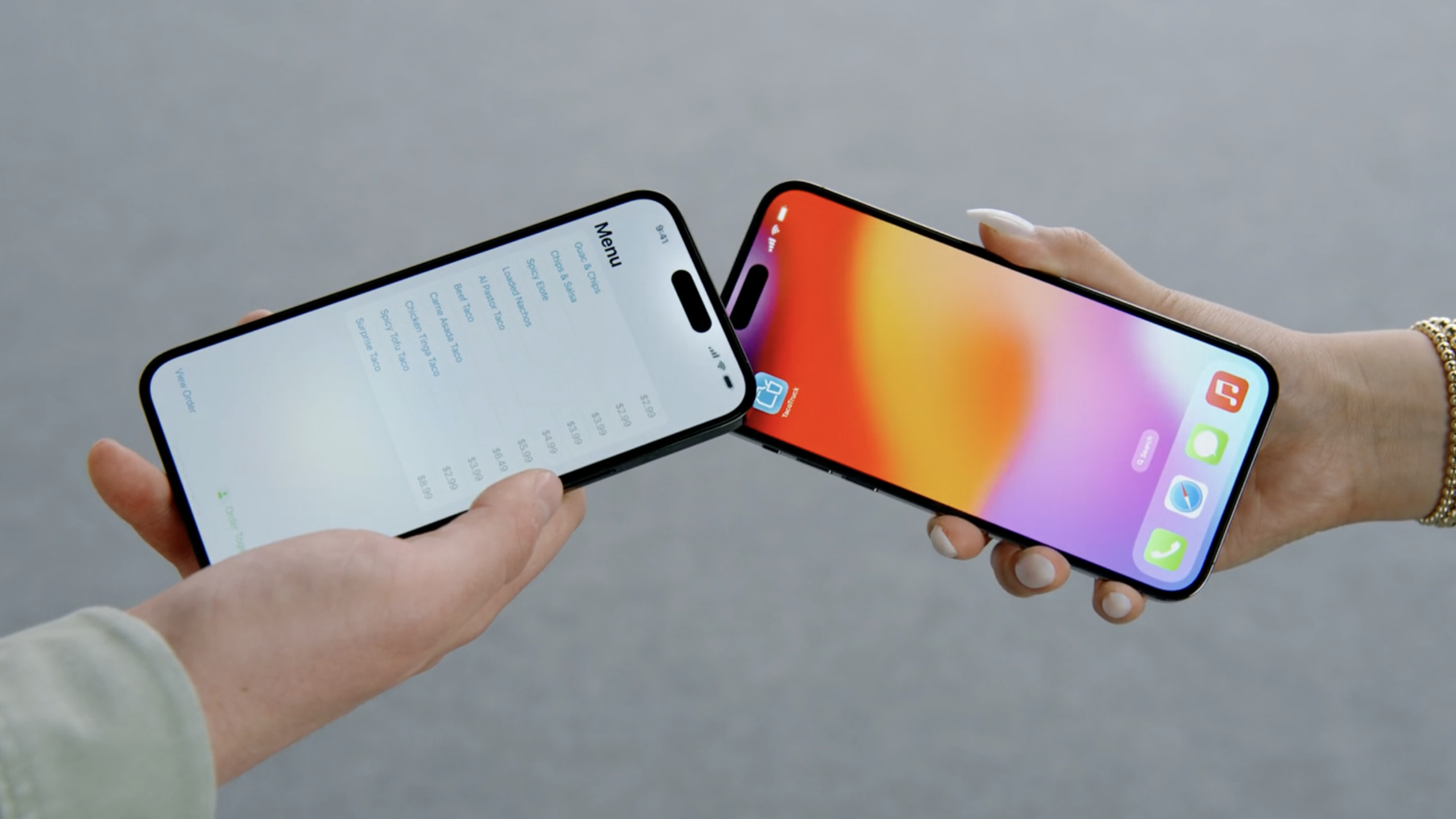
From remote to in-person: AirDrop launches SharePlay
SharePlay was initially only available in FaceTime calls and was later expanded to Messages. But many times, friends are by your side—listening to music together on the subway, ordering food together in a restaurant, and picking out furniture together in the mall.
(03:02) iOS 17 adds SharePlay via AirDrop. SharePlay can be started when two devices are brought into close proximity, without exchanging usernames or email addresses. This expands the applicable scenarios of SharePlay from “remote play” to “face-to-face collaboration”.
Even better is the continuity of the experience. SharePlay initiated from AirDrop, if friends subsequently separate, you can seamlessly switch to Messages to continue; if you want to voice chat, you can jump to a FaceTime call with one click. tvOS 17 also supports FaceTime on the big screen and launches SharePlay.
Richer activity types
(04:45) In addition to the existing Watching Together, Listening Together, Playing Together and Generic, five new activity types have been added this year: Workout, Shop, Read, Learn, and Create Together. These types determine the icons and text displayed in the system HUD, helping users identify what they are currently doing at a glance.
You lead the event, Apple leads the crowd
The core concept of SharePlay is “you bring the event, Apple brings the crowd.” The application only needs to define activity content and synchronization logic, and the GroupActivities framework does the rest: crowd discovery, invitation sending, end-to-end encrypted data channel, group management UI (person selector, notifications, status changes) are all built-in.
(01:06) The data channel uses the same end-to-end encryption as FaceTime, and Apple cannot see any app data. This is a strong guarantee for user privacy.
Detailed Content
Define GroupActivity
(04:15) A SharePlay activity needs to be implementedGroupActivityprotocol:
import GroupActivities

struct OrderTogether: GroupActivity {
    // Unique identifier for system reference
    static let activityIdentifier = "com.example.TacoTruck.OrderTogether"

    // App-specific data used to launch the activity on other devices
    let orderUUID: UUID
    let truckName: String

    var metadata: GroupActivityMetadata {
        var metadata = GroupActivityMetadata()
        metadata.title = "Order Tacos Together"
        metadata.subtitle = truckName
        metadata.previewImage = UIImage(named: "ActivityImage")?.cgImage
        metadata.type = .shopTogether
        return metadata
    }
}
Key points:
activityIdentifierMust be a globally unique reverse domain name format -metadata.titleis the name of the activity (not the app name) -subtitleProvide additional contextual information -previewImageIs an event-specific image (not an app icon) -typeSelect the most matching activity type to affect the system UI display
Metadata configuration example
(04:15) Basic metadata settings:
var metadata: GroupActivityMetadata {
    var metadata = GroupActivityMetadata()
    metadata.title = "Order Tacos Together"
    metadata.type = .generic
    return metadata
}
Key points:
- If the app has multiple activities, make sure the title and icon for each activity are not common
- The system will
typeShow corresponding icon in HUD (Watch, Listen, Game, or General) - New types (Workout, Shop, Read, Learn, Create) available on iOS 17, iPadOS 17, macOS Sonoma and tvOS 17
Cross-scene continuity
(03:36) SharePlay now supports three initiation methods and can be switched seamlessly:
- FaceTime: Click the Share button during the call, and the system will display a list of apps that support SharePlay.
- Messages: No need to call, initiate sharing activities directly in messages
- AirDrop: It can be initiated when the device is close to it, suitable for face-to-face scenarios
(08:35) Once in a SharePlay session, participants can switch activity types at any time without reconfiguring the group. For example, if you switch from “Listen to songs together” to “Watch videos together”, the entire group will switch accordingly.
Application discovery and installation
(08:54) If someone in the group has not installed an app that supports SharePlay, the system will automatically direct them to the App Store to download it. This lowers the barrier for new users to join.
Core Takeaways
-
E-commerce application for shopping together
- What to do: Couples or roommates can browse products together and decide together what furniture or decorations to buy
- Why it’s worth doing: SharePlay via AirDrop makes face-to-face shopping scenes natural, without the need to watch the same screen together
- How to start: Define a
GroupActivity, type is set to.shopTogether,useGroupSessionMessengerSynchronize the currently browsed products and annotations
-
Educational applications for collaborative learning
- What to do: Students can look at teaching charts, make annotations, and discuss questions together, and the content is synchronized in real time
- Why it’s worth doing: Educational scenarios are naturally suitable for multi-person collaboration. SharePlay provides an end-to-end encrypted synchronization channel and does not require a self-built server.
- How to start: set type to
.learnTogether, pass canvas operations (brush, annotation, page turning) throughGroupSessionMessengerbroadcast
-
Exercise application for fitness together
- What to do: Friends can follow the course together and see each other’s progress and heart rate in real time
- Why it’s worth doing: New types
.workoutTogetherLet the system display fitness icons in the HUD so users know what they are doing at a glance - How to start: When defining GroupActivity, set type to
.workoutTogether, synchronize the current training stage and completion status
-
Design application for shared whiteboard
- What to do: Designers and clients can paste pictures, draw lines, and write notes on the whiteboard together
- Why it’s worth doing: Combine
GroupSessionJournal(See Share files with SharePlay), you can transfer image attachments to the shared canvas - How to start: Use
GroupSessionMessengerTo synchronize brush operations, useGroupSessionJournalTransfer reference pictures
-
Make a takeaway app for ordering food together
- What to do: A group of people browse the menu together, each choose what they want to eat, and finally combine the orders
- Why is it worth doing: This is a demonstration scene in Session, which is very close to daily life and has high user acceptance.
- How to start: set type to
.shopTogetheror.generic, sync everyone’s selections and shopping cart status
Related Sessions
- Share files with SharePlay — Transfer files and attachments in SharePlay using the GroupSessionJournal API
- Build spatial SharePlay experiences — Build spatial SharePlay experiences in visionOS
- Make a great SharePlay experience — SharePlay experience design best practices
Comments
GitHub Issues · utterances