
Highlight
CKSyncEngine is a high-level synchronization engine launched by Apple for CloudKit. Developers only need to process application-specific data conversion logic, and the system will automatically handle push monitoring, task scheduling, network retry, batch transmission and conflict resolution, reducing custom synchronization implementations that originally required thousands of lines of code to a few hundred lines.
Core Content
Users expect data to be synchronized across all devices. Take a note on your iPhone and it should be there when you open your Mac. This experience seems natural, but it is complex to implement.
CloudKit itself is not complicated, but synchronization involves many details: network status monitoring, battery management, push notification processing, subscription management, status tracking, error recovery, account switching, etc. A complete synchronization engine may require thousands of lines of code, and test code will be twice as long. Apple internally revealed that the test code of NSPersistentCloudKitContainer exceeds 70,000 lines.
The CKSyncEngine launched at WWDC23 encapsulates these common logic, allowing you to only care about the application-specific parts.
There are three levels of CloudKit synchronization solutions on Apple platforms:
- NSPersistentCloudKitContainer: full-stack solution, including local persistence, suitable for applications that directly use Core Data
- CKSyncEngine: comes with local persistence synchronization engine, suitable for applications that require customized storage solutions
- CKDatabase + CKOperations: Full manual control, only used when CKSyncEngine cannot meet the needs
If you are already using NSPersistentCloudKitContainer, just keep using it. If you have your own local storage solution (SQLite, file system, etc.), CKSyncEngine is the best choice.
CKSyncEngine has been adopted by several system applications, including Freeform and NSUbiquitousKeyValueStore. It uses standard CKRecord and CKRecordZone and can interoperate with existing CloudKit. As the platform evolves, CKSyncEngine automatically gains performance optimizations and new features.
Workflow of synchronization engine
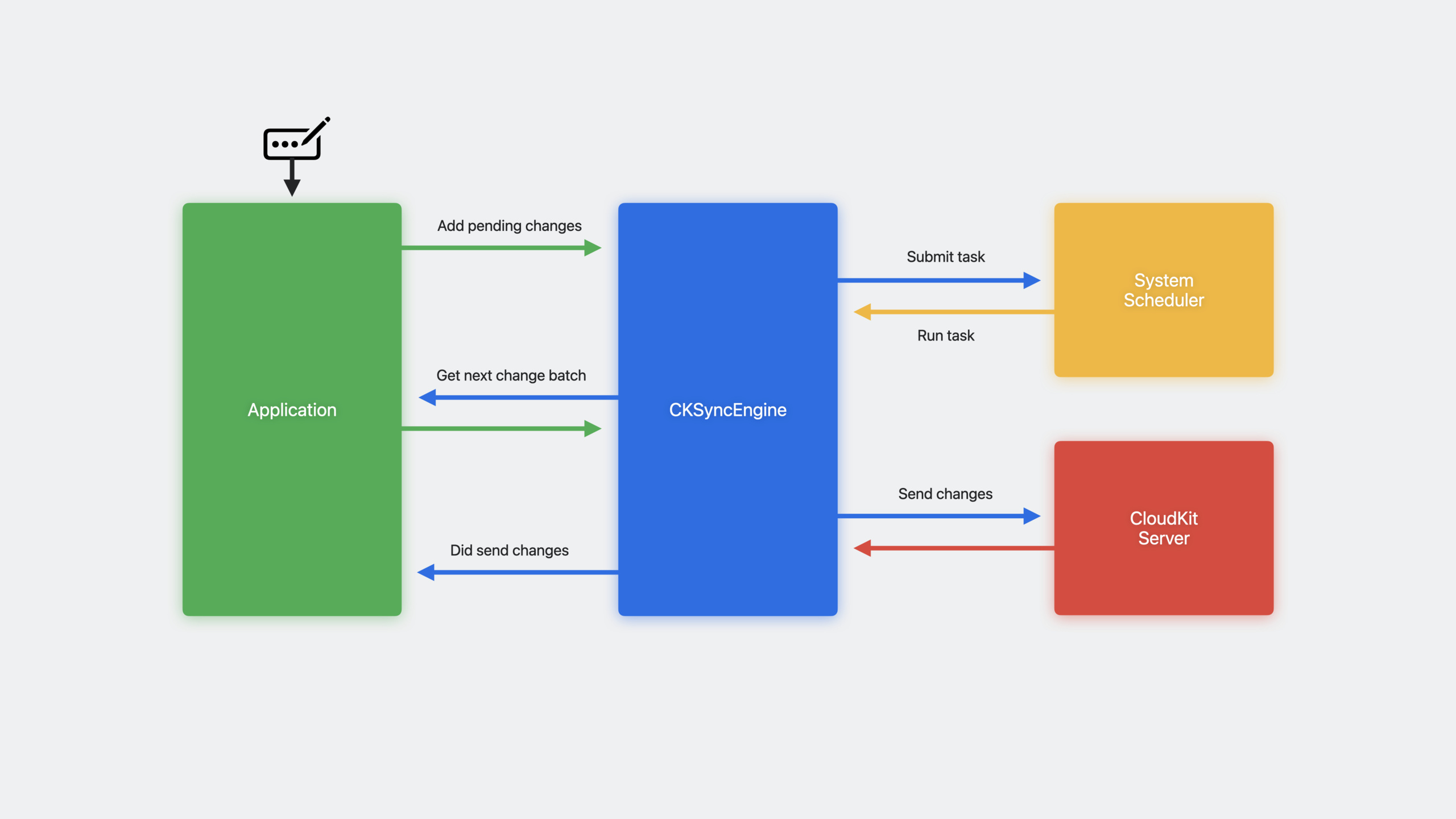
(05:11) The core of CKSyncEngine is the data pipeline. Your application uses records and zones to communicate with the engine, which is responsible for interacting with the server.
Process for sending changes:
- Users modify data (enter text, switch switches, delete objects)
- The application tells the sync engine the changes to be sent
- Sync engine submits tasks to the system scheduler
- After the device is ready, the scheduler runs the task
- Sync engine requests changed data in batches from the application
- Send data to server
- The server returns the result and the sync engine calls back to the application.
(06:45) Batch processing is the key design. If the user imports a large amount of data, there may be hundreds or thousands of changes. Sync engine batches requests to avoid loading all records into memory at once. The application only serves the next batch of data when requested by the engine.
Process for receiving changes:
- The server sends a push notification after receiving new changes.
- CKSyncEngine automatically monitors push notifications
- Submit the task to the scheduler after receiving the notification
- After the scheduler runs, the sync engine obtains changes from the server
- The changes are handed over to the application and persisted locally.
(08:00) The system scheduler is the basis of it all. It monitors network connections, battery power, resource usage and other conditions to ensure synchronization at the right time. Synchronization completes within seconds under normal circumstances, but can be delayed if the network is disconnected or the battery is low. You don’t need to handle this logic yourself.
Of course, there are also scenarios where immediate synchronization is required: pull-down refresh and immediate backup buttons. CKSyncEngine provides an API for manual synchronization, but Apple recommends relying on automatic scheduling first.
Initialization and configuration
(12:14) Using CKSyncEngine requires several prerequisites: understanding CKRecord and CKRecordZone, enabling CloudKit and remote push capabilities in Xcode.
Initialization code:
actor MySyncManager: CKSyncEngineDelegate {

    init(container: CKContainer, localPersistence: MyLocalPersistence) {
        let configuration = CKSyncEngine.Configuration(
            database: container.privateCloudDatabase,
            stateSerialization: localPersistence.lastKnownSyncEngineState,
            delegate: self
        )
        self.syncEngine = CKSyncEngine(configuration)
    }

    func handleEvent(_ event: CKSyncEngine.Event, syncEngine: CKSyncEngine) async {
        switch event {
        case .stateUpdate(let stateUpdate):
            self.localPersistence.lastKnownSyncEngineState = stateUpdate.stateSerialization
        }
    }
}
Key points:
- Provide database, last saved state serialization, delegate during initialization
- State serialization must be persisted locally and restored at next startup
- Delegate’s
handleEventIs the main communication interface - It is recommended to initialize the sync engine as soon as possible after the application starts so that it can monitor push and schedule tasks
Send changes to server
(14:13) Sending changes is divided into three steps: marking changes to be sent, implementing batch provision methods, and processing the sending results.
func userDidEditData(recordID: CKRecord.ID) {
    // Tell the sync engine that this data needs to be sent
    self.syncEngine.state.add(pendingRecordZoneChanges: [ .save(recordID) ])
}

func nextRecordZoneChangeBatch(
    _ context: CKSyncEngine.SendChangesContext,
    syncEngine: CKSyncEngine
) async -> CKSyncEngine.RecordZoneChangeBatch? {

    let changes = syncEngine.state.pendingRecordZoneChanges.filter {
        context.options.zoneIDs.contains($0.recordID.zoneID)
    }

    return await CKSyncEngine.RecordZoneChangeBatch(pendingChanges: changes) { recordID in
        self.recordToSave(for: recordID)
    }
}
Key points:
pendingRecordZoneChangesTell the engine which records need to be synchronized- Sync engine will automatically remove duplicates and maintain consistency
-
nextRecordZoneChangeBatchCalled when the engine is ready to send -RecordZoneChangeBatchInitialized with pending changes and record provider, the provider will only load the record when it is actually needed.
Get server changes
(15:40) Getting changes is automatic. Sync engine will sendfetchedRecordZoneChangesandfetchedDatabaseChangesevent:
func handleEvent(_ event: CKSyncEngine.Event, syncEngine: CKSyncEngine) async {
    switch event {

    case .fetchedRecordZoneChanges(let recordZoneChanges):
        for modifications in recordZoneChanges.modifications {
            // Persist modifications locally
        }
        for deletions in recordZoneChanges.deletions {
            // Delete data locally
        }

    case .fetchedDatabaseChanges(let databaseChanges):
        for modifications in databaseChanges.modifications {
            // Handle database-level modifications
        }
        for deletions in databaseChanges.deletions {
            // Handle database-level deletions
        }

    case .willFetchChanges, .didFetchChanges:
        // Perform setup/cleanup before and after fetching
        break

    case .sentRecordZoneChanges(let sentChanges):
        for failedSave in sentChanges.failedRecordSaves {
            let recordID = failedSave.record.recordID

            switch failedSave.error.code {

            case .serverRecordChanged:
                if let serverRecord = failedSave.error.serverRecord {
                    // Merge the server record into local data
                    syncEngine.state.add(pendingRecordZoneChanges: [ .save(recordID) ])
                }

            case .zoneNotFound:
                // Zone does not exist; create the zone first, then retry
                syncEngine.state.add(pendingDatabaseChanges: [ .save(recordID.zoneID) ])
                syncEngine.state.add(pendingRecordZoneChanges: [ .save(recordID) ])

            // The sync engine automatically retries the following errors
            case .networkFailure, .networkUnavailable, .serviceUnavailable, .requestRateLimited:
                break

            default:
                break
            }
        }

    case .accountChange(let event):
        switch event.changeType {
        case .signIn:
            // Prepare data for the new user
            break
        case .signOut:
            // Clear local data
            break
        case .switchAccounts:
            // Clear data and prepare for the new user
            break
        }
    }
}
Key points:
fetchedRecordZoneChangesContains two arrays: modifications and deletions -serverRecordChangedis the most common conflict and requires applying your own merge strategy -zoneNotFoundYou need to create a zone first and then try saving the record again.- Network errors (networkFailure, serviceUnavailable, etc.) will be automatically handled by sync engine
-
accountChangeEvent processing account login, logout, switching three situations
Supports Private and Shared databases
(18:49) An independent sync engine can be created for each database:
let databases = [ container.privateCloudDatabase, container.sharedCloudDatabase ]

let syncEngines = databases.map {
    var configuration = CKSyncEngine.Configuration(
        database: $0,
        stateSerialization: lastKnownSyncEngineState($0.databaseScope),
        delegate: self
    )
    return CKSyncEngine(configuration)
}
Key points:
- Each database requires a separate sync engine instance
- Each instance requires independent state serialization storage
- Shared database for CloudKit Sharing scenarios
test
(20:00) Multiple sync engine instances can be used to simulate multi-device scenarios:
func testSyncConflict() async throws {
    // Create two local databases to simulate two devices
    let deviceA = MySyncManager()
    let deviceB = MySyncManager()

    // Device A saves to the server first
    deviceA.value = "A"
    try await deviceA.syncEngine.sendChanges()

    // Device B also tries to save before fetching changes
    deviceB.value = "B"
    XCTAssertThrows(try await deviceB.syncEngine.sendChanges())
    XCTAssertEqual(deviceB.value, "A")
}
Key points:
- Create multiple sync managers to simulate multiple devices
- settings
automaticallySync = falseCan precisely control synchronization timing - When testing conflict resolution logic, verify that local data is updated as expected
- Logging record ID and zone ID helps debug multi-device sync issues
Detailed Content
Error handling strategy
CKSyncEngine handles transient errors automatically:
- networkFailure/networkUnavailable: Network problem, automatically retry
- serviceUnavailable: The service is unavailable, automatically retry
- requestRateLimited: request frequency limit, automatic retry
- account issues: Account issues, automatically handled
Errors that need to be handled by the application:
- serverRecordChanged: The server record has been modified and a decision merge strategy needs to be applied
- zoneNotFound: zone does not exist and needs to be created first
- unknown errors: Unknown errors that require the application to decide how to handle them
Status management
The internal state of the Sync engine is passedstateSerializationsave. This status includes:
- Known server change token
- Queue of changes to be sent
- Subscription information
- Other internal tracking data
Each time the status is updated, the sync engine will sendstateUpdateevent. You must persist this state, otherwise the sync engine will be fully synchronized again the next time you start it.
Debugging Tips
- Record Event Sequence: In
handleEventRecord the type and timestamp of each event in - Record record ID and zone ID: Help track data flow
- Compare multi-device logs: Use timestamps to align operations on different devices
- Use Push Notifications Console: Verify whether the push arrives normally
Core Takeaways
1. Add iCloud synchronization to existing local storage applications
- What to do: Add cross-device synchronization to applications that originally only saved local notes, to-dos, habit tracking, etc.
- Why it’s worth doing: CKSyncEngine reduces synchronization complexity to a minimum. You only need to deal with data conversion, and you can get the same level of synchronization experience as system applications.
- How to start: Define CKRecord conversion logic, initialize CKSyncEngine, and mark pending changes when data changes
2. Make a document editor that supports collaboration
- What it does: A multi-person collaborative whiteboard or document application similar to Freeform
- Why it’s worth doing: CKSyncEngine supports shared database, and combined with CloudKit Sharing can achieve real-time collaboration between multiple users
- How to start: Use private database to store personal data, use shared database to store collaborative data, and create an independent sync engine for each database.
3. Make an offline-first photo album/collection application
- What to do: Picture collection, link collection, music collection and other applications, support offline browsing and automatic synchronization
- Why it’s worth it: Sync engine’s automatic scheduling ensures seamless synchronization when the network is restored, and batch processing is suitable for large amounts of media metadata
- How to start: Use SwiftData or Core Data to store locally, synchronize records to CloudKit with CKSyncEngine, and use CKAsset for media files
4. Rewrite custom synchronization scheme
- What to do: Migrate the original CloudKit synchronization code maintained by yourself to CKSyncEngine
- Why it’s worth doing: Reduce maintenance costs, automatically obtain system-level optimization, and have better test coverage
- How to start: Gradual replacement: first let CKSyncEngine coexist with the existing implementation, verify data consistency before switching completely
Related Sessions
- Get the most out of CloudKit Sharing — A complete implementation of CloudKit data sharing
- What’s new in Core Data — New features of Core Data and NSPersistentCloudKitContainer
- Meet Push Notifications Console — Graphical tool for debugging push notifications
- Build robust and resumable file transfers — Best practices for large file transfers
Comments
GitHub Issues · utterances