
Highlight
Core Data introduced Composite Attributes in iOS 17 to organize structured data, Staged Migration to handle complex model changes, and Deferred Migration to avoid long waits at startup.
Core Content
The data model will become more and more complex as the app iterates. When encountering these problems in the past, developers often had to choose between “writing a bunch of migration code” and “giving up Core Data and switching to other solutions.”
Composite Attributes solves the storage problem of structured data. In the past, you had to flatten a set of related properties into multiple independent fields, or use the Transformable type to write your own serialization code. Composite Attributes allows you to encapsulate a set of related attributes into a composite attribute, access it like a dictionary, and directly use keypath as query conditions.
Staged Migration solves the migration problem of complex model changes. Some changes (such as splitting an entity’s attributes into separate entities) are beyond the capabilities of lightweight migration. In the past, you could only write custom migration mappings, which was a large amount of code and prone to errors. Staged Migration allows you to break complex changes into multiple steps that can be processed by lightweight migrations, and Core Data automatically executes them in sequence.
Deferred Migration solves the problem of migration blocking UI. Although some lightweight migrations can be completed automatically, cleaning up old data takes time. Previously this would get stuck on app startup. Deferred Migration allows the cleaning work to be delayed to the background. The app uses the new schema first, and the data cleaning is done later.
Detailed Content
Composite Attributes
(00:56) Composite Attributes are Core Data’s new attribute type for encapsulating structured data.
Suppose there is aAircraftEntities, previously using Transformable types to store color schemes:
@NSManaged public var colors: Data? // Transformable, requires a custom transformerComposite Attribute is now available:
@NSManaged public var colorScheme: [String: Any]?Define the composite attribute in the Xcode model editor:
- Add composite attribute and name it
colorScheme2. Add three String sub-properties there:primary、secondary、tertiary3. inAircraftAdd to entitycolorSchemeAttribute, type is set tocolorScheme
Set composite attribute:
private func addAircraft() {
    viewContext.performAndWait {
        let newAircraft = Aircraft(context: viewContext)
        newAircraft.tailNumber = tailNumber
        newAircraft.aircraftType = aircraftType
        newAircraft.aircraftClass = aircraftClass
        newAircraft.aircraftCategory = aircraftCategory

        newAircraft.colorScheme = [
            "primary": primaryColor.rawValue,
            "secondary": secondaryColor.rawValue,
            "tertiary": tertiaryColor.rawValue
        ]

        do {
            try viewContext.save()
        } catch {
            // Handle errors
        }
    }
}
Key points:
- Use dictionary syntax to access sub-attributes of a composite attribute
- The key name is consistent with the attribute name defined in the model editor
Use keypath to query composite attributes:
private func findAircraft(with color: String) {
    viewContext.performAndWait {
        let fetchRequest = Aircraft.fetchRequest()
        fetchRequest.predicate = NSPredicate(
            format: "colorScheme.primary == %@", color
        )

        do {
            let fetchedResults = try viewContext.fetch(fetchRequest)
            // ...
        } catch {
            // Handle errors
        }
    }
}
Key points:
- use
colorScheme.primarynamespaced keypath like this - You can directly
NSPredicateQuery sub-attributes in - This is something the Transformable property cannot do
Composite Attributes can also be nested, and a composite attribute can contain other composite attributes. Elements can only beNSAttributeDescriptionor nestedNSCompositeAttributeDescription, cannot contain relationship.
In terms of performance, if you almost always need to access one of its relationships after fetching an entity, you can change the data of that relationship to a composite attribute. This avoids additional queries caused by faulting.
Staged Migration
(07:36) Use Staged Migration when model changes exceed the capabilities of lightweight migration.
The core idea: Split complex non-lightweight changes into multiple steps that can be handled by lightweight migrations.
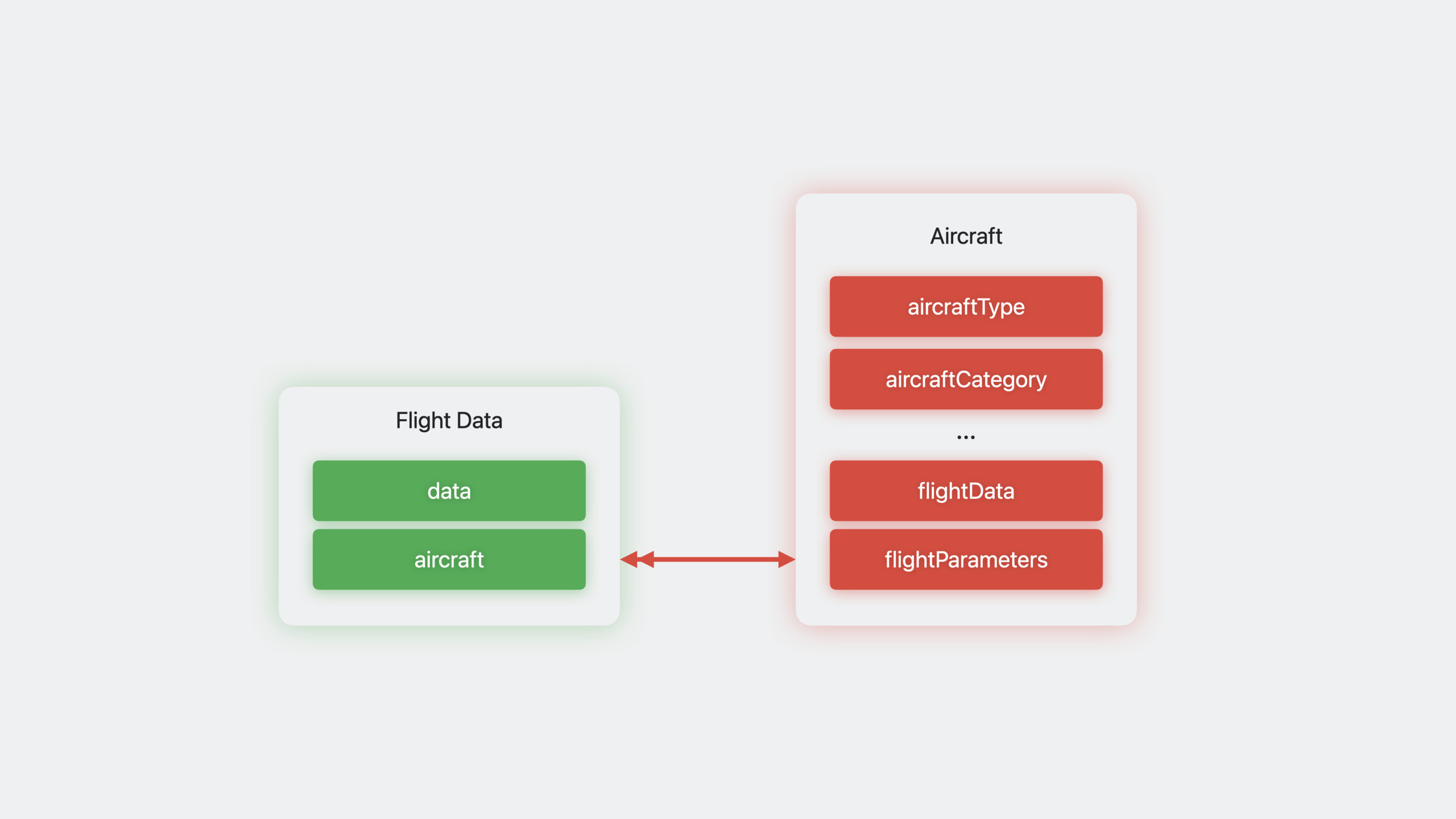
Example scenario:AircraftThe entity has aflightDataBinary attributes need to be split into independentFlightDataentity.
Decomposition steps:
- ModelV1 (original):
AircrafthaveflightDataProperties - ModelV2: added
FlightDataentity, withAircraftEstablish a relationship and lightweight migration can be completed - ModelV3: Delete
AircraftofflightDataProperties, data has been migrated via custom code toFlightData
Create a model reference:
let v1ModelChecksum = "kk8XL4OkE7gYLFHTrH6W+EhTw8w14uq1klkVRPiuiAk="
let v1ModelReference = NSManagedObjectModelReference(
    modelName: "modelV1",
    in: Bundle.main,
    versionChecksum: v1ModelChecksum
)

let v2ModelChecksum = "PA0Gbxs46liWKg7/aZMCBtu9vVIF6MlskbhhjrCd7ms="
let v2ModelReference = NSManagedObjectModelReference(
    modelName: "modelV2",
    in: Bundle.main,
    versionChecksum: v2ModelChecksum
)

let v3ModelChecksum = "iWKg7bxs46g7liWkk8XL4OkE7gYL/FHTrH6WF23Jhhs="
let v3ModelReference = NSManagedObjectModelReference(
    modelName: "modelV3",
    in: Bundle.main,
    versionChecksum: v3ModelChecksum
)
Key points:
versionChecksumuseNSManagedObjectModel.versionChecksumget- You can also search for “version checksum” in the Xcode build log
- The checksum of versioned model is also included
VersionInfo.plistmiddle
Create a migration stage:
// V1 -> V2 is a lightweight change (adding attributes/entities)
let lightweightStage = NSLightweightMigrationStage([v1ModelChecksum])
lightweightStage.label = "V1 to V2: Add flightData attribute"

// V2 -> V3 requires custom code to migrate data
let customStage = NSCustomMigrationStage(
    migratingFrom: v2ModelReference,
    to: v3ModelReference
)
customStage.label = "V2 to V3: Denormalize model with FlightData entity"
Migrate data in the customization phase:
customStage.willMigrateHandler = { migrationManager, currentStage in
    guard let container = migrationManager.container else {
        return
    }

    let context = container.newBackgroundContext()
    try context.performAndWait {
        let fetchRequest = NSFetchRequest<NSFetchRequestResult>(entityName: "Aircraft")
        fetchRequest.predicate = NSPredicate(format: "flightData != nil")

        do {
            let fetchedResults = try context.fetch(fetchRequest)
            for airplane in fetchedResults {
                guard let airplane = airplane as? NSManagedObject else { continue }

                let fdEntity = NSEntityDescription.insertNewObject(
                    forEntityName: "FlightData",
                    into: context
                )

                let flightData = airplane.value(forKey: "flightData")
                fdEntity.setValue(flightData, forKey: "data")
                fdEntity.setValue(airplane, forKey: "aircraft")
                airplane.setValue(nil, forKey: "flightData")
            }
            try context.save()
        } catch {
            // Handle errors
        }
    }
}
Key points:
- use
NSFetchRequestResultandNSManagedObjectGeneric, because the subclass may not exist when migrating -willMigrateHandlerExecuted after the lightweight migration is completed and before the schema is updated. - Create new entities, copy data, and establish relationships in the handler
-
didMigrateHandlerExecuted after schema update (if needed)
Configure staged migration:
let migrationStages = [lightweightStage, customStage]
let migrationManager = NSStagedMigrationManager(migrationStages)

let persistentContainer = NSPersistentContainer(
    path: "/path/to/store.sqlite",
    managedObjectModel: myModel
)

var storeDescription = persistentContainer.persistentStoreDescriptions.first
storeDescription?.setOption(
    migrationManager,
    forKey: NSPersistentStoreStagedMigrationManagerOptionKey
)

persistentContainer.loadPersistentStores { storeDescription, error in
    if let error = error {
        // Handle errors
    }
}
Key points:
NSStagedMigrationManagerManage the entire migration process- Pass
NSPersistentStoreStagedMigrationManagerOptionKeyadd to store options - Core Data automatically executes each stage in sequence
Deferred Migration
(18:56) Cleanup work for some lightweight migrations can be delayed.
Enable delayed migration:
let options = [
    NSPersistentStoreDeferredLightweightMigrationOptionKey: true,
    NSMigratePersistentStoresAutomaticallyOption: true,
    NSInferMappingModelAutomaticallyOption: true
]

let store = try coordinator.addPersistentStore(
    ofType: NSSQLiteStoreType,
    configurationName: nil,
    at: storeURL,
    options: options
)
Complete delayed migration at the right time:
// Execute in the background through BGProcessingTask
let metadata = coordinator.metadata(for: store)
if metadata[NSPersistentStoreDeferredLightweightMigrationOptionKey] == true {
    coordinator.finishDeferredLightweightMigration()
}
Key points:
- The lightweight migration itself is still synchronous, only the cleanup is delayed
- The app can use the new schema immediately
- Delayed migration support for fallback to macOS Big Sur and iOS 14
- Only supports SQLite store type
- Suitable scenarios: deleting attributes/relationship, changing entity hierarchy, changing ordered relationship
- Recommended
BGProcessingTaskExecuted when the device is idle
Staged + Deferred used in combination
(22:08) Complex migrations can combine both techniques. For example, the ModelV3 in the example is deletedflightDataProperty, this cleanup work can be delayed to the background.
Core Takeaways
1. Address/contact structured storage
- What to do: Use Composite Attributes to encapsulate the province, city, district, and street of the address into one
addressProperties - Why is it worth doing: It is more intuitive than making four independent attributes and can be used when querying.
address.city == %@Direct filtering - How to get started: Create a composite attribute in the Xcode model editor, including
province、city、district、streetFour String subproperties
2. Safely migrate large user databases
- What: Use Staged Migration to break complex database changes into multiple steps to avoid startup crashes caused by one-time migration
- Why it’s worth doing: When the amount of user data is large, complex migration may time out and be killed by the system, so phased execution is more stable.
- How to start: Analyze model changes and split non-lightweight changes into three steps: “add new structure → migrate data → delete old structure”, using a model version for each step
3. Zero-blocking startup experience
- What to do: Use Deferred Migration to put the cleaning work in the background, and it will be available immediately after the app is launched.
- Why it’s worth doing: If users are stuck on the startup screen for more than a few seconds when opening the app, they will be lost. Delayed migration keeps startup fast.
- How to start: Add in store options
NSPersistentStoreDeferredLightweightMigrationOptionKey: true,registerBGProcessingTaskCalled in the backgroundfinishDeferredLightweightMigration()
4. Migrate from Transformable to Composite Attributes
- What: Gradually replace existing Transformable attributes (such as custom types that store JSON encoding) with Composite Attributes
- Why is it worth doing: Transformable cannot directly query subfields, Composite Attributes supports
NSPredicatekeypath query, better performance - How to start: Create a new composite attribute in Staged Migration
willMigrateHandlerParse Transformable data and write it into composite sub-property
Related Sessions
- Meet SwiftData — Apple’s new data persistence framework
- SwiftData in-depth — Advanced SwiftData usage and relationship with Core Data
- Evolve your app’s schema — Best practices for data model evolution
Comments
GitHub Issues · utterances