
Highlight
Apple Push Notification service added
liveactivityThe push type allows the server to send updates directly to Live Activity without the need for the app to run in the foreground, which greatly reduces the impact on the battery.
Core Content
Local updates Live Activity has a limitation: the app needs to be running in the background to update data. For scenarios that require real-time synchronization of multi-user status (such as team games, multi-person delivery), this means either frequently waking up the app, or the data is out of sync.
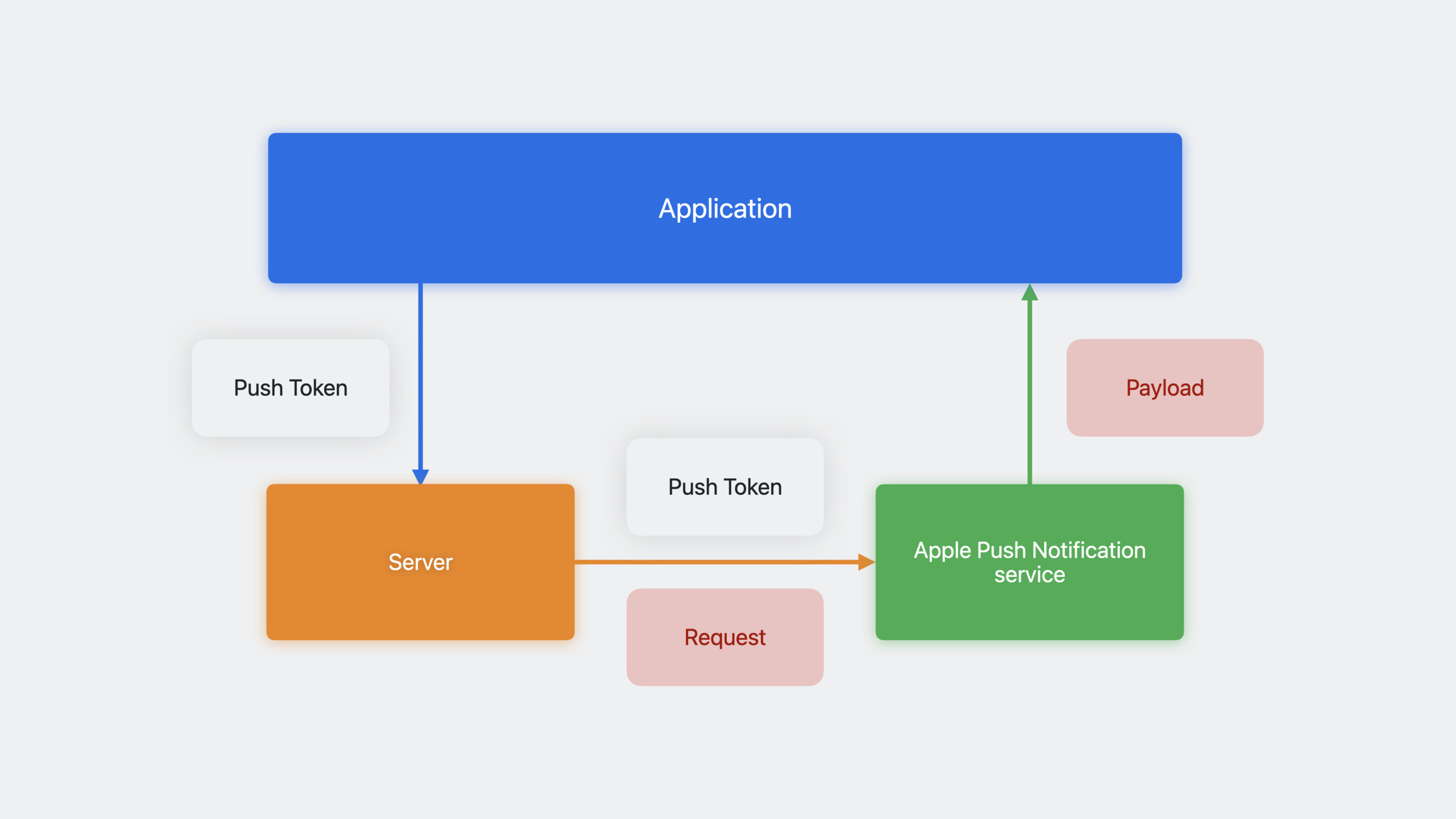
Pushing updates remotely solves this problem. The server sends content updates directly to the device’s Live Activity through APNs, and the widget extension is awakened to render the new UI. The entire process does not require the participation of the main app.
The implementation path is divided into three steps: when the app starts the Live Activity, it obtains the push token and reports it to the server; the server constructs APNs and requests to send updates when the status changes; the device automatically updates the Live Activity UI after receiving the push.
Push updates support two priorities: low priority (5) is suitable for non-urgent updates, with no quantity limit; high priority (10) is suitable for updates that need to be delivered immediately, with system budget restrictions. You can also add alert objects to trigger notifications on Apple Watch, supporting localized strings and custom sounds.
Detailed Content
Enable push updates
(03:53) First add the Push Notifications capability in Xcode’s Signing & Capabilities, and then set it in the codepushType:
func startActivity(hero: EmojiRanger) throws {
    let adventure = AdventureAttributes(hero: hero)
    let initialState = AdventureAttributes.ContentState(
        currentHealthLevel: hero.healthLevel,
        eventDescription: "Adventure has begun!"
    )

    let activity = try Activity.request(
        attributes: adventure,
        content: .init(state: initialState, staleDate: nil),
        pushType: .token  // Enable push updates
    )

    Task {
        for await pushToken in activity.pushTokenUpdates {
            let pushTokenString = pushToken.reduce("") {
                $0 + String(format: "%02x", $1)
            }
            Logger().log("New push token: \(pushTokenString)")
            try await self.sendPushToken(hero: hero, pushTokenString: pushTokenString)
        }
    }
}
Key points:
pushType: .tokenTell ActivityKit to apply for a push token for this Live Activity- Do not synchronize access
activity.pushToken, there is a high probability that it is nil when it is first created. - use
pushTokenUpdatesasync sequence monitors token changes - The token may be updated during the life cycle. When a new token arrives, the server must be notified to discard the old token.
- The system gives the app foreground running time to process token updates
APNs push payload
(06:54) Update the push payload format of Live Activity:
{
    "aps": {
        "timestamp": 1685952000,
        "event": "update",
        "content-state": {
            "currentHealthLevel": 0.941,
            "eventDescription": "Power Panda found a sword!"
        }
    }
}
Key points:
timestamp: Unix timestamp, the system uses it to determine the latest content -event:updateorendcontent-state: JSON object, must be able to be decoded intoContentStateType- Use default
JSONDecoderDecoding, do not use custom decoding strategy
Generate content-state JSON
(07:37) used in appJSONEncoderGenerate the correct format:
let contentState = AdventureAttributes.ContentState(
    currentHealthLevel: 0.941,
    eventDescription: "Power Panda found a sword!"
)

let encoder = JSONEncoder()
encoder.outputFormatting = .prettyPrinted

let json = try! encoder.encode(contentState)
Logger().log("\(String(data: json, encoding: .utf8)!)")
Key points:
- Output is camelCase key name
- The JSON key name sent by the server must match
ContentStateThe property names are consistent - Do not use custom encoding strategy
Use curl to test push
(09:18) During the development stage, test push can be sent directly from the terminal:
curl \
  --header "apns-topic: com.example.app.push-type.liveactivity" \
  --header "apns-push-type: liveactivity" \
  --header "apns-priority: 10" \
  --header "authorization: bearer $AUTHENTICATION_TOKEN" \
  --data '{
      "aps": {
          "timestamp": '$(date +%s)',
          "event": "update",
          "content-state": {
              "currentHealthLevel": 0.941,
              "eventDescription": "Power Panda found a sword!"
          }
      }
  }' \
  --http2 https://api.sandbox.push.apple.com/3/device/$ACTIVITY_PUSH_TOKEN
Key points:
apns-topic:app bundle ID +.push-type.liveactivityapns-push-type: Must beliveactivityapns-priority:5(low) or10(high) -authorization:JWT bearer token- URL must use HTTP/2
- use
date +%sAutomatically generate current timestamp
Push with Alert
(14:21) Important updates can trigger alerts:
{
    "aps": {
        "timestamp": 1685952000,
        "event": "update",
        "content-state": {
            "currentHealthLevel": 0.0,
            "eventDescription": "Power Panda has been knocked down!"
        },
        "alert": {
            "title": "Power Panda is knocked down!",
            "body": "Use a potion to heal Power Panda!",
            "sound": "default"
        }
    }
}
Key points:
- alert appears as a notification on Apple Watch -On iPhone/iPad, only sound is played and pop-ups are not displayed.
- title and body are only used on Apple Watch
Localization Alert
(14:56) Support multiple languages:
{
    "aps": {
        "timestamp": 1685952000,
        "event": "update",
        "content-state": {
            "currentHealthLevel": 0.0,
            "eventDescription": "Power Panda has been knocked down!"
        },
        "alert": {
            "title": {
                "loc-key": "%@ is knocked down!",
                "loc-args": ["Power Panda"]
            },
            "body": {
                "loc-key": "Use a potion to heal %@!",
                "loc-args": ["Power Panda"]
            },
            "sound": "HeroDown.mp4"
        }
    }
}
Key points:
loc-keyCorresponds to the key in the app localization file -loc-argsare parameters inserted into the localized string- The device automatically selects the language based on the user locale
-
soundCan be a custom audio file name
End Live Activity
(15:52) End the activity via push:
{
    "aps": {
        "timestamp": 1685952000,
        "event": "end",
        "dismissal-date": 1685959200,
        "content-state": {
            "currentHealthLevel": 0.23,
            "eventDescription": "Adventure over! Power Panda is taking a nap."
        }
    }
}
Key points:
event: "end"Indicates the end of the activity -dismissal-dateSpecify when to remove from the lock screen (Unix timestamp)- omitted
dismissal-dateLet the system decide - You can pass the final content-state to give the user a summary
Stale Date and Expiration UI
(16:44) Mark when content expires:
{
    "aps": {
        "timestamp": 1685952000,
        "event": "update",
        "stale-date": 1685959200,
        "content-state": {
            "currentHealthLevel": 0.79,
            "eventDescription": "Egghead is in the woods and lost connection."
        }
    }
}
Responding to expired status in SwiftUI:
ActivityConfiguration(for: AdventureAttributes.self) { context in
    AdventureLiveActivityView(
        hero: context.attributes.hero,
        isStale: context.isStale,  // Becomes true when stale
        contentState: context.state
    )
    .activityBackgroundTint(Color.gameWidgetBackground)
}
Key points:
stale-dateAfter arrivalcontext.isStalebecometrue- The UI should give an expiration prompt (such as graying out, adding a “may have expired” label)
Relevance Score
(17:19) Control the ordering of multiple Live Activities:
{
    "aps": {
        "timestamp": 1685952000,
        "event": "update",
        "relevance-score": 100,
        "content-state": {
            "currentHealthLevel": 0.941,
            "eventDescription": "Power Panda found a sword!"
        }
    }
}
Key points:
- The higher the score, the higher the ranking on the lock screen
- The activity with the highest score will occupy the Smart Island
- Scores can be dynamically adjusted in the push
Push priority and budget
(11:18) Two priorities:
| Priority | Value | Characteristics |
|---|---|---|
| Low | 5 | opportunistic delivery, power saving, no quantity limit |
| High | 10 | Immediate delivery, suitable for urgent updates, subject to system budget constraints |
Most updates should be of low priority. High priority is suitable for events that require immediate attention, such as a hero being knocked down or the game ending.
If the app frequently requires high-priority updates, you can add it in Info.plistNSSupportsLiveActivitiesFrequentUpdatesSet to YES to get a higher update budget. Users can turn off this feature in settings byActivityAuthorizationInfo.frequentPushesEnabledDetection status.
Core Takeaways
1. Multiplayer real-time game status synchronization
- What to do: In team games, each team member’s Live Activity displays the entire team’s status and events in real time
- Why it’s worth doing: The server calculates the status and pushes it, without requiring each client to poll frequently or maintain a connection
- How to start: The game server constructs the APNs payload when the event occurs, via
liveactivitypush type token sent to each team member
2. Takeaway/logistics real-time tracking
- What to do: Automatically update the Live Activity on the user’s lock screen when the delivery status changes (pickup, departure, arrival)
- Why is it worth doing: After the rider reports the location, the server calculates the ETA and pushes it to the user. The user does not need to open the app during the entire process.
- How to start: Rider GPS reporting → Server calculation → APNs push
content-stateUpdate ETA and distance
3. Match/score live push
- What to do: When there are goals, red and yellow cards, etc. in the game you are following, the Live Activity will be updated immediately and a notification sound will be played.
- Why it’s worth it: More immersive than traditional push notifications, users can see the full score and event timeline at a glance
- How to start: event data supplier push event → server structure alert payload → APNs high priority push
4. Flight/train dynamic information
- What: Gate changes, delays, start of boarding and other important information are updated in real time through push Live Activity
- Why it’s worth it: Travelers don’t need to repeatedly check airport screens or open apps, there’s always the latest information on the lock screen
- How to start: Connect with the flight data API, push updates when the status changes, and increase the relevance-score when there is a delay to rank it at the top
Related Sessions
- Meet ActivityKit — Live Activity basic implementation
- Bring widgets to life — WidgetKit interactivity
- Sending notification requests to APNs — APNs push notification basics
Comments
GitHub Issues · utterances