
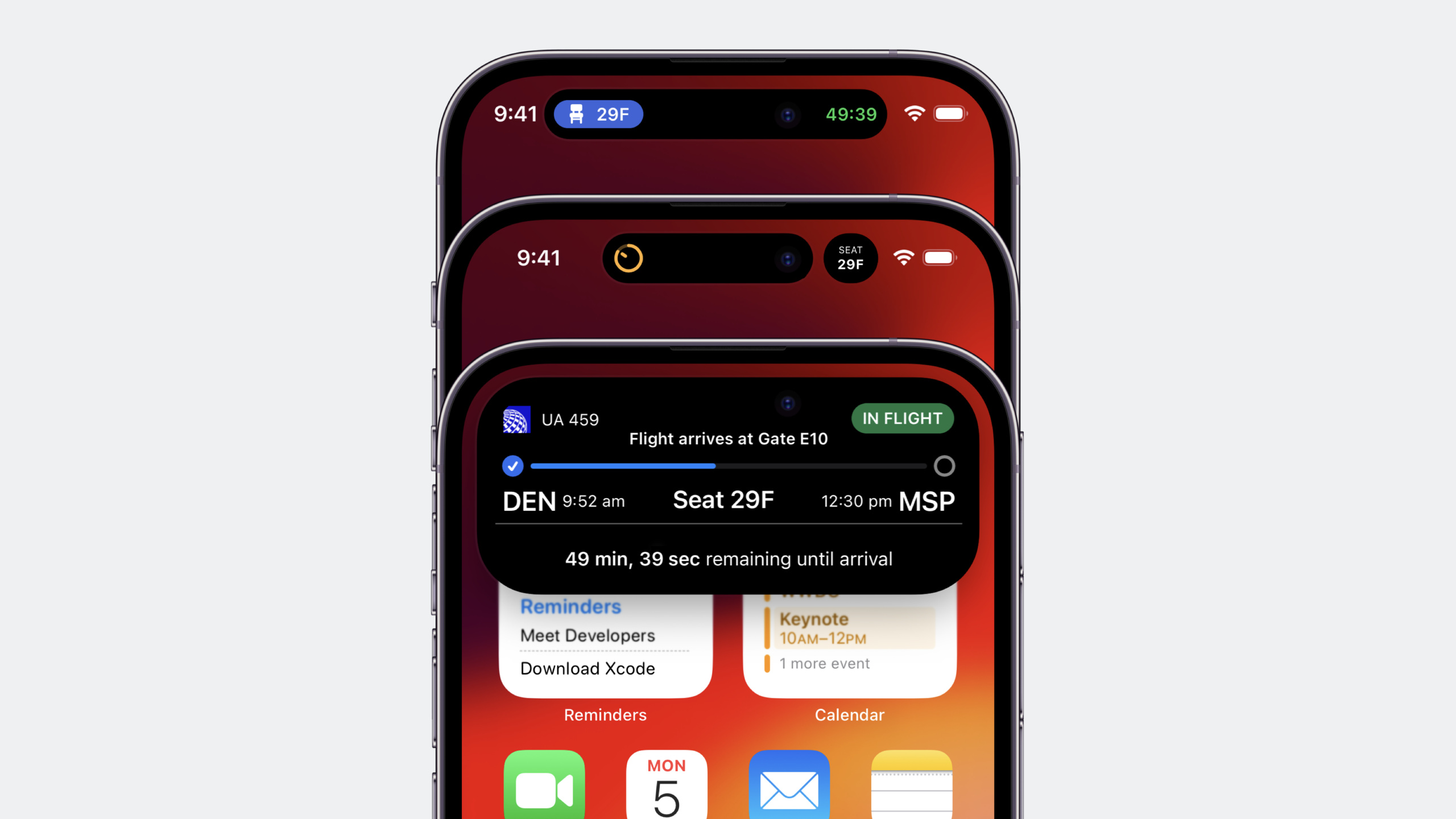
Highlight
ActivityKit allows developers to use SwiftUI and WidgetKit to create real-time activities on the lock screen, Smart Island and StandBy, supporting local updates and remote push updates. iOS 17 also adds support for iPad and interactive controls.
Core Content
Users want to know where the takeout is at any time, what the game score is, and how long it will take for the taxi to arrive. In the past, this information either required opening the app to view it, or disturbing users with frequent push notifications.
Live Activity solves this problem by continuously displaying key information on the lock screen and on the smart island. It has a clear start and end, updates progress in real time, and users can get the information they need at a glance.
On iPhone 14 Pro and Pro Max, Live Activity appears in Smart Island. The compact form is displayed for a single activity, and the minimal form is displayed for two activities. Long press to expand the expanded form to see more information.
iOS 17 brings three new capabilities: Live Activity will be enlarged in StandBy mode; iPad also supports Live Activity; you can use WidgetKit to add buttons, switches and other interactive controls.
Detailed Content
Define ActivityAttributes
(05:40) Each Live Activity needs to define static and dynamic data:
import ActivityKit

struct AdventureAttributes: ActivityAttributes {
    let hero: EmojiRanger  // Static data: unchanged after creation

    struct ContentState: Codable & Hashable {
        let currentHealthLevel: Double  // Dynamic data: updates over time
        let eventDescription: String
    }
}
Key points:
ActivityAttributesProtocol definition static properties- Nested
ContentStateDefine dynamic state, which must be implementedCodableandHashable- Static data is determined when created, and dynamic data can be updated in real time
Start Live Activity
(06:28) Start Live Activity in the app foreground:
let adventure = AdventureAttributes(hero: hero)

let initialState = AdventureAttributes.ContentState(
    currentHealthLevel: hero.healthLevel,
    eventDescription: "Adventure has begun!"
)
let content = ActivityContent(
    state: initialState,
    staleDate: nil,
    relevanceScore: 0.0
)

let activity = try Activity.request(
    attributes: adventure,
    content: content,
    pushType: nil  // nil means local updates only
)
Key points:
- Live Activity can only be requested in the foreground of the app
- Should be started after explicit user action (such as “Start Tracking”)
-
staleDateMark when content expires -relevanceScoreDetermine the ordering of multiple Live Activities, the higher the priority, the higher the priority -pushType: nilIndicates updating only through local code, set to.tokenCan receive remote push
Update Live Activity
(08:00) Called when the status changesupdate:
let heroName = activity.attributes.hero.name
let contentState = AdventureAttributes.ContentState(
    currentHealthLevel: hero.healthLevel,
    eventDescription: "\(heroName) has taken a critical hit!"
)

var alertConfig = AlertConfiguration(
    title: "\(heroName) has taken a critical hit!",
    body: "Open the app and use a potion to heal \(heroName)",
    sound: .default
)

activity.update(
    ActivityContent<AdventureAttributes.ContentState>(
        state: contentState,
        staleDate: nil
    ),
    alertConfiguration: alertConfig
)
Key points:
updatePass in newContentStateand optionalAlertConfiguration- Alert appears as a notification on Apple Watch and plays the specified sound on iPhone/iPad- Title and body only work on Apple Watch
Monitor Activity status
(09:30) Observe status changes to clean up resources:
// Listen asynchronously
func observeActivity(activity: Activity<AdventureAttributes>) {
    Task {
        for await activityState in activity.activityStateUpdates {
            if activityState == .dismissed {
                self.cleanUpDismissedActivity()
            }
        }
    }
}

// Get synchronously
let activityState = activity.activityState
if activityState == .dismissed {
    self.cleanUpDismissedActivity()
}
Four states:
-.started— started
-.finished— ended
-.dismissed— User has closed
-.stale— Content has expired
End Live Activity
(10:03) End the activity when the task is completed:
let hero = activity.attributes.hero

let finalContent = AdventureAttributes.ContentState(
    currentHealthLevel: hero.healthLevel,
    eventDescription: "Adventure over! \(hero.name) has defeated the boss!"
)

let dismissalPolicy: ActivityUIDismissalPolicy = .default

activity.end(
    ActivityContent(state: finalContent, staleDate: nil),
    dismissalPolicy: dismissalPolicy
)
Key points:
.defaultThe policy allows the content after the end to be retained on the lock screen for a period of time- You can pass in the final status to give the user a summary
Add Live Activity to WidgetBundle
(10:50) Live Activity configuration needs to add widget extension:
import WidgetKit
import SwiftUI

@main
struct EmojiRangersWidgetBundle: WidgetBundle {
    var body: some Widget {
        EmojiRangerWidget()
        LeaderboardWidget()
        AdventureActivityConfiguration()
    }
}
Define lock screen interface
(11:05) Lock screen and StandBy share the same UI:
struct AdventureActivityConfiguration: Widget {
    var body: some WidgetConfiguration {
        ActivityConfiguration(for: AdventureAttributes.self) { context in
            AdventureLiveActivityView(
                hero: context.attributes.hero,
                isStale: context.isStale,
                contentState: context.state
            )
            .activityBackgroundTint(Color.navyBlue)
        } dynamicIsland: { context in
            // Dynamic Island configuration...
        }
    }
}
Key points:
ActivityConfigurationReceive attributes type and closure -contextsupplyattributes、state、isStale- No need to specify the size, the system automatically determines it- StandBy will automatically enlarge the lock screen UI to fill the screen
Define the Compact form of Smart Island
(13:28) Compact form of a single activity:
dynamicIsland: { context in
    DynamicIsland {
        // expanded presentation...
    } compactLeading: {
        Avatar(hero: context.attributes.hero)
    } compactTrailing: {
        ProgressView(value: context.state.currentHealthLevel) {
            Text("\(Int(context.state.currentHealthLevel * 100))")
        }
        .progressViewStyle(.circular)
        .tint(context.state.currentHealthLevel <= 0.2 ? Color.red : Color.green)
    } minimal: {
        // minimal presentation...
    }
}
Key points:
compactLeadingandcompactTrailingLocated on both sides of Lingdong Island- Space is limited, only put the most critical information
- Users should be able to identify which activity it is from this content
Define the Minimal form of Smart Island
(14:42) The minimal form when two activities exist at the same time:
minimal: {
    ProgressView(value: context.state.currentHealthLevel) {
        Avatar(hero: context.attributes.hero)
    }
    .progressViewStyle(.circular)
    .tint(context.state.currentHealthLevel <= 0.2 ? Color.red : Color.green)
}
Key points:
- minimal The shape space is extremely small and only the most critical information can be placed
- One activity is attached to the TrueDepth camera and the other is detached
Define the Expanded form of Smart Island
(15:26) Long press the expanded form:
DynamicIsland {
    DynamicIslandExpandedRegion(.leading) {
        LiveActivityAvatarView(hero: hero)
    }
    DynamicIslandExpandedRegion(.trailing) {
        StatsView(hero: hero, isStale: isStale)
    }
    DynamicIslandExpandedRegion(.bottom) {
        HealthBar(currentHealthLevel: contentState.currentHealthLevel)
        EventDescriptionView(hero: hero, contentState: contentState)
    }
} compactLeading: {
    // ...
} compactTrailing: {
    // ...
} minimal: {
    // ...
}
Key points:
- expanded divided into
.leading、.trailing、.bottomthree areas -.centerArea left for system display time - You can add a deep link to the view, click to jump to the corresponding page of the app
Core Takeaways
1. Takeaway/delivery progress tracking
- What to do: After the user places an order, the rider’s location and estimated delivery time are displayed in real time on the lock screen and smart island
- Why it’s worth doing: Users don’t need to open the app repeatedly to check the progress, and the experience is significantly improved.
- How to start: Definition
DeliveryAttributesContains order number (static) and rider position, ETA (dynamic), useActivityConfigurationDesign a simple progress bar UI
2. Sports/fitness real-time data
- What to do: Display pace, heart rate and distance on Smart Island when running or cycling
- Why it’s worth it: It’s inconvenient to look at your phone while exercising, but you can get key data at a glance on Smart Island
- How to start: Static data displays exercise type and target, dynamic data displays real-time pace and distance, compact form displays current pace, expanded displays complete data panel
3. Live game/event scores
- What to do: Follow a football match and continuously display the score and key events on the lock screen
- Why it’s worth doing: More continuous and less intrusive than push notifications, users can know the score at a glance at any time
- How to start: Combined with remote push updates (refer to 10185 session), server push events such as goals, red and yellow cards, etc., and local update UI
4. Waiting for a taxi/online ride-hailing
- What to do: Display vehicle distance, license plate number and estimated arrival time after requesting a ride
- Why it’s worth doing: Solve the pain point of users repeatedly opening the app to see where the car is
- How to start: Static data contains the destination and car model, dynamic data contains the vehicle location and ETA, and the minimal form only displays the estimated minutes.
Related Sessions
- Update Live Activities with push notifications — Remote push update Live Activity
- Bring widgets to life — iOS 17 WidgetKit interactivity
- Design dynamic Live Activities — Live Activity design best practices
Comments
GitHub Issues · utterances