
Highlight
Core Location introduced in iOS 17
CLLocationUpdateClass, use one linefor try awaitThe code replaces the traditional delegate mode, natively supports Swift Concurrency, and has a built-in automatic pause/resume mechanism to save power.
Core Content
In the past, getting location updates required writing a bunch of code: CreateCLLocationManager, set delegate, implementdidUpdateLocations, manual callstartUpdatingLocation()andstopUpdatingLocation(). The code is scattered in multiple methods, state management is complex, and you have to handle background keep-alive and power optimization yourself.
Apple launched this yearCLLocationUpdate, compressing it all into one line of code. it returns aAsyncSequence, use directlyfor try awaitYou can get location updates by traversing. No delegate is needed, no manual start and stop is required, and the code changes from scattered callbacks to linear sequential logic.
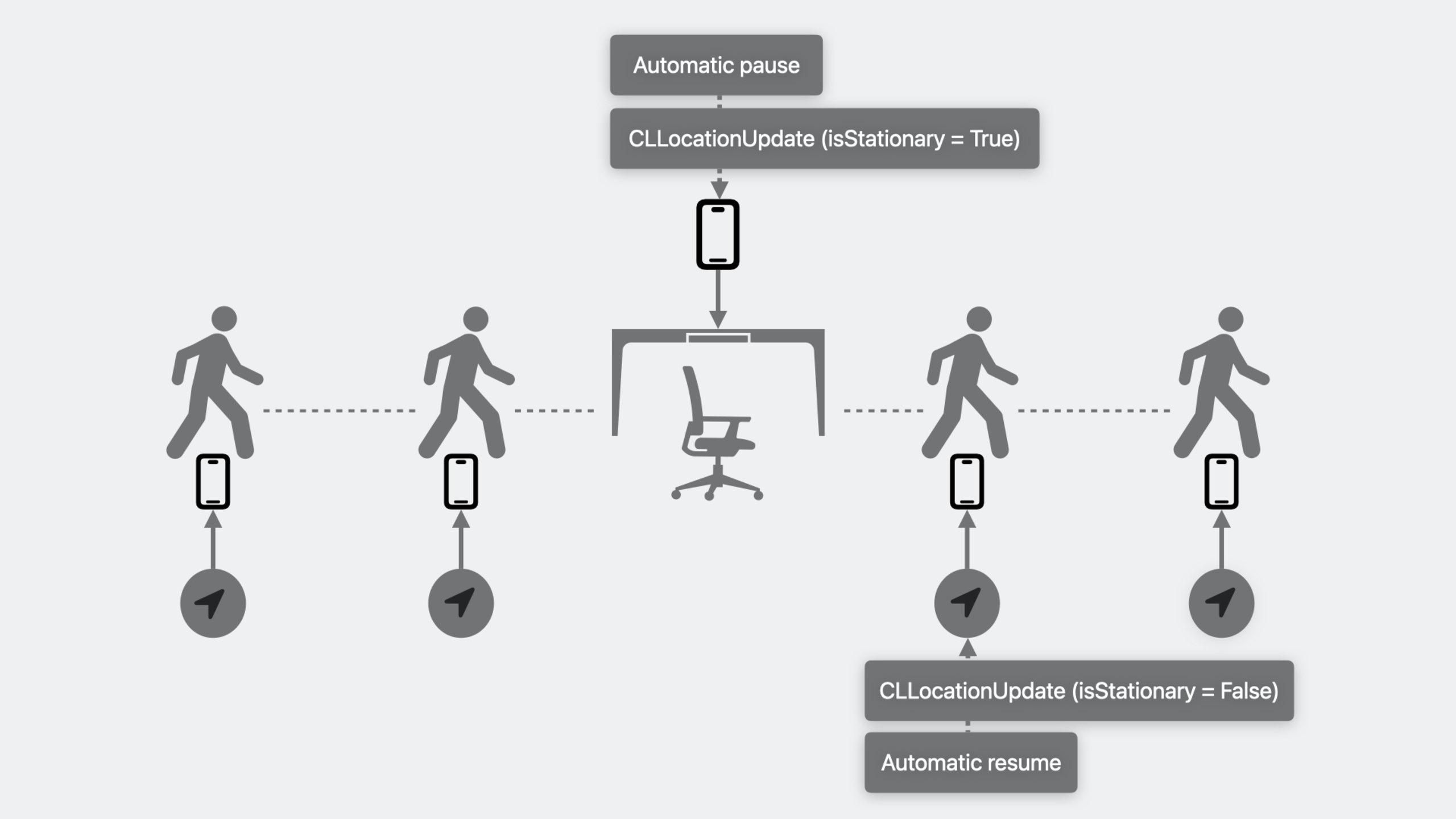
More critical is automatic pause/resume. When the device is stationary for a period of time, the system will automatically pause the update and send aisStationary == truemark. Automatically resumes when the device is moved again. This saves developers the trouble of judging the resting state by themselves, and also reduces the number of background wake-ups.
The background scenes have also been simplified. If your app has Live Activity, background location updates take effect automatically. If not, create oneCLBackgroundActivitySessionYou can maintain background capabilities, and the system will display a blue location indicator bar to let the user know.
Detailed Content
Basic usage of CLLocationUpdate
(00:27) Getting location updates now only requires one line of code:
import CoreLocation

for try await update in CLLocationUpdate.liveUpdates() {
    print("My current location: \(update.location)")
}
Key points:
CLLocationUpdate.liveUpdates()returnAsyncSequence,supportfor try await- eachupdateIncludelocation: CLLocation?andisStationary: BoollocationfornilIndicates that there is currently no available location, which is different from stopping updates. -isStationaryfortrueWhen the device is stationary, you canbreakBreak out of the loop and stop updating
Use default configuration
(04:41)liveUpdates()accept an optionalLiveConfigurationparameter:
for try await update in CLLocationUpdate.liveUpdates(.fitness) {
    print("Location: \(update.location)")
}LiveConfigurationContains the following presets:
-.default—Default configuration
-.automotiveNavigation— Car navigation
-.otherNavigation— Other navigation
-.fitness— Sports and fitness
-.airborne— Aviation
These correspond to the oldCLActivityType, select the corresponding configuration during migration to obtain the same location accuracy experience.
Filtering capabilities of AsyncSequence
(03:17) returnedUpdatesyesAsyncSequence, you can use the filtering operation directly:
let fastUpdate = try await CLLocationUpdate.liveUpdates()
    .first { update in
        guard let speed = update.location?.speed else { return false }
        return speed > 200  // 200 meters/second, about 447 miles/hour
    }
Key points:
firstThe filtering operation will block until the condition is matched- After successful matching
AsyncSequenceAutomatically ends, no need to stop manually - Based on
horizontalAccuracyBe careful with filtering, you may not be able to match it for a long time
Background location update
(06:04) The best way is with Live Activity. As long as the Live Activity is active, the app can receive location updates in the background without additional configuration.
If there is no Live Activity, useCLBackgroundActivitySession:
class LocationManager {
    var backgroundActivity: CLBackgroundActivitySession?

    func startBackgroundUpdates() {
        // Must be assigned to a property, not a local variable
        backgroundActivity = CLBackgroundActivitySession()

        Task {
            for try await update in CLLocationUpdate.liveUpdates() {
                print("Location: \(update.location)")
                if update.isStationary {
                    break
                }
            }
        }
    }

    func stop() {
        backgroundActivity?.invalidate()
        backgroundActivity = nil
    }
}
Key points:
CLBackgroundActivitySessionMust hold a reference, dealloc will automatically invalidate- app
UIBackgroundModesstill needs to be includedlocation- New sessions can only be started from the foreground, and existing sessions can only be rejoined in the background.
Automatic pause and resume
(09:19) When the device is stationary, the system will automatically pause updates:
- The device remains stationary for long enough → trigger automatic pause
- Send
isStationary = trueUpdate, location is not nil - The device is moved again → automatic recovery
- Send
isStationary = falseUpdates to continue delivering location
This eliminates the need for apps to determine resting states themselves and avoids processing redundant location data.
App life cycle and recovery
(10:39) During background running, the app may switch between the following states:
- Foreground operation → background operation: normal transition
- Running in the background → Hang: automatically occurs when no updates can be delivered
- Suspended → Background: Automatically resumes when updates are available, no action required
- Background running/hanging → Termination: crash, user shutdown or system recycling resources
After the app is terminated, the system automatically launches the app in the background when location updates are available. At this time it is necessary toapplication(_:didFinishLaunchingWithOptions:)mid-reconstructionliveUpdates()andCLBackgroundActivitySession:
func application(_ application: UIApplication,
                 didFinishLaunchingWithOptions launchOptions: [UIApplication.LaunchOptionsKey: Any]?) -> Bool {
    // Rebuild the background session (this is a rejoin, not a new session)
    backgroundActivity = CLBackgroundActivitySession()

    Task {
        for try await update in CLLocationUpdate.liveUpdates() {
            handleLocationUpdate(update)
        }
    }
    return true
}
Key points:
- The rebuild operation must be performed immediately after receiving the background start
- Backend reconstruction
CLBackgroundActivitySessionYes rejoin an existing session, which complies with background startup restrictions.
Core Takeaways
1. Battery Optimization of Sports Tracking App
- What to do: Use
CLLocationUpdatereplace old oneCLLocationManagerdelegate mode - Why it’s worth doing: The automatic pause/resume mechanism stops power consumption when the device is at rest, eliminating the need to write inactivity detection logic yourself.
- How to start: Put
locationManager.startUpdatingLocation()Replace withfor try await update in CLLocationUpdate.liveUpdates(.fitness)
2. Takeaway/taxi-hailing real-time location sharing
- What to do: Add Live Activity to the rider/driver terminal to coordinate
CLLocationUpdateReport location in real time - Why it’s worth doing: Live Activity allows background location updates to take effect with zero configuration, and users can see the delivery progress on the lock screen at any time.
- How to start: First implement Live Activity (refer to ActivityKit), and then start it directly in the foreground
CLLocationUpdate.liveUpdates()
3. Combination scenario of geofencing + location tracking
- What to do: Use
CLMonitorTo monitor geofence events, useCLLocationUpdateTrack the detailed trajectory after entering the fence - Why it’s worth doing: The combination of the two allows you to know exactly “when you arrived” and “what you did in the area”
- How to start: First look at the “Meet Core Location Monitor” session to understand
CLMonitor, and then superimposeCLLocationUpdate
4. Automatically pause exercise recording
- What to do: Exploit
isStationaryAutomatically detect when the user has stopped to take a break, pause the recording and prompt - Why is it worth doing: In the past, you had to maintain the speed threshold and timer yourself, but now the system directly gives the static state
- How to start: In
for try awaitCheck in loopupdate.isStationary,fortrueRecording is paused and “Paused” is displayed.
Related Sessions
- Meet Core Location Monitor — Learn about the new geofencing and location monitoring APIs
- Meet ActivityKit — Live Activity makes background location updates easier
- What’s new in Swift — New features of Swift Concurrency
Comments
GitHub Issues · utterances