
Highlight
Core Motion adds three new capabilities in iOS 17 and watchOS 10: AirPods head tracking data support for macOS, Apple Watch Ultra underwater depth and temperature monitoring, and HealthKit high-frequency sensor data streaming during exercise (800Hz accelerometer / 200Hz device motion).
Core Content
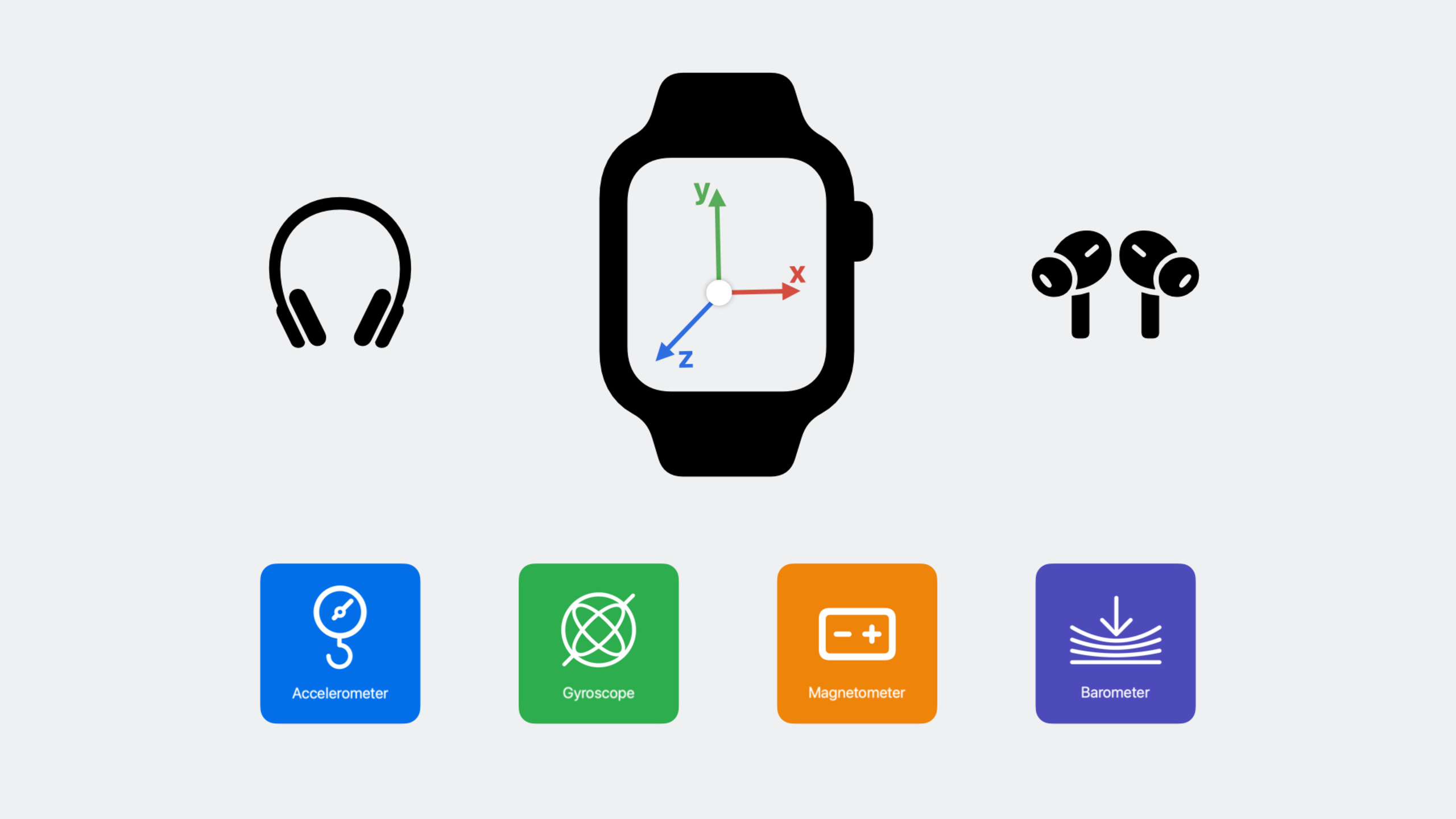
Sports data is the invisible infrastructure of the Apple ecosystem. Step counting, collision detection, spatial audio - these experiences are all based on sensors such as accelerometers, gyroscopes, and barometers. Core Motion serves as a unified portal for developers to use this data.
AirPods head tracking expanded to macOS
(02:22) Dynamic head tracking for spatial audio relies on the same motion algorithms as iPhone and Apple Watch.CMHeadphoneMotionManagerStarting from iOS 14, this data will be opened up, allowing apps to track the posture, acceleration, and rotation of the user’s head.
This year this capability is expanded to macOS 14.
import CoreMotion

let headphoneManager = CMHeadphoneMotionManager()
headphoneManager.delegate = self

// Check whether the device is supported
if headphoneManager.isDeviceMotionAvailable {
    headphoneManager.startDeviceMotionUpdates(to: .main) { motion, error in
        guard let motion = motion else { return }

        // Head attitude (pitch, yaw, roll)
        let attitude = motion.attitude

        // User acceleration
        let acceleration = motion.userAcceleration

        // Rotation rate
        let rotation = motion.rotationRate

        // Data source: left ear or right ear
        let location = motion.sensorLocation // .left or .right
    }
}
Key points:
- Supports headphones such as AirPods Pro that support spatial audio dynamic head tracking
-
sensorLocationDistinguish whether the data comes from the left ear or the right ear - After turning on automatic in-ear detection, taking out one ear will automatically switch to the other ear to continue transmission.
- Requires configuration in Info.plist
Motion Usage DescriptionPermission description
Connection status monitoring:
extension ViewController: CMHeadphoneMotionManagerDelegate {
    func headphoneMotionManagerDidConnect(_ manager: CMHeadphoneMotionManager) {
        // Headphones are connected; data can start being received
    }

    func headphoneMotionManagerDidDisconnect(_ manager: CMHeadphoneMotionManager) {
        // Headphones disconnected; stop related features
    }
}
Key points:
- The delegate method is triggered when the connection status changes
- When automatic in-ear detection is turned on, taking out/putting in the headphones will also trigger disconnect/connect
- Wearing detection of headphones is also supported
Apple Watch Ultra underwater data monitoring
(07:22)CMWaterSubmersionManagerUse Apple Watch Ultra’s barometer to track water depth and temperature during water activities like snorkeling, swimming, and more.
import CoreMotion

let submersionManager = CMWaterSubmersionManager()
submersionManager.delegate = self
Delegate implementation:
extension WorkoutManager: CMWaterSubmersionManagerDelegate {
    // Submersion state changes (entering/leaving water)
    func waterSubmersionManager(
        _ manager: CMWaterSubmersionManager,
        didUpdate event: CMWaterSubmersionEvent
    ) {
        switch event.state {
        case .notSubmerged:
            // At the water surface
        case .submergedShallow:
            // Within 1 meter underwater
        case .submergedDeep:
            // More than 1 meter underwater
        case .approachingMaxDepth:
            // Approaching the maximum depth of 6 meters
        case .pastMaxDepth:
            // Deeper than 6 meters
        case .sensorDepthError:
            // Sensor is out of range
        }
    }

    // Depth, pressure, and water temperature measurements
    func waterSubmersionManager(
        _ manager: CMWaterSubmersionManager,
        didUpdate measurement: CMWaterSubmersionMeasurement
    ) {
        let depth = measurement.depth?.value      // Water depth (meters)
        let pressure = measurement.pressure?.value // Water pressure
        let surfacePressure = measurement.surfacePressure?.value // Surface air pressure
    }

    // Water temperature updates
    func waterSubmersionManager(
        _ manager: CMWaterSubmersionManager,
        didUpdate temperature: CMWaterTemperature
    ) {
        let waterTemp = temperature.temperature.value // Water temperature
        let uncertainty = temperature.uncertainty     // Uncertainty
    }
}
Key points:
- Supported by Apple Watch Ultra only, requires watchOS 9+
- Need to add “Shallow Depth and Pressure” capability
- Water temperature data is only available in the immersed state. The uncertainty is high when first entering the water and converges over time.
- The maximum monitoring depth is 6 meters, entering after exceeding
pastMaxDepthStatus - Depth partitioning:
notSubmerged→submergedShallow(less than 1m) →submergedDeep(greater than 1m)
High frequency sensor data stream CMBatchedSensorManager
(11:35) Apple Watch Series 8 and Ultra support new high-frequency sensor data streams. with existingCMMotionManager(up to 100Hz, real-time push sample by sample) different,CMBatchedSensorManagerData is transferred in batches every second, up to 800Hz for accelerometers and 200Hz for device motion.
Comparison of two data acquisition methods:
| Features | CMMotionManager | CMBatchedSensorManager |
|---|---|---|
| Accelerometer frequency | Up to 100Hz | 800Hz |
| Equipment movement frequency | Maximum 100Hz | 200Hz |
| Transmission method | Sample-by-sample real-time push | Batch transmission per second |
| Latency | Low (sub-second level) | High (second level) |
| Usage scenarios | UI feedback, real-time control | Motion analysis, post-event calculations |
| Prerequisites | None | Requires active HealthKit Workout |
(13:18) The speaker used the baseball swing as an example to demonstrate the value of high-frequency data. During the entire swing, which lasts about 0.3 seconds, 100Hz sampling can only obtain 30 data points, while 800Hz can obtain 240 - enough to distinguish the subtle vibration differences at the moment of impact.
Detailed Content
Usage process of high-frequency data flow
(16:17) UseCMBatchedSensorManagerRequires an active HealthKit Workout Session:
import CoreMotion
import HealthKit

let batchedManager = CMBatchedSensorManager()

// 1. Confirm device support
guard batchedManager.isAccelerometerSupported else { return }

// 2. Start a HealthKit Workout
let workoutConfiguration = HKWorkoutConfiguration()
workoutConfiguration.activityType = .baseball
// ... configure and start the workout session

// 3. Use Swift async to receive batched data
Task {
    do {
        for try await batch in batchedManager.accelerometerUpdates() {
            processAccelerometerBatch(batch)
        }
    } catch {
        // Handle authorization errors or unsupported platforms
    }
}
Key points:
isAccelerometerSupportedandisDeviceMotionSupportedCheck device support- Only supported by Apple Watch Series 8 and Ultra
- Must be in an active HealthKit Workout to get data
- Process data batch by batch using Swift async/await interface
- You need to check whether the workout is over during the loop to avoid infinite loops
Algorithm implementation of swing analysis
(17:08) The speaker showed how to calculate “time to contact” using high-frequency data:
Step 1: Detect the moment of impact
func detectImpact(from batch: [CMAccelerometerData]) -> TimeInterval? {
    // The z-axis is perpendicular to the crown direction and shows clear vibration at impact
    let filteredZ = batch.map { highPassFilter($0.acceleration.z) }

    // Find the peak of the filtered signal
    guard let maxIndex = filteredZ.enumerated().max(by: { $0.element < $1.element })?.offset else {
        return nil
    }

    // Get the corresponding timestamp from the raw data
    return batch[maxIndex].timestamp
}
Key points:
- The z-axis direction is perpendicular to the Apple Watch crown
- Use a high-pass filter to isolate high-frequency impact signals
- Peak corresponds to the moment of impact
Step 2: Detect Swing Initiation
func detectSwingStart(impactTime: TimeInterval, motionBuffer: [CMDeviceMotion]) -> TimeInterval? {
    // Traverse backward from impactTime and look for the rotation-rate component along gravity
    // Find the transition point where it falls from above the threshold to below it

    for sample in motionBuffer.reversed() {
        // Only check samples before impactTime
        guard sample.timestamp < impactTime else { continue }

        // Swing duration should not exceed a reasonable range, such as 500 ms
        guard impactTime - sample.timestamp < 0.5 else { break }

        // Compute the rotation-rate component along gravity
        let rotationAlongGravity =
            sample.rotationRate.x * sample.gravity.x +
            sample.rotationRate.y * sample.gravity.y +
            sample.rotationRate.z * sample.gravity.z

        // Look for the transition from above the threshold to below it
        if abs(rotationAlongGravity) < swingThreshold {
            return sample.timestamp
        }
    }

    return nil
}
Key points:
- Traverse device motion data forward from impactTime
- The component of the rotation rate along the direction of gravity reflects the rotation of the wrist around the body
- This component is significantly non-zero during the swing and close to zero at rest
- Set a reasonable swing duration upper limit to filter noise
Step 3: Calculate contact time
func computeTimeToContact(impactTime: TimeInterval, swingStartTime: TimeInterval?) -> TimeInterval? {
    guard let startTime = swingStartTime else { return nil }

    // Verify that accumulated rotation during the swing is within a reasonable range
    let accumulatedRotation = computeAccumulatedRotation(from: startTime, to: impactTime)
    guard accumulatedRotation > minRotationThreshold && accumulatedRotation < maxRotationThreshold else {
        return nil
    }

    return impactTime - startTime
}
Key points:
- Contact time = timestamp of moment of impact - timestamp of start of swing
- Verify whether the detected swing is valid by accumulating rotation angles
- Filter false detections (such as waving, adjusting posture and other non-swinging movements)
Signal difference between hits and misses
(20:45) The speaker compared the accelerometer signals of a hit ball and a missed ball. The swing itself is similar in both cases, but the vibration pattern at impact is noticeably different—a sharp impact peak on impact and a more gentle vibration on miss. The 800Hz data stream captures this difference, 100Hz makes it indistinguishable.
Core Takeaways
1. Head tracking driven spatial audio game
- What: Use AirPods head gesture data to control game perspective or menu selections
- Why it’s worth doing: Users don’t need to hold the device and can operate it by turning their head, suitable for fitness and VR experiences.
- How to start:
CMHeadphoneMotionManagergetattitudeData, mapped to the Euler angles of the game camera
2. Water Sports Recording App
- What to do: Record depth curves, water temperature changes, and underwater time for snorkeling and free diving enthusiasts
- Why it’s worth it: Apple Watch Ultra
CMWaterSubmersionManagerProvides native water depth and water temperature APIs without external sensors - How to start: Configure the “Shallow Depth and Pressure” capability, implement the delegate to receive depth and temperature updates, and superimpose it into the HealthKit Workout
3. Sports posture analysis tool
- What: Use 800Hz accelerometer and 200Hz device motion data to analyze golf swings, tennis serves, etc.
- Why it’s worth it: High-frequency data can capture subtle differences in movements that cannot be distinguished at 100Hz, such as club head speed and wrist flip angle at the moment of impact.
- How to start: Start HealthKit Workout, use
CMBatchedSensorManagerThe async interface obtains data in batches and designs detection algorithms for specific movements.
4. Fitness action counting and quality assessment
- What to do: Automatically identify the number of completions of push-ups, squats and other movements, and evaluate the quality of the movements
- Why it’s worth doing: Head tracking data can determine body posture, and high-frequency accelerometers can detect the rhythm and amplitude of movements.
- How to start: AirPods provide head posture reference,
CMBatchedSensorManagerProvides wrist motion details, and the two are combined to build a full-body motion model
Related Sessions
- Build a multi-device workout app — The complete process of building a sports app with Apple Watch and iPhone
- Building custom workouts with WorkoutKit — WorkoutKit custom training structure, used with CMBatchedSensorManager
- What’s new in HealthKit — HealthKit new features, sports data storage and sharing
- Meet Core ML Tools — Using high-frequency sensor data for machine learning model training
Comments
GitHub Issues · utterances