
Highlight
Starting from Xcode 15, Swift and C++ implement two-way intercalling without the need for an Objective-C bridging layer and no runtime overhead.
Core Content
You maintain a large C++ code base, and the image processing engine, physics simulator, audio decoder - the core business logic is all written in C++. The UI layer was originally Objective-C++. Every time I wanted to introduce a new component of SwiftUI, I had to write a bunch of glue code first.
After WWDC23, that changed.
Swift 5.9 introduces C++ Interoperability. You can write Swift files directly in the C++ code base, and the Swift code directly calls the C++ API, and conversely, C++ can also call the Swift API. The compiler automatically handles type mapping, memory management, and namespace conversion, eliminating the need for handwritten bridging headers.
(02:21) The speaker demonstrated a photo editing app: C++ for the image processing framework and Objective-C++ for the UI. She wants to add SwiftUI’s PhotoPicker. In the past, she needed to write an Objective-C bridging layer. Now she can just create a new Swift file directly in the project.
Actual process of two-way calling
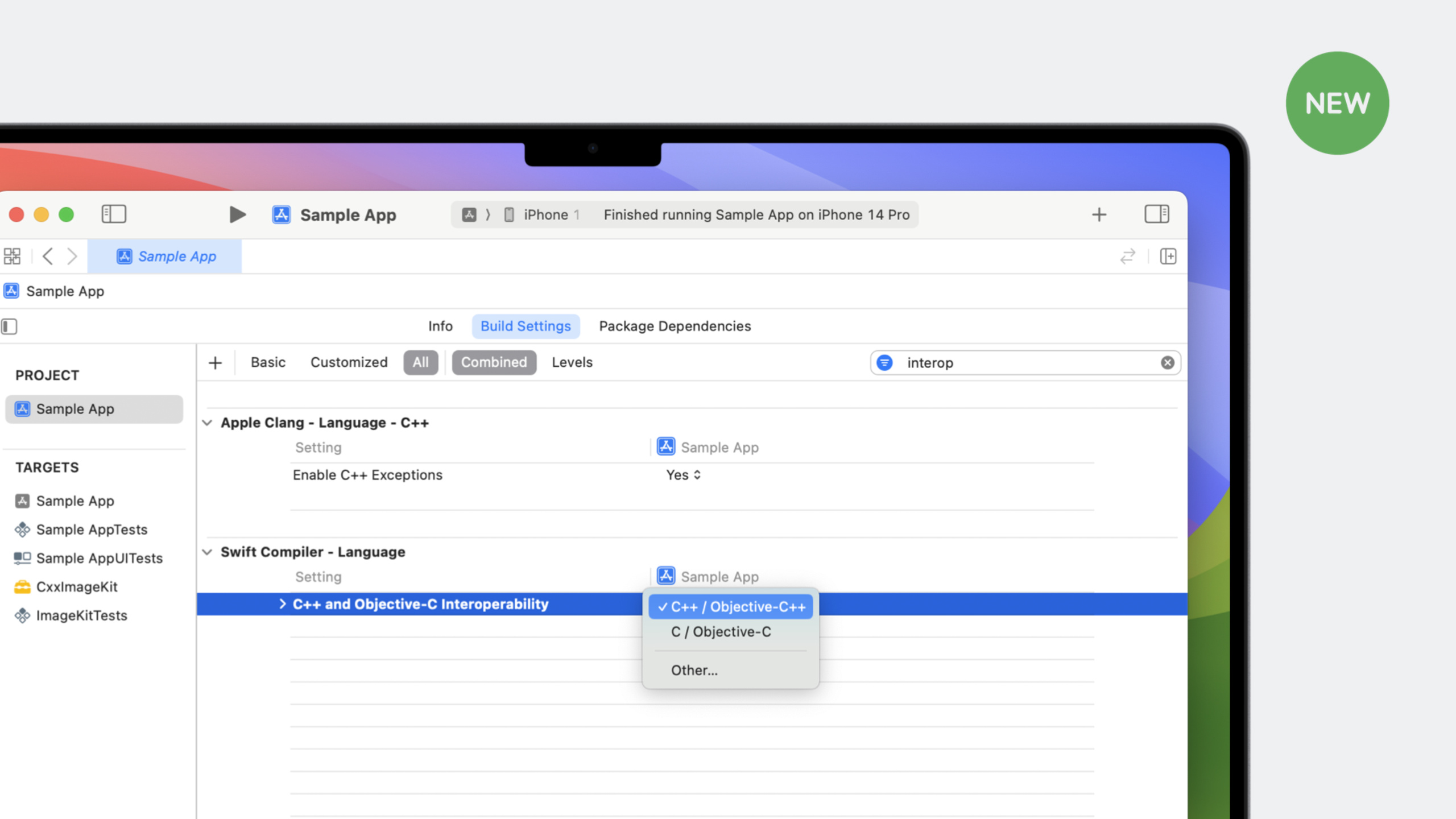
(02:47) Step 1: Change the “C and Objective-C Interoperability Mode” of “Swift Compiler - Language” from “C and Objective-C” to “C++ and Objective-C++” in Build Settings.
(03:16) Step 2: In the Swift fileimport CxxImageKit, the API of the C++ framework is presented in Swift style.CxxImageEngine::sharedbecomeCxxImageEngine.shared,loadImage()Call directly.
(04:39) Step 3: In C++ code#import "SampleApp-Swift.h", Swiftpublic struct ImagePickerIt can be constructed and used in C++, and can even be embedded in SwiftUI views.
All integration is done automatically by the compiler, and the calls are direct and native, with no additional runtime overhead.
Detailed Content
Automatically imported C++ types
(06:15) The Swift compiler can automatically import most C++ collection types, including those from the standard librarystd::vector、std::mapwait. C++ types are mapped to Swift’s struct (value type) by default, operators are mapped to corresponding Swift operators, and the container automatically follows Swift’sCollectionprotocol.
// C++ std::vector<Image*> can be iterated directly in Swift
for image in CxxImageEngine.shared.pointee.getImages() {
    let uiImage = CxxImageEngine.shared.pointee.uiImageFrom(image)
    UIImageWriteToSavedPhotosAlbum(uiImage, nil, nil, nil)
}
Key points:
getImages()Return to C++std::vector, Swift automatically recognizes it as a traversable collection -for...inThe loop is directly available because vector hasbegin()andend()method- The compiler ensures safety when traversing and avoids common life cycle problems of C++ iterators
Optimize API import with annotations
(07:44) APIs automatically imported by the compiler are sometimes not “Swift-y” enough. passswift/bridgingAnnotations in header files can finely control import behavior.
SWIFT_SHARED_REFERENCE: Map C++ types to Swift classes
(08:22)CxxImageEngineIn C++, it is always used as a pointer, with reference semantics. When imported as Swift struct by default, each access must be written.pointee, and the type appears asUnsafePointer。
Add annotations to the C++ header file:
#import <swift/bridging>

struct SWIFT_SHARED_REFERENCE(IKRetain, IKRelease) CxxImageEngine {
    static CxxImageEngine *shared;
    void loadImage(UIImage *image);
    std::vector<Image *> getImages() const;
    UIImage *uiImageFrom(Image *image) const;
};
Key points:
SWIFT_SHARED_REFERENCE(retainFunc, releaseFunc)Tell Swift this is a reference type- Swift automatically manages the life cycle and calls the specified
IKRetainandIKReleasefunction - Use it directly in Swift after importing
CxxImageEngine.shared, no longer needed.pointee
SWIFT_COMPUTED_PROPERTY: Map getters/setters as computed properties
(08:22) Common in C++getImages() / setImages()Naming doesn’t feel natural enough in Swift.
/// \returns all images that have been loaded into the engine.
SWIFT_COMPUTED_PROPERTY
inline std::vector<Image *_Nonnull> getImages() const;
Key points:
SWIFT_COMPUTED_PROPERTYAnnotate getter methods- Automatically mapped in Swift to
imagesProperties - Calling method from
engine.getImages()becomeengine.images
Updated Swift code:
for image in CxxImageEngine.shared.images {
    let uiImage = CxxImageEngine.shared.uiImageFrom(image)
    UIImageWriteToSavedPhotosAlbum(uiImage, nil, nil, nil)
}
Other common annotations
(08:42)
// Annotate that the return value is independent, so Swift will not implicitly retain references
SWIFT_RETURNS_INDEPENDENT_VALUE
std::string_view networkName() const;
Key points:
SWIFT_RETURNS_INDEPENDENT_VALUEFunctions that return temporary values or view types- Tell Swift that the caller needs to hold the return value independently and avoid dangling references
Calling Swift from C++
(04:45) Swift code marked aspublicAfterwards, the compiler generates header files for use by C++.
#import "SampleApp-Swift.h"

- (IBAction)openPhotoLibrary:(UIButton *)sender {
    // Construct the SwiftUI view and call it from C++
    SampleApp::ImagePicker::init().present(self);
}
Key points:
#import "ProjectName-Swift.h"Import the generated header file- Swift
public structExposed as a namespace in C++ -Support SwiftUI views, method calls, property access
Core Takeaways
1. Progressive migration of C++ code base to Swift
- What to do: Gradually introduce Swift modules into existing C++ projects, replacing the UI layer or business layer
- Why it’s worth it: You can use modern features such as SwiftUI and Swift Concurrency without rewriting the core C++ engine.
- How to start: Create a new Swift file, turn on C++ Interoperability in Build Settings, and directly
importC++ framework
2. Encapsulate C++ game engine for Swift use
- What: Optimize the core interface of the C++ game/rendering engine with annotations and expose it to Swift
- Why it’s worth doing: The game logic uses C++ to ensure performance, and the UI and level editor are quickly developed using SwiftUI.
- How to start: Use
SWIFT_SHARED_REFERENCETo manage the engine singleton life cycle, useSWIFT_COMPUTED_PROPERTYOptimize attribute access
3. Cross-platform C++ library + Swift front end
- What: The same C++ core library, using SwiftUI on iOS and Kotlin on Android
- Why it’s worth doing: C++ Interoperability supports Linux and Windows, and the core code is completely reusable
- How to start: Compile the C++ library into a framework, and the Swift project directly depends on it, without additional binding layers
4. Machine learning model inference layer optimization
- What: Custom C++ inference code outside of Core ML (such as ONNX Runtime) called through Swift
- Why it’s worth doing: Avoid the complexity of Objective-C++ bridging and manage input and output tensors directly in Swift
- How to start: Encapsulate the C++ inference engine as a framework, process image/text preprocessing in Swift, and call the C++ API for inference
Related Sessions
- What’s new in Swift — An overview of new features in Swift 5.9, with full context for C++ interoperability
- Write Swift macros — Swift macro system, accompanying Swift 5.9 language improvements
- What’s new in Xcode 15 — The complete setup process for turning on C++ Interoperability in Xcode 15
- Meet SwiftData — If the migrated Swift layer requires data persistence, SwiftData is the native solution
Comments
GitHub Issues · utterances