
Highlight
Swift macros constrain the capabilities of macros through the role system and provide independent macros (
#) and subsidiary macros (@) There are seven roles in two categories, allowing developers to safely generate code during compilation while maintaining input type checking, predictable expansion, and debuggable results.
Core Content
Swift already has many features for automatically generating code: Codable automatic synthesisCodingKeysand encoding and decoding methods, Result Builder expands declarative syntax into imperative code. However, these features are hard-coded in the compiler, and if you want to add similar capabilities, you must modify the compiler source code.
Acer opens this capability to developers. You can create your own “language features” and distribute them as Swift Packages without forking the compiler.
(00:50)
Four design principles
Swift macros are designed with four core goals:
Explicit identification. Standalone macro with#Beginning with@beginning. If you don’t see these two symbols, you can be sure that no macro is involved. This gives code readers clear expectations.
Type safety. The parameters passed into the macro must be complete expressions of the correct type.#unwrap(1 + )Syntax errors will be reported directly.@AddCompletionHandler(parameterName: 42)Report type does not match. The macro’s input and output are fully type checked.
Predictable expansion. Macros can only add code and cannot delete or modify existing code. You don’t need to worry about a macro secretly deleting your function calls.
Transparently debuggable. Xcode supports right-clicking to view macro expansion results, setting breakpoints in the expansion code, and single-step debugging. These tools still work even if the macro is from a closed source library.
(03:16)
Independent macro
Standalone macro use#Calling has two roles:
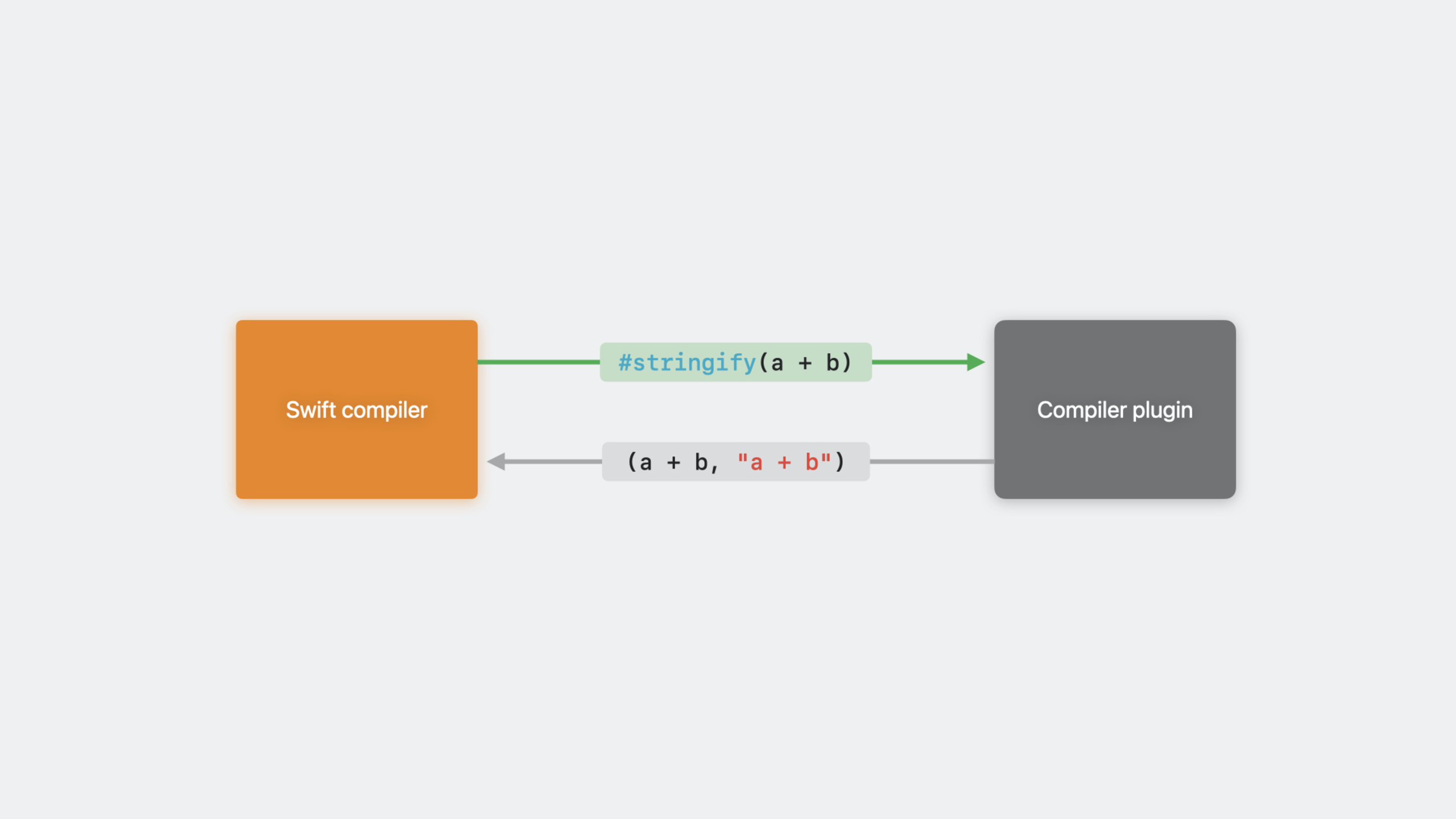
expression macro(@freestanding(expression)) expands into an expression.#stringify(a + b)expand into(a + b, "a + b"), can be used anywhere an expression is required.
Declare Macro(@freestanding(declaration, names: arbitrary)) expands into one or more statements. for example#makeArrayND(n: 5)can be expanded intoArray5DComplete definition of the structure.
(04:51)
Subsidiary macros
Auxiliary macro@Marked on the statement, there are five roles:
peer(@attached(peer, names: overloaded)) to add a new declaration next to the target declaration.@AddCompletionHandlercan beasyncThe function automatically generates an overloaded version with a completion handler.
@AddCompletionHandler(parameterName: "onCompletion")
func fetchAvatar(_ username: String) async -> Image? {
    // ...
}

// Automatically generated after macro expansion:
func fetchAvatar(
    _ username: String,
    onCompletion: @escaping (Image?) -> Void
) {
    Task.detached {
        onCompletion(await fetchAvatar(username))
    }
}accessor(@attached(accessor)) to add getters/setters for stored properties.@DictionaryStorageThe reading and writing of attributes can be automatically delegated to the dictionary.
memberAttribute(@attached(memberAttribute)) to add properties to members of a type.@DictionaryStorageWhen annotated on a structure, each attribute will automatically be added@DictionaryStorage。
member(@attached(member, names: named(dictionary), named(init(dictionary:)))) to add new members to the type.@DictionaryStoragewill be automatically generateddictionaryattributes andinit(dictionary:)Constructor.
conformance(@attached(conformance)) to add protocol compliance to the type.@DictionaryStoragewill automatically let the structure followDictionaryRepresentableprotocol.
A macro can have multiple roles at the same time.@DictionaryStorageIt implements the four roles of accessor, memberAttribute, member and conformance at the same time, compressing dozens of lines of boilerplate code into a single line of annotation.
(11:23)
Implementation mechanism
The implementation of the macro is written in a separate compiler plug-in. For declaration#externalMacroRelated to implementation:
@freestanding(expression)
macro stringify<T>(_ expr: T) -> (T, String) = #externalMacro(
    module: "MyLibMacros",
    type: "StringifyMacro"
)
The implementation requires importing SwiftSyntax, SwiftSyntaxMacros, and SwiftSyntaxBuilder:
import SwiftSyntax
import SwiftSyntaxMacros
import SwiftSyntaxBuilder

struct DictionaryStorageMacro: MemberMacro {
    static func expansion(
        of attribute: AttributeSyntax,
        providingMembersOf declaration: some DeclGroupSyntax,
        in context: some MacroExpansionContext
    ) throws -> [DeclSyntax] {
        return [
           "init(dictionary: [String: Any]) { self.dictionary = dictionary }",
           "var dictionary: [String: Any]"
        ]
    }
}(18:01)
Error reporting
Macros can be passedcontext.diagnose()Report errors to the compiler:
struct DictionaryStorageMacro: MemberMacro {
    static func expansion(
        of attribute: AttributeSyntax,
        providingMembersOf declaration: some DeclGroupSyntax,
        in context: some MacroExpansionContext
    ) throws -> [DeclSyntax] {
        guard declaration.is(StructDeclSyntax.self) else {
            let structError = Diagnostic(
                node: attribute,
                message: MyLibDiagnostic.notAStruct
            )
            context.diagnose(structError)
            return []
        }
        return [
            "init(dictionary: [String: Any]) { self.dictionary = dictionary }",
            "var dictionary: [String: Any]"
        ]
    }
}

enum MyLibDiagnostic: String, DiagnosticMessage {
    case notAStruct

    var severity: DiagnosticSeverity { return .error }

    var message: String {
        switch self {
        case .notAStruct:
            return "'@DictionaryStorage' can only be applied to a 'struct'"
        }
    }

    var diagnosticID: MessageID {
        MessageID(domain: "MyLibMacros", id: rawValue)
    }
}
In this way, as a developer@DictionaryStorageWhen used on enumerations, Xcode will directly display an error message.
(25:17)
Naming declaration
New declarations generated during macro expansion need to be included in the macro’snames:Predicted in parameters. This helps the compiler understand the program structure before macro expansion:
named(xxx)— Generate a statement named xxx -overloaded— Generate an overload declaration with the same name as the target -arbitrary— Generate declarations of arbitrary names (requires explicit declaration)
@attached(conformance)
@attached(member, names: named(dictionary), named(init(dictionary:)))
@attached(memberAttribute)
@attached(accessor)
macro DictionaryStorage(key: String? = nil)

@attached(peer, names: overloaded)
macro AddCompletionHandler(parameterName: String = "completionHandler")

@freestanding(declaration, names: arbitrary)
macro makeArrayND(n: Int)(35:44)
Detailed Content
#unwrap macro implementation
#unwrapis a practical expression macro that converts dangerous!Force unpacking and replace it with detailed error informationpreconditionFailure:
let image = #unwrap(downloadedImage, message: "was already checked")

// After expansion:
{ [downloadedImage] in
    guard let downloadedImage else {
        preconditionFailure(
            "Unexpectedly found nil: 'downloadedImage' was already checked",
            file: "main/ImageLoader.swift",
            line: 42
        )
    }
    return downloadedImage
}()
Several details need to be dealt with during implementation:
- The capture variable name may conflict with the external scope, so you need to use
context.makeUniqueName()Generate unique name - The error message should include a description of the original expression, using
originalWrapped.description3. File and line number passedcontext.location(of:)get
static func makeGuardStmt(
    wrapped: TokenSyntax,
    originalWrapped: ExprSyntax,
    message: ExprSyntax,
    in context: some MacroExpansionContext
) -> StmtSyntax {
    let messagePrefix = "Unexpectedly found nil: '\(originalWrapped.description)' "
    let originalLoc = context.location(of: originalWrapped)!

    return """
        guard let \(wrapped) else {
            preconditionFailure(
                \(literal: messagePrefix) + \(message),
                file: \(originalLoc.file),
                line: \(originalLoc.line)
            )
        }
    """
}
Key points:
\(literal: messagePrefix)Insert strings as literals to avoid escaping problems -context.location(of:)Returns the source code location of the original expression -context.makeUniqueName()Generate unique identifiers that will not conflict with external variables
(30:17)
The complete evolution of @DictionaryStorage
@DictionaryStorageShows how to combine multiple roles to gradually simplify your code.
Original code:
struct Person: DictionaryRepresentable {
    init(dictionary: [String: Any]) { self.dictionary = dictionary }
    var dictionary: [String: Any]

    var name: String {
        get { dictionary["name"]! as! String }
        set { dictionary["name"] = newValue }
    }
    var height: Measurement<UnitLength> {
        get { dictionary["height"]! as! Measurement<UnitLength> }
        set { dictionary["height"] = newValue }
    }
    var birthDate: Date? {
        get { dictionary["birth_date"] as! Date? }
        set { dictionary["birth_date"] = newValue as Any? }
    }
}
Step 1: Add getters/setters for each property using the accessor role:
struct Person: DictionaryRepresentable {
    init(dictionary: [String: Any]) { self.dictionary = dictionary }
    var dictionary: [String: Any]

    @DictionaryStorage var name: String
    @DictionaryStorage var height: Measurement<UnitLength>
    @DictionaryStorage(key: "birth_date") var birthDate: Date?
}
Step 2: Add the memberAttribute role so that the@DictionaryStorageAutomatically added for each property@DictionaryStorage:
@DictionaryStorage
struct Person: DictionaryRepresentable {
    init(dictionary: [String: Any]) { self.dictionary = dictionary }
    var dictionary: [String: Any]

    var name: String
    var height: Measurement<UnitLength>
    @DictionaryStorage(key: "birth_date") var birthDate: Date?
}
Step 3: Add the member role and automatically generate itinit(dictionary:)anddictionaryproperty:
@DictionaryStorage
struct Person {
    var name: String
    var height: Measurement<UnitLength>
    @DictionaryStorage(key: "birth_date") var birthDate: Date?
}
Step 4: Add conformance role to automatically followDictionaryRepresentable:
@DictionaryStorage
struct Person {
    var name: String
    var height: Measurement<UnitLength>
    @DictionaryStorage(key: "birth_date") var birthDate: Date?
}
The original boilerplate code of more than 20 lines was finally compressed into 5 lines.
(17:28)
Test macro
SwiftSyntaxMacrosTestSupport providesassertMacroExpansion:
import MyLibMacros
import XCTest
import SwiftSyntaxMacrosTestSupport

final class MyLibTests: XCTestCase {
    func testMacro() {
        assertMacroExpansion(
            """
            @DictionaryStorage var name: String
            """,
            expandedSource: """
            var name: String {
                get { dictionary["name"]! as! String }
                set { dictionary["name"] = newValue }
            }
            """,
            macros: ["DictionaryStorage": DictionaryStorageMacro.self]
        )
    }
}(38:28)
Core Takeaways
Automatically generate callback versions for asynchronous functions
@AddCompletionHandlerThe idea can be expanded. Many projects need to be maintained at the same timeasyncversion and callback version. Write a macro to automatically start fromasyncThe function generates a completion handler version, which can eliminate a lot of duplicate code.
Entrance:@attached(peer, names: overloaded). Read the parameters and return type of the function, generate a new function that calls the original function and awaits the result in the Task.
Automatically generate custom implementations of Equatable/Hashable
Swift automatically synthesizesEquatableSometimes it’s not enough. You can write one@CustomEquatableMacro, which determines which fields participate in comparison and how to compare based on attribute tags.
Entrance:@attached(member) + MemberMacro. Traverse the attributes and mark them@CompareByThe attributes generate corresponding comparison logic.
Generate preview code for SwiftUI
write a@PreviewVariantsMacros, marked on the View, automatically generate multiple preview variations (different sizes, different color modes, different dynamic fonts).
Entrance:@attached(member). Read the View type and generate multiplePreviewProvideraccomplish.
Automatically generate Builder mode code
Many classes require the Builder pattern to construct complex objects. write a@BuilderMacros automatically generate corresponding Builder classes and chained calling methods for classes.
Entrance:@attached(peer). Read all attributes of the class and generate a Builder class with the same name, each attribute corresponds to awithXxx()method and abuild()method.
Related Sessions
- Write Swift macros — Write your first Swift macro
- Generalize APIs with parameter packs — Advanced features of generic programming in Swift
- Swift concurrency: Behind the scenes — The underlying principles of Swift structured concurrency
- Meet Swift OpenAPI Generator — Use code generation to simplify server-side API calls
Comments
GitHub Issues · utterances