
Highlight
Swift 5.9 introduces the macro (Macro) mechanism. Developers can write compiler plug-ins to generate repeated code at compile time, while maintaining type safety, supporting IDE expansion and viewing, unit testing, and reporting custom errors to the compiler.
Core Content
Writing duplicate code is something every developer hates. For example, if you want to maintain a set of arithmetic exercises, each question must record the calculation results and the corresponding calculation string at the same time:
let calculations = [
    (2 + 3, "2 + 3"),
    (10 * 5, "10 * 5"),
]
This writing method has three problems: duplication, redundancy, and error-prone. The result and the calculation string are completely aligned manually. If you change one side and forget to change the other, bugs will be buried.
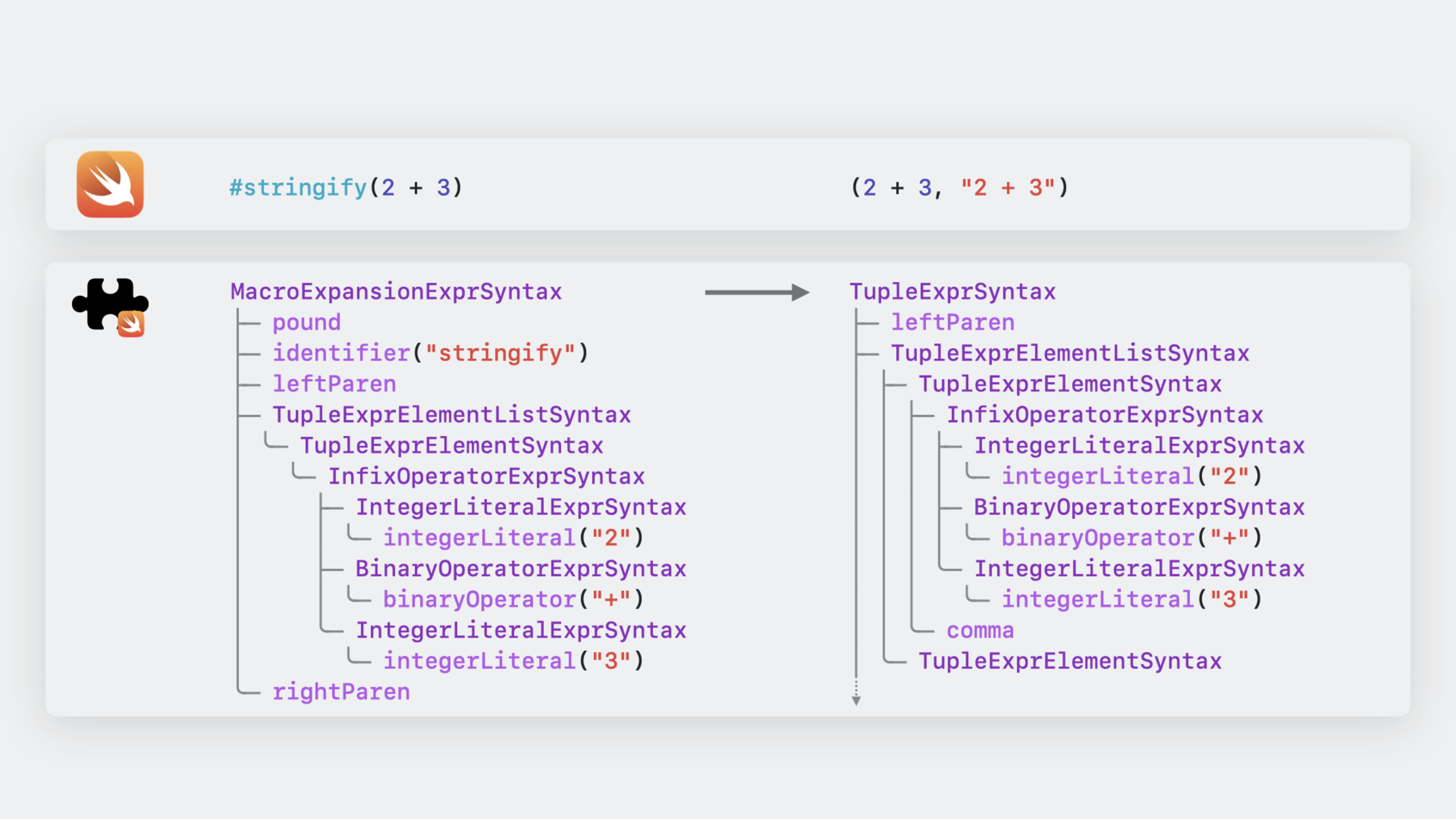
The solution given in Swift 5.9 is a macro.#stringify(a + b)This way of writing will automatically expand into(a + b, "a + b"), the result and calculation formula are always consistent.
Macros work completely differently from the C preprocessor. C macros do text replacement before type checking, Swift macros do it after type checking. This means that the macro parameters must pass type checking before the compiler will call macro expansion. You pass oneStringgive requestIntFor macros, the compiler will directly report an error and will not enter the macro expansion stage.
(01:15)
Independent expression macro
#stringifyBelongs to the freestanding expression macro (freestanding expression macro), use#At the beginning, it can be used anywhere an expression is required.
The declaration of a macro looks like a function, but uses@freestanding(expression)mark:
@freestanding(expression)
public macro stringify<T>(_ value: T) -> (T, String) = #externalMacro(
    module: "WWDCMacros",
    type: "StringifyMacro"
)#externalMacroAssociate macro declarations with implementations. The implementation is written in a separate compiler plug-in and runs as an independent process.
(05:55)
Additional member macros
In addition to independent expression macros, there are also attached macros (attached macros), using@At the beginning, it is used to strengthen the statement.
The speaker gave the example of a skiing scene. There is oneSlopeThe enumeration represents all the snow trails, and there is also aEasySlopeEnumeration representing a subset of slopes suitable for beginners.EasySlopeTwo conversion methods need to be written by hand: fromSlopeinitializedinit?and transfer backSlopeofslopeproperty.
enum EasySlope {
    case beginnersParadise
    case practiceRun

    init?(_ slope: Slope) {
        switch slope {
        case .beginnersParadise: self = .beginnersParadise
        case .practiceRun: self = .practiceRun
        default: return nil
        }
    }

    var slope: Slope {
        switch self {
        case .beginnersParadise: return .beginnersParadise
        case .practiceRun: return .practiceRun
        }
    }
}
Each time a subset enumeration is added, the boilerplate code needs to be written again. use@SlopeSubsetMacros can be automatically generatedinit?method:
@SlopeSubset
enum EasySlope {
    case beginnersParadise
    case practiceRun
}(12:05)
Error reporting for macros
Macros can check whether their usage scenarios are correct. for example@SlopeSubsetCan only be used for enumerations. If developers misuse it on structures, the macro can throw compilation errors:
enum SlopeSubsetError: CustomStringConvertible, Error {
    case onlyApplicableToEnum

    var description: String {
        switch self {
        case .onlyApplicableToEnum:
            return "@SlopeSubset can only be applied to an enum"
        }
    }
}
Check the declared type in the macro implementation, if it does not match thethrow:
guard let enumDecl = declaration.as(EnumDeclSyntax.self) else {
    throw SlopeSubsetError.onlyApplicableToEnum
}
In this way, when developers use macros in the wrong location, Xcode will directly display friendly error prompts.
(28:00)
Detailed Content
Create macro project
Xcode 15 provides Swift Macro templates. File > New > Package, select the Swift Macro template to create a complete project structure including macro definition, macro implementation and testing.
Template generated#stringifyThe macro shows the complete workflow:
let a = 17
let b = 25
let (result, code) = #stringify(a + b)
print("The value \(result) was produced by the code \"\(code)\"")
Right-click the macro call and select Expand Macro to see the expanded code:
(a + b, "a + b")(05:55)
Implementation principle of macro
When the compiler encounters a macro call, it sends the source code of the entire macro expression to the compiler plug-in. The plug-in uses SwiftSyntax to parse the source code into a syntax tree, the macro implementation performs transformations on the syntax tree, and then serializes the result back to the source code and returns it to the compiler.
StringifyMacroThe implementation demonstrates the basic pattern:
public struct StringifyMacro: ExpressionMacro {
    public static func expansion(
        of node: some FreestandingMacroExpansionSyntax,
        in context: some MacroExpansionContext
    ) -> ExprSyntax {
        guard let argument = node.argumentList.first?.expression else {
            fatalError("compiler bug: the macro does not have any arguments")
        }

        return "(\(argument), \(literal: argument.description))"
    }
}
Key points:
- Realize
ExpressionMacroprotocol -expansion(of:in:)Receive syntax tree nodes and context - Extract the first expression from the argument list
- return new
ExprSyntax, use string interpolation to construct the expansion result -\(literal: ...)Convert expression description into string literal
(07:10)
Implementation of member macro
SlopeSubsetMacroaccomplishMemberMacroprotocol, generated for the enumerationinit?method:
public struct SlopeSubsetMacro: MemberMacro {
    public static func expansion(
        of attribute: AttributeSyntax,
        providingMembersOf declaration: some DeclGroupSyntax,
        in context: some MacroExpansionContext
    ) throws -> [DeclSyntax] {
        guard let enumDecl = declaration.as(EnumDeclSyntax.self) else {
            throw SlopeSubsetError.onlyApplicableToEnum
        }

        let members = enumDecl.memberBlock.members
        let caseDecls = members.compactMap { $0.decl.as(EnumCaseDeclSyntax.self) }
        let elements = caseDecls.flatMap { $0.elements }

        let initializer = try InitializerDeclSyntax("init?(_ slope: Slope)") {
            try SwitchExprSyntax("switch slope") {
                for element in elements {
                    SwitchCaseSyntax("""
                    case .\(element.identifier):
                        self = .\(element.identifier)
                    """)
                }
                SwitchCaseSyntax("default: return nil")
            }
        }

        return [DeclSyntax(initializer)]
    }
}
Key points:
- use
declaration.as(EnumDeclSyntax.self)Convert declaration to enumeration declaration -memberBlock.membersGet member list -compactMapFilter out enum case statements -flatMap { $0.elements }Extract all case elements - use
InitializerDeclSyntaxandSwitchExprSyntaxConstructing a syntax tree from SwiftSyntax Builder - Traverse the case elements to generate the corresponding switch branch
- return
[DeclSyntax]array
(19:25)
Register macro plug-in
All macro implementations need to be registered at the compiler plug-in entry:
@main
struct WWDCPlugin: CompilerPlugin {
    let providingMacros: [Macro.Type] = [
        StringifyMacro.self,
        SlopeSubsetMacro.self
    ]
}(16:23)
Test macro
SwiftSyntaxMacrosTestSupport providesassertMacroExpansionTo test the macro expansion results:
final class WWDCTests: XCTestCase {
    func testMacro() {
        assertMacroExpansion(
            """
            #stringify(a + b)
            """,
            expandedSource: """
            (a + b, "a + b")
            """,
            macros: testMacros
        )
    }
}

let testMacros: [String: Macro.Type] = [
    "stringify": StringifyMacro.self
]
Test member macro:
func testSlopeSubset() {
    assertMacroExpansion(
        """
        @SlopeSubset
        enum EasySlope {
            case beginnersParadise
            case practiceRun
        }
        """,
        expandedSource: """
        enum EasySlope {
            case beginnersParadise
            case practiceRun
            init?(_ slope: Slope) {
                switch slope {
                case .beginnersParadise:
                    self = .beginnersParadise
                case .practiceRun:
                    self = .practiceRun
                default:
                    return nil
                }
            }
        }
        """,
        macros: testMacros
    )
}
You can also test error scenarios:
func testSlopeSubsetOnStruct() throws {
    assertMacroExpansion(
        """
        @SlopeSubset
        struct Skier {
        }
        """,
        expandedSource: """
        struct Skier {
        }
        """,
        diagnostics: [
            DiagnosticSpec(message: "@SlopeSubset can only be applied to an enum", line: 1, column: 1)
        ],
        macros: testMacros
    )
}(09:12)
Generalized macro
SlopeSubsetcan be generalized toEnumSubset, accepts a generic parameter specifying the parent enumeration:
@attached(member, names: named(init))
public macro EnumSubset<Superset>() = #externalMacro(
    module: "WWDCMacros",
    type: "SlopeSubsetMacro"
)
Extract generic parameters in macro implementation:
guard let supersetType = attribute
    .attributeName.as(SimpleTypeIdentifierSyntax.self)?
    .genericArgumentClause?
    .arguments.first?
    .argumentType else {
    return []
}so@EnumSubset<Slope>It can be used for any enumeration subset.
(31:03)
Core Takeaways
Make a safe forced unpacking macro
There is always someone in the team who writes!Forced unpacking makes it difficult to locate problems. can make one#unwrapMacro, expanded to include file and line numberpreconditionFailure:
let image = #unwrap(downloadedImage, message: "was already checked")Entrance:@freestanding(expression) + ExpressionMacroprotocol. refer to#stringifyTo realize, usecontext.location(of:)Get the source code location.
Automatically generate alternative implementations of Codable
Some models require custom CodingKeys, but most fields are just simple key mappings. You can write one@CustomCodableMacro, automatically generatedinit(from:)andencode(to:), while allowing attribute tags to be used to override the behavior of specific fields.
Entrance:@attached(member) + MemberMacroprotocol. Traverse the attribute declarations and generate corresponding decode/encode code for each attribute.
Generate transformation code for state machine
There are often state machines in games or workflows, and each state needs to define a target state that it can transition to. You can write one@StateMachineMacro, automatically generates state transition methods and validity checks based on state declarations.
Entrance:@attached(member, names: arbitrary) + MemberMacroprotocol. Read all cases and generate for each statecanTransition(to:)andtransition(to:)method.
Generate multi-device snapshots for SwiftUI preview
You can write one#previewDevicesDeclare a macro and expand it into multiple.previewDeviceCombinations of modifiers to see the effect on different devices at once.
Entrance:@freestanding(declaration)+ Generate multiplePreviewProviderstatement.
Related Sessions
- Expand on Swift macros — Deeply understand the design principles of macros and more role types
- Generalize APIs with parameter packs — Advanced features of generic programming in Swift
- Beyond the basics of structured concurrency — Advanced patterns for structured concurrency in Swift
Comments
GitHub Issues · utterances