
Highlight
SwiftData passes
@ModelMacro,@Queryproperty wrappers and.modelContainer()Modifiers allow SwiftUI applications to persist data in just a few lines of code, while automatically gaining Observable capabilities, automatic saving, and document-based application support.
Core Content
From memory to persistence: one step away
Previously, adding data persistence to SwiftUI applications required introducing Core Data and learning complex object graph management, context saving, and migration rules. Many developers give up on persistence because of this. Data only exists in memory and is lost when the application is closed.
SwiftData changes this situation. It makes data persistence as easy as declaring the UI.
(03:33) Adds to existing model classes@Modelmacro, it becomes a persistable SwiftData model. At the same time, it automatically obtains the consistency of the Observable protocol, no need@Published,unnecessaryObservableObject。
@Query automatic query and refresh
(05:52) used@Queryreplace@State, the view can directly query the model in the SwiftData store. The view automatically refreshes when data changes, and@Statebehavior is consistent.
ModelContainer configuration storage stack
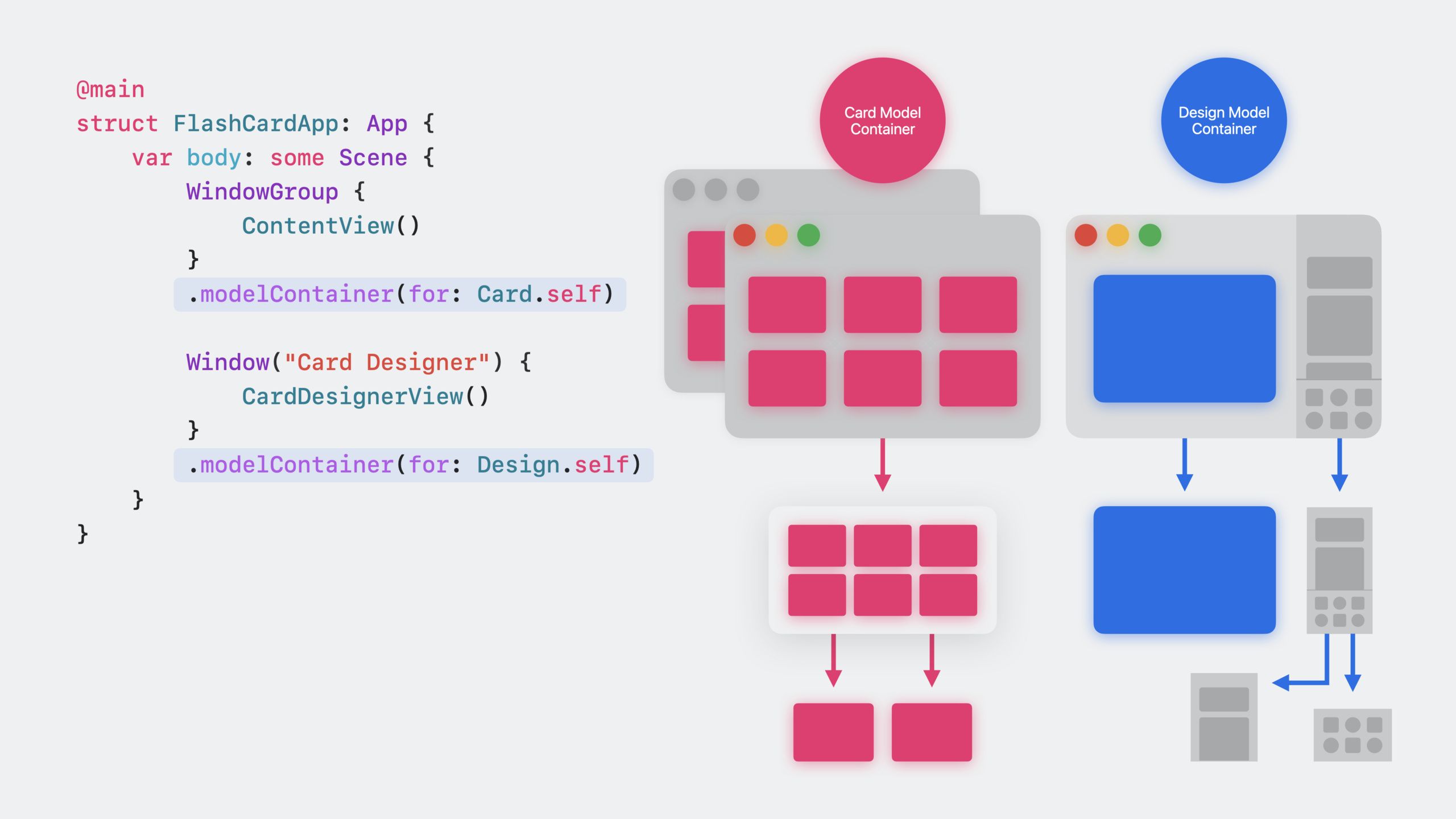
(08:27) passed.modelContainer()Modifiers configure the storage stack in the view hierarchy. WindowGroup-level containers are shared by all windows created by the group. You can also configure independent containers for individual views.
Auto save
(11:13) SwiftData automatically saves model context during UI events and user input, no need to call it manuallysave(). Explicit calls are only needed in scenarios where immediate persistence is required (such as before sharing data).
Document-based application
(13:34) SwiftUI supports SwiftData-driven document applications. useDocumentGroupThe initializer specifies the model type and content type, and SwiftData automatically handles the storage of each document. Users get standard document operations: create, open, save, and share.
Detailed Content
Define SwiftData model
(03:33) flashcard applicationCardModel transformation:
import SwiftData

@Model
final class Card {
    var front: String
    var back: String
    var creationDate: Date

    init(front: String, back: String, creationDate: Date = .now) {
        self.front = front
        self.back = back
        self.creationDate = creationDate
    }
}
Key points:
import SwiftDataIntroducing the framework -@ModelMacros make classes persistent- No need
ObservableObject,unnecessary@Published @ModelAutomatically add Observable protocol conformance- Stored properties automatically become observable properties
Bind to SwiftData model
(04:25) for editing view@BindableCreate binding:
struct CardEditorView: View {
    @Bindable var card: Card

    var body: some View {
        Form {
            TextField("Front", text: $card.front)
            TextField("Back", text: $card.back)
        }
    }
}
Key points:
@BindableIs the most lightweight binding wrapper -$card.frontgenerateBinding<String>TextFieldReading and writing bound values- No need
@ObservedObject
Query model
(05:52) for content view@QueryGet data:
struct ContentView: View {
    @Query private var cards: [Card]

    var body: some View {
        List(cards) { card in
            CardRow(card: card)
        }
    }
}
Key points:
@QueryAutomatically query data from SwiftData storage- View automatically refreshes when data changes
- Supports sorting, filtering and animation configuration
- Use the model context inherited by the view as the data source
Query with sorting:
@Query(sort: \Card.creationDate, order: .reverse) private var cards: [Card]Key points:
sortParameter specifies sort key path -order: .reverseSort in descending order- Also supports multi-field sorting and filtering conditions
Set ModelContainer
(08:27) is configured in the App definition:
@main
struct FlashCardApp: App {
    var body: some Scene {
        WindowGroup {
            ContentView()
        }
        .modelContainer(for: Card.self)
    }
}
Key points:
.modelContainer(for:)Set up storage stack for WindowGroup- All windows created by this group share the same container
- Subviews can only operate on model types declared in container
- Views without a container configured cannot use SwiftData
Provide sample data for Preview
(09:24) Create an in-memory container filled with preview data:
import SwiftData

@MainActor
let previewContainer: ModelContainer = {
    let schema = Schema([Card.self])
    let config = ModelConfiguration(schema: schema, isStoredInMemoryOnly: true)
    let container = try! ModelContainer(for: schema, configurations: config)

    let sampleCards = [
        Card(front: "Who invented the compiler?", back: "Grace Hopper"),
        Card(front: "What is SwiftData?", back: "A persistence framework")
    ]

    for card in sampleCards {
        container.mainContext.insert(card)
    }

    return container
}()

#Preview {
    ContentView()
        .frame(minWidth: 500, minHeight: 500)
        .modelContainer(previewContainer)
}
Key points:
isStoredInMemoryOnly: trueCreate an in-memory database- Used in Preview
.modelContainer(previewContainer)Inject - Real data is displayed in the preview to facilitate debugging the UI
-
@MainActorMake sure to create it on the main thread
Create and save models
(10:30) Insert new data via model context:
struct CardListView: View {
    @Environment(\.modelContext) private var modelContext
    @Query private var cards: [Card]

    var body: some View {
        List(cards) { card in
            Text(card.front)
        }
        .toolbar {
            Button("Add", systemImage: "plus") {
                let newCard = Card(front: "Sample Front", back: "Sample Back")
                modelContext.insert(newCard)
            }
        }
    }
}
Key points:
@Environment(\.modelContext)Get the model context of the view -modelContext.insert()Add new model to context- SwiftData is saved automatically, no need to call it manually
save()- Autosave triggered by UI events and user input - Called explicitly only if immediate persistence is required
save()
Document-based application
(13:34) Use SwiftData as a stored document application:
@main
struct SwiftDataFlashCardSample: App {
    var body: some Scene {
        #if os(iOS) || os(macOS)
        DocumentGroup(editing: Card.self, contentType: .flashCards) {
            ContentView()
        }
        #else
        WindowGroup {
            ContentView()
                .modelContainer(for: Card.self)
        }
        #endif
    }
}
Key points:
DocumentGroup(editing:contentType:)Specify model type and content type- SwiftData automatically creates a separate model container for each document
- No manual settings required
.modelContainer()- Get standard document operations: create, open, save, share
Define content type:
import UniformTypeIdentifiers

extension UTType {
    static var flashCards: UTType {
        UTType(exportedAs: "com.example.flashcards")
    }
}
Declare in Info.plist:
<key>UTExportedTypeDeclarations</key>
<array>
    <dict>
        <key>UTTypeIdentifier</key>
        <string>com.example.flashcards</string>
        <key>UTTypeDescription</key>
        <string>Flash Cards Deck</string>
        <key>UTTypeConformsTo</key>
        <array>
            <string>com.apple.package</string>
        </array>
        <key>UTTypeTagSpecification</key>
        <dict>
            <key>public.filename-extension</key>
            <string>sampledeck</string>
        </dict>
    </dict>
</array>
Key points:
- The content type identifier must be consistent with the one in the code
- SwiftData documents are of type package
- Specify file extensions to help system identification
-
com.apple.packageDocument representing directory structure
Core Takeaways
-
Add data persistence to existing SwiftUI applications
- Add to model class
@Modelmacro, replace@Statefor@Query- Add in App definition.modelContainer(for:)- No need to rewrite the data layer, the amount of changes is minimal - Entrance:
@Model+@Query+.modelContainer()
- Add to model class
-
Make a cross-platform note-taking application
- Use SwiftData to store notes, supporting iOS, macOS, watchOS, and tvOS
- use
@QuerySorting and filtering capabilities for folders and tags - Entrance:
@Query(sort: \Note.creationDate)+\Note.folder
-
Build document-based creation tools
- use
DocumentGroupLet each document be a separate SwiftData store - Users can open different documents in different windows
- Documents can be shared and synchronized directly
- Entrance:
DocumentGroup(editing: Model.self, contentType: .customType)
- use
-
Create reusable sample data container for Preview
- create
previewContainerSingle instance, filled with various test data - All Previews share the same in-memory database
- Entrance:
ModelConfiguration(isStoredInMemoryOnly: true)
- create
Related Sessions
- What’s new in SwiftUI — Overview of all new features in SwiftUI 2023
- Discover Observation in SwiftUI — How the @Observable macro works
- Meet SwiftData — Getting started with the SwiftData framework
- Build programmatic UI with Xcode Previews — Speed up development with Xcode Previews
Comments
GitHub Issues · utterances