
Highlight
Introduced in Swift 5.9
@ObservableMacros, eliminating the need for data models@PublishedandObservableObject, SwiftUI automatically tracks dependencies at attribute granularity and only refreshes the truly affected views.
Core Content
Previous data flow pain points
useObservableObjectWhen, each attribute must be added@Published. Use it in the view@ObservedObjector@StateObjectPackage. The problem is: as long as any one in the model@PublishedWhen a property changes, the entire view will be refreshed, even if the view does not use that property at all.
The same is true when the intermediate view transfers the model. The parent view is passed to the child view, and the child view is passed to the grandchild view. Every time the attributes change, the views on the entire link must recalculate the body.
Solution to @Observable macro
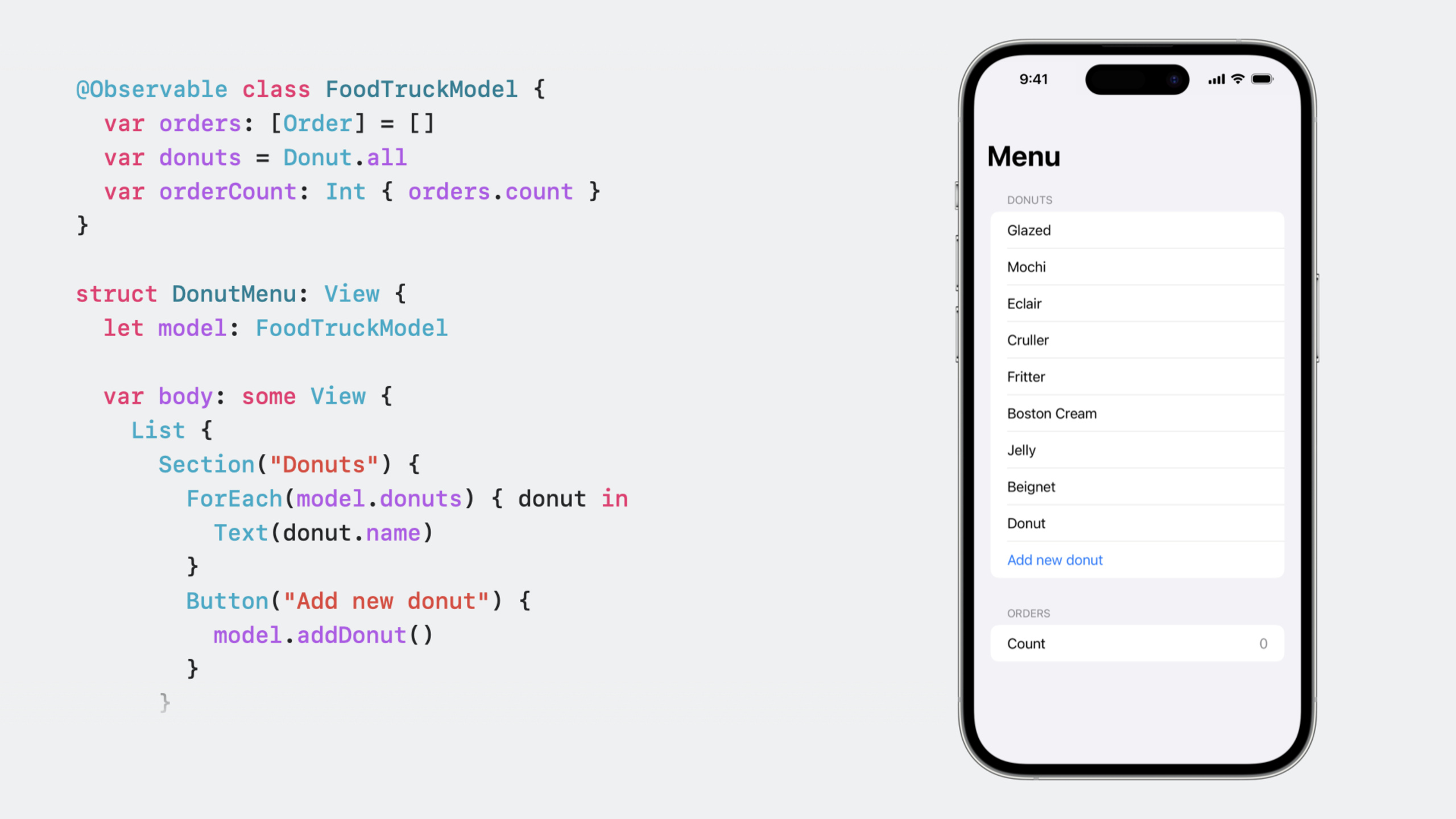
(01:21)@ObservableIt is a macro in Swift 5.9 and is automatically expanded into an observable type at compile time. Developers only need to add a line of annotation before the class declaration:
@Observable class FoodTruckModel {
    var orders: [Order] = []
    var donuts = Donut.all
}unnecessary@Published,unnecessaryObservableObjectprotocol. All stored properties are observable by default.
When SwiftUI executes the view body, it automatically records which properties are accessed. Later, only when these recorded properties change, the refresh of the view will be triggered.
(02:56) ifordersArray adds elements, but a view only readsdonuts, then this view will not be refreshed. Accurate tracking down to the attribute level avoids a large number of unnecessary updates.
Computed properties are also supported
(03:12) If a computed attribute consists of a stored attribute, Observation automatically tracks:
@Observable class FoodTruckModel {
    var orders: [Order] = []
    var donuts = Donut.all
    var orderCount: Int { orders.count }
}orderCountrelyorders. view readorderCountWhen, SwiftUI will track the underlyingordersproperty.ordersWhen changing, readorderCountThe view will refresh.
Property wrappers are simplified into three types
(04:41) When using the Observable type with SwiftUI, you only need to remember three questions:
- Is this model the view’s own state? Yes, use
@State. - Does this model need to be shared in the global environment? Yes, use
@Environment. - Does this model only need binding? Yes, use
@Bindable。
If the answer to all three questions is no, just use the model as a normal attribute of the view.
@StateUsage:
struct DonutListView: View {
    var donutList: DonutList
    @State private var donutToAdd: Donut?

    var body: some View {
        List(donutList.donuts) { DonutView(donut: $0) }
        Button("Add Donut") { donutToAdd = Donut() }
            .sheet(item: $donutToAdd) {
                TextField("Name", text: $donutToAdd.name)
                Button("Save") {
                    donutList.donuts.append(donutToAdd)
                    donutToAdd = nil
                }
                Button("Cancel") { donutToAdd = nil }
            }
    }
}
Key points:
@StateManaged property lifecycle and view binding -donutToAddIt is the view’s own state, not the model passed in from the outside.- Used in sheet
$donutToAdd.nameCreate binding
@EnvironmentUsage:
@Observable class Account {
    var userName: String?
}

struct FoodTruckMenuView: View {
    @Environment(Account.self) var account

    var body: some View {
        if let name = account.userName {
            HStack { Text(name); Button("Log out") { account.logOut() } }
        } else {
            Button("Login") { account.showLogin() }
        }
    }
}
Key points:
@Environment(Account.self)Reads a value of the specified type from the environment- Use the type itself as the environment key, and also support custom keys
-
account.userNameis accessed, so the view refreshes when userName changes
@BindableUsage:
@Observable class Donut {
    var name: String
}

struct DonutView: View {
    @Bindable var donut: Donut

    var body: some View {
        TextField("Name", text: $donut.name)
    }
}
Key points:
@BindableIt is only responsible for creating bindings and is the lightest wrapper. -$donut.namegrammar generationBinding<String>TextFieldRead the binding display value and write back the binding when the user inputs
Observable model in array
(07:53) The Observable model can be accurately tracked even if it is placed in an array:
@Observable class Donut {
    var name: String
}

struct DonutList: View {
    var donuts: [Donut]

    var body: some View {
        List(donuts) { donut in
            HStack {
                Text(donut.name)
                Spacer()
                Button("Randomize") {
                    donut.name = randomName()
                }
            }
        }
    }
}
Key points:
- SwiftUI tracks property access for each instance in an array
- Click “Randomize” to refresh the view of the corresponding row only
- Other lines
donut.nameNo changes, no update will be triggered - Models can be nested: Observable models contain other Observable models
Manual Observation
(09:18) If the calculated attribute relies on external data sources, access and changes need to be marked manually:
@Observable class Donut {
    var name: String {
        get {
            access(keyPath: \.name)
            return someNonObservableLocation.name
        }
        set {
            withMutation(keyPath: \.name) {
                someNonObservableLocation.name = newValue
            }
        }
    }
}
Key points:
access(keyPath:)Tag attributes are read -withMutation(keyPath:)Mark attribute is modified- Most scenarios do not need to be written manually, the compiler automatically synthesizes them
- Only required if the computed property relies on non-Observable external data
Migrate from ObservableObject
(10:25) The migration steps are straightforward:
Before modification:
class FoodTruckModel: ObservableObject {
    @Published var orders: [Order] = []
    @Published var donuts = Donut.all
}
After modification:
@Observable class FoodTruckModel {
    var orders: [Order] = []
    var donuts = Donut.all
}
View level replacement:
-@ObservedObject→ Directly as a normal attribute, or change to@Bindable(if binding is required)
-@EnvironmentObject → @Environment
@StateObject→@State
Most of the changes are to remove annotations. The code is shorter and the performance is better.
Detailed Content
Complete data flow decision-making process
(06:55) Decision tree to determine which attribute wrapper to use:
// Scenario 1: the view's own state
struct AddDonutSheet: View {
    @State private var newDonut = Donut()

    var body: some View {
        TextField("Name", text: $newDonut.name)
    }
}

// Scenario 2: globally shared data
@main
struct FoodTruckApp: App {
    let account = Account()

    var body: some Scene {
        WindowGroup {
            ContentView()
                .environment(account)
        }
    }
}

struct ProfileView: View {
    @Environment(Account.self) var account

    var body: some View {
        Text(account.userName ?? "Guest")
    }
}

// Scenario 3: only a binding is needed
struct DonutEditor: View {
    @Bindable var donut: Donut

    var body: some View {
        Form {
            TextField("Name", text: $donut.name)
            TextField("Flavor", text: $donut.flavor)
        }
    }
}

// Scenario 4: no wrapper is needed
struct DonutRow: View {
    let donut: Donut

    var body: some View {
        Text(donut.name)
    }
}
Key points:
newDonutCreated and managed by views, using@StateaccountTo share between multiple views, use.environment()injection,@Environmentread -donutPassed in from the parent view, two-way binding is required, use@BindabledonutRead-only display, no wrapper required
Performance advantages
(04:05) Observation’s precise tracking brings significant performance improvements:
@Observable class FoodTruckModel {
    var orders: [Order] = []      // read by View A
    var donuts = Donut.all        // read by View B
    var revenue: Decimal = 0      // read by View C
}ordersChange → Only View A refreshes -donutsChange → Only View B refreshes -revenueChange → Only View C refreshes
useObservableObjectWhen , all three attributes are marked@Published, any change, the three views will be refreshed. Observable reduces the refresh scope to the minimum.
Core Takeaways
-
Refactor the data layer of the existing SwiftUI project
- put
ObservableObject+@PublishedModel migrated to@Observable- Delete a large number of views@ObservedObjectand@EnvironmentObject- Entry: model-by-model replacement, starting from the leaf view and moving upwards
- put
-
Build a high-performance large list application
- Each cell in the list corresponds to an Observable model instance
- When modifying the data of a single cell, only that cell is refreshed
- Entrance:
List(items) { ItemRow(item: $0) },ItemRowreceive directlyItemExample
-
Design reusable editing components
- use
@BindablePackaging model, used inside componentsTextField、ToggleWait for bound controls - The component does not rely on a specific state management method, the parent view determines the method used
@Statestill@Environment- Entrance:struct EditorView: View { @Bindable var item: Item }
- use
-
Achieve user status shared across views
- use
@EnvironmentInject global status such as user accounts and settings into the root view - Subviews read specific properties on demand and refresh only when the property changes.
- Entrance:
.environment(userAccount)+@Environment(Account.self)
- use
Related Sessions
- What’s new in SwiftUI — Overview of all new features in SwiftUI 2023
- Build an app with SwiftData — Practical integration of SwiftData and SwiftUI
- Write Swift macros — Deep understanding of how the Swift macro system works
- Demystify SwiftUI performance — SwiftUI performance optimization guide
Comments
GitHub Issues · utterances